

- Local time
- 5:36 PM
- Messages
- 715
Here is what my Toolbars look like in IE:
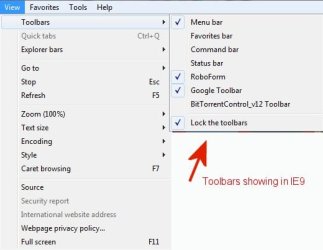

Looking at Image 2, the Google box is only about 1 inch long and I can not really see what I have typed into it.
Is there anyway to place the Google Toolbar on a separate line by itself so that the box is longer and I can see what I have typed into it.
Up until recently, it was showing as longer box and I am not sure what happened to change it. Any help be appreciated.
Looking at Image 2, the Google box is only about 1 inch long and I can not really see what I have typed into it.
Is there anyway to place the Google Toolbar on a separate line by itself so that the box is longer and I can see what I have typed into it.
Up until recently, it was showing as longer box and I am not sure what happened to change it. Any help be appreciated.
My Computer
- OS
- Windows 7 Pro
- CPU
- Intel(R) Pentium(R) Duel CPU E2200 2.20 Ghz
- Motherboard
- GA-G41M-ES2L
- Memory
- 4 gb 2.96 Usable
- Graphics Card(s)
- Onboard
- Sound Card
- Onboard
- Hard Drives
- 2 - 1TB WD Sata Drives


