Solved 'Ask for genuine Microsoft Software' in My computer properties

AbhishekS

Fun lover
Power User
Local time
12:35 PM
Messages
110
Location
India
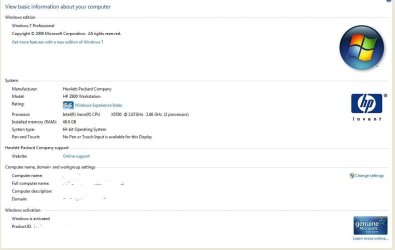
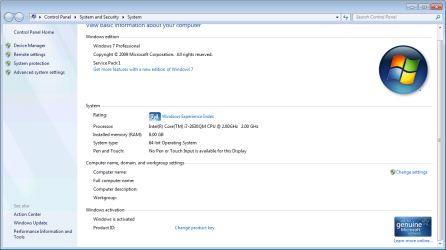
Hey guys, I have a genuine copy of Windows 7 Home Premium but when I right click on 'My Computer' and go to 'Properties' I see this (image attached). Is this normal or is something wrong in my system?

And when I go here (Genuine Microsoft Software), I get a message saying, "Because Windows installed on your PC is genuine, enjoy the security, reliability and protection it provides."

What shall I do? Is that message of 'Ask for genuine Microsoft Software' in the properties of My Computer normal?

Thank you.
 

Attachments

  • Capture.JPG
    Capture.JPG
    15.2 KB · Views: 121

My Computer My Computer

At a glance

32-bit Windows 7 Home Premium & Windows 8 Rel...Intel(R) Core(TM)2 Duo4 GB RAM DDR3NVIDIA GeForce G 105M
Computer Manufacturer/Model Number
Acer Aspire 5738G
OS
32-bit Windows 7 Home Premium & Windows 8 Release Preview
CPU
Intel(R) Core(TM)2 Duo
Motherboard
Acer JV50
Memory
4 GB RAM DDR3
Graphics Card(s)
NVIDIA GeForce G 105M
Sound Card
Realtek High Definition
Monitor(s) Displays
1x Generic PnP Monitor
Screen Resolution
1366 x 768 - 32 bit
Hard Drives
C: (263 GB)
K: (24.3 GB)
Keyboard
Acer Inbuilt
Mouse
5 Button Wheel Laser Mouse
Internet Speed
3 MBPS Download and 2 MBPS Upload
Hi,

That image as shown is absolutely normal - you don't need to do anything. Its simply the genuine software logo.

Here is one from mine.

Regards,
Golden
 

Attachments

  • Capture.JPG
    Capture.JPG
    55.6 KB · Views: 282

My Computer My Computer

At a glance

Windows 10 Pro x64 ; Xubuntu x64Intel i7 860 @ 2.80 GHz O/C'ed to 4.0GHz16GB Corsair Vengance DDR3 @ 661 MHz Dual Cha...EVGA NVidia GTX 560 1024MB
Computer type
PC/Desktop
Computer Manufacturer/Model Number
Golden Mk. I.4
OS
Windows 10 Pro x64 ; Xubuntu x64
CPU
Intel i7 860 @ 2.80 GHz O/C'ed to 4.0GHz
Motherboard
Gigabyte P55A-UD3R Rev.1. Award BIOS F13
Memory
16GB Corsair Vengance DDR3 @ 661 MHz Dual Channel (9-9-9-24)
Graphics Card(s)
EVGA NVidia GTX 560 1024MB
Sound Card
Realtek Integrated
Monitor(s) Displays
Dual Samsung SyncMaster 2494HS
Screen Resolution
1920*1080 and 1920*1080
Hard Drives
1*Samsung 840 EVO 120GB SSD;
1*OCZ Vertex 2 60GB SSD;
2*Samsung F3 SpinPoint 1TB in RAID0;
1*Samsung F1 SpinPoint 1TB;
2*Western Digital 1TB External USB 3.0
1*Western Digital 500GB External USB 3.0
1*Seagate 500GB External USB 2.0
PSU
Thermaltake ToughPower QFan 750W
Case
Thermaltake Element S VK60001W2Z
Cooling
Corsair H60 Water Cooling, 2*230mm and 2*80mm case fans
Keyboard
Logitech G110
Mouse
Logitech MX518
I can also assure you that it is absolutely normal.
 

Attachments

  • Untitled.png
    Untitled.png
    39.5 KB · Views: 155

My Computer My Computer

At a glance

Windows 10 Pro / OpenSUSEIntel Core i7 4790K32GB DDR3EVGA GTX 1070
Computer type
PC/Desktop
Computer Manufacturer/Model Number
Custom built Desktop(Myself) Specs below - Also Asus G53SW-A1 laptop
OS
Windows 10 Pro / OpenSUSE
CPU
Intel Core i7 4790K
Motherboard
Asus Z97-A
Memory
32GB DDR3
Graphics Card(s)
EVGA GTX 1070
Sound Card
OnBoard
Monitor(s) Displays
3 X 1080P 24" displays
Screen Resolution
1280x1050 & 1920x1080
Hard Drives
SSD: Crucial M500 128GB
HD 1: WD Caviar Black 1TB
HD 2: WD Caviar Black 2TB
HD 3: WD Caviar Blue 500GB
PSU
Corsair CX650M
Case
Corsair Obisidian 450D
Cooling
Noctua NH-D14
Keyboard
Corsair K70 Vengeance (blue switches)
Mouse
Logitech M500
Internet Speed
65/10
Antivirus
Kaskersky Internet Securty
Browser
Opera
Hey guys, I have a genuine copy of Windows 7 Home Premium but when I right click on 'My Computer' and go to 'Properties' I see this (image attached). Is this normal or is something wrong in my system?

And when I go here (Genuine Microsoft Software), I get a message saying, "Because Windows installed on your PC is genuine, enjoy the security, reliability and protection it provides."

What shall I do? Is that message of 'Ask for genuine Microsoft Software' in the properties of My Computer normal?

Thank you.

I agree with both other posters. The 'flag' is perfectly normal. If your system had been found non-genuine, You'd have a black desktop and a very visible watermark on it.
FWIW, there's nothing 'personal or identifiable' about your Product ID - it's shared with a few tens of thousands of others :)

Having said that, if you have any reason to suspect that your system may be non-genuine (or you're just curious), please post an MGADiag report so that we can check it out.

To properly analyse and solve problems with Activation and Validation, we need to see a full copy of the report produced by the MGADiag tool
(download and save to desktop - http://go.microsoft.com/fwlink/?linkid=52012 )
Once saved, run the tool.
Click on the Continue button, which will produce the report.
To copy the report to your response, click on the Copy button in the tool (ignore any error messages at this point), and then paste (using either r-click/Paste, or Ctrl+V ) into your response.
- **in your own thread**, please
Please also state the Version and Edition of Windows quoted on your COA sticker (if you have one) on the case of your machine (or inside the battery compartment), but do NOT quote the Key on the sticker!
How to Tell
 

My Computer My Computer

At a glance

Win 7 x64 Home Premium (and x86 VirtualBox VM...i3 370M/i7 6500U8GB - finally :)/8GBit's an i3, dude!/dual Intel&nVidia
Computer type
Laptop
Computer Manufacturer/Model Number
Asus K52F or Lenovo B51-80
OS
Win 7 x64 Home Premium (and x86 VirtualBox VM)/Win10
CPU
i3 370M/i7 6500U
Motherboard
Asus/Lenovo
Memory
8GB - finally :)/8GB
Graphics Card(s)
it's an i3, dude!/dual Intel&nVidia
Sound Card
onboard
Monitor(s) Displays
15.6" built-in
Screen Resolution
1366x768/1920x1080
Hard Drives
750GB Seagate internal
Sundry external drives attached to other computers on the local network
1TB SSD on the Lenovo
PSU
n/a
Internet Speed
as much as I can get - usually on a dongle/phone, so <1MB/s
Antivirus
MSE/Defender
Browser
IE11/12/Edge/Chrome/FF(if I must)
Thanks a lot for the replies guys! :)
 

My Computer My Computer

At a glance

32-bit Windows 7 Home Premium & Windows 8 Rel...Intel(R) Core(TM)2 Duo4 GB RAM DDR3NVIDIA GeForce G 105M
Computer Manufacturer/Model Number
Acer Aspire 5738G
OS
32-bit Windows 7 Home Premium & Windows 8 Release Preview
CPU
Intel(R) Core(TM)2 Duo
Motherboard
Acer JV50
Memory
4 GB RAM DDR3
Graphics Card(s)
NVIDIA GeForce G 105M
Sound Card
Realtek High Definition
Monitor(s) Displays
1x Generic PnP Monitor
Screen Resolution
1366 x 768 - 32 bit
Hard Drives
C: (263 GB)
K: (24.3 GB)
Keyboard
Acer Inbuilt
Mouse
5 Button Wheel Laser Mouse
Internet Speed
3 MBPS Download and 2 MBPS Upload
Back
Top