Solved Asks for OS despite i have just Windows7

icedLR

New member
Local time
5:27 AM
Messages
11
Hi,

I have read some threads about this but couldn't solve the problem.. Problem is my computer asks for OS to boot every time i start my computer.. And i have only Windows 7 installed on it.. why does it asks for it?? i have been using this computer for about 4 months but facing this problem for just about 1-2 weeks.. the last major change before this problem occured was a video card driver update.. and dont have a recovery point to check if that update caused it or not.

some say " go to msconfig, then boot, then choose the OS u want".. but anyway i have only windows 7 on the list.. and some others say " right click my computer, settings, advanced system settings, boot and recovery settings, choose default OS from dropdown menu " and again i only have windows 7 on the list..

Thanks in advance..
 

My Computer My Computer

At a glance

Windows 7 Basic 32bit
OS
Windows 7 Basic 32bit
goto into your bios and make sure your boot drive is first. if that don't work try a system repair.

scrooge
 

My Computer My Computer

At a glance

win 7 ( 64 bit)Intel Core i7-870 Lynnfield 2.93GHz 8MB L3 Ca...G.SKILL Sniper Series 16GB (4 x 4GB) 240-Pin ...ATI Radeon HD6800 Series
Computer Manufacturer/Model Number
home build
OS
win 7 ( 64 bit)
CPU
Intel Core i7-870 Lynnfield 2.93GHz 8MB L3 Cache LGA 1156 95
Motherboard
ASUS P7P55 LX LGA 1156
Memory
G.SKILL Sniper Series 16GB (4 x 4GB) 240-Pin DDR3 SDRAM
Graphics Card(s)
ATI Radeon HD6800 Series
Sound Card
hdmi
Monitor(s) Displays
42" lg 3d tv
Screen Resolution
1920 x 1080
Hard Drives
1 ssd pci-e revodrive
4 seagate 1.5 tb
PSU
Rosewill BRONZE Series RBR1000-M 1000W Continuous@40°C, 80Pl
Case
CoolMaster 922
Cooling
CORSAIR CWCH60 Hydro Series H60 High Performance Liquid CPU
Keyboard
logtech
Mouse
logitect
Internet Speed
5 mbit
Hi,

I have read some threads about this but couldn't solve the problem.. Problem is my computer asks for OS to boot every time i start my computer.. And i have only Windows 7 installed on it.. why does it asks for it?? i have been using this computer for about 4 months but facing this problem for just about 1-2 weeks.. the last major change before this problem occured was a video card driver update.. and dont have a recovery point to check if that update caused it or not.

some say " go to msconfig, then boot, then choose the OS u want".. but anyway i have only windows 7 on the list.. and some others say " right click my computer, settings, advanced system settings, boot and recovery settings, choose default OS from dropdown menu " and again i only have windows 7 on the list..

Thanks in advance..

If you can, use a digital camera (turn off the flash), and take a photo of the message you receive then attach that photo to you post here.

It may help us to diagnose exactly what is going on.
 

My Computer My Computer

At a glance

Windows 7 Professional 32-bit SP1AMD A4/A63.00GB EDOVMware SVGA 3D
Computer type
PC/Desktop
Computer Manufacturer/Model Number
Virtual Machine
OS
Windows 7 Professional 32-bit SP1
CPU
AMD A4/A6
Motherboard
Intel Corporation 440BX Desktop Reference Platform
Memory
3.00GB EDO
Graphics Card(s)
VMware SVGA 3D
Sound Card
High Definition Audio Device
Monitor(s) Displays
Generic Non-PnP Monitor on VMware SVGA 3D
Screen Resolution
1440x900
Hard Drives
1 x 60GB VMware Virtual SATA Hard Drive ATA Device
Antivirus
Kaspersky Total Security


Uploaded with ImageShack.us

Sorry, it is Turkish.. but i can explain :

1-TOP HEADING with white background is smthg.like : WINDOWS BOOT MANAGER

2-and then : chose an OS to boot or press TAB to choose a tool

3-between brackets : to highlight your choice , use the arrow keys and then press ENTER.

4- And then again a white bar and " WINDOWS7 " written in it..

5- And then TOOLS: Windows Memory Diognastics ( I once run it but found no problem-error)

6- finally a white bar on the bottom with button explanations like : ENTER = CHOOSE, ESC = CANCEL

Hope it is clear enough..

And also looked at BIOS but couldn't find any setting about boot drive..

TY..

EDIT 1: I ALSO REALIZED THAT PC BRINGS THIS SCREEN JUST WHILE RESTARTING, NOT WHILE TURNUNG ON..

EDIT 2: THERE IS NO PROBLEM ABOUT USING THE PC AFTER CHOOSING OS..
 

My Computer My Computer

At a glance

Windows 7 Basic 32bit
OS
Windows 7 Basic 32bit
If you have a Windows7 DVD you could try a Startup Repair
 

My Computer My Computer

At a glance

Windows 10 Pro x64, Arch LinuxIntel Core 2 Quad Q8200 OC'd 3.08GHz8GB DDR2 900MhzMSI GT730 2GB GDDR5 (Kepler)
Computer type
PC/Desktop
Computer Manufacturer/Model Number
Custom Build
OS
Windows 10 Pro x64, Arch Linux
CPU
Intel Core 2 Quad Q8200 OC'd 3.08GHz
Motherboard
Asus Rampage formula LGA775
Memory
8GB DDR2 900Mhz
Graphics Card(s)
MSI GT730 2GB GDDR5 (Kepler)
Sound Card
Supreme FX2
Monitor(s) Displays
Samsung LS22F350 LED
Screen Resolution
1080P
Hard Drives
Kingston SSDNow UV400 120GB, 500GB Hitachi, 2TB Samsung, 500GB Seagate FreeAgent, 640GB Samsung, 160GB Toshiba (Arch)
PSU
AeroCool 500W Bronze
Cooling
Cooler Master V6 + 3X fans
Keyboard
Prolink keyboard
Mouse
Logitech M705
Internet Speed
1MiB/s
Browser
Chrome Beta
It would appear as though Windows has been set to always show the boot loader.

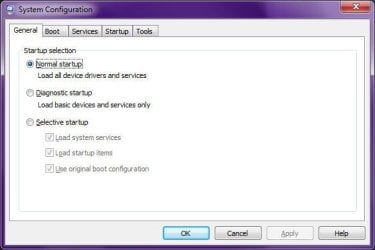
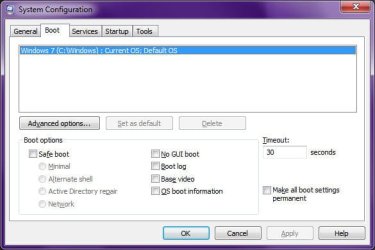
Start System Configuration utility by pressing <WINDOWS_KEY>+<R>, type "MSCONFIG" (without quotes) in the run box, then pressing <ENTER>.

Do your General and Boot settings in MSCONFIG match mine as shown in the following screenshots? Specifically, what is the Timeout setting under boot?:

Image1.jpg Image2.jpg
 

My Computer My Computer

At a glance

Windows 7 Professional 32-bit SP1AMD A4/A63.00GB EDOVMware SVGA 3D
Computer type
PC/Desktop
Computer Manufacturer/Model Number
Virtual Machine
OS
Windows 7 Professional 32-bit SP1
CPU
AMD A4/A6
Motherboard
Intel Corporation 440BX Desktop Reference Platform
Memory
3.00GB EDO
Graphics Card(s)
VMware SVGA 3D
Sound Card
High Definition Audio Device
Monitor(s) Displays
Generic Non-PnP Monitor on VMware SVGA 3D
Screen Resolution
1440x900
Hard Drives
1 x 60GB VMware Virtual SATA Hard Drive ATA Device
Antivirus
Kaspersky Total Security
it is 30 secs.

the settings are already identical to your settings, but still the same screen on REstart..

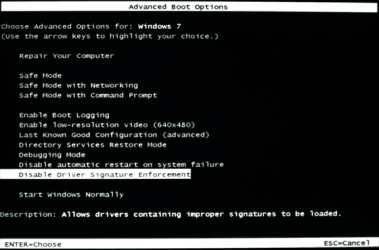
in that screen (the image that i've posted) when i highlight " WINDOWS7 " , it says " f8 for advanced settings " and when i press f8, a new screen appears.. i found an english one in google..


windows_7_advanced_boot_options.png
 

My Computer My Computer

At a glance

Windows 7 Basic 32bit
OS
Windows 7 Basic 32bit
Also i chose "Eneble Boot Logging" and it created a ntbtlog.txt file on my pc.. here it is :


Code:
Microsoft (R) Windows (R) Version 6.1 (Build 7600)
11 28 2010 21:50:40.125
Loaded driver \SystemRoot\system32\ntkrnlpa.exe
Loaded driver \SystemRoot\system32\halmacpi.dll
Loaded driver \SystemRoot\system32\kdcom.dll
Loaded driver \SystemRoot\system32\mcupdate_GenuineIntel.dll
Loaded driver \SystemRoot\system32\PSHED.dll
Loaded driver \SystemRoot\system32\BOOTVID.dll
Loaded driver \SystemRoot\system32\CLFS.SYS
Loaded driver \SystemRoot\system32\CI.dll
Loaded driver \SystemRoot\system32\drivers\Wdf01000.sys
Loaded driver \SystemRoot\system32\drivers\WDFLDR.SYS
Loaded driver \SystemRoot\System32\Drivers\sptd.sys
Loaded driver \SystemRoot\System32\Drivers\WMILIB.SYS
Loaded driver \SystemRoot\System32\Drivers\SCSIPORT.SYS
Loaded driver \SystemRoot\system32\DRIVERS\ACPI.sys
Loaded driver \SystemRoot\system32\DRIVERS\msisadrv.sys
Loaded driver \SystemRoot\system32\DRIVERS\vdrvroot.sys
Loaded driver \SystemRoot\system32\DRIVERS\pci.sys
Loaded driver \SystemRoot\System32\drivers\partmgr.sys
Loaded driver \SystemRoot\system32\DRIVERS\compbatt.sys
Loaded driver \SystemRoot\system32\DRIVERS\BATTC.SYS
Loaded driver \SystemRoot\system32\DRIVERS\volmgr.sys
Loaded driver \SystemRoot\System32\drivers\volmgrx.sys
Loaded driver \SystemRoot\System32\drivers\mountmgr.sys
Loaded driver \SystemRoot\system32\DRIVERS\iaStor.sys
Loaded driver \SystemRoot\system32\DRIVERS\atapi.sys
Loaded driver \SystemRoot\system32\DRIVERS\ataport.SYS
Loaded driver \SystemRoot\system32\DRIVERS\msahci.sys
Loaded driver \SystemRoot\system32\DRIVERS\PCIIDEX.SYS
Loaded driver \SystemRoot\system32\DRIVERS\amdxata.sys
Loaded driver \SystemRoot\system32\drivers\fltmgr.sys
Loaded driver \SystemRoot\system32\drivers\fileinfo.sys
Loaded driver \SystemRoot\System32\Drivers\Ntfs.sys
Loaded driver \SystemRoot\System32\Drivers\msrpc.sys
Loaded driver \SystemRoot\System32\Drivers\ksecdd.sys
Loaded driver \SystemRoot\System32\Drivers\cng.sys
Loaded driver \SystemRoot\System32\drivers\pcw.sys
Loaded driver \SystemRoot\System32\Drivers\Fs_Rec.sys
Loaded driver \SystemRoot\system32\drivers\ndis.sys
Loaded driver \SystemRoot\system32\drivers\NETIO.SYS
Loaded driver \SystemRoot\System32\Drivers\ksecpkg.sys
Loaded driver \SystemRoot\system32\DRIVERS\volsnap.sys
Loaded driver \SystemRoot\System32\Drivers\spldr.sys
Loaded driver \SystemRoot\System32\drivers\rdyboost.sys
Loaded driver \SystemRoot\System32\Drivers\mup.sys
Loaded driver \SystemRoot\System32\drivers\hwpolicy.sys
Loaded driver \SystemRoot\System32\DRIVERS\fvevol.sys
Loaded driver \SystemRoot\system32\DRIVERS\disk.sys
Loaded driver \SystemRoot\system32\DRIVERS\CLASSPNP.SYS
Loaded driver \SystemRoot\system32\DRIVERS\cdrom.sys
Loaded driver \SystemRoot\System32\Drivers\Null.SYS
Loaded driver \SystemRoot\System32\Drivers\Beep.SYS
Loaded driver \SystemRoot\System32\drivers\vga.sys
Loaded driver \SystemRoot\System32\DRIVERS\RDPCDD.sys
Loaded driver \SystemRoot\system32\drivers\rdpencdd.sys
Loaded driver \SystemRoot\system32\drivers\rdprefmp.sys
Loaded driver \SystemRoot\System32\Drivers\Msfs.SYS
Loaded driver \SystemRoot\System32\Drivers\Npfs.SYS
Loaded driver \SystemRoot\System32\drivers\tcpip.sys
Loaded driver \SystemRoot\system32\DRIVERS\tdx.sys
Loaded driver \SystemRoot\System32\Drivers\aswTdi.SYS
Loaded driver \SystemRoot\System32\DRIVERS\netbt.sys
Loaded driver \SystemRoot\system32\drivers\afd.sys
Loaded driver \SystemRoot\System32\Drivers\aswRdr.SYS
Loaded driver \SystemRoot\system32\DRIVERS\wfplwf.sys
Loaded driver \SystemRoot\system32\DRIVERS\pacer.sys
Loaded driver \SystemRoot\system32\DRIVERS\vwififlt.sys
Loaded driver \SystemRoot\system32\DRIVERS\netbios.sys
Loaded driver \SystemRoot\system32\DRIVERS\wanarp.sys
Loaded driver \SystemRoot\system32\DRIVERS\termdd.sys
Loaded driver \??\C:\windows\system32\Drivers\SABI.sys
Loaded driver \SystemRoot\system32\DRIVERS\rdbss.sys
Loaded driver \SystemRoot\system32\drivers\nsiproxy.sys
Loaded driver \SystemRoot\system32\DRIVERS\mssmbios.sys
Loaded driver \SystemRoot\System32\drivers\discache.sys
Loaded driver \SystemRoot\System32\Drivers\dfsc.sys
Loaded driver \SystemRoot\system32\DRIVERS\blbdrive.sys
Loaded driver \SystemRoot\System32\Drivers\aswSP.SYS
Loaded driver \SystemRoot\system32\DRIVERS\tunnel.sys
Loaded driver \SystemRoot\System32\drivers\dxgkrnl.sys
Loaded driver \SystemRoot\system32\DRIVERS\nvlddmkm.sys
Loaded driver \SystemRoot\system32\DRIVERS\HDAudBus.sys
Loaded driver \SystemRoot\system32\DRIVERS\usbehci.sys
Loaded driver \SystemRoot\system32\DRIVERS\athr.sys
Loaded driver \SystemRoot\system32\DRIVERS\vwifibus.sys
Loaded driver \SystemRoot\system32\DRIVERS\yk62x86.sys
Loaded driver \SystemRoot\system32\DRIVERS\CmBatt.sys
Loaded driver \SystemRoot\system32\DRIVERS\i8042prt.sys
Loaded driver \SystemRoot\system32\DRIVERS\kbdclass.sys
Loaded driver \SystemRoot\system32\DRIVERS\SynTP.sys
Loaded driver \SystemRoot\system32\DRIVERS\mouclass.sys
Loaded driver \SystemRoot\system32\DRIVERS\Impcd.sys
Loaded driver \SystemRoot\System32\Drivers\akd4dwzh.SYS
Loaded driver \SystemRoot\system32\DRIVERS\intelppm.sys
Loaded driver \SystemRoot\system32\DRIVERS\CompositeBus.sys
Loaded driver \SystemRoot\system32\DRIVERS\AgileVpn.sys
Loaded driver \SystemRoot\system32\DRIVERS\rasl2tp.sys
Loaded driver \SystemRoot\system32\DRIVERS\ndistapi.sys
Loaded driver \SystemRoot\system32\DRIVERS\ndiswan.sys
Loaded driver \SystemRoot\system32\DRIVERS\raspppoe.sys
Loaded driver \SystemRoot\system32\DRIVERS\raspptp.sys
Loaded driver \SystemRoot\system32\DRIVERS\rassstp.sys
Loaded driver \SystemRoot\system32\DRIVERS\swenum.sys
Loaded driver \SystemRoot\system32\DRIVERS\umbus.sys
Did not load driver \SystemRoot\System32\drivers\vga.sys
Loaded driver \SystemRoot\system32\DRIVERS\usbhub.sys
Loaded driver \SystemRoot\System32\Drivers\NDProxy.SYS
Did not load driver \SystemRoot\System32\Drivers\NDProxy.SYS
Loaded driver \SystemRoot\system32\drivers\nvhda32v.sys
Loaded driver \SystemRoot\system32\drivers\RTKVHDA.sys
Loaded driver \SystemRoot\system32\DRIVERS\monitor.sys
Loaded driver \SystemRoot\system32\DRIVERS\usbccgp.sys
Loaded driver \SystemRoot\System32\Drivers\usbvideo.sys
Loaded driver \SystemRoot\system32\DRIVERS\hidusb.sys
Loaded driver \SystemRoot\system32\DRIVERS\kbdhid.sys
Loaded driver \SystemRoot\system32\DRIVERS\mouhid.sys
Loaded driver \SystemRoot\system32\drivers\btusbflt.sys
Loaded driver \SystemRoot\System32\Drivers\BTHUSB.sys
Loaded driver \SystemRoot\system32\DRIVERS\rfcomm.sys
Loaded driver \SystemRoot\system32\DRIVERS\BthEnum.sys
Loaded driver \SystemRoot\system32\DRIVERS\bthpan.sys
Loaded driver \SystemRoot\system32\drivers\luafv.sys
Loaded driver \??\C:\windows\system32\drivers\aswMonFlt.sys
Loaded driver \SystemRoot\System32\Drivers\aswFsBlk.SYS
Loaded driver \SystemRoot\system32\drivers\WudfPf.sys
Loaded driver \SystemRoot\system32\DRIVERS\bthmodem.sys
Loaded driver \SystemRoot\system32\drivers\modem.sys
Loaded driver \SystemRoot\system32\DRIVERS\btwavdt.sys
Loaded driver \SystemRoot\system32\drivers\btwaudio.sys
Loaded driver \SystemRoot\system32\DRIVERS\btwl2cap.sys
Loaded driver \SystemRoot\system32\DRIVERS\btwrchid.sys
Loaded driver \SystemRoot\system32\DRIVERS\lltdio.sys
Loaded driver \SystemRoot\system32\DRIVERS\nwifi.sys
Loaded driver \SystemRoot\system32\DRIVERS\ndisuio.sys
Loaded driver \SystemRoot\system32\DRIVERS\rspndr.sys
Loaded driver \SystemRoot\system32\DRIVERS\TurboB.sys
Loaded driver \SystemRoot\system32\DRIVERS\vwifimp.sys
Loaded driver \SystemRoot\system32\drivers\HTTP.sys
Loaded driver \SystemRoot\system32\DRIVERS\bowser.sys
Loaded driver \SystemRoot\System32\drivers\mpsdrv.sys
Loaded driver \SystemRoot\system32\DRIVERS\mrxsmb.sys
Loaded driver \SystemRoot\system32\DRIVERS\mrxsmb10.sys
Loaded driver \SystemRoot\system32\DRIVERS\mrxsmb20.sys
Did not load driver \SystemRoot\system32\DRIVERS\parport.sys
Loaded driver \SystemRoot\system32\DRIVERS\atksgt.sys
Loaded driver \SystemRoot\system32\DRIVERS\lirsgt.sys
Loaded driver \SystemRoot\system32\drivers\peauth.sys
Loaded driver \SystemRoot\System32\Drivers\secdrv.SYS
Loaded driver \SystemRoot\System32\DRIVERS\srvnet.sys
Loaded driver \SystemRoot\System32\drivers\tcpipreg.sys
Loaded driver \SystemRoot\System32\DRIVERS\srv2.sys
Loaded driver \SystemRoot\System32\DRIVERS\srv.sys
Did not load driver \SystemRoot\System32\DRIVERS\srv.sys
Loaded driver \SystemRoot\system32\drivers\MSPQM.sys
 
Last edited by a moderator:

My Computer My Computer

At a glance

Windows 7 Basic 32bit
OS
Windows 7 Basic 32bit
IcedLR,

I;ve asked one of the SevenForums admins to lend a hand here. I've tried everything that I can think of, to no avail. Perhaps an Admin here can help...
 

My Computer My Computer

At a glance

Windows 7 Professional 32-bit SP1AMD A4/A63.00GB EDOVMware SVGA 3D
Computer type
PC/Desktop
Computer Manufacturer/Model Number
Virtual Machine
OS
Windows 7 Professional 32-bit SP1
CPU
AMD A4/A6
Motherboard
Intel Corporation 440BX Desktop Reference Platform
Memory
3.00GB EDO
Graphics Card(s)
VMware SVGA 3D
Sound Card
High Definition Audio Device
Monitor(s) Displays
Generic Non-PnP Monitor on VMware SVGA 3D
Screen Resolution
1440x900
Hard Drives
1 x 60GB VMware Virtual SATA Hard Drive ATA Device
Antivirus
Kaspersky Total Security
IcedLR,

I;ve asked one of the SevenForums admins to lend a hand here. I've tried everything that I can think of, to no avail. Perhaps an Admin here can help...

Not a big deal m8 , thanks for your help..

and thanks to all other's help..
 

My Computer My Computer

At a glance

Windows 7 Basic 32bit
OS
Windows 7 Basic 32bit
IcedLR,

I;ve asked one of the SevenForums admins to lend a hand here. I've tried everything that I can think of, to no avail. Perhaps an Admin here can help...

Not a big deal m8 , thanks for your help..

and thanks to all other's help..

Here's something else that I've just thought of.

Start MSCONFIG as I explained in an earlier post, the under the BOOT tab, change the timeout to 1 second. It may not remove that menu, but at least it won't stay up for very long.

Try it, and let me know how it goes?
 

My Computer My Computer

At a glance

Windows 7 Professional 32-bit SP1AMD A4/A63.00GB EDOVMware SVGA 3D
Computer type
PC/Desktop
Computer Manufacturer/Model Number
Virtual Machine
OS
Windows 7 Professional 32-bit SP1
CPU
AMD A4/A6
Motherboard
Intel Corporation 440BX Desktop Reference Platform
Memory
3.00GB EDO
Graphics Card(s)
VMware SVGA 3D
Sound Card
High Definition Audio Device
Monitor(s) Displays
Generic Non-PnP Monitor on VMware SVGA 3D
Screen Resolution
1440x900
Hard Drives
1 x 60GB VMware Virtual SATA Hard Drive ATA Device
Antivirus
Kaspersky Total Security
IcedLR,

I;ve asked one of the SevenForums admins to lend a hand here. I've tried everything that I can think of, to no avail. Perhaps an Admin here can help...

Not a big deal m8 , thanks for your help..

and thanks to all other's help..

Here's something else that I've just thought of.

Start MSCONFIG as I explained in an earlier post, the under the BOOT tab, change the timeout to 1 second. It may not remove that menu, but at least it won't stay up for very long.

Try it, and let me know how it goes?

it is min. 3 secs. but it is weird that even i set it to 3 secs. it wont start until i press enter :S
 

My Computer My Computer

At a glance

Windows 7 Basic 32bit
OS
Windows 7 Basic 32bit

My Computer My Computer

At a glance

Windows 7 64 Bit Home Premium SP1i7-3820GSkill F3-14900CL9Q - 16GBEVGA GeForce GTX660 - Driver 352.86
Computer type
PC/Desktop
Computer Manufacturer/Model Number
Home Built - Jan 2013
OS
Windows 7 64 Bit Home Premium SP1
CPU
i7-3820
Motherboard
Asus P9X79-PRO - Bios 4608
Memory
GSkill F3-14900CL9Q - 16GB
Graphics Card(s)
EVGA GeForce GTX660 - Driver 352.86
Sound Card
On board Realtek ALC898
Monitor(s) Displays
Acer S271HL
Screen Resolution
1920 x 1080
Hard Drives
#1- Samsung 840 Pro Series
#2- Western Digital WD1002FAEX Sata3 Black
#3- Western Digital WD1002FAEX Sata3 Black
PSU
Corsair CMPSU-850TX-V2 - 850 watt (by Seasonic)
Case
Corsair Obsidian 550D
Cooling
Standard 3 120mm case fans, Cooler Master Hyper 212 EVO
Keyboard
MS KC-0405
Mouse
Intellimouse 5-button
Internet Speed
56 Mbits/Sec (on a good day)
Antivirus
Avast & Malwarebytes
Browser
Firefox
Other Info
Asus DVD - DRW-24B1ST 24X

My Computer My Computer

At a glance

64-bit Windows 11 Pro for WorkstationsIntel i7-8700K OC'd to 5 GHz64 GB (4x16GB) G.SKILL TridentZ RGB DDR4 3600...ASUS ROG-STRIX-GTX1080TI-O11G-GAMING
Computer type
PC/Desktop
Computer Manufacturer/Model Number
Self built custom
OS
64-bit Windows 11 Pro for Workstations
CPU
Intel i7-8700K OC'd to 5 GHz
Motherboard
ASUS ROG Maximus XI Formula Z390
Memory
64 GB (4x16GB) G.SKILL TridentZ RGB DDR4 3600 MHz
Graphics Card(s)
ASUS ROG-STRIX-GTX1080TI-O11G-GAMING
Sound Card
Integrated
Monitor(s) Displays
2 x Samsung Odyssey G7 27"
Screen Resolution
2560x1440
Hard Drives
1TB Samsung 990 PRO M.2,
4TB Samsung 990 PRO PRO M.2,
TerraMaster F8 SSD Plus NAS
PSU
Seasonic Prime Titanium 850W
Case
Thermaltake Core P3
Cooling
Corsair Hydro H115i
Keyboard
Logitech wireless K800
Mouse
Logitech MX Master 4
Internet Speed
2 Gb/s Download and 100 Mb/s Upload
Antivirus
Malwarebyte Anti-Malware Premium
Browser
Google Chrome
Other Info
Logitech Z625 speaker system,
Logitech BRIO 4K Pro webcam,
HP Color LaserJet Pro MFP M477fdn,
APC SMART-UPS RT 1000 XL - SURT1000XLI,
Galaxy S23 Plus phone
@ TVeblen and Brink

Many thanks ,

Before i have seen the last post, i tried Tveblen's "But possibly easier is this solution by our friend SIW2: http://www.sevenforums.com/general-discussion/installat...manager-2.html - post #15 if that does not come through." solution. that was just a cmd entry : "bcdedit /set {bootmgr} displaybootmenu no" hope it is not harmful but worked perfectly..

But i also unchecked the waiting time as described on the tutorial.. it looks like a safer solution but i am happy now as i have got rid of that screen..

Thanks..
 

My Computer My Computer

At a glance

Windows 7 Basic 32bit
OS
Windows 7 Basic 32bit
That's great news icedLR. I'm happy to hear that you got it sorted. :)
 

My Computer My Computer

At a glance

64-bit Windows 11 Pro for WorkstationsIntel i7-8700K OC'd to 5 GHz64 GB (4x16GB) G.SKILL TridentZ RGB DDR4 3600...ASUS ROG-STRIX-GTX1080TI-O11G-GAMING
Computer type
PC/Desktop
Computer Manufacturer/Model Number
Self built custom
OS
64-bit Windows 11 Pro for Workstations
CPU
Intel i7-8700K OC'd to 5 GHz
Motherboard
ASUS ROG Maximus XI Formula Z390
Memory
64 GB (4x16GB) G.SKILL TridentZ RGB DDR4 3600 MHz
Graphics Card(s)
ASUS ROG-STRIX-GTX1080TI-O11G-GAMING
Sound Card
Integrated
Monitor(s) Displays
2 x Samsung Odyssey G7 27"
Screen Resolution
2560x1440
Hard Drives
1TB Samsung 990 PRO M.2,
4TB Samsung 990 PRO PRO M.2,
TerraMaster F8 SSD Plus NAS
PSU
Seasonic Prime Titanium 850W
Case
Thermaltake Core P3
Cooling
Corsair Hydro H115i
Keyboard
Logitech wireless K800
Mouse
Logitech MX Master 4
Internet Speed
2 Gb/s Download and 100 Mb/s Upload
Antivirus
Malwarebyte Anti-Malware Premium
Browser
Google Chrome
Other Info
Logitech Z625 speaker system,
Logitech BRIO 4K Pro webcam,
HP Color LaserJet Pro MFP M477fdn,
APC SMART-UPS RT 1000 XL - SURT1000XLI,
Galaxy S23 Plus phone
@ TVeblen and Brink

Many thanks ,

Before i have seen the last post, i tried Tveblen's "But possibly easier is this solution by our friend SIW2: http://www.sevenforums.com/general-discussion/installat...manager-2.html - post #15 if that does not come through." solution. that was just a cmd entry : "bcdedit /set {bootmgr} displaybootmenu no" hope it is not harmful but worked perfectly..

But i also unchecked the waiting time as described on the tutorial.. it looks like a safer solution but i am happy now as i have got rid of that screen..

Thanks..

See, this is what I like about the SevenForums - there's always somebody around who can help. Glad you got the issue sorted.
 

My Computer My Computer

At a glance

Windows 7 Professional 32-bit SP1AMD A4/A63.00GB EDOVMware SVGA 3D
Computer type
PC/Desktop
Computer Manufacturer/Model Number
Virtual Machine
OS
Windows 7 Professional 32-bit SP1
CPU
AMD A4/A6
Motherboard
Intel Corporation 440BX Desktop Reference Platform
Memory
3.00GB EDO
Graphics Card(s)
VMware SVGA 3D
Sound Card
High Definition Audio Device
Monitor(s) Displays
Generic Non-PnP Monitor on VMware SVGA 3D
Screen Resolution
1440x900
Hard Drives
1 x 60GB VMware Virtual SATA Hard Drive ATA Device
Antivirus
Kaspersky Total Security
The way I see it, there is nothing wrong with the OS itself (confirmed by the OP stating that his system runs well after start-up).

The screen that you see is the OS choice screen of the boot loader. I see that screen every time I boot my machine. But then I am dual-booting, so I need this screen to choose the OS. It seems that your boot loader was set to show this screen anyways, even though you only have 1 OS. If you Google for it, you can find lots of suggestions on how to repair the MBR (master boot record) in Windows. However, since I haven't used any of these myself, I will refrain from recommending any.

So, at his point, I do not have a solution for this problem, I do hope someone will come up with a good explanation on how to edit such boot loader settings. To add my own interest in the issue, I have an older computer where I played with various Linux distros alongside the old trusted Win2K. Eventually, I decided that Linux is not for me, did not see any point of having it at home and uninstalled all of them. However, I still don't know how to uninstall GRUB - the boot loader that Linux forced on my PC without asking my permission to replace the Windows MBR. I read numerous suggestions on how to get rid of GRUB and get MBR back, but nothing helped really. This issue is not related to the OP's but hopefully someone will explain things about the MBR and I will learn as well.
 

My Computer My Computer

At a glance

Windows 7 Ultimate (x64)Q66008 GBATI Radeon HD 2600 XT
Computer Manufacturer/Model Number
Dell Inspiron 530
OS
Windows 7 Ultimate (x64)
CPU
Q6600
Memory
8 GB
Graphics Card(s)
ATI Radeon HD 2600 XT
Monitor(s) Displays
Samsung Syncmaster P2450
Screen Resolution
1920x1080
Hard Drives
Samsung HD103UJ
Samsung HD501LJ
Internet Speed
25 Mb/s
@ TVeblen and Brink

Many thanks ,

Before i have seen the last post, i tried Tveblen's "But possibly easier is this solution by our friend SIW2: http://www.sevenforums.com/general-discussion/installat...manager-2.html - post #15 if that does not come through." solution. that was just a cmd entry : "bcdedit /set {bootmgr} displaybootmenu no" hope it is not harmful but worked perfectly..

But i also unchecked the waiting time as described on the tutorial.. it looks like a safer solution but i am happy now as i have got rid of that screen..

Thanks..

See, this is what I like about the SevenForums - there's always somebody around who can help. Glad you got the issue sorted.

yes i see, my first post and what a concern :) thanks..
 

My Computer My Computer

At a glance

Windows 7 Basic 32bit
OS
Windows 7 Basic 32bit
The way I see it, there is nothing wrong with the OS itself (confirmed by the OP stating that his system runs well after start-up).

The screen that you see is the OS choice screen of the boot loader. I see that screen every time I boot my machine. But then I am dual-booting, so I need this screen to choose the OS. It seems that your boot loader was set to show this screen anyways, even though you only have 1 OS. If you Google for it, you can find lots of suggestions on how to repair the MBR (master boot record) in Windows. However, since I haven't used any of these myself, I will refrain from recommending any.

So, at his point, I do not have a solution for this problem, I do hope someone will come up with a good explanation on how to edit such boot loader settings. To add my own interest in the issue, I have an older computer where I played with various Linux distros alongside the old trusted Win2K. Eventually, I decided that Linux is not for me, did not see any point of having it at home and uninstalled all of them. However, I still don't know how to uninstall GRUB - the boot loader that Linux forced on my PC without asking my permission to replace the Windows MBR. I read numerous suggestions on how to get rid of GRUB and get MBR back, but nothing helped really. This issue is not related to the OP's but hopefully someone will explain things about the MBR and I will learn as well.

hi unifex,

i think u r also looking for suggestions about something just a bit related to my problem.. maybe you better highlight your question for more attention..
 

My Computer My Computer

At a glance

Windows 7 Basic 32bit
OS
Windows 7 Basic 32bit
Back
Top