I have a 3 year old Dell laptop that I bought refurbished. It has Windows 7 Home Premium 64-bit, Intel i5 2.53GHZ. 6GB hard drive less than 50% full.
The laptop screen has always occasionally gone gray instead of loading - the computer continues to boot up properly, just no display. It does this on initial start or sometimes (more often) when coming out of screen saver. If I close the laptop lid and reopen it in a minute, it comes back to normal. It has started do it more and more now that I am having other issues.
It would help to know if these other issues are related or unrelated:
- I lost the ability to make new folders and after searching around the web a lot, I found the solution and that is finally back. Accessories lost the CMD and I figured out how to put that back.
- It has never just automatically updated Windows, I get Error Code 80072EE2, but have run the troubleshooter to no avail. I can update Windows, I have to manually do it from the option at the bottom of the update screen that says Check Online For Updates From Microsoft Update. I finally found out somewhere that I could delete a certain file in my registry and figured that out. Then Microsoft told me I didn't have an authentic Windows, but then certified that I did.
- Recently the program list in the Control Panel (Uninstall program) lost about half of the programs listed. The programs were still on my computer, but they were no longer on the list. I have spent a fair amount of time uninstalling and reinstalling the programs I really wanted to have back. I'm afraid to do that with a couple of programs that came pre-loaded on the computer since I don't have a way to reinstall them. (PowerDVD and RoxioBurn).
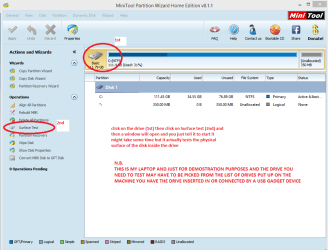
- Microsoft Security Essentials won't run a full scan, but it will run a short scan. I've looked that up and in finding what someone wrote on that, I tried doing chkdsk /f /r and it only froze up on the step where it was checking files. I researched that and it appears that my hard drive may be going bad. I am in the process of backing up my computer to one of those online backups. Should I take MSE off and reinstall? In running chkdsk, it would hang up at about the 80,000 file area (of 564,000, I think) and would (most times) say it fixed some files. Should I keep trying to run chkdsk? The first time it froze there, it stayed in that place for 18+ hours. It allowed me to restart the computer, which then wanted to run chkdsk again, but after about 6 tries, I researched it (to find out that my hard drive might be going bad), exited chkdsk (which thankfully, it allowed me to do) and am in the process of backing up my drive online (6 days later!). I'm using BackBlaze which was highly recommended on a website that rated the online backups.
-Sometimes Adobe Flash crashes spontaneously, sometimes I get a message saying that scripts have stopped working and I never know whether to stop them or what.
- Last, but quite possibly the most important of all (certainly the most ANNOYING!) is that my computer slows WAY WAY down and takes minutes to open or close a page or program and can take up to 2 hours to shut down once I coax all the programs to close.
Does all of this suggest that my poor computer is dying a slow death? Or, are these separate issues that I can try and solve separately? If I'm backed up online, I can do a whole system reinstall once I get back home at the end of August and get one of my computer friends to help me with it.
Sorry this was so long, but being only a good "muddler" (basic knowledge back from the DOS days) with these things, I'm a bit confused and don't know how to sort out nagging minor issues from the major stuff. Thanks!
The laptop screen has always occasionally gone gray instead of loading - the computer continues to boot up properly, just no display. It does this on initial start or sometimes (more often) when coming out of screen saver. If I close the laptop lid and reopen it in a minute, it comes back to normal. It has started do it more and more now that I am having other issues.
It would help to know if these other issues are related or unrelated:
- I lost the ability to make new folders and after searching around the web a lot, I found the solution and that is finally back. Accessories lost the CMD and I figured out how to put that back.
- It has never just automatically updated Windows, I get Error Code 80072EE2, but have run the troubleshooter to no avail. I can update Windows, I have to manually do it from the option at the bottom of the update screen that says Check Online For Updates From Microsoft Update. I finally found out somewhere that I could delete a certain file in my registry and figured that out. Then Microsoft told me I didn't have an authentic Windows, but then certified that I did.
- Recently the program list in the Control Panel (Uninstall program) lost about half of the programs listed. The programs were still on my computer, but they were no longer on the list. I have spent a fair amount of time uninstalling and reinstalling the programs I really wanted to have back. I'm afraid to do that with a couple of programs that came pre-loaded on the computer since I don't have a way to reinstall them. (PowerDVD and RoxioBurn).
- Microsoft Security Essentials won't run a full scan, but it will run a short scan. I've looked that up and in finding what someone wrote on that, I tried doing chkdsk /f /r and it only froze up on the step where it was checking files. I researched that and it appears that my hard drive may be going bad. I am in the process of backing up my computer to one of those online backups. Should I take MSE off and reinstall? In running chkdsk, it would hang up at about the 80,000 file area (of 564,000, I think) and would (most times) say it fixed some files. Should I keep trying to run chkdsk? The first time it froze there, it stayed in that place for 18+ hours. It allowed me to restart the computer, which then wanted to run chkdsk again, but after about 6 tries, I researched it (to find out that my hard drive might be going bad), exited chkdsk (which thankfully, it allowed me to do) and am in the process of backing up my drive online (6 days later!). I'm using BackBlaze which was highly recommended on a website that rated the online backups.
-Sometimes Adobe Flash crashes spontaneously, sometimes I get a message saying that scripts have stopped working and I never know whether to stop them or what.
- Last, but quite possibly the most important of all (certainly the most ANNOYING!) is that my computer slows WAY WAY down and takes minutes to open or close a page or program and can take up to 2 hours to shut down once I coax all the programs to close.
Does all of this suggest that my poor computer is dying a slow death? Or, are these separate issues that I can try and solve separately? If I'm backed up online, I can do a whole system reinstall once I get back home at the end of August and get one of my computer friends to help me with it.
Sorry this was so long, but being only a good "muddler" (basic knowledge back from the DOS days) with these things, I'm a bit confused and don't know how to sort out nagging minor issues from the major stuff. Thanks!
My Computer
At a glance
Windows 7 Home Premium 64-bitIntel i5 2.53GHZ6.00 GB
- Computer type
- PC/Desktop
- Computer Manufacturer/Model Number
- Dell Inspiron
- OS
- Windows 7 Home Premium 64-bit
- CPU
- Intel i5 2.53GHZ
- Memory
- 6.00 GB
- Hard Drives
- C: 266 free of 582 GB
D: 2.76 free of 13.6 GB
- Antivirus
- Microsoft Security Essentials (plus AdAware, Spybot and Malw
- Browser
- Firefox