
ASUS AI Suite III issues

Cliff789

New member
Member
Local time
1:57 AM
Messages
86
My Asus AI Suite III (disk utilities and drivers) seems buggy. I've installed it properly but this is what it does.
When I'm booting as Administrator it all goes flawlessly.
When I boot as a user the stinkin' bleedin' various sub programs of Suite III demand to be given Admin privileges to run one at a time forcing me to enter the password for the admin for each one that thinks it needs it and here is the goofy part:
There is no consistency about which among them thinks it needs this treatment from boot up to boot up.

So here is my question:
A) Maybe this is because I installed it as a user invoking my Admin password?
or
B) Maybe I can set these little buggers to load at boot up by setting to run at start up in the "startup" folder.

About item B: Will this me problematic since the want Admin privileges?
 

My Computer

Computer type
PC/Desktop
Computer Manufacturer/Model Number
Home built
OS
ASUS X79 DELUXE LGA 2011 Intel X79 SATA 6Gb/s USB 3.0 ATX
CPU
Intel Core i7-4930K Ivy Bridge-E 3.4GHz LGA 2011 130W 6-Core
Motherboard
ASUS X79 DELUXE LGA 2011 Intel X79 SATA 6Gb/s USB 3.0 ATX
Memory
CORSAIR Dominator Platinum 16GB (4 x 4GB) 240-Pin DDR3 SDRAM
Graphics Card(s)
ASUS EAH6450 Silent/DI/1GD3(LP) Radeon HD 6450 1GB 64-bit DD
Sound Card
onboard
Monitor(s) Displays
Dell lcd 32"
Hard Drives
1tb SATA, 2tb SATA, 500 gig SATA, 500 Gig SATA, 500 Gig IDE
PSU
CORSAIR HX Series HX750 750W ATX12V 2.3 / EPS12V 2.91 SLI Re
Case
something colored black
Cooling
Cooler Master Seidon 120XL
Keyboard
this thing with buttons on it
Mouse
a tailed devil
Internet Speed
whizzing along
Antivirus
KASPERSKY
Browser
Firefox. Opra, Explorer.
Other Info
I am naked and outside your window shouting Non Sequiturs in a loony high pitched voice.
If you put them in Startup and they want Admin privileges, you'll still have to enter passwords to allow them to run like you do now.

I tried AI Suite, and I deleted it very quickly. As far as I'm concerned, it was just very buggy bloatware, but YMMV.
 

My Computer

Computer type
PC/Desktop
Computer Manufacturer/Model Number
Mellon Labs (custom build)
OS
Win 7 Pro x64/Win 10 Pro x64 dual boot
CPU
AMD FX 8350 Vishera @ 4200
Motherboard
ASUS M5A97 R2.0
Memory
16 GB Mushkin Blackline DDR3-2400 @ 1866 (9-10-10-10-31)
Graphics Card(s)
XFX Radeon R9 280 Double D Black Edition
Sound Card
Realtek HD Audio on MB. Sounds great.
Monitor(s) Displays
Acer 24", Acer 22"
Screen Resolution
3840 x 1080
Hard Drives
1 x Mushkin Chronos 120 GB SSD (Win 10)
1 x Samsung 850 EVO 250 GB SSD (Win 7)
1 x WD 1TB SATA Blue
1 x WD 1TB SATA Green
PSU
Corsair TX-750
Case
CoolerMaster HAF 912+
Cooling
Coolermaster Seidon 240M Liquid AIO. 6 case fans
Keyboard
Logitech G710+
Mouse
Logitech G500s
Internet Speed
Much better since I got fiber, but still way overpriced.
Antivirus
MSE, Malware Bytes for scanning
Browser
Firefox
Other Info
Corsair VOID USB headphones.

A Mellon Labs X-1 - LCD Smartie driven system status display.

Brought to you by the letter E
The only parts of AI Suite III I installed on my Asus Gryphon Z87, i5-4670 system were Thermal Radar 2 and System Information. It works very well, and the program has been well-behaved. I haven't noticed any memory leaks, instability, problems with sleep or hibernation, popups, etc. This is going on 10 months now, and I'm really quite impressed with it, and this is coming from someone who considers such software junk until proven otherwise. I do run an Administrator account, though.

I have no startup Asus programs, but there are two tasks in Task Scheduler, "Asus AISuiteIII" and "Asus DIPAwayMode". I disabled the latter with no ill effect. I know that using Task Scheduler can help with boot-time UAC prompts. For example, though it has since been fixed, I still have this line in my 30 step Windows 7 installation guide:

16. Add "C:\Program Files (x86)\APC\APC PowerChute Personal Edition\Display.exe" to Task Scheduler at logon with highest privileges and delete from autoruns to avoid UAC prompt when logging in. Necessary for Powerchute Personal 3.0. FIXED IN LATER VERSIONS.

So that might be a way out of the prompts, but I have no idea if it's advisable for the Asus programs. Again, I was running an Administrator account, and I don't know if it would have behaved any differently when running a plain User account.
 

My Computer

Computer type
PC/Desktop
OS
Windows 7 Ultimate x64
I like how it works with my USB ports and there is a utility that functions with my dual processors to make them work.
I can tell a difference when I don't have it loaded.
 

My Computer

Computer type
PC/Desktop
Computer Manufacturer/Model Number
Home built
OS
ASUS X79 DELUXE LGA 2011 Intel X79 SATA 6Gb/s USB 3.0 ATX
CPU
Intel Core i7-4930K Ivy Bridge-E 3.4GHz LGA 2011 130W 6-Core
Motherboard
ASUS X79 DELUXE LGA 2011 Intel X79 SATA 6Gb/s USB 3.0 ATX
Memory
CORSAIR Dominator Platinum 16GB (4 x 4GB) 240-Pin DDR3 SDRAM
Graphics Card(s)
ASUS EAH6450 Silent/DI/1GD3(LP) Radeon HD 6450 1GB 64-bit DD
Sound Card
onboard
Monitor(s) Displays
Dell lcd 32"
Hard Drives
1tb SATA, 2tb SATA, 500 gig SATA, 500 Gig SATA, 500 Gig IDE
PSU
CORSAIR HX Series HX750 750W ATX12V 2.3 / EPS12V 2.91 SLI Re
Case
something colored black
Cooling
Cooler Master Seidon 120XL
Keyboard
this thing with buttons on it
Mouse
a tailed devil
Internet Speed
whizzing along
Antivirus
KASPERSKY
Browser
Firefox. Opra, Explorer.
Other Info
I am naked and outside your window shouting Non Sequiturs in a loony high pitched voice.
My Asus AI Suite III (disk utilities and drivers) seems buggy.

It is. Take a look at the ROG forum and you'll see lots a comments on it. There is one or two programs that can be useful but for the most part it should be avoided. They have a small app that removes all traces of it at ROG.
 

My Computer

Computer type
PC/Desktop
Computer Manufacturer/Model Number
Custom, Dell and Lenono LT's
OS
Win8/8.1,Win7-U64, Vista U64, uncounted Linux distor's
CPU
AMD and Intell, 9590, 8350, i5 3570k
Motherboard
CFVFZ, GA990FXA, Z77e-itx
Memory
Corsair G Skill
Graphics Card(s)
Crossfired Sapphire HD 7950 Vapor-X, ASUS R9 280X TOP
Sound Card
Realtek ALC889
Monitor(s) Displays
ViewSonic VX2770SMH 27" / ViewSonic VX2433 LCD 24"
Screen Resolution
1080i HD
Hard Drives
Samsung SSD 840 Pro
OCZ Agility 3's
OCZ Vector's
WD's Blue, red, green, Velociraptors
Seagate USB3 & Hybrid's
ASUS Blu-Ray
ASUS DVD
PSU
Corsair AX1200i, Seasonice 850 Gold
Case
Cooler Master HAF 922 & HAF 932, Lian Li Train case.
Cooling
Air, Glacer 240L expanded, custom EK loop with duel D5's
Keyboard
Microsoft SideWinder X4 USB Keyboard / Logitech 250 PS2
Mouse
Logitech G500 / MS wireless 5000
Internet Speed
Best of 5ms / 75+ dn / 12+ up More or less.
Antivirus
MS esentials-MalwareBytes
Browser
Firefox Chromebook
I Fixed it

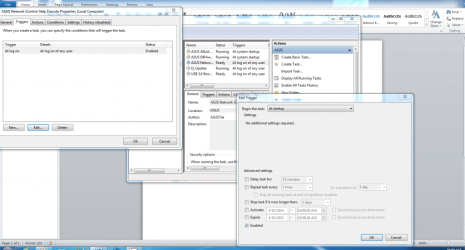
In the Run box enter taskschd.msc hit return
Select Task Scheduler Library
In the programs list on the left click the one you want it opens the middle box with the Executable files .
Select them one at a time and right click them Select Properties.
In the new pop up dialog box select the tab for Triggers
Select EDIT
In the new pop up there is a drop down list that allows you to choose when the application starts I want it to happen at START UP so I chose that.
Select and click OK
That’s it


AIfix_zpsf21a3440.png
 

My Computer

Computer type
PC/Desktop
Computer Manufacturer/Model Number
Home built
OS
ASUS X79 DELUXE LGA 2011 Intel X79 SATA 6Gb/s USB 3.0 ATX
CPU
Intel Core i7-4930K Ivy Bridge-E 3.4GHz LGA 2011 130W 6-Core
Motherboard
ASUS X79 DELUXE LGA 2011 Intel X79 SATA 6Gb/s USB 3.0 ATX
Memory
CORSAIR Dominator Platinum 16GB (4 x 4GB) 240-Pin DDR3 SDRAM
Graphics Card(s)
ASUS EAH6450 Silent/DI/1GD3(LP) Radeon HD 6450 1GB 64-bit DD
Sound Card
onboard
Monitor(s) Displays
Dell lcd 32"
Hard Drives
1tb SATA, 2tb SATA, 500 gig SATA, 500 Gig SATA, 500 Gig IDE
PSU
CORSAIR HX Series HX750 750W ATX12V 2.3 / EPS12V 2.91 SLI Re
Case
something colored black
Cooling
Cooler Master Seidon 120XL
Keyboard
this thing with buttons on it
Mouse
a tailed devil
Internet Speed
whizzing along
Antivirus
KASPERSKY
Browser
Firefox. Opra, Explorer.
Other Info
I am naked and outside your window shouting Non Sequiturs in a loony high pitched voice.
Thank you!

Hi Cliff789

I just wanted to say a whole-hearted "thank you"

I just put my Asus Hero system together and started working on doing the right things (like not playing in Admin mode) and bam! every Asus utility would pop up with a UAC request just like everyone else experienced. I tried everything I knew of, then went looking on the web, and nothing seemed to work. Then I came across your post and voila! no more UAC issues.

You sir, are a genius

Thanks yet again

Tabx3
 

My Computer

Computer type
PC/Desktop
Computer Manufacturer/Model Number
Custom Build
OS
Win 7 Pro 64Bit
CPU
Intel 4790K
Motherboard
Asus Hero 7
Memory
16GB Kingston HyperX
Graphics Card(s)
Gigabyte Radeon HD5800
Hard Drives
Plextor PCIE M.2 128 GB
Glad I could be of help.
 

My Computer

Computer type
PC/Desktop
Computer Manufacturer/Model Number
Home built
OS
ASUS X79 DELUXE LGA 2011 Intel X79 SATA 6Gb/s USB 3.0 ATX
CPU
Intel Core i7-4930K Ivy Bridge-E 3.4GHz LGA 2011 130W 6-Core
Motherboard
ASUS X79 DELUXE LGA 2011 Intel X79 SATA 6Gb/s USB 3.0 ATX
Memory
CORSAIR Dominator Platinum 16GB (4 x 4GB) 240-Pin DDR3 SDRAM
Graphics Card(s)
ASUS EAH6450 Silent/DI/1GD3(LP) Radeon HD 6450 1GB 64-bit DD
Sound Card
onboard
Monitor(s) Displays
Dell lcd 32"
Hard Drives
1tb SATA, 2tb SATA, 500 gig SATA, 500 Gig SATA, 500 Gig IDE
PSU
CORSAIR HX Series HX750 750W ATX12V 2.3 / EPS12V 2.91 SLI Re
Case
something colored black
Cooling
Cooler Master Seidon 120XL
Keyboard
this thing with buttons on it
Mouse
a tailed devil
Internet Speed
whizzing along
Antivirus
KASPERSKY
Browser
Firefox. Opra, Explorer.
Other Info
I am naked and outside your window shouting Non Sequiturs in a loony high pitched voice.
Back
Top