Solved Asus K51AC extremely slow start up

garvey

New member
Local time
3:08 AM
Messages
2
Asus K51AC (windows 7 64 bit) takes a long time to start. When the power on is pressed the CPU gets warm, the fan operates normally and DVD will spin, but it won’t enter BIOS, the keyboard isn’t operating and the screen remains black. If left with power on it will start and run normally of it’s own accord, this can be up to an hour later. I have tried it on battery alone and with battery removed, removing CMOS battery, starting in safe mode, starting in diagnostic mode from msconfig, from repair disc I have tried start up repair, fixmbr and fixboot, I have reflashed BIOS using BIOS tool, I installed another HDD with win.XP and it started straight away but blue screened at windows start up. I reinstalled the system HDD and it started normally. It continued to start properly for the rest of the day and I was convinced my problem was fixed, then it sat over night and wouldn’t start in the morning. Any advice you can offer would be welcomed.
 

My Computer My Computer

Computer type
PC/Desktop
Computer Manufacturer/Model Number
Asus k51ac
OS
Windows 7 home premium 64bit SP1
CPU
AMD athlon x2 QL-65 2100 Mhz
Memory
4 GB
Hard Drives
Samsung HM160HI
Antivirus
Norton internet security
Browser
Internet Explorer / Google
Hello and welcome Garvey mate have you any way of testing the drive onanother machine using

http://support-us.samsung.com/cyber/popup/iframe/pop_troubleshooting_fr.jsp?idx=42990&modelname=SV0411N if you cannot get this machine going.

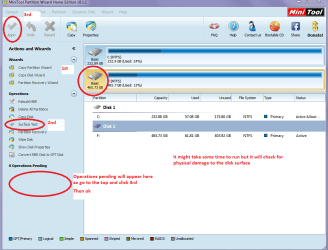
Another drive test is a physical surface one using this Best Free Partition Manager Freeware and free partition magic for Windows 7, Windows 8, Windows Vista and Windows XP 32 bit & 64 bit. MiniTool Free Partition Manager Software Home Edition. see pic

If you can then try it,and also try these

http://www.sevenforums.com/tutorials/1538-sfc-scannow-command-system-file-checker.html

http://www.sevenforums.com/tutorials/433-disk-check.html > you might have to use Option 2


You might even want to try this.

MEMTEST

http://www.sevenforums.com/tutorials/105647-ram-test-memtest86.htmlthis one you will need to make a bootable disk set the BIOSto optical (or USB if preferred) boot the machine and let it run for at LEAST 8 passesunless the errors come upstraight away. Takes a fair time to complete and some leave it runningovernight.

If you do get errors and have morethan one stick then you will need to test each one separately and maybe even inthe separate slots.
But I would hazard a guess at it being a hard drive problem.
 

Attachments

  • PW SURFACE.PNG
    PW SURFACE.PNG
    39.4 KB · Views: 1

My Computer My Computer

Computer type
PC/Desktop
Computer Manufacturer/Model Number
Own build (new) Desk1 / Asus ROG Win 7 / Desk2 1st build
OS
Desk1 7 Home Prem / Desk2 10 Pro / Main lap Asus ROG 10 Pro 2 laptop Toshiba 7 Pro Asus P2520 7 & 10
CPU
Desk1 i5 3750K / Laptop i7 GTX 860M / Desk2 i5 2500
Motherboard
Desk1 Asus P877-V / Desk2 Gigabyte H67 UD3H / Laptop ?
Memory
Desk1 8GB (1866) / Desk2 16GB (1333) / Laptop 8Gb DDR3
Graphics Card(s)
Desk 1& 2NVidia GTX 650 & Laptops on board Intel
Sound Card
Desk 1 & 2 -XONAR DG Realtek High Def audio Laptop
Monitor(s) Displays
Desk 1 Benq HD 2450 / Desk2 Philips 24" / Laptop 17.5"
Screen Resolution
1920x1080 D1 & D2 & Laptop 1
Hard Drives
Desk1 Samsung 120GB 830 SSD
Asus ROG 256GB 850 Pro SSD
Desk2 Samsung 840 256 SSD
Toshiba 120GB EVO
PSU
Desk 1 Corsair HX 1050/ Laptop ? / Desk 2 Corsair HX 650
Case
Desk 1 Cooler HAF XM ? Toshiba laptop / Desk2 Coolermaster
Cooling
Fans on all Desk1 -2 Desk2 - all Coolermasters 5 Laptop ?
Keyboard
Desk 1 MS Sidewinder X6 Desk 2 MS Sidewinder X 4
Mouse
Desk 1&2 - Gigabyte MS 900 gamer - laptop - Logitec wireless
Internet Speed
ADSL2+
Other Info
One other Desktop (tester) and spare Toshba laptop both with SSD's
Running Kaspersky 2016 ISS on all machines config'd identically
Logitec audio stereo systems on each machine (x3)
Canon MG5250MFC
Router/modem TP-Link running WPA2SK
Thanks for the advice, I was able to fit HDD into a MSI A5000 and it booted straight away so I'm guessing the problem isn't the HDD and I had run disc check twice already. I will pull the mother-board and see if anything is fried. I know it's a long shot. Thanks for the samsung link, it will be usefull.
 

My Computer My Computer

Computer type
PC/Desktop
Computer Manufacturer/Model Number
Asus k51ac
OS
Windows 7 home premium 64bit SP1
CPU
AMD athlon x2 QL-65 2100 Mhz
Memory
4 GB
Hard Drives
Samsung HM160HI
Antivirus
Norton internet security
Browser
Internet Explorer / Google
garvey, Welcome to Seven Forums. Before pulling the motherboard, here are spme steps to try to diagnose the problems, some of which it sounds like you may have done. http://www.sevenforums.com/tutorials/219533-troubleshooting-windows-7-failure-boot.html

I would also start up in Safe Mode just to see if it runs any better. Safe mode will have limited functionality as it only loads The minimum drivers necessary for it to run. See if it runs better that way. It should tell you the problem lies somewhere in the Programs you have installed or a driver issue. http://www.sevenforums.com/tutorials/69585-safe-mode.html

I would also suggest you run sfc /scannow which is a system file checker. It will check system files for corruption and attempt to repair them. This will show several option to do it. http://www.sevenforums.com/tutorials/1538-sfc-scannow-command-system-file-checker.html

These are some steps to troubleshoot Windows 7. It covers most everything you can do to diagnose a problem.
http://www.sevenforums.com/tutorials/220165-troubleshooting-steps-windows-7-a.html

Try some of these and let us know how it works for you. I hope you can resolve your problem without too much time and effort. Testing can be very time consuming and a real pain. I know I've been there several times. But, please let us know the outcome.

Also, be aware that any time you load an OS from another system, you will always have problems with start up. The OS you are loading has the drivers from the other system which most likely will not work well, if at all, on the hardware of your system.
 

My Computers My Computers

System One System Two

  • Computer type
    PC/Desktop
    Computer Manufacturer/Model Number
    ALWAYS UNDER CONSTRUCTION
    OS
    Windows 11 Pro
    CPU
    Ryzen 9 5900X
    Motherboard
    Asus X570 Crosshair Viii Hero
    Memory
    32GB G Skill DDR4-3600
    Graphics Card(s)
    EVGA RTX 3080 FTW 3 Ultra
    Sound Card
    On Board/Sennheiser PC37X Headset
    Monitor(s) Displays
    3 X Asus 27"
    Screen Resolution
    2560x1440
    Hard Drives
    2 X 1 TB NVME drives
    PSU
    EVGA 850
    Case
    Phanteks Eclipse P400A
    Cooling
    EVGA 280 AIO
    Keyboard
    Logitech G510s/ Logitech G13
    Mouse
    Logitech G502
    Internet Speed
    24/1
    Antivirus
    ESET/MBAM Pro/SAS Pro
    Browser
    Chrome/ Firefox/ Edge
  • Computer type
    Laptop
    System Manufacturer/Model Number
    Dell 16 Plus
    OS
    Windows 11 Pro
    CPU
    Intel Ultra 9 288V
    Memory
    32 GB LPDDR5X 8533
    Monitor(s) Displays
    16" Mini-LED HDR600 Touch 90 Hz
    Screen Resolution
    2560X1600
    Hard Drives
    1 TB NVME
Yep I agree with essenbe re the troubleshooting tutorial and not wanting to repeat myself I said already try the SFC and the chkdsk and maybe use Option 2 to do some further diagnosing although I was assuming you might take that as in safe mode being that you had such a problem with normal start up but.... :o


I still think if all that doesn't do something then I would run the memtest perhaps it just isn't holding instructions as it should but that is a bit of a hunch on my part. .

Maybe a look at the temps might throw some light on it too as I see the machine is getting into middle age now try Speccy and post back the temps - if you can (you might get lucky and run it from a stick made on another machine and in safe mode)
Speccy - Download < download from piriform and just as a matter of interest can you hear the cooling fan spin real fats from power up and onwards.
 

My Computer My Computer

Computer type
PC/Desktop
Computer Manufacturer/Model Number
Own build (new) Desk1 / Asus ROG Win 7 / Desk2 1st build
OS
Desk1 7 Home Prem / Desk2 10 Pro / Main lap Asus ROG 10 Pro 2 laptop Toshiba 7 Pro Asus P2520 7 & 10
CPU
Desk1 i5 3750K / Laptop i7 GTX 860M / Desk2 i5 2500
Motherboard
Desk1 Asus P877-V / Desk2 Gigabyte H67 UD3H / Laptop ?
Memory
Desk1 8GB (1866) / Desk2 16GB (1333) / Laptop 8Gb DDR3
Graphics Card(s)
Desk 1& 2NVidia GTX 650 & Laptops on board Intel
Sound Card
Desk 1 & 2 -XONAR DG Realtek High Def audio Laptop
Monitor(s) Displays
Desk 1 Benq HD 2450 / Desk2 Philips 24" / Laptop 17.5"
Screen Resolution
1920x1080 D1 & D2 & Laptop 1
Hard Drives
Desk1 Samsung 120GB 830 SSD
Asus ROG 256GB 850 Pro SSD
Desk2 Samsung 840 256 SSD
Toshiba 120GB EVO
PSU
Desk 1 Corsair HX 1050/ Laptop ? / Desk 2 Corsair HX 650
Case
Desk 1 Cooler HAF XM ? Toshiba laptop / Desk2 Coolermaster
Cooling
Fans on all Desk1 -2 Desk2 - all Coolermasters 5 Laptop ?
Keyboard
Desk 1 MS Sidewinder X6 Desk 2 MS Sidewinder X 4
Mouse
Desk 1&2 - Gigabyte MS 900 gamer - laptop - Logitec wireless
Internet Speed
ADSL2+
Other Info
One other Desktop (tester) and spare Toshba laptop both with SSD's
Running Kaspersky 2016 ISS on all machines config'd identically
Logitec audio stereo systems on each machine (x3)
Canon MG5250MFC
Router/modem TP-Link running WPA2SK
Hello,

My friend has same issue with slow start up on same Asus K51AC.
Root cause looks in chipset (north bridge RS780M 216-0674026)
Chipset was heat in repair centre and laptop start booting properly for several month, now it again provide slow start up unfortunately...
Next step is to replace chipset with new one. Expensive little bit but 3.5-4 times cheaper than to buy new laptop

But why chipset not working properly there are several ideas:
1)damaged chipset (for example because of overheat) -> solution replase chipset
2)Bad soldering - at factory -> solution try reballing or new chipset
3)Broken contact - due to heat -> solution try reballing or new chipset
 
Last edited:

My Computer My Computer

Computer type
PC/Desktop
Computer Manufacturer/Model Number
Asus
OS
Windows XP 32 bit
Problem solved by north bridge RS780M 216-0674026 replacement
 

My Computer My Computer

Computer type
PC/Desktop
Computer Manufacturer/Model Number
Asus
OS
Windows XP 32 bit
Mark as solved Sergi and good to hear alls well:)
 

My Computer My Computer

Computer type
PC/Desktop
Computer Manufacturer/Model Number
Own build (new) Desk1 / Asus ROG Win 7 / Desk2 1st build
OS
Desk1 7 Home Prem / Desk2 10 Pro / Main lap Asus ROG 10 Pro 2 laptop Toshiba 7 Pro Asus P2520 7 & 10
CPU
Desk1 i5 3750K / Laptop i7 GTX 860M / Desk2 i5 2500
Motherboard
Desk1 Asus P877-V / Desk2 Gigabyte H67 UD3H / Laptop ?
Memory
Desk1 8GB (1866) / Desk2 16GB (1333) / Laptop 8Gb DDR3
Graphics Card(s)
Desk 1& 2NVidia GTX 650 & Laptops on board Intel
Sound Card
Desk 1 & 2 -XONAR DG Realtek High Def audio Laptop
Monitor(s) Displays
Desk 1 Benq HD 2450 / Desk2 Philips 24" / Laptop 17.5"
Screen Resolution
1920x1080 D1 & D2 & Laptop 1
Hard Drives
Desk1 Samsung 120GB 830 SSD
Asus ROG 256GB 850 Pro SSD
Desk2 Samsung 840 256 SSD
Toshiba 120GB EVO
PSU
Desk 1 Corsair HX 1050/ Laptop ? / Desk 2 Corsair HX 650
Case
Desk 1 Cooler HAF XM ? Toshiba laptop / Desk2 Coolermaster
Cooling
Fans on all Desk1 -2 Desk2 - all Coolermasters 5 Laptop ?
Keyboard
Desk 1 MS Sidewinder X6 Desk 2 MS Sidewinder X 4
Mouse
Desk 1&2 - Gigabyte MS 900 gamer - laptop - Logitec wireless
Internet Speed
ADSL2+
Other Info
One other Desktop (tester) and spare Toshba laptop both with SSD's
Running Kaspersky 2016 ISS on all machines config'd identically
Logitec audio stereo systems on each machine (x3)
Canon MG5250MFC
Router/modem TP-Link running WPA2SK
Sorry you had to do that, but great it is running well.
 

My Computers My Computers

System One System Two

  • Computer type
    PC/Desktop
    Computer Manufacturer/Model Number
    ALWAYS UNDER CONSTRUCTION
    OS
    Windows 11 Pro
    CPU
    Ryzen 9 5900X
    Motherboard
    Asus X570 Crosshair Viii Hero
    Memory
    32GB G Skill DDR4-3600
    Graphics Card(s)
    EVGA RTX 3080 FTW 3 Ultra
    Sound Card
    On Board/Sennheiser PC37X Headset
    Monitor(s) Displays
    3 X Asus 27"
    Screen Resolution
    2560x1440
    Hard Drives
    2 X 1 TB NVME drives
    PSU
    EVGA 850
    Case
    Phanteks Eclipse P400A
    Cooling
    EVGA 280 AIO
    Keyboard
    Logitech G510s/ Logitech G13
    Mouse
    Logitech G502
    Internet Speed
    24/1
    Antivirus
    ESET/MBAM Pro/SAS Pro
    Browser
    Chrome/ Firefox/ Edge
  • Computer type
    Laptop
    System Manufacturer/Model Number
    Dell 16 Plus
    OS
    Windows 11 Pro
    CPU
    Intel Ultra 9 288V
    Memory
    32 GB LPDDR5X 8533
    Monitor(s) Displays
    16" Mini-LED HDR600 Touch 90 Hz
    Screen Resolution
    2560X1600
    Hard Drives
    1 TB NVME
Back
Top