Asus Laptop can't find wireless connections

pclaptop23

New member
Local time
4:19 AM
Messages
60
Location
Under the Boardwalk AC NJ USA
I have an Asus K53E and my wireless Icon says "Not connected - no connections are available" !

Now what I've got and what I've tried . . . .

1) Intel I3 2350M CPU, 8 gb Ram, X64 Windows 7 Home Premium, Atheros AR9285 Wlan.

2) I've disabled and uninstalled the Atheros device and it's drivers (as well as d/led new drivers) and the associated Asus Wirelesss Console 3 manager!

3) At start-up the little stairs/steps looking icon for wireless connections has a blue spinning circle for a sec or two as if it sees a connection, but eventually reverts to a red X and give the above message, "Not connected - no connections are available" !

4) I've checked all of the network specific connection MS client, IPV4 etc . . .

5) I've scanned for spyware and for Virii, Eset Nod32 Smart Security 7 and Malwarebytes 2.0.2.1012 and although they found some insignificant virii and spyware (after removal problem still exists) maybe those items detected removed or corrupted necessary files?

6) The device in device manager under Network Adapters says, "This device is working properly"

7) 3 Other laptops within range connect fine wirelessly, and if I use a short cat5 jumper from the ethernet port on the Asus directly to one of the router ports on the all in one Comcast modem~wireless router this Asus K53E connects to the internet fine!

8) The Atheros wireless adapter turns off and on fine (by Fn + Fn2) and is displayed as operating by the Asus Wireless Console 3 icon!

9) On a couple of my Google searches for this problem some people inferred the internal Atheros card may have failed and evidenced by an external Wireless USB device! I have access to one but have not yet tried it! Is it feasible/possible/probable this Atheros AR9285 Wlan card has failed?

10) Oh and when I click on troubleshoot the network problem, I get an error has occurred with the troubleshooter,
Path: C:\Windows\diagnostics\system\networking,
Error code: 0x8007045A
Source: Command line

Re-installing XML didn't change troubleshooting error!

11) Booting into safe mode with networking has the same results, "Not connected - no connections are available" !

Any thoughts or input gentlemen and or ladies?

thanks in advance
 
Last edited:

My Computer My Computer

At a glance

Win 7 Ultimate 64 bitIntel duo core P8600 2.4ghz/2.4ghz4gb
Computer type
PC/Desktop
OS
Win 7 Ultimate 64 bit
CPU
Intel duo core P8600 2.4ghz/2.4ghz
Memory
4gb
Is the little wi-fi light below the touch pad on? Sometimes there is a button or switch to turn it on.. Just something to check.
 

My Computer My Computer

At a glance

Microsoft Windows 7 Home Premium 64-bit 7601 ...AMD Phenom(tm) II X4 965 Processor8.0 GBNVIDIA GeForce GTX 560 Ti
Computer type
PC/Desktop
Computer Manufacturer/Model Number
Custom Build
OS
Microsoft Windows 7 Home Premium 64-bit 7601 Multiprocessor Free Service Pack 1
CPU
AMD Phenom(tm) II X4 965 Processor
Motherboard
ASUSTeK Computer INC. M4A785-M
Memory
8.0 GB
Graphics Card(s)
NVIDIA GeForce GTX 560 Ti
Sound Card
(1) NVIDIA High Definition Audio (2) NVIDIA High Definitio
Monitor(s) Displays
Samsung SyncMaster T220G
Screen Resolution
1680 x 1050 x 32 bits (4294967296 colors) @ 59 Hz
Hard Drives
WDC WD7500AADS-00M2B0
PSU
650 Watt
Case
Cooler Master HAF XM
Cooling
Air
Keyboard
CompUSA SK-6200
Mouse
Logitech M-510
Internet Speed
Comcast
Antivirus
MSE
Browser
Firefox 27.0 IE 11
Other Info
Belkin Hub To Go F5U706
jgeils yes it comes on with Fn + F2!

out of curiosity, are you old enough to know the jgeils band?
 

My Computer My Computer

At a glance

Win 7 Ultimate 64 bitIntel duo core P8600 2.4ghz/2.4ghz4gb
Computer type
PC/Desktop
OS
Win 7 Ultimate 64 bit
CPU
Intel duo core P8600 2.4ghz/2.4ghz
Memory
4gb
Oh and It was working as well, it is not as if it NEVER worked!
 

My Computer My Computer

At a glance

Win 7 Ultimate 64 bitIntel duo core P8600 2.4ghz/2.4ghz4gb
Computer type
PC/Desktop
OS
Win 7 Ultimate 64 bit
CPU
Intel duo core P8600 2.4ghz/2.4ghz
Memory
4gb
So fn +f2 makes it toggle on and off? When on does it list multiple networks?
Yes I do know of the band. Am old enough great party band.
 

My Computer My Computer

At a glance

Microsoft Windows 7 Home Premium 64-bit 7601 ...AMD Phenom(tm) II X4 965 Processor8.0 GBNVIDIA GeForce GTX 560 Ti
Computer type
PC/Desktop
Computer Manufacturer/Model Number
Custom Build
OS
Microsoft Windows 7 Home Premium 64-bit 7601 Multiprocessor Free Service Pack 1
CPU
AMD Phenom(tm) II X4 965 Processor
Motherboard
ASUSTeK Computer INC. M4A785-M
Memory
8.0 GB
Graphics Card(s)
NVIDIA GeForce GTX 560 Ti
Sound Card
(1) NVIDIA High Definition Audio (2) NVIDIA High Definitio
Monitor(s) Displays
Samsung SyncMaster T220G
Screen Resolution
1680 x 1050 x 32 bits (4294967296 colors) @ 59 Hz
Hard Drives
WDC WD7500AADS-00M2B0
PSU
650 Watt
Case
Cooler Master HAF XM
Cooling
Air
Keyboard
CompUSA SK-6200
Mouse
Logitech M-510
Internet Speed
Comcast
Antivirus
MSE
Browser
Firefox 27.0 IE 11
Other Info
Belkin Hub To Go F5U706
This is getting screwier
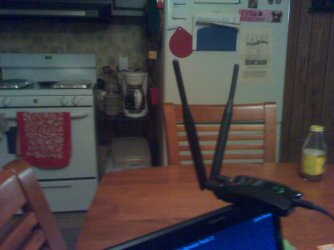
Ok I attached an external Wi-fi unit thru the USB port (RaLink) and voila I now can see available wireless networks when I left click on the stair/step icon!

Ok I click on MY wireless SSID and enter the correct key code 5 times and I get an incorrect key! I know it is the right key as I copied from the bottom of the router! Hmmmm, I boot into safe mode with networking, I click on the stair step icon and enter the code! BANG I'm in! I update AV and spyware check for system up dates I'm connected no BLUE CIRCLE no RED X and no YELLOW EXCLAMATION POINT! It is connected using the ext wifi wirelessly!

Ok now that the password is stored, I log out of safe mode, reboot thinking the int Atheros module is bad, and problem solved. I'll either use the ext RaLink thru he USB port and/or order a new Atheros internal module.

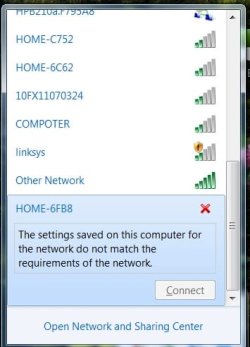
Boot up normal, go to the stair/step icon left click see all BUT my SSID! WTF? I scroll down the wireless list of SSID's and at the very bottom is wireless SSID with a RED X saying incorrect network data (see attached pic)! Booting back into safe mode with networking is the same result ? How the hell did that happen?

Ok it's got a serious virus or VERY corrupt files, I'll re-install Windows7. I put in my Windows 7 DVD start a custom (complete wipe and reinstall) of the OS but the Win7 install says there's no hard drive presentWTF again?! When I boot up this Asus (complete with the original error as above with int Atheros) I see my Toshiba Sata(I first I though maybe it was gpat formatted and it was using UEFI) 750gb hard and it is in two partitions C: 450gb and D:300gb logical drive for movie/music storage!

I take the hard drive out and using a Sata to USB adapter connect to another laptop and run a couple different diagnostic programs and NONE of them see a formatted drive! GPART, (a Linux formatting/partitioning program), shows and un-allocated 750gb drive! another program Partition Manager shows a drive with IO errors and Windows explorer says drive needs to be formatted!!

Yet when I re-insert this drive back into the Asus K53E it boots fine and windows explorer running on the Asus shows the Toshiba 750 gb as it was, with two partitioned drives C: and D:! How the hell is this possible?

I can't believe the Windows 7 Ultimate install DVD says no hard drive present!

Somebody shine a light here!

thanks chris​
 

Attachments

  • IMG_20140830_204459.jpg
    IMG_20140830_204459.jpg
    211.1 KB · Views: 1
  • WTF.jpg
    WTF.jpg
    24.8 KB · Views: 12

My Computer My Computer

At a glance

Win 7 Ultimate 64 bitIntel duo core P8600 2.4ghz/2.4ghz4gb
Computer type
PC/Desktop
OS
Win 7 Ultimate 64 bit
CPU
Intel duo core P8600 2.4ghz/2.4ghz
Memory
4gb
apologies for delay down to the beach for memorial day weekend and put this asus out of my mind.

if i haven't said it already thanks for the input guys
 

My Computer My Computer

At a glance

Win 7 Ultimate 64 bitIntel duo core P8600 2.4ghz/2.4ghz4gb
Computer type
PC/Desktop
OS
Win 7 Ultimate 64 bit
CPU
Intel duo core P8600 2.4ghz/2.4ghz
Memory
4gb
btw the coffee is still hot!
 

My Computer My Computer

At a glance

Win 7 Ultimate 64 bitIntel duo core P8600 2.4ghz/2.4ghz4gb
Computer type
PC/Desktop
OS
Win 7 Ultimate 64 bit
CPU
Intel duo core P8600 2.4ghz/2.4ghz
Memory
4gb
Formatting in Linux and then back to NFTS is what i have done before to remove boot sector infections, seems as though Linux formats parts of the hard drive that windows does not!

Jesus Christ here, the viruses are getting ALOT more sophisticated and a REAL b i t c h to remove!

Anyhow between Linux and Windows7 and multiple removed hard drive scans I got the offending s h ! t off and the ASUS is back to SOP!

Either that or I lucked out with serendipity. This laptop had BS free spyware and Anti-virus and the offending proggies just walked right by!

Thanks for all of the input guys
 

My Computer My Computer

At a glance

Win 7 Ultimate 64 bitIntel duo core P8600 2.4ghz/2.4ghz4gb
Computer type
PC/Desktop
OS
Win 7 Ultimate 64 bit
CPU
Intel duo core P8600 2.4ghz/2.4ghz
Memory
4gb
Back
Top