
Asus N61Ja laptop CMOS Battery

zKs

New member
Local time
12:35 AM
Messages
6
Hi,

I need to know what type of CMOS Battery is in the Asus N61Ja-JX046X laptop, because I need to replace it

Anyone here able to tell me what type it is?

ps. I've already done all the research and this is the only solution. Please do not reply with something like 'i advise against it', post if you can help me out someway, otherwise please just don't post. Thanks :p
 

My Computer My Computer

At a glance

Windows 7 Professional x64
OS
Windows 7 Professional x64
cannot find out any specifics on the CMOS battery--nor it's specific location.

you'll need to open the laptop, locate the battery--the number 'should' be on the top side of it--if you're not comfortable dismantling your machine--a shop would be useful.

you could try contacting asus about the specific battery #

try this address

[email protected]

I did find this guide--it's for a different model--but--process should be similar--see step 16 as it seems asus puts the cmos under the palmrest

http://www.insidemylaptop.com/how-to-disassemble-asus-k53u-laptop/
 

My Computer My Computer

At a glance

win7 ultimate 32bitcore2 Extreme QX6850-OCd to 3.15 GHz4 GBNVidia 8600 GT
Computer Manufacturer/Model Number
SALEON model 2.2b
OS
win7 ultimate 32bit
CPU
core2 Extreme QX6850-OCd to 3.15 GHz
Motherboard
ASUS P5G41-M LE
Memory
4 GB
Graphics Card(s)
NVidia 8600 GT
Monitor(s) Displays
23" acer
Hard Drives
one SATA 250GB partitioned equally in half
one SATA 160GB-internal storage
PSU
500W Thermaltake
Case
mini tower
Hi!

Thanks for your reply :) I will be dismantling my laptop once I get a new battery, but problem is I don't have anywhere here I can leave it 'opened up', dustfree.. so then I would have to disassemble and reassemble twice, which idno, once is already enough of a hassle for me (quite new to it).
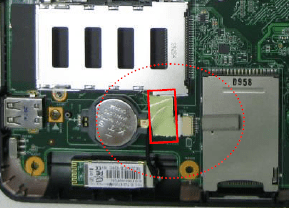
People on other forums have been saying it's probably a 3v CR 2032, but I can't be sure of course. I attached a picture a guy from the Belgian Asus TSD sent me showing me the location of the CMOS battery and that it's not soldered onto the motherboard. I do have a disassembly guide for the N61VN, which should also work for my model.

Here's a link to my initial thread about the problem, btw: http://www.sevenforums.com/hardware-devices/238646-asus-n61ja-bios-update-problem.html
 

Attachments

  • cmos battery (1).PNG
    cmos battery (1).PNG
    38.6 KB · Views: 82

My Computer My Computer

At a glance

Windows 7 Professional x64
OS
Windows 7 Professional x64
re: your post about BIOS flash--if you improperly flashed the BIOS (which it sounds like you did) you've basically killed your motherboard--the data that is written to the eProm (a chip on the MOBO) is hosed--it 'may' be able to be fixed, but you'll need to take it to a shop to see if they can dismantle the machine and connect the MOBO to 'something (?)' to fix it--other than that--you'll need a new MOBO.
the CMOS battery probably won't make any difference--because even if the CMOS battery were dead--the machine should still boot

good luck
 

My Computer My Computer

At a glance

win7 ultimate 32bitcore2 Extreme QX6850-OCd to 3.15 GHz4 GBNVidia 8600 GT
Computer Manufacturer/Model Number
SALEON model 2.2b
OS
win7 ultimate 32bit
CPU
core2 Extreme QX6850-OCd to 3.15 GHz
Motherboard
ASUS P5G41-M LE
Memory
4 GB
Graphics Card(s)
NVidia 8600 GT
Monitor(s) Displays
23" acer
Hard Drives
one SATA 250GB partitioned equally in half
one SATA 160GB-internal storage
PSU
500W Thermaltake
Case
mini tower
Laptop motherboard batteries are almost always cr1220.
2032 is desktop size.
 

My Computer My Computer

At a glance

W7 Home Premium 32bit
Computer Manufacturer/Model Number
8 home-builds from the 80's into 2004
OS
W7 Home Premium 32bit
Hey! I sure hope that's not the case. It actually seemed to flash the bios correctly. Finished the checking and then it shut down and wouldn't come back on. But err, look at the first post here: CMOS Battery needs to be replaced frequently - AnandTech Forums

could still be the case right :o

My plan is to prepare a usb stick which will auto-flash the old, 'standard' bios.. replace the cmos battery, boot with that usb stick.. well, if it will boot..
 

My Computer My Computer

At a glance

Windows 7 Professional x64
OS
Windows 7 Professional x64
in case you nuked the BIOS chip, you can replace the chip with a brand-new one. (and really hope it works) these guys sold me a couple new chips I used to perform some necromancy on dead mobos after some guys screwed up big way a BIOS update.

Maybe they have the right chip for you, maybe not. Google around.

Take note that its pretty damn small and you'll have to use tiny solders to do the soldering and that it's a complete and total pain in the backside to do so even for someone with soldering experience.
 
Last edited:

My Computer My Computer

At a glance

Win 7 Pro 64-bit 7601AMD Phenom 9650 QuadCore, revision DR-B35 GB yes I run 2x 2GB and 1x 1GB, different b...NVIDIA GeForce 9800 GT 512 Mb, unknown manufa...
Computer type
PC/Desktop
Computer Manufacturer/Model Number
custom built
OS
Win 7 Pro 64-bit 7601
CPU
AMD Phenom 9650 QuadCore, revision DR-B3
Motherboard
ASUS M4A78
Memory
5 GB yes I run 2x 2GB and 1x 1GB, different brand, spank me.
Graphics Card(s)
NVIDIA GeForce 9800 GT 512 Mb, unknown manufacturer.
Sound Card
Crappy Realtek Integrated Audio
Monitor(s) Displays
Fujitsu Siemens P19-3P
Screen Resolution
1280 x 1024 x 32 bits @ 60 Hz Oh yeah, 4:3 rocks!
Hard Drives
(1) MAXTOR S TM3320613AS SATA Disk Device (2) STM35004 18AS SATA Disk Device (3) TOSHIBA USB 2.5"-HDD
PSU
whatever, around 450w
Case
Scavenged from old company PC, 10+ years old
Cooling
CPU fan, GPU fan, case fan, nothing fancy
Keyboard
Microsoft, PS/2, white.
Mouse
Optical, logitec.
Internet Speed
effective max speeds: 70-ish kB/s down 30-ish kB/s up
Antivirus
Avira, free edition.
Browser
Firefox with FXChrome to make it look like Google Chrome :P
Other Info
Was discarded by previous owner due to "horrible performance".
Was running Win Xp from a IDE drive. Yeah. Was a pain.
SATA II drive and Win7 and it zips away! Yay!
zKs,

"It actually seemed to flash the bios correctly. Finished the checking and then it shut down and wouldn't come back on."

if it won't come back on, then the pRom data 'may' be hosed...have you tried pulling the main battery from the laptop, letting it set awhile, putting battery back in and connecting the laptop to AC power?

CMOS batteries should last for years.
 

My Computer My Computer

At a glance

win7 ultimate 32bitcore2 Extreme QX6850-OCd to 3.15 GHz4 GBNVidia 8600 GT
Computer Manufacturer/Model Number
SALEON model 2.2b
OS
win7 ultimate 32bit
CPU
core2 Extreme QX6850-OCd to 3.15 GHz
Motherboard
ASUS P5G41-M LE
Memory
4 GB
Graphics Card(s)
NVidia 8600 GT
Monitor(s) Displays
23" acer
Hard Drives
one SATA 250GB partitioned equally in half
one SATA 160GB-internal storage
PSU
500W Thermaltake
Case
mini tower
Back
Top