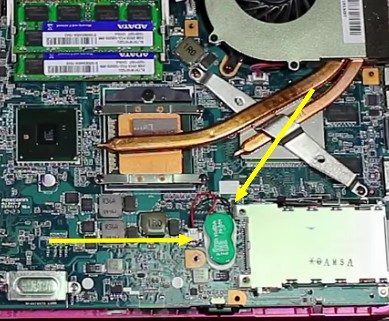
Sony Laptop Cmos battery replacment

ariespaan

New member
Member
Local time
9:33 PM
Messages
71
Good morning,

I have a Sony Laptop, model: VPCF1 ((Exact: VPCF13L8E), 16-inch-screen) working with win-7
I think the Cmos-battery of this laptop is losing more and more Power.

I want to replace this Cmos-battery with a new one.
I want to know what type of Cmos-battery i have to use (the Sony manal does not mention about any type)
and i am also interested in how to do the step-by-step instructions, to replace the Cmos battery
Has anyone any suggestions?
Thanks
 

My Computer My Computer

Computer type
Laptop
Computer Manufacturer/Model Number
Sony
OS
Windows-7 64 Bits Home Premium
CPU
Intel I5
It's not that difficult. Watch this video to get an idea. Reset BIOS settings Sony VAIO PCG-61211V laptop | CMOS battery replacement - YouTube The battery in your laptop probably looks like that one. See image here. It may be an S129. It'll say on the battery. If you Google that you'll be sure to find a vendor that sells them. In the U.S. we have battery stores. Not sure if stores like that exist in the Netherlands.


Y9jjRQ0.jpg


Just know that after you replace the battery you'll have to go into BIOS and reset settings.

What leads you to think the battery is losing power?
 

My Computer My Computer

Computer type
PC/Desktop
OS
Windows 7 Ultimate x64
I thought the battery was losing power, because the system-time was 1 hour earlier than it had to be
The time-zone settings where good.
So i manually changed the time 1 hour forward, and i now see that te system-time is correct
 

My Computer My Computer

Computer type
Laptop
Computer Manufacturer/Model Number
Sony
OS
Windows-7 64 Bits Home Premium
CPU
Intel I5
See if there is a battery health or percentage rating in BIOS. It may be under diagnostics or advanced. Just look everywhere in BIOS. It appears most Sony VAIO laptops use the F2 key to enter BIOS. When the computer boots keep taping the F2 key. If that's not it, the splash screen will say what key to press, but you have to read quick as the display will change in a few seconds.

The time setting could be due to the time server. You can go to the clock and chose a different Internet source under Internet Time. Click the Update now button. If there's no sync try another source. You may have to check a firewall, DNS filtering, etc
 

My Computer My Computer

Computer type
PC/Desktop
OS
Windows 7 Ultimate x64
Back
Top