Kimbolini
New member
I'm having trouble with my Asus desktop not booting properly. I get this message:
"Reboot and Select proper boot device or Insert Boot Media in Selected Boot device and press a key"
I have tried setting the boot options variously switching between manually setting between the boot options below, #1 and #2, and setting to the Optimized Defaults setting. I'm not sure which boot option should be first or which one is working when it does work. Here's my options:
Boot option #1: SATA: ATAPI DVD A DH24ABS
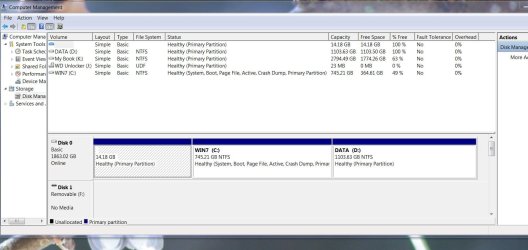
Boot option #2: WDC WD20EARX-22PASB0
Boot option #3: Generic-MS/MS-Pro 1.03
Noticed that the driver for the bios is the original one (2011), and tried to update it through the option provided, but it never seems to work and just continues to 'connect to server' with no result.
Through numerous trials and errors I seem able to get the boot to work (not sure how though), and once it does Windows 7 works fine. The trouble is as soon as I try to boot again the whole process happens over.
I have a "new system image restore Asus 2012 ISO Files disk that I made when I purchased the computer, but haven't tried to use it as I'm not sure how or if it would only restore the bios settings or overwrite the whole system.
Help would be most appreciated!
"Reboot and Select proper boot device or Insert Boot Media in Selected Boot device and press a key"
I have tried setting the boot options variously switching between manually setting between the boot options below, #1 and #2, and setting to the Optimized Defaults setting. I'm not sure which boot option should be first or which one is working when it does work. Here's my options:
Boot option #1: SATA: ATAPI DVD A DH24ABS
Boot option #2: WDC WD20EARX-22PASB0
Boot option #3: Generic-MS/MS-Pro 1.03
Noticed that the driver for the bios is the original one (2011), and tried to update it through the option provided, but it never seems to work and just continues to 'connect to server' with no result.
Through numerous trials and errors I seem able to get the boot to work (not sure how though), and once it does Windows 7 works fine. The trouble is as soon as I try to boot again the whole process happens over.
I have a "new system image restore Asus 2012 ISO Files disk that I made when I purchased the computer, but haven't tried to use it as I'm not sure how or if it would only restore the bios settings or overwrite the whole system.
Help would be most appreciated!
My Computer
At a glance
Windows 7 Home 64 bitIntel(R) Core(TM) i5-2320 CPU @ 3.00GHz 3.00 GHz6 GB RAMGeForce GT 530
- Computer type
- PC/Desktop
- Computer Manufacturer/Model Number
- ASUSTeK Computer Inc. Desktop PC CM6830 Series
- OS
- Windows 7 Home 64 bit
- CPU
- Intel(R) Core(TM) i5-2320 CPU @ 3.00GHz 3.00 GHz
- Memory
- 6 GB RAM
- Graphics Card(s)
- GeForce GT 530
- Monitor(s) Displays
- Acer H233H & Acer P223WA
- Screen Resolution
- 1920 x 1080
- Hard Drives
- 466 GB
- Keyboard
- Microsoft Natural Ernomic Keyboard 4000
- Mouse
- Trackman Wheel
- Antivirus
- Microsoft Security Essentials
- Browser
- Firefox, Internex Explorer, Chrome, Opera, Safari