
Asus SupremeFX X-FI

Still no new drivers from Asus or creative for the supremefx x-fi card for W7~???

Guess creative only has care for their own branded products and not their vendor branded products???

Wonder if the new Asus Xonar 7.1 would work with W7~?

As an updated it is now February 21st 2009, three weeks since my last posting in this thread.

There are no new official or unofficial drivers from Creative or Asus. And, no word on any new unofficial driver from Daniel K.

If anyone with a Rampage I or II Extreme with Supremfx x-fi has been able to do any go arounds please drop a post and let your fellow RE users in the know.

Update from one week ago...all Asus SupremeFX X-Fi users' see the thread titled Creative sound card issues to list your problem the more users listing problem the faster a new driver will be developed.


Update from three past.

Have any SupremeFX X-Fi users' gandred the new windows 7 7068 build? If so is there any changes with the driver support of the audio for recognition of creative x-fi cards?
 
Last edited by a moderator:

My Computer

Computer Manufacturer/Model Number
Self-Build
OS
Windows 7 RC 7100
CPU
Intel c2q6600 oc'd @4239Mhz 1.68v w/mod'd VapoChill LS
Motherboard
Asus Rampage Extreme
Memory
2gb Ocz Flex II DDR3 2000 8-8-8-24 2.2v
Graphics Card(s)
2x Asus 3870x2 Tops in quad xfire
Sound Card
Asus SupremeFX X-FI
Monitor(s) Displays
1-HP 2408 24'' LCD & 1-Viewsonic VG2230wm 22'' LCD
Screen Resolution
1920x1200 & 1600x1200
Hard Drives
2x WD Caviar 160gb in Raid0
1x 1TB backup

Opticals:

Sony optical drive
Samsung optical drive
PSU
1x Apevia 680watt & 1x Logisys 550watt
Case
2x Custom Plexiglass cases 1-PC & 1- LS Phase Change
Cooling
Aqua Computer 360xt single loop north/south & Flex II DDR3
Keyboard
Logitech Di Novo Edge Keyboard & Optimus Mini 3 Keyboard
Mouse
Saitek Obsidian mouse & 3D Connexion Space Pilot 3D mouse
Internet Speed
not worth mentioning
Other Info
Upek Fingerprint reader
Plantronic 590 Bluetooth headset
HP 7550 Photo Printer
HP 4670 See-Thru Scanner
NextEngine 3D Scanner
Enzotech north, south and mosfet blocks, 4xDanger Den Maze-5 vga blocks, //UPGRADES COMING SOON//
Koolance liquid-cooled psu, i7 975, Rampage II Extreme
I think the issue lies, not within the SoundMax driver, rather with the Creative MB and Alchemy application. I have the Maximus II Formula, and so far I have only resolved the SoundMax driver issue. It works perfectly, except there is no X-Fi support due to the creative mb issue. Hopefully someone can hack it, or Creative gets off their butt and does something right...FOR ONCE!
 

My Computer

OS
Windows 7 (Build 7068)
Hello Dear Samu,

Please share with us that peticular sound blaster driver which you have shown us in the screenshot in your post?

I noticed that your windows 7 build is a Spanish one, but from the little I can see of the sb screen I would imagine that is an Asus driver.

Just checked the Asus download driver site for Spain, the xfi driver is there but it is the version 1.0 dated 2008-06-06. I have already tried using the stock version xfi driver which works fine with Vista.

But, not with windows 7.

Therefore, either you have a newer version or you have worked a go around no?

At any rate please let us know step by step the procedure you used to get it operational.

Thank You in advance.
 

My Computer

Computer Manufacturer/Model Number
Self-Build
OS
Windows 7 RC 7100
CPU
Intel c2q6600 oc'd @4239Mhz 1.68v w/mod'd VapoChill LS
Motherboard
Asus Rampage Extreme
Memory
2gb Ocz Flex II DDR3 2000 8-8-8-24 2.2v
Graphics Card(s)
2x Asus 3870x2 Tops in quad xfire
Sound Card
Asus SupremeFX X-FI
Monitor(s) Displays
1-HP 2408 24'' LCD & 1-Viewsonic VG2230wm 22'' LCD
Screen Resolution
1920x1200 & 1600x1200
Hard Drives
2x WD Caviar 160gb in Raid0
1x 1TB backup

Opticals:

Sony optical drive
Samsung optical drive
PSU
1x Apevia 680watt & 1x Logisys 550watt
Case
2x Custom Plexiglass cases 1-PC & 1- LS Phase Change
Cooling
Aqua Computer 360xt single loop north/south & Flex II DDR3
Keyboard
Logitech Di Novo Edge Keyboard & Optimus Mini 3 Keyboard
Mouse
Saitek Obsidian mouse & 3D Connexion Space Pilot 3D mouse
Internet Speed
not worth mentioning
Other Info
Upek Fingerprint reader
Plantronic 590 Bluetooth headset
HP 7550 Photo Printer
HP 4670 See-Thru Scanner
NextEngine 3D Scanner
Enzotech north, south and mosfet blocks, 4xDanger Den Maze-5 vga blocks, //UPGRADES COMING SOON//
Koolance liquid-cooled psu, i7 975, Rampage II Extreme
hello all

FYI, i use new windows 7 RC 7100 on administrator account

1.please instal (like in windows vista) you driver maximus ii formula SupremeFX you can download it from here
ASUSTeK Computer Inc.-Support-

when you finish instalaction reboot your pc

2.download x-fi utility of 1366 rampage ii gene (or rampage ii extreme im not sure if this one work )

3.this step is very important , you must run xfi setup utility in compatibility mode WINDOWS VISTA (SP1) i dont need admin rights because i use admin account...

4.reboot your machine and activate xfi utility in internet explorer

5. have fun

sorry for my english...:cool:
 
Last edited:

My Computer

OS
windows
Ok, well I have tried that before, and it does not work. When you click on the creative console, you get the message "There are no supported audio device available..." This was tried by myself and others previously.
 

My Computer

OS
Windows 7 (Build 7068)
I'm lost.

I've been using the drivers bundled with Win 7 7100 and haven't had any problems. A while ago I read something about using creative drivers (or something) with the Rampage Extreme's X-Fi card but never found a need to. Is it worth it..?
 

My Computer

Computer type
PC/Desktop
Computer Manufacturer/Model Number
Custom Build/Mod
OS
Windows 7 Home Premium x64
CPU
Intel QX9650 Extreme 4.0 GHz
Motherboard
ASUS Rampage Extreme Rev2
Memory
8GB (4x2) Corsair Dominator DDR3
Graphics Card(s)
2x Radeon R390X [8GB]
Sound Card
SupremeFX X-Fi
Monitor(s) Displays
Dell 2408WFP 26" Panel
Screen Resolution
1920x1200
Hard Drives
4x WD 2TB (8TB+ Total)
2x Crucial SSD 128GB (RAID-0)
1x LG Blu-ray read/write
1x Phillips LightScribe DVD read/write
PSU
Corsair HX1000
Case
CoolerMaster - Cosmos S
Cooling
Custom Liquid - 320mm rad w/ 3x 80mm fans, CPU/NB/SB Blocks
Keyboard
Logitech Illuminater Pro
Mouse
Logitech
Internet Speed
Fractional T1 - 125Mbps
Antivirus
ESET Security Suite / Microsoft Security Essentials
Browser
Cyberfox Intel x64
Other Info
OC'd to 5.0GHz @ 44c under full load
There is no difference as far as functionality between the stock HD driver and Soundmax, but when you use the SoundMax driver, music and everything in general sounds considerably better. So yes it is worth it.
However, in this thread, we are not talking about getting the SoundMax driver to work, that was easy. What these cards have is a creative alchamy addon driver that can be used in conjunction with the SoundMax driver. What this does is enable EAX effects and enhances performance in games. It also accelerates MP3 and audio encoding. As far as sound in music quality, there is no difference if you don't use the X-Fi addon (unless you like the effects). It is just nice to be able to use the full potential of the AD2000 Chip in the ROG cards! So far, nobody has managed to get the creative side to this card to work in W7 with the Creative MB driver. Only SoundMax works so far. As far as the guy that has it working, I would like to see more evidence and a DETAILED way to do it....because at this time I do not believe him, sorry to say. Its kinda like people that say PB works on their computer when in fact it will not work because PB is not updated to W7 API...and no hack/mod can work around that since it is an anti hack tool.lol
 

My Computer

OS
Windows 7 (Build 7068)
djfirestorm, thanks for the info. I didn't know that much about it, to be honest. I know more, now. ;)

I'm one that firmly believes in using a system to its fullest potential. Looks like this might be my next project. One thing that I did notice was an 'add-on' from Creative, a driver, perhaps? It wanted some kind of activation, iirc. I scoffed and ditched it on the spot.

Just curious, why doesn't ASUS provide drivers for this stuff? I tried the driver for the Rampage Extreme and it was a joke, I hate those ridiculous glam-panels they use where you can't find any of the buttons. Puh-lease.

Curious about this now, though. Let's get this working. ;)
 

My Computer

Computer type
PC/Desktop
Computer Manufacturer/Model Number
Custom Build/Mod
OS
Windows 7 Home Premium x64
CPU
Intel QX9650 Extreme 4.0 GHz
Motherboard
ASUS Rampage Extreme Rev2
Memory
8GB (4x2) Corsair Dominator DDR3
Graphics Card(s)
2x Radeon R390X [8GB]
Sound Card
SupremeFX X-Fi
Monitor(s) Displays
Dell 2408WFP 26" Panel
Screen Resolution
1920x1200
Hard Drives
4x WD 2TB (8TB+ Total)
2x Crucial SSD 128GB (RAID-0)
1x LG Blu-ray read/write
1x Phillips LightScribe DVD read/write
PSU
Corsair HX1000
Case
CoolerMaster - Cosmos S
Cooling
Custom Liquid - 320mm rad w/ 3x 80mm fans, CPU/NB/SB Blocks
Keyboard
Logitech Illuminater Pro
Mouse
Logitech
Internet Speed
Fractional T1 - 125Mbps
Antivirus
ESET Security Suite / Microsoft Security Essentials
Browser
Cyberfox Intel x64
Other Info
OC'd to 5.0GHz @ 44c under full load
hello djfirestorm

you use windows 7 RC 7100 or is some older version ?

do you downloaded software (xfi utility) of rampage 2 gene motherboard ?

i dont know what you did wrong :confused: do you switch to admin account before instalaction ? what motherboard you have ? maximus 2 formula ?
 

My Computer

OS
windows
So far I've tried 3 different drivers, no luck. Yet. ;)

EDIT

Oddly enough, the drivers that are posted on ASUS for the Rampage Extreme appear to work flawlessly with W7. Run them in Compat mode/Vista SP1 and as Admin.

Also, the SurpemeFX X-Fi utility (look under Utilities) installed and works, as well. Silly thing though, having to register and activate (live) that software. The key for it is on the back of the installation disc so that was easy enough.

No problems so far and I can confirm that EAX works now on games, where it didn't before.
 
Last edited:

My Computer

Computer type
PC/Desktop
Computer Manufacturer/Model Number
Custom Build/Mod
OS
Windows 7 Home Premium x64
CPU
Intel QX9650 Extreme 4.0 GHz
Motherboard
ASUS Rampage Extreme Rev2
Memory
8GB (4x2) Corsair Dominator DDR3
Graphics Card(s)
2x Radeon R390X [8GB]
Sound Card
SupremeFX X-Fi
Monitor(s) Displays
Dell 2408WFP 26" Panel
Screen Resolution
1920x1200
Hard Drives
4x WD 2TB (8TB+ Total)
2x Crucial SSD 128GB (RAID-0)
1x LG Blu-ray read/write
1x Phillips LightScribe DVD read/write
PSU
Corsair HX1000
Case
CoolerMaster - Cosmos S
Cooling
Custom Liquid - 320mm rad w/ 3x 80mm fans, CPU/NB/SB Blocks
Keyboard
Logitech Illuminater Pro
Mouse
Logitech
Internet Speed
Fractional T1 - 125Mbps
Antivirus
ESET Security Suite / Microsoft Security Essentials
Browser
Cyberfox Intel x64
Other Info
OC'd to 5.0GHz @ 44c under full load
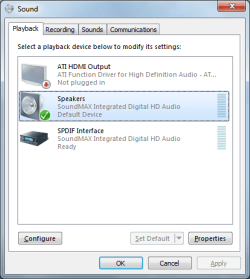
Double click the volume panel, what does it say?
Another thing, if you didnt get the drivers to work, then Crative will not work. It does install, that is not the issue, it just does not recignize the drivers.
Unless I missed something, which I didn't I am sure, did you download the X-Fi mobo driver from the site, or just use the CD in compatibility mode? Because I have done all that and nodda.
 

My Computer

OS
Windows 7 (Build 7068)
I used the drivers from the site. Here's my panel and, for what it's worth, my surround speakers won't kick in. The fronts works - I only have 4 speakers and one pair has a sub but it's not SPDIF. The Alchemy utility is working though, I've added games support to it without any problems.

Well, my two rears still don't work. lol
 

Attachments

  • Soundpanel.png
    Soundpanel.png
    51.3 KB · Views: 179

My Computer

Computer type
PC/Desktop
Computer Manufacturer/Model Number
Custom Build/Mod
OS
Windows 7 Home Premium x64
CPU
Intel QX9650 Extreme 4.0 GHz
Motherboard
ASUS Rampage Extreme Rev2
Memory
8GB (4x2) Corsair Dominator DDR3
Graphics Card(s)
2x Radeon R390X [8GB]
Sound Card
SupremeFX X-Fi
Monitor(s) Displays
Dell 2408WFP 26" Panel
Screen Resolution
1920x1200
Hard Drives
4x WD 2TB (8TB+ Total)
2x Crucial SSD 128GB (RAID-0)
1x LG Blu-ray read/write
1x Phillips LightScribe DVD read/write
PSU
Corsair HX1000
Case
CoolerMaster - Cosmos S
Cooling
Custom Liquid - 320mm rad w/ 3x 80mm fans, CPU/NB/SB Blocks
Keyboard
Logitech Illuminater Pro
Mouse
Logitech
Internet Speed
Fractional T1 - 125Mbps
Antivirus
ESET Security Suite / Microsoft Security Essentials
Browser
Cyberfox Intel x64
Other Info
OC'd to 5.0GHz @ 44c under full load
It's already set for Quad. Still only getting the front 2.
 

My Computer

Computer type
PC/Desktop
Computer Manufacturer/Model Number
Custom Build/Mod
OS
Windows 7 Home Premium x64
CPU
Intel QX9650 Extreme 4.0 GHz
Motherboard
ASUS Rampage Extreme Rev2
Memory
8GB (4x2) Corsair Dominator DDR3
Graphics Card(s)
2x Radeon R390X [8GB]
Sound Card
SupremeFX X-Fi
Monitor(s) Displays
Dell 2408WFP 26" Panel
Screen Resolution
1920x1200
Hard Drives
4x WD 2TB (8TB+ Total)
2x Crucial SSD 128GB (RAID-0)
1x LG Blu-ray read/write
1x Phillips LightScribe DVD read/write
PSU
Corsair HX1000
Case
CoolerMaster - Cosmos S
Cooling
Custom Liquid - 320mm rad w/ 3x 80mm fans, CPU/NB/SB Blocks
Keyboard
Logitech Illuminater Pro
Mouse
Logitech
Internet Speed
Fractional T1 - 125Mbps
Antivirus
ESET Security Suite / Microsoft Security Essentials
Browser
Cyberfox Intel x64
Other Info
OC'd to 5.0GHz @ 44c under full load
That is so odd. My sound panel and device manager shows the proper soundmax driver, and it functions 100%. No sound issues, full 5.1 and HDMI works too. Yet my Creative Alchamy just poops a brick and says no supported audio device. HMMMMMM. Damn Creative, that is why I no longer use Creative products for DJ'n. I know it will be fixed by ASUS when RTM comes out, so not to worry.
 

My Computer

OS
Windows 7 (Build 7068)
How did you get the panel? I don't have that, all I have is Alchemy and it doesn't seem to do much at all. You have to *manually* add games to its support list? Yeah, right.
 

My Computer

Computer type
PC/Desktop
Computer Manufacturer/Model Number
Custom Build/Mod
OS
Windows 7 Home Premium x64
CPU
Intel QX9650 Extreme 4.0 GHz
Motherboard
ASUS Rampage Extreme Rev2
Memory
8GB (4x2) Corsair Dominator DDR3
Graphics Card(s)
2x Radeon R390X [8GB]
Sound Card
SupremeFX X-Fi
Monitor(s) Displays
Dell 2408WFP 26" Panel
Screen Resolution
1920x1200
Hard Drives
4x WD 2TB (8TB+ Total)
2x Crucial SSD 128GB (RAID-0)
1x LG Blu-ray read/write
1x Phillips LightScribe DVD read/write
PSU
Corsair HX1000
Case
CoolerMaster - Cosmos S
Cooling
Custom Liquid - 320mm rad w/ 3x 80mm fans, CPU/NB/SB Blocks
Keyboard
Logitech Illuminater Pro
Mouse
Logitech
Internet Speed
Fractional T1 - 125Mbps
Antivirus
ESET Security Suite / Microsoft Security Essentials
Browser
Cyberfox Intel x64
Other Info
OC'd to 5.0GHz @ 44c under full load
Manually add games? What are you talking about? Since when do you add games to a sound card...that is a new one on me!!! Either you have EAX and X-Fi support or you don't. You are one confusing dude, you first said you had to add games, then you questioned it yourself then said ya right. Ya smokin' something? lol
I think you are confused when I said the sound panel...the windows sound control panel, not the creative audio console which is what I think you are referring to. I am trying to get the audio console to work. Which Samu apprears to have. One thing I am wondering is if the Spanish W7 is different and that is why it works. On English, it does not.
 

My Computer

OS
Windows 7 (Build 7068)
Back
Top