ASUS x54c Problems shutting down (BIOS update? Or change to 32bit OS?)

deepwaters

New member
Local time
2:04 PM
Messages
4
Location
Thailand
I downloaded 64 bit Windows 8 around 1 year ago and since then my ASUS x54c is having problems.


1. One of the USB ports often malfunctions
2. Certain keys sometimes do not work.
3. The notebook wont shut down whilst connected to the mains, but is fine otherwise.
4. The battery doesn't charge and the power can now only last for 30 seconds when disconnected from the mains.

It seems I need to buy a new battery, but I am stalling until I have fixed the problem with the shutdown. I have formatted the notebook twice and since tried Windows 8.1 64 bit, so it is not faulty software (but may well be a 32/64 bit matter).

ADVICE GIVEN TO DATE:

1. I am told from a link on the ASUS Support website that I should update my BIOS to 207. There are now newer versions available (210) so I'm not sure whether their info is out of date, or if 207 is still the preferred choice for this issue.

2. I have been told my a techie working at the school where I teach that I should not update the BIOS as it is dangerous and could seriously damage my Laptop. instead, he says the problem is that I am running a 64 bit OS when my system is made for 32 bit. He suggests that I go back to Windows 7 32 bit.

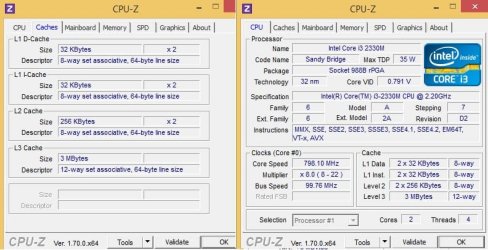
Can you take a look at my specs and take a vote on which option is best to take?

Many thanks

:party:
 

Attachments

  • COMP TEST.jpg
    COMP TEST.jpg
    64.9 KB · Views: 1

My Computer My Computer

At a glance

Windows 8.1 64 bitIntel Core i3 2330mDDR3 2978MBIntel(R) HD Graphics 3000
Computer type
Laptop
Computer Manufacturer/Model Number
ASUS
OS
Windows 8.1 64 bit
CPU
Intel Core i3 2330m
Motherboard
ASUS Tek Computer Inc
Memory
DDR3 2978MB
Graphics Card(s)
Intel(R) HD Graphics 3000
Antivirus
Windows Defender
Browser
Google Chrome
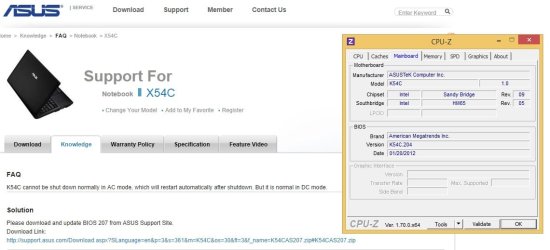
It is true that I am running BIOS version 204 and not 207.

See message here from my quick search.
 

Attachments

  • COMP TEST 2.jpg
    COMP TEST 2.jpg
    57.4 KB · Views: 1

My Computer My Computer

At a glance

Windows 8.1 64 bitIntel Core i3 2330mDDR3 2978MBIntel(R) HD Graphics 3000
Computer type
Laptop
Computer Manufacturer/Model Number
ASUS
OS
Windows 8.1 64 bit
CPU
Intel Core i3 2330m
Motherboard
ASUS Tek Computer Inc
Memory
DDR3 2978MB
Graphics Card(s)
Intel(R) HD Graphics 3000
Antivirus
Windows Defender
Browser
Google Chrome

My Computer My Computer

At a glance

Windows 10 Pro x64 ; Xubuntu x64Intel i7 860 @ 2.80 GHz O/C'ed to 4.0GHz16GB Corsair Vengance DDR3 @ 661 MHz Dual Cha...EVGA NVidia GTX 560 1024MB
Computer type
PC/Desktop
Computer Manufacturer/Model Number
Golden Mk. I.4
OS
Windows 10 Pro x64 ; Xubuntu x64
CPU
Intel i7 860 @ 2.80 GHz O/C'ed to 4.0GHz
Motherboard
Gigabyte P55A-UD3R Rev.1. Award BIOS F13
Memory
16GB Corsair Vengance DDR3 @ 661 MHz Dual Channel (9-9-9-24)
Graphics Card(s)
EVGA NVidia GTX 560 1024MB
Sound Card
Realtek Integrated
Monitor(s) Displays
Dual Samsung SyncMaster 2494HS
Screen Resolution
1920*1080 and 1920*1080
Hard Drives
1*Samsung 840 EVO 120GB SSD;
1*OCZ Vertex 2 60GB SSD;
2*Samsung F3 SpinPoint 1TB in RAID0;
1*Samsung F1 SpinPoint 1TB;
2*Western Digital 1TB External USB 3.0
1*Western Digital 500GB External USB 3.0
1*Seagate 500GB External USB 2.0
PSU
Thermaltake ToughPower QFan 750W
Case
Thermaltake Element S VK60001W2Z
Cooling
Corsair H60 Water Cooling, 2*230mm and 2*80mm case fans
Keyboard
Logitech G110
Mouse
Logitech MX518
Thanks.

I've downloaded the 207 BIOS update file.

The extension is ".210" and is not recognised my any programs currently installed. How can I run it?

:geek:
 

My Computer My Computer

At a glance

Windows 8.1 64 bitIntel Core i3 2330mDDR3 2978MBIntel(R) HD Graphics 3000
Computer type
Laptop
Computer Manufacturer/Model Number
ASUS
OS
Windows 8.1 64 bit
CPU
Intel Core i3 2330m
Motherboard
ASUS Tek Computer Inc
Memory
DDR3 2978MB
Graphics Card(s)
Intel(R) HD Graphics 3000
Antivirus
Windows Defender
Browser
Google Chrome
You need to install it by tunning EzyFlash from within the BIOS.
 

My Computer My Computer

At a glance

Windows 10 Pro x64 ; Xubuntu x64Intel i7 860 @ 2.80 GHz O/C'ed to 4.0GHz16GB Corsair Vengance DDR3 @ 661 MHz Dual Cha...EVGA NVidia GTX 560 1024MB
Computer type
PC/Desktop
Computer Manufacturer/Model Number
Golden Mk. I.4
OS
Windows 10 Pro x64 ; Xubuntu x64
CPU
Intel i7 860 @ 2.80 GHz O/C'ed to 4.0GHz
Motherboard
Gigabyte P55A-UD3R Rev.1. Award BIOS F13
Memory
16GB Corsair Vengance DDR3 @ 661 MHz Dual Channel (9-9-9-24)
Graphics Card(s)
EVGA NVidia GTX 560 1024MB
Sound Card
Realtek Integrated
Monitor(s) Displays
Dual Samsung SyncMaster 2494HS
Screen Resolution
1920*1080 and 1920*1080
Hard Drives
1*Samsung 840 EVO 120GB SSD;
1*OCZ Vertex 2 60GB SSD;
2*Samsung F3 SpinPoint 1TB in RAID0;
1*Samsung F1 SpinPoint 1TB;
2*Western Digital 1TB External USB 3.0
1*Western Digital 500GB External USB 3.0
1*Seagate 500GB External USB 2.0
PSU
Thermaltake ToughPower QFan 750W
Case
Thermaltake Element S VK60001W2Z
Cooling
Corsair H60 Water Cooling, 2*230mm and 2*80mm case fans
Keyboard
Logitech G110
Mouse
Logitech MX518
Cheers. Sounds daunting!. :sarc:

How long does the update take? Is it straight forward for someone who doesn't really do IT? Self explanatory once in BIOS?
 

My Computer My Computer

At a glance

Windows 8.1 64 bitIntel Core i3 2330mDDR3 2978MBIntel(R) HD Graphics 3000
Computer type
Laptop
Computer Manufacturer/Model Number
ASUS
OS
Windows 8.1 64 bit
CPU
Intel Core i3 2330m
Motherboard
ASUS Tek Computer Inc
Memory
DDR3 2978MB
Graphics Card(s)
Intel(R) HD Graphics 3000
Antivirus
Windows Defender
Browser
Google Chrome
It doesn't take long at all, and its reasonably straightforward.

1. Copy the new 207 BIOS update to a small USB thumb drive.
2. Boot to the BIOS.
3. In the Advanced Option, check for the menu labelled EzyFlash.
4. Run it and browse to the USB drive (plug it into a USB2.0 port).
5. Select the BIOS update to install - do NOT interrupt the process.

If in doubt, it's best to let someone more familiar with systems run this for you.
 

My Computer My Computer

At a glance

Windows 10 Pro x64 ; Xubuntu x64Intel i7 860 @ 2.80 GHz O/C'ed to 4.0GHz16GB Corsair Vengance DDR3 @ 661 MHz Dual Cha...EVGA NVidia GTX 560 1024MB
Computer type
PC/Desktop
Computer Manufacturer/Model Number
Golden Mk. I.4
OS
Windows 10 Pro x64 ; Xubuntu x64
CPU
Intel i7 860 @ 2.80 GHz O/C'ed to 4.0GHz
Motherboard
Gigabyte P55A-UD3R Rev.1. Award BIOS F13
Memory
16GB Corsair Vengance DDR3 @ 661 MHz Dual Channel (9-9-9-24)
Graphics Card(s)
EVGA NVidia GTX 560 1024MB
Sound Card
Realtek Integrated
Monitor(s) Displays
Dual Samsung SyncMaster 2494HS
Screen Resolution
1920*1080 and 1920*1080
Hard Drives
1*Samsung 840 EVO 120GB SSD;
1*OCZ Vertex 2 60GB SSD;
2*Samsung F3 SpinPoint 1TB in RAID0;
1*Samsung F1 SpinPoint 1TB;
2*Western Digital 1TB External USB 3.0
1*Western Digital 500GB External USB 3.0
1*Seagate 500GB External USB 2.0
PSU
Thermaltake ToughPower QFan 750W
Case
Thermaltake Element S VK60001W2Z
Cooling
Corsair H60 Water Cooling, 2*230mm and 2*80mm case fans
Keyboard
Logitech G110
Mouse
Logitech MX518
Back
Top