About 2 weeks ago, my motherboard sound had stopped working. I triedeverything to get it working again and had failed.
Therefore I decided to purchase a new Asus Xonar-D Karax PCIe sound card.
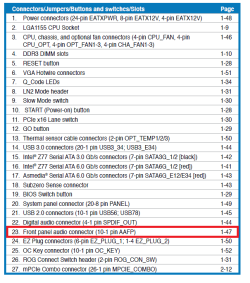
I installed the card as described in the instruction manual (with HD frontpanel audio plug connected to the card)
The problem I have is no sound is coming out of the card
Things I've tried to far:
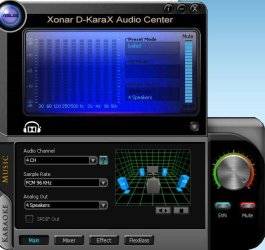
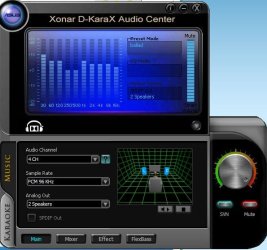
1. Downloaded and installed latest drivers from Asus 2. Tried using another PCIe slot 3. Disabling HD Audio in the BIOS 4. Installing the original disc drivers. 5. Playing around with the settings on the Asus Audio ControlCentre. 6. Disabling the NVIDIA HD audio
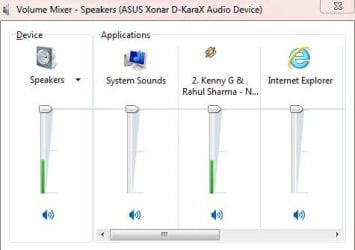
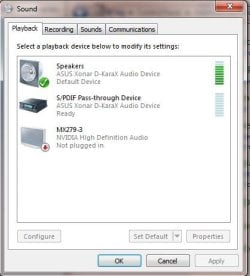
The Asus Control Centre and the Volume control does show that sound is playing by the graphs moving, but no sound is reaching my speakers.
Info: 1. I am using 2 x 2.0 channel pc speakers to make it easier to work with. 2. Both sets of speakers work on my phone (tested).
Specs:
OS Windows 7 64bit CPU Intel i7 3770k Motherboard Asus Maximus V EXtreme Memory Corsair 1600mhz 4 x 8GB Graphics Card(s) MSI N460GTX OC Cyclone 1GB Monitor(s) DisplaysAsus MX279HHard Drives Primary: OCZ 3 120GB PSUVantec iON2CaseThermaltake MK1
Attachments
11.JPG
23.6 KB
· Views: 10
10.JPG
44.2 KB
· Views: 10
Last edited:
My Computer
At a glance
Windows 7 64bitIntel i7 3770kCorsair 1600mhz 4 x 8GBMSI N460GTX OC Cyclone 1GB
Hello and welcome Dhirendra mate I run the Xonar DG's in my desktops and have had no trouble at all and your problems smacks of either her the card or slot being bad. In particular I would have a close inspection of the joints around the output sockets on the board.
I am assuming you have reseated the card and made sure it is a snug fit? the other thing you could try is this.
SLOT CLEANING
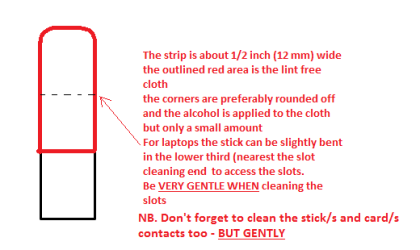
Now as for the slots to clean themuse a strip of old credit card about 1/2 inch wide nip the corners off one end- preferably round them offhold a piece of thin lintfree cloth over the end dab on some form of alcohol - isopropyl alcohol (whatwe swab the skin with before an injection) is good and GENTLY swipe along the slots.
This can also be done for the GPUslot/s and also the contacts of the sticks or cards - not the stick but somelint free cloth of course. See my pic for the sick but please be very gentledoing it if you are in any doubt - please ask before doing it but I use thisall the time and have yet to damage anything.
Attachments
STICK CLEANER.PNG
6.1 KB
· Views: 7
My Computer
At a glance
Desk1 7 Home Prem / Desk2 10 Pro / Main lap A...Desk1 i5 3750K / Laptop i7 GTX 860M / Desk2 i...Desk1 8GB (1866) / Desk2 16GB (1333) / Laptop...Desk 1& 2NVidia GTX 650 & Laptops on board Intel
Computer type
PC/Desktop
Computer Manufacturer/Model Number
Own build (new) Desk1 / Asus ROG Win 7 / Desk2 1st build
OS
Desk1 7 Home Prem / Desk2 10 Pro / Main lap Asus ROG 10 Pro 2 laptop Toshiba 7 Pro Asus P2520 7 & 10
One other Desktop (tester) and spare Toshba laptop both with SSD's
Running Kaspersky 2016 ISS on all machines config'd identically
Logitec audio stereo systems on each machine (x3)
Canon MG5250MFC
Router/modem TP-Link running WPA2SK
I've had 4 PCIe slots that have never been used prior to installing the sound card, I"ve tried all 4 slots and still there's no sound being pushed out from the sound card.
I tried wiping them gently with a fine sponge and some 70% alcohol that we use in theatre,
still not sound
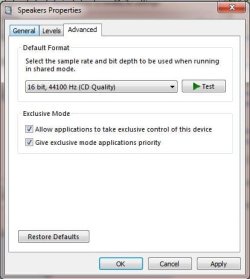
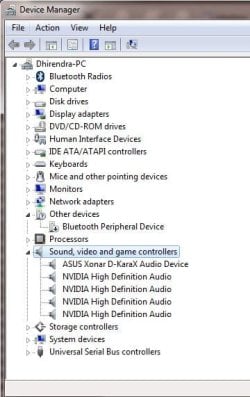
In the below pictures, do my settings look correct?
I have this feeling that "Bluetooth peripheral device" is casing the problem - but I am not sure, ever since I've been having this sound problem, peripheral bluetooth device was either not installed or installed in boot-up, and it still sometimes does show in device manager that there are no drivers for it...
A couple of weeks ago tried to connect a Sinotec Bluetooth speaker to this PC via Bluetooth to play music, but I failed to get it to work so I just gave up... I'm hoping this didn't mess up the sound drivers, etc.
Attachments
12.JPG
53.7 KB
· Views: 7
13.JPG
32.2 KB
· Views: 6
14.JPG
30.4 KB
· Views: 6
15.JPG
40.3 KB
· Views: 6
My Computer
At a glance
Windows 7 64bitIntel i7 3770kCorsair 1600mhz 4 x 8GBMSI N460GTX OC Cyclone 1GB
I connected a 6-pin PCIe power plug from the motherboard (this 6 pin plug supplies power directly to the PCIe lanes only) to the power supply. My thought was that the sound card wasn't receiving sufficient power.
But this didn't work ...
My Computer
At a glance
Windows 7 64bitIntel i7 3770kCorsair 1600mhz 4 x 8GBMSI N460GTX OC Cyclone 1GB
Look I missed it before but you say you have connected the card with thefront panel. (Nice board by the way my main desktop is an Asus P8Z77-V)
Now I don't remember having to do that with my Xonar DG's and usually thecard being inserted cuts out the onboard audio. Now I have to admit I don'tuse the front panel and phones very infrequently..
So my thought is to disconnect that front panel and if you need phones usethem from the card - tedious to keep doing I know but my sound system (LogitecZ506) and one other I use have phone jacks in them - it cuts out the system andI use the phones
Now the Blu tooth my board has a bolt on Blu tooth / wifi but I never use it and I cannot see why it should be affecting the audio to be honest
Just as a by the by I uninstalled all that Asus tweak crap that comes with the disk it id more problematical than it is worth. Also I found my local Asus service centre far more helpful than the global or "?local" support sites were it might be worth a word with them. That is because I bought a ROG laptop that took the usual support four months to try and help me and within an hour of me calling the service centre the issue was solved.
Attachments
ASUS 1.PNG
36.5 KB
· Views: 0
ASUS 2.PNG
31.8 KB
· Views: 5
My Computer
At a glance
Desk1 7 Home Prem / Desk2 10 Pro / Main lap A...Desk1 i5 3750K / Laptop i7 GTX 860M / Desk2 i...Desk1 8GB (1866) / Desk2 16GB (1333) / Laptop...Desk 1& 2NVidia GTX 650 & Laptops on board Intel
Computer type
PC/Desktop
Computer Manufacturer/Model Number
Own build (new) Desk1 / Asus ROG Win 7 / Desk2 1st build
OS
Desk1 7 Home Prem / Desk2 10 Pro / Main lap Asus ROG 10 Pro 2 laptop Toshiba 7 Pro Asus P2520 7 & 10
One other Desktop (tester) and spare Toshba laptop both with SSD's
Running Kaspersky 2016 ISS on all machines config'd identically
Logitec audio stereo systems on each machine (x3)
Canon MG5250MFC
Router/modem TP-Link running WPA2SK
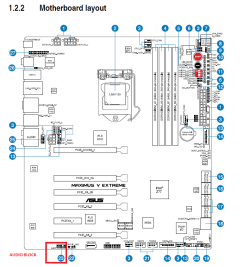
Sorry, I meant the front panel header was connected directly to the sound card (tried ac97 and HD audio), and not to the motherboard since installation of the sound card.
Unfortunately, we don't have a Asus support in South Africa
My Computer
At a glance
Windows 7 64bitIntel i7 3770kCorsair 1600mhz 4 x 8GBMSI N460GTX OC Cyclone 1GB
Yes mate I knew you said that and why I asked the question as I could see why. So I can assume that the HD and AC don't work?? In that case maybe it needs the drivers for the board audio redoing and trying the front panel again.
My Computer
At a glance
Desk1 7 Home Prem / Desk2 10 Pro / Main lap A...Desk1 i5 3750K / Laptop i7 GTX 860M / Desk2 i...Desk1 8GB (1866) / Desk2 16GB (1333) / Laptop...Desk 1& 2NVidia GTX 650 & Laptops on board Intel
Computer type
PC/Desktop
Computer Manufacturer/Model Number
Own build (new) Desk1 / Asus ROG Win 7 / Desk2 1st build
OS
Desk1 7 Home Prem / Desk2 10 Pro / Main lap Asus ROG 10 Pro 2 laptop Toshiba 7 Pro Asus P2520 7 & 10
One other Desktop (tester) and spare Toshba laptop both with SSD's
Running Kaspersky 2016 ISS on all machines config'd identically
Logitec audio stereo systems on each machine (x3)
Canon MG5250MFC
Router/modem TP-Link running WPA2SK


 Windows 7 64bit CPU