At the end of my wit with windows live messenger.. Constant problem!

Tekken179

New member
Member
Local time
4:21 AM
Messages
83
Location
Northern Ireland
OK so I have been constantly trying to fix my messenger problem but I cannot seem to fix it, as you can see I'm running a 32 bit version of win7 ultimate and I have never had any problems with Messenger I can't understand what is wrong.

I have tried to re-install, run as admin, compatibility mode, other versions, portable versions, un-installing Java, several helplines (who were all pathetic btw), running in safe mode, scanned with 2 different anti viruses (eset and AVG), completed 2 clean installs (deleting everything to do with live including registries, folders, appdata and credentials, followed every bit of Microsoft help they had to give and still nothing i sign in then crash and get this error.

Problem signature:
Problem Event Name: APPCRASH
Application Name: msnmsgr.exe
Application Version: 14.0.8117.416
Application Timestamp: 4bc935af
Fault Module Name: msnmsgr.exe
Fault Module Version: 14.0.8117.416
Fault Module Timestamp: 4bc935af
Exception Code: c0000005
Exception Offset: 0026ca50
OS Version: 6.1.7600.2.0.0.256.1
Locale ID: 2057

Or this one

Problem signature:
Problem Event Name: BEX
Application Name: msnmsgr.exe
Application Version: 14.0.8117.416
Application Timestamp: 4bc935af
Fault Module Name: unknown
Fault Module Version: 0.0.0.0
Fault Module Timestamp: 00000000
Exception Offset: 00000000
Exception Code: c0000005
Exception Data: 00000008
OS Version: 6.1.7600.2.0.0.256.1
Locale ID: 2057

Same 2 errors every time, and once I click 'check online for a solution to this,' that crashes then just closes no solution. :(
 

My Computer My Computer

At a glance

Windows 7 Premium (64 Bit)Intel Core i5-2320 3.0 Ghz8 GBAMD Radeon HD 6670
Computer type
PC/Desktop
Computer Manufacturer/Model Number
ADVENT DT1411
OS
Windows 7 Premium (64 Bit)
CPU
Intel Core i5-2320 3.0 Ghz
Motherboard
N Foxconn
Memory
8 GB
Graphics Card(s)
AMD Radeon HD 6670
Sound Card
Built in
Monitor(s) Displays
21.5" Samsung LED HD
Screen Resolution
1920x1080
Hard Drives
1x 1.5TB
1x 1TB
PSU
405v
Case
Advent standard
Keyboard
Acer
Mouse
Trust GTX
Internet Speed
Sky Broadband 20Mgbs
Antivirus
E-Trust
Browser
Firefox
I have also tried several different portable versions on top of legit install versions and non work all keep crashing...
 

My Computer My Computer

At a glance

Windows 7 Premium (64 Bit)Intel Core i5-2320 3.0 Ghz8 GBAMD Radeon HD 6670
Computer type
PC/Desktop
Computer Manufacturer/Model Number
ADVENT DT1411
OS
Windows 7 Premium (64 Bit)
CPU
Intel Core i5-2320 3.0 Ghz
Motherboard
N Foxconn
Memory
8 GB
Graphics Card(s)
AMD Radeon HD 6670
Sound Card
Built in
Monitor(s) Displays
21.5" Samsung LED HD
Screen Resolution
1920x1080
Hard Drives
1x 1.5TB
1x 1TB
PSU
405v
Case
Advent standard
Keyboard
Acer
Mouse
Trust GTX
Internet Speed
Sky Broadband 20Mgbs
Antivirus
E-Trust
Browser
Firefox
Hi Tekken and welcome to the forums,

Are you receiving any error messages either on screen or in the windows event log? If so please let us know.

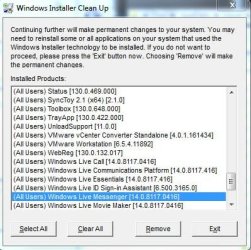
To do a clean reinstall of Messenger, follow these steps.

1. Download the Microsoft Windows Installer Clean up utility
2. Run it and look for live messenger in the list of programs.
3. Then click REMOVE."Messenger" folder:
- 32bit Windows = %systemdrive%\Program Files\Windows Live
- 64bit Windows = %systemdrive%\Program Files (x86)\Windows Live
4. Navigate to %userprofile%\AppData\Local\Microsoft and delete the folder called "Messenger"
5. Download a new copy of windows Live and install messenger.

-Timo
 

Attachments

  • installer clean up.JPG
    installer clean up.JPG
    47 KB · Views: 10
Last edited:

My Computer My Computer

At a glance

Windows 7 Ultimate 64 bitIntel(R) Core(TM)2 Quad CPU Q8200 @ 2.33GHz8 GB KingstonNvidia GeForce 9600GT
Computer Manufacturer/Model Number
Custom Hack job
OS
Windows 7 Ultimate 64 bit
CPU
Intel(R) Core(TM)2 Quad CPU Q8200 @ 2.33GHz
Motherboard
GigaByte EP45-UD3
Memory
8 GB Kingston
Graphics Card(s)
Nvidia GeForce 9600GT
Sound Card
Soundblaster Audigy
Monitor(s) Displays
AOC x2 22"
Hard Drives
2 x Samsung 500GB (RAID)
2 x Samsung 2TB
1 x WD Green 2TB
1 x Seagate 1TB
1 x Samsung 500GB
PSU
Thermaltake QFan 750W
Case
CM Scout Gaming
Cooling
Coolermaster V10
Keyboard
Microsoft Wireless Keyboard 1000
Mouse
Microsoft Wireless Optical 2000
Internet Speed
320
Other Info
Winfast PVR2000CP
LG DVD-RAM DVD/RW/DL Super Multi
Linksys WMP300Nx2 Wireless Adapter
Yes it's the standard window pop-up for 'This program is not responding' Trying this now, can't believe i missed this idea thank you :).
 

My Computer My Computer

At a glance

Windows 7 Premium (64 Bit)Intel Core i5-2320 3.0 Ghz8 GBAMD Radeon HD 6670
Computer type
PC/Desktop
Computer Manufacturer/Model Number
ADVENT DT1411
OS
Windows 7 Premium (64 Bit)
CPU
Intel Core i5-2320 3.0 Ghz
Motherboard
N Foxconn
Memory
8 GB
Graphics Card(s)
AMD Radeon HD 6670
Sound Card
Built in
Monitor(s) Displays
21.5" Samsung LED HD
Screen Resolution
1920x1080
Hard Drives
1x 1.5TB
1x 1TB
PSU
405v
Case
Advent standard
Keyboard
Acer
Mouse
Trust GTX
Internet Speed
Sky Broadband 20Mgbs
Antivirus
E-Trust
Browser
Firefox
ok this is the error message now after your recommendations, :( thanks however I thought that option would work

Problem signature:
Problem Event Name: APPCRASH
Application Name: msnmsgr.exe
Application Version: 14.0.8117.416
Application Timestamp: 4bc935af
Fault Module Name: UXCore.dll
Fault Module Version: 14.0.8117.416
Fault Module Timestamp: 4bc91115
Exception Code: c0000005
Exception Offset: 00073cde
OS Version: 6.1.7600.2.0.0.256.1
Locale ID: 2057
 

My Computer My Computer

At a glance

Windows 7 Premium (64 Bit)Intel Core i5-2320 3.0 Ghz8 GBAMD Radeon HD 6670
Computer type
PC/Desktop
Computer Manufacturer/Model Number
ADVENT DT1411
OS
Windows 7 Premium (64 Bit)
CPU
Intel Core i5-2320 3.0 Ghz
Motherboard
N Foxconn
Memory
8 GB
Graphics Card(s)
AMD Radeon HD 6670
Sound Card
Built in
Monitor(s) Displays
21.5" Samsung LED HD
Screen Resolution
1920x1080
Hard Drives
1x 1.5TB
1x 1TB
PSU
405v
Case
Advent standard
Keyboard
Acer
Mouse
Trust GTX
Internet Speed
Sky Broadband 20Mgbs
Antivirus
E-Trust
Browser
Firefox
btw i have latest versions of directX and Flash as well.
 

My Computer My Computer

At a glance

Windows 7 Premium (64 Bit)Intel Core i5-2320 3.0 Ghz8 GBAMD Radeon HD 6670
Computer type
PC/Desktop
Computer Manufacturer/Model Number
ADVENT DT1411
OS
Windows 7 Premium (64 Bit)
CPU
Intel Core i5-2320 3.0 Ghz
Motherboard
N Foxconn
Memory
8 GB
Graphics Card(s)
AMD Radeon HD 6670
Sound Card
Built in
Monitor(s) Displays
21.5" Samsung LED HD
Screen Resolution
1920x1080
Hard Drives
1x 1.5TB
1x 1TB
PSU
405v
Case
Advent standard
Keyboard
Acer
Mouse
Trust GTX
Internet Speed
Sky Broadband 20Mgbs
Antivirus
E-Trust
Browser
Firefox
pffft microsoft are pathetic sent 2 emails one to live support one to microsoft support both redirected me to each other, absolutley pathetic
 

My Computer My Computer

At a glance

Windows 7 Premium (64 Bit)Intel Core i5-2320 3.0 Ghz8 GBAMD Radeon HD 6670
Computer type
PC/Desktop
Computer Manufacturer/Model Number
ADVENT DT1411
OS
Windows 7 Premium (64 Bit)
CPU
Intel Core i5-2320 3.0 Ghz
Motherboard
N Foxconn
Memory
8 GB
Graphics Card(s)
AMD Radeon HD 6670
Sound Card
Built in
Monitor(s) Displays
21.5" Samsung LED HD
Screen Resolution
1920x1080
Hard Drives
1x 1.5TB
1x 1TB
PSU
405v
Case
Advent standard
Keyboard
Acer
Mouse
Trust GTX
Internet Speed
Sky Broadband 20Mgbs
Antivirus
E-Trust
Browser
Firefox
As the problem is UXcore.dll now ..found links to the other site vista forums where Johnathan Kay mentioned it maybe some thing to do with 3rd party software.. i'll try to help more but i'm downloading win7 Updates on my dialup.. and moving he**a slow i did google your problem Click Here i'll try more when there done to see if i can find it.
 

My Computer My Computer

At a glance

Win7 Home Premium x64 SP1, Archlinux x86_64. ...
Computer type
PC/Desktop
OS
Win7 Home Premium x64 SP1, Archlinux x86_64. Elementary Luna
god only knows i did have msg plus but it never failed me before, however i don't know how to do a complete un-install including message plus reg's because i have no idea what they are.

Also I am using custom themes but this was not the problem as i reverted all to default and no difference.

thank you very much for taking time to my problem :)
 

My Computer My Computer

At a glance

Windows 7 Premium (64 Bit)Intel Core i5-2320 3.0 Ghz8 GBAMD Radeon HD 6670
Computer type
PC/Desktop
Computer Manufacturer/Model Number
ADVENT DT1411
OS
Windows 7 Premium (64 Bit)
CPU
Intel Core i5-2320 3.0 Ghz
Motherboard
N Foxconn
Memory
8 GB
Graphics Card(s)
AMD Radeon HD 6670
Sound Card
Built in
Monitor(s) Displays
21.5" Samsung LED HD
Screen Resolution
1920x1080
Hard Drives
1x 1.5TB
1x 1TB
PSU
405v
Case
Advent standard
Keyboard
Acer
Mouse
Trust GTX
Internet Speed
Sky Broadband 20Mgbs
Antivirus
E-Trust
Browser
Firefox
What would a simple uninstall and re-install of window live messenger do?
IMO If I something isn't working they way I like it I uninstall it with Revo Unistaller.
Then I go to the software site, download the item and install it.
Just a thought...
 

My Computer My Computer

At a glance

Windows 7 Home Premium 64bitIntel(R)Core(TM)2 quad [email protected] 2.39GHz6GB DDR2 6400GeForce 8500/512MB
Computer Manufacturer/Model Number
HP M9077c
OS
Windows 7 Home Premium 64bit
CPU
Intel(R)Core(TM)2 quad [email protected] 2.39GHz
Motherboard
ASUSeK
Memory
6GB DDR2 6400
Graphics Card(s)
GeForce 8500/512MB
Sound Card
Realtek High Def Audio
Monitor(s) Displays
HP w2408 LCD 24" widescreen
Screen Resolution
1920x1200
Cooling
6 pack of Bud
Keyboard
MS wireless Inteli
Mouse
MS wireless Inteli
As would i Dennis but with this problem it's different..if i remember right years ago i had this problem pi**ed me off only way i solved it was re-format lol... but hopefully you do not need to do that Tekken.
 

My Computer My Computer

At a glance

Win7 Home Premium x64 SP1, Archlinux x86_64. ...
Computer type
PC/Desktop
OS
Win7 Home Premium x64 SP1, Archlinux x86_64. Elementary Luna
ok this is the error message now after your recommendations, :( thanks however I thought that option would work

Problem signature:
Problem Event Name: APPCRASH
Application Name: msnmsgr.exe
Application Version: 14.0.8117.416
Application Timestamp: 4bc935af
Fault Module Name: UXCore.dll
Fault Module Version: 14.0.8117.416
Fault Module Timestamp: 4bc91115
Exception Code: c0000005
Exception Offset: 00073cde
OS Version: 6.1.7600.2.0.0.256.1
Locale ID: 2057

It's good that we stripped it and reinstalled because it's now unlikely that messenger itself is the cause. Add that to the error info and I agree with Nem, it's probably a 3rd party application hooking the uxcore.dll.

Some other things we can look at to find the 3rd party program and/or get more info in the issue. Make aChane and test after, do one at a time in any order:
  • Is a system restore back to a happy place possible or is the install to new for that?
  • What 3rd party apps do you have installed and that are loaded in memory (see PROCMON below)
  • Use MSCONFIG to turn off all but critical boot processes (I can post more info on this if required)
  • Use the show hidden icon button, to close any non critical running apps
  • Disable your antivirus (temporarily of course)
  • A long shot, but lets just rule it out - Replace the uxcore.dll with one from your windows 7 installation media. I've also attached mine from my 64bit build (I suspect it's a 32bit driver anyway; but I could be wrong so use at your own risk).

Process Monitor (PROCMON)
Down load process monitor from Microsoft technet and run it. From the EDIT menu select find and type in uxcore. It will appear more than once (so f3 through all of them). Look in the PATH column for a non MS product and/or a NON windows live product hooked to this dll. Kill that process and try Messenger again.

EDIT: You can also try to open an elevated command prompt and Run tasklist -m uxcore.dll and see if this will tell you what processes are using uxcore.dll (I've never tested that this works on Windows 7 only server 2003, so please let me know).
 

Attachments

Last edited:

My Computer My Computer

At a glance

Windows 7 Ultimate 64 bitIntel(R) Core(TM)2 Quad CPU Q8200 @ 2.33GHz8 GB KingstonNvidia GeForce 9600GT
Computer Manufacturer/Model Number
Custom Hack job
OS
Windows 7 Ultimate 64 bit
CPU
Intel(R) Core(TM)2 Quad CPU Q8200 @ 2.33GHz
Motherboard
GigaByte EP45-UD3
Memory
8 GB Kingston
Graphics Card(s)
Nvidia GeForce 9600GT
Sound Card
Soundblaster Audigy
Monitor(s) Displays
AOC x2 22"
Hard Drives
2 x Samsung 500GB (RAID)
2 x Samsung 2TB
1 x WD Green 2TB
1 x Seagate 1TB
1 x Samsung 500GB
PSU
Thermaltake QFan 750W
Case
CM Scout Gaming
Cooling
Coolermaster V10
Keyboard
Microsoft Wireless Keyboard 1000
Mouse
Microsoft Wireless Optical 2000
Internet Speed
320
Other Info
Winfast PVR2000CP
LG DVD-RAM DVD/RW/DL Super Multi
Linksys WMP300Nx2 Wireless Adapter
PROCMON reads only windows live and windows explorer running off of UXcore :(

command prompt says nothing at all is running off of it...

I can't sys restore that long back i'm afraid :( and i certainly can't re-format too much to lose

i tried replacing the .dll with your file no changes :(
 

My Computer My Computer

At a glance

Windows 7 Premium (64 Bit)Intel Core i5-2320 3.0 Ghz8 GBAMD Radeon HD 6670
Computer type
PC/Desktop
Computer Manufacturer/Model Number
ADVENT DT1411
OS
Windows 7 Premium (64 Bit)
CPU
Intel Core i5-2320 3.0 Ghz
Motherboard
N Foxconn
Memory
8 GB
Graphics Card(s)
AMD Radeon HD 6670
Sound Card
Built in
Monitor(s) Displays
21.5" Samsung LED HD
Screen Resolution
1920x1080
Hard Drives
1x 1.5TB
1x 1TB
PSU
405v
Case
Advent standard
Keyboard
Acer
Mouse
Trust GTX
Internet Speed
Sky Broadband 20Mgbs
Antivirus
E-Trust
Browser
Firefox
PROCMON reads only windows live and windows explorer running off of UXcore :(

Can you please double check and screen print that, I wouldn't expect the path to show explorer (see my screen print).

command prompt says nothing at all is running off of it...
Yeah same with my test, I guess there is a problem with tasklist in Windows 7
I can't sys restore that long back i'm afraid :( and i certainly can't re-format too much to lose

i tried replacing the .dll with your file no changes :(

Ok, then look at disabling non critical programs and then testing MSN, we need to find out if one is hooking the DLL.
 

Attachments

  • Capture.JPG
    Capture.JPG
    51 KB · Views: 51

My Computer My Computer

At a glance

Windows 7 Ultimate 64 bitIntel(R) Core(TM)2 Quad CPU Q8200 @ 2.33GHz8 GB KingstonNvidia GeForce 9600GT
Computer Manufacturer/Model Number
Custom Hack job
OS
Windows 7 Ultimate 64 bit
CPU
Intel(R) Core(TM)2 Quad CPU Q8200 @ 2.33GHz
Motherboard
GigaByte EP45-UD3
Memory
8 GB Kingston
Graphics Card(s)
Nvidia GeForce 9600GT
Sound Card
Soundblaster Audigy
Monitor(s) Displays
AOC x2 22"
Hard Drives
2 x Samsung 500GB (RAID)
2 x Samsung 2TB
1 x WD Green 2TB
1 x Seagate 1TB
1 x Samsung 500GB
PSU
Thermaltake QFan 750W
Case
CM Scout Gaming
Cooling
Coolermaster V10
Keyboard
Microsoft Wireless Keyboard 1000
Mouse
Microsoft Wireless Optical 2000
Internet Speed
320
Other Info
Winfast PVR2000CP
LG DVD-RAM DVD/RW/DL Super Multi
Linksys WMP300Nx2 Wireless Adapter
Can you please double check and screen print that, I wouldn't expect the path to show explorer (see my screen print).

oops your correct actually for some reason i was reading the wrong list but it was just windows live products.
 

My Computer My Computer

At a glance

Windows 7 Premium (64 Bit)Intel Core i5-2320 3.0 Ghz8 GBAMD Radeon HD 6670
Computer type
PC/Desktop
Computer Manufacturer/Model Number
ADVENT DT1411
OS
Windows 7 Premium (64 Bit)
CPU
Intel Core i5-2320 3.0 Ghz
Motherboard
N Foxconn
Memory
8 GB
Graphics Card(s)
AMD Radeon HD 6670
Sound Card
Built in
Monitor(s) Displays
21.5" Samsung LED HD
Screen Resolution
1920x1080
Hard Drives
1x 1.5TB
1x 1TB
PSU
405v
Case
Advent standard
Keyboard
Acer
Mouse
Trust GTX
Internet Speed
Sky Broadband 20Mgbs
Antivirus
E-Trust
Browser
Firefox
I'm also afraid i have tried disabling all non-critical programs everything was off and not running except core system programs such as explorer. winlogon.exe and csrss.exe
 

My Computer My Computer

At a glance

Windows 7 Premium (64 Bit)Intel Core i5-2320 3.0 Ghz8 GBAMD Radeon HD 6670
Computer type
PC/Desktop
Computer Manufacturer/Model Number
ADVENT DT1411
OS
Windows 7 Premium (64 Bit)
CPU
Intel Core i5-2320 3.0 Ghz
Motherboard
N Foxconn
Memory
8 GB
Graphics Card(s)
AMD Radeon HD 6670
Sound Card
Built in
Monitor(s) Displays
21.5" Samsung LED HD
Screen Resolution
1920x1080
Hard Drives
1x 1.5TB
1x 1TB
PSU
405v
Case
Advent standard
Keyboard
Acer
Mouse
Trust GTX
Internet Speed
Sky Broadband 20Mgbs
Antivirus
E-Trust
Browser
Firefox
Ok, Plan C

Although I think it's a 3rd party program issue. I just want to be thorough and cover you in case it's not. With that in mind....
- Open your firewall and erase all entries related to windows live. Lets rule out a process being blocked for some reason.
- Remove your messenger passport settings from the registry to fix any corruption here (this will rebuild when you start it next). you find it under HKEY_USERS\YOUR_S.I.D.\Software\Microsoft\MSNMessenger\PerPassportSettings. If you don't know your S.I.D. then a quick search for PerPassPortSettings will find the right spot for you. This key only exists here so you can delete it for every user profile no problem. Feel free to right click and export the key before you delete it so that you have a backup.
- Lastly run the batch attached. I had an old msn fix batch from long ago, I've quickly updated it and exported all of the names of the Dll's that my windows live messenger has hooks to. I've also added the added the services and path permissions for windows 7 32bit and 64bit. The batch will reregister the dll's, start the service and check your permissions.

What I haven't covered in the batch are registry entries and registry permissions.... but I can't see that it'd install if these were wrong.

EDIT: NOTE - Right click on it and run the batch as an admin user.
 

Attachments

Last edited:

My Computer My Computer

At a glance

Windows 7 Ultimate 64 bitIntel(R) Core(TM)2 Quad CPU Q8200 @ 2.33GHz8 GB KingstonNvidia GeForce 9600GT
Computer Manufacturer/Model Number
Custom Hack job
OS
Windows 7 Ultimate 64 bit
CPU
Intel(R) Core(TM)2 Quad CPU Q8200 @ 2.33GHz
Motherboard
GigaByte EP45-UD3
Memory
8 GB Kingston
Graphics Card(s)
Nvidia GeForce 9600GT
Sound Card
Soundblaster Audigy
Monitor(s) Displays
AOC x2 22"
Hard Drives
2 x Samsung 500GB (RAID)
2 x Samsung 2TB
1 x WD Green 2TB
1 x Seagate 1TB
1 x Samsung 500GB
PSU
Thermaltake QFan 750W
Case
CM Scout Gaming
Cooling
Coolermaster V10
Keyboard
Microsoft Wireless Keyboard 1000
Mouse
Microsoft Wireless Optical 2000
Internet Speed
320
Other Info
Winfast PVR2000CP
LG DVD-RAM DVD/RW/DL Super Multi
Linksys WMP300Nx2 Wireless Adapter
Some other thoughts:

Try creating a new user profile and log into live messenger there.
Try logging in via live mail
 

My Computer My Computer

At a glance

Windows 7 Ultimate 64 bitIntel(R) Core(TM)2 Quad CPU Q8200 @ 2.33GHz8 GB KingstonNvidia GeForce 9600GT
Computer Manufacturer/Model Number
Custom Hack job
OS
Windows 7 Ultimate 64 bit
CPU
Intel(R) Core(TM)2 Quad CPU Q8200 @ 2.33GHz
Motherboard
GigaByte EP45-UD3
Memory
8 GB Kingston
Graphics Card(s)
Nvidia GeForce 9600GT
Sound Card
Soundblaster Audigy
Monitor(s) Displays
AOC x2 22"
Hard Drives
2 x Samsung 500GB (RAID)
2 x Samsung 2TB
1 x WD Green 2TB
1 x Seagate 1TB
1 x Samsung 500GB
PSU
Thermaltake QFan 750W
Case
CM Scout Gaming
Cooling
Coolermaster V10
Keyboard
Microsoft Wireless Keyboard 1000
Mouse
Microsoft Wireless Optical 2000
Internet Speed
320
Other Info
Winfast PVR2000CP
LG DVD-RAM DVD/RW/DL Super Multi
Linksys WMP300Nx2 Wireless Adapter
can't re-format too much to lose

Do you have a backup procedure in place? are you backing up this data to an external hard-drive. I know this is a little off topic, but I would advise backing up your data.

If you ever run into any more critical problems it would be "so much I would have lost" instead of "so much I lost".

Also if your data is backed up as a system image, if you reach a point where a re-install is necessary, you can reinstall an image instead of re-installing all of windows and all your programs etc.
 

My Computer My Computer

At a glance

Win7 Home Premium 64xIntel Core 2 Duo P7450 / 2.13 GHz (2.29 with ...4 GB PC-6400 Hyundai (2X2) at 800MhzNVIDIA GeForce GTX 260M 1GB DDR3 VRAM
Computer type
Laptop
Computer Manufacturer/Model Number
ASUS G60-RBBX05
OS
Win7 Home Premium 64x
CPU
Intel Core 2 Duo P7450 / 2.13 GHz (2.29 with Extreme Turbo)
Memory
4 GB PC-6400 Hyundai (2X2) at 800Mhz
Graphics Card(s)
NVIDIA GeForce GTX 260M 1GB DDR3 VRAM
Monitor(s) Displays
16" LED Backlit
Screen Resolution
1366 x 768 on laptop 1600x1050 max res on 22" external mon
Hard Drives
OCZ Agility 3 60GB SSD / 320 GB - Serial ATA-150 - 7200 rpm
PSU
6-cell Lithium ion { lasts 1.5 hours }
Case
ASUS G60 Laptop
Keyboard
Chicklet type back-lit (white light) keyboard
Mouse
Logitech G9 Laser Mouse 3200dpi and 1000 reports per minute
Internet Speed
Comcast 8.60mb/s up - 3.11mb/s down
Antivirus
MSE
Browser
Firefox
Other Info
General mid-budget gaming Comp. Low batterylife - High FrameRates - currently overheating problems :(

2nd Rig: Case: Rosewill BLACKHAWK Gaming ATX Mid Tower Computer Case

Mobo: GIGABYTE GA-990FXA-UD3
CPU: AMD FX-6200 Zambezi 3.8GHz (4.1GHz Turbo)
Heatsink: COOLER MASTER V8 CPU Cooler
RAM: Patriot Viper 3 8GB (2 x 4GB) 240-Pin DDR3 SDRAM 1866 (PC3 15000)
GPU: SAPPHIRE Radeon HD 6850 1GB 2
I can log in through a browser etc. tried creating a new account the error is just the same i'm afraid. On your Option C there

I use windows firewall and all rules and entries of all Windows live products have been erased, however i'm not quite sure i understand the PerPassPortSettings search to find my SID , i know that each sid is unique to each account on every machine but that's about it really. I went into the registry editor to the correct location to find my SID but i couldn't find it
 

My Computer My Computer

At a glance

Windows 7 Premium (64 Bit)Intel Core i5-2320 3.0 Ghz8 GBAMD Radeon HD 6670
Computer type
PC/Desktop
Computer Manufacturer/Model Number
ADVENT DT1411
OS
Windows 7 Premium (64 Bit)
CPU
Intel Core i5-2320 3.0 Ghz
Motherboard
N Foxconn
Memory
8 GB
Graphics Card(s)
AMD Radeon HD 6670
Sound Card
Built in
Monitor(s) Displays
21.5" Samsung LED HD
Screen Resolution
1920x1080
Hard Drives
1x 1.5TB
1x 1TB
PSU
405v
Case
Advent standard
Keyboard
Acer
Mouse
Trust GTX
Internet Speed
Sky Broadband 20Mgbs
Antivirus
E-Trust
Browser
Firefox
Back
Top