ATI 5670, AVIVO, Catalyst

rhinse

New member
Local time
4:32 PM
Messages
34
Just got a new HTPC system with a Sapphire HD Radeon 5670 graphics card.
Everything seems to work very well and I can even play Blu-ray 1080P DVD rips
downloaded from the internet, although I have to use the Windows port of MPlayer
since MP doesn't seem to have the ability.

After having played a Blu-ray version of Avatar, I ran SiSoft Sandra and found a
temp of an unnamed component was 79C (174F) and a fan (also not indicated)
was not functioning or functioning poorly. Turned off the computer and felt the case
which was cool to the touch. I don't know if this is some sort of anomaly or mistake
but it got me thinking (not like I wasn't going to do it sometime anyway) about
offloading part of the CPU load to the GPU with ATI AVIVO.

Looking in the Catalyst Control Center, I couldn't find any menu for AVIVO or any
indication that the card was AVIVO capable although that was what the advertising
said. I thought maybe I needed the lastest version of Catalyst and drivers. The
versions or the software that came with the card are:

Driver Packaging Version 8.771-100825a-104559C-ATI
Catalyst™ Version 10.9
Provider ATI Technologies Inc.
2D Driver Version 8.01.01.1071
Direct3D Version 8.14.10.0779
OpenGL Version 6.14.10.10188
Catalyst™ Control Center Version 2010.0825.2146.37182

Surfing on over to the ATI(AMD) website I found the latest Catalyst/driver package
was 11.3 so downloaded it. However I also noticed in the optional downloads
section, the AVIVO Codec package.

Now I'm confused! I thought that AVIVO was a set of software programming and
hardware capabilities that were present on every Radeon card since 4200 I believe
and that the ability to control or refine these capabilities was part of the Catalyst
Center software/driver package. I find myself wondering whether or not I am
somehow getting GPU offloading in playback and I just can't see it or the capability
is just not there but I can obtain it by installing the latest Catalyst/driver package.
Or can I just download the optional codec package. If so, will MPlayer use it to
provide playback, or will this somehow magically enable MP to work.


Can anyone provide a good explanation of how all this fits together and tell me
what I need to do?
 

My Computer My Computer

At a glance

Windows Home Premium 32bitAMD Athlon II X2 255 Regor 3.1GHz Socket AM3Kingston ValueRAM 2GB (2x1GB) DDR3 1333 Dual ...Sapphire 100287L Radeon HD5670 512MB PCI Expr...
Computer Manufacturer/Model Number
Custom
OS
Windows Home Premium 32bit
CPU
AMD Athlon II X2 255 Regor 3.1GHz Socket AM3
Motherboard
Gigabyte GA-870A-UD3 Rev.2.1
Memory
Kingston ValueRAM 2GB (2x1GB) DDR3 1333 Dual Channel
Graphics Card(s)
Sapphire 100287L Radeon HD5670 512MB PCI Express 2.0 x16
Sound Card
Realtek onboard
Monitor(s) Displays
Samsung 56" HDTV
Hard Drives
Western Digital 3.5" 640GB SATA
PSU
Black Cooler Master eXtreme Power Plus 500W ATX12V V2.3
Case
Black Logisys Ikonik Taran A10 Mid Tower
Cooling
AMD CPU cooler, 2 120mm case fans
rhinse, welcome to the Seven Forums.

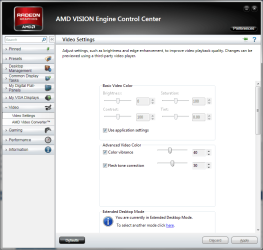
AVIVO is a separate download to reduce the overall size of the monthly Catalyst update for those that don't want or use it. For those like you that do then you have to download and install the separate package. Assuming you are running the 11.3 with AVIVO installed and it has the new Catalyst Control Center (CCC) you should find the setting for it under Video (don't mind that it isn't called CCC, they changed the name of it for those with completely AMD systems; both GPU and CPU/chipset),

amdvideo.png

If yours doesn't look like that click on Preferences near the top right and set it to Advanced view.

As for those temperature readings, get rid of Sandra as it always has been and still is a buggy mess as far as hardware monitoring goes. You aren't the first I have seen have it give wrong or misleading info (try having it outright tell you that your CPU fan isn't spinning, when you know it very well is). A better option for overall system monitoring and not just the video card would be something like this,

HWiNFO32 Download

Also for just monitoring the video card you already have what you need in the CCC. Click on Performance and then click on AMD Overdrive, and there will be gauges and numeric readout for the temp and fan speed.
 

My Computer My Computer

At a glance

Win 7 Ultimate x64FX-8350 @ 4.6 GHz so farADATA XPG V1 Series Black 8GB DDR3 1600Sapphire R9 270x Dual-X
Computer type
PC/Desktop
Computer Manufacturer/Model Number
Me
OS
Win 7 Ultimate x64
CPU
FX-8350 @ 4.6 GHz so far
Motherboard
Asus M5A97 EVO
Memory
ADATA XPG V1 Series Black 8GB DDR3 1600
Graphics Card(s)
Sapphire R9 270x Dual-X
Sound Card
Xonar DGX w/ Corsair Vengence 1300
Monitor(s) Displays
Acer S232HL Abid
Screen Resolution
1920x1080
Hard Drives
120 GB OCZ Vertex 3
500 GB Seagate 7200.12
PSU
Antec Earthwatts 650W Green
Case
Antec Three Hundred
Cooling
Cooler Master 212 EVO
Keyboard
Logitech G510
Mouse
Logitech G500s
Internet Speed
35000/3000
Not a guru on this but as I understand it. The GPU has a built in UVD (Unified Video Decoder)which is a hardware processor. AVIVO is the software codex that UVD uses to encode or decode your video. See the following site for more information.

ATI Avivo

You can try this program to monitor what is going on. Run it with your current setup and then install AVIVO and see if it changes the loads.

AMD System Monitor Version 1.0.5

If you decide to update your drivers, uninstall the old drivers first and then install the new ones. Do not use Driver Sweeper as some people recommend as it can dork your system.

Jim :geek:
 

My Computer My Computer

At a glance

Windows 8.1 Pro w/Media Center 64bit, Windows...Phenom II X6 1100TCrucial Balistic 8gb DDR3-1866 CL9MSI R6850 Cyclone IGD5 PE
Computer type
PC/Desktop
Computer Manufacturer/Model Number
Home Built
OS
Windows 8.1 Pro w/Media Center 64bit, Windows 7 HP 64bit
CPU
Phenom II X6 1100T
Motherboard
ASUS M5A99X EVO
Memory
Crucial Balistic 8gb DDR3-1866 CL9
Graphics Card(s)
MSI R6850 Cyclone IGD5 PE
Sound Card
On Board
Monitor(s) Displays
ASUS VE258Q 25" LED with DVI-HDMI-DisplayPort
Screen Resolution
1920 x 1080
Hard Drives
Two WD Cavier Black 2TB Sata III, WD My Book Essential 2TB USB 3.0
PSU
Seasonic X650 80 Plus GOLD Modular
Case
Corsair 400R
Cooling
Antec Kuhler H2O 620, Two 120mm and four 140mm
Keyboard
Logitech K120
Mouse
Logitech Marble Mouse USB, Logitech Precision Game Pad
Internet Speed
15MB
Antivirus
Norton IS 2013, Malwarebytes Pro Beta 2
Browser
IE-11, FF-27
Other Info
APC UPS ES 750, Netgear WNR3500L Gigabit & Wireless N Router with SamKnows Test Program, Motorola SB6120 Gigabit Cable Modem. Brother HL-2170W Laser Printer, Epson V300 Scanner
Thanks for the input!

I think I'd like to install the latest version of Catalyst and drivers.

If I uninstall the current Catalyst manager, will that remove the drivers also or is that a separate removal?

What happens to my screen if I remove the drivers?

Do I install the new Catalyst Manager and drivers and then install the optional AVIVO codec package?

Can I install the optional package on top of my current Catalyst Mgr and drivers or do they have to come from the same package?

I'm still a little bit confused by AVIVO. I have read that UVD decoding is present in hardware and is always utilized by the video card to process HD video. I'm not sure what AVIVO does other than provide a codecthat somehow works in tandem with UVD and insures that video is processed by the GPU rather than the CPU. I have also read that playback software must be able to utilize the AVIVO components (I assmue that means the codec) or at least interface with the codec to insure offloading tasks to the GPU. I iassuming that if the AVIVO components (whatever they are) cannot be utilized, all video processing will be performed by the CPU.

Am I even close to understanding this?
 

My Computer My Computer

At a glance

Windows Home Premium 32bitAMD Athlon II X2 255 Regor 3.1GHz Socket AM3Kingston ValueRAM 2GB (2x1GB) DDR3 1333 Dual ...Sapphire 100287L Radeon HD5670 512MB PCI Expr...
Computer Manufacturer/Model Number
Custom
OS
Windows Home Premium 32bit
CPU
AMD Athlon II X2 255 Regor 3.1GHz Socket AM3
Motherboard
Gigabyte GA-870A-UD3 Rev.2.1
Memory
Kingston ValueRAM 2GB (2x1GB) DDR3 1333 Dual Channel
Graphics Card(s)
Sapphire 100287L Radeon HD5670 512MB PCI Express 2.0 x16
Sound Card
Realtek onboard
Monitor(s) Displays
Samsung 56" HDTV
Hard Drives
Western Digital 3.5" 640GB SATA
PSU
Black Cooler Master eXtreme Power Plus 500W ATX12V V2.3
Case
Black Logisys Ikonik Taran A10 Mid Tower
Cooling
AMD CPU cooler, 2 120mm case fans
Yes you are getting close. The UDV is hardware and normally will handle the video. The Avivo is an enhancement to the UDV for higher quality and also has options that can be tweaked by CCC.

The Catalyst Manager handles the uninstall and install of all the drivers and related software. Go to Control Panel/Programs and Features and click on CM and it will let you uninstall all the programs or just some. When updating I use CM and let it uninstall everything. Then a new version of CM will be installed with the new software. When installing Avivo it opens the CM and shows what is installed and lets you install Avivo.

When you uninstall the ATI drivers the system will revert back to default Windows driver and your screen will blank out for a few seconds and then come back using the default drivers. That is why I don't recommend Drive Sweeper since it could remove the default Windows driver also.

Read this link to replace the drivers. Express will install everything in the package and Custom lets you choose individual components.

GPU-33: Graphics Driver Installation Instructions for Microsoft Windows 7

Jim :geek:
 

My Computer My Computer

At a glance

Windows 8.1 Pro w/Media Center 64bit, Windows...Phenom II X6 1100TCrucial Balistic 8gb DDR3-1866 CL9MSI R6850 Cyclone IGD5 PE
Computer type
PC/Desktop
Computer Manufacturer/Model Number
Home Built
OS
Windows 8.1 Pro w/Media Center 64bit, Windows 7 HP 64bit
CPU
Phenom II X6 1100T
Motherboard
ASUS M5A99X EVO
Memory
Crucial Balistic 8gb DDR3-1866 CL9
Graphics Card(s)
MSI R6850 Cyclone IGD5 PE
Sound Card
On Board
Monitor(s) Displays
ASUS VE258Q 25" LED with DVI-HDMI-DisplayPort
Screen Resolution
1920 x 1080
Hard Drives
Two WD Cavier Black 2TB Sata III, WD My Book Essential 2TB USB 3.0
PSU
Seasonic X650 80 Plus GOLD Modular
Case
Corsair 400R
Cooling
Antec Kuhler H2O 620, Two 120mm and four 140mm
Keyboard
Logitech K120
Mouse
Logitech Marble Mouse USB, Logitech Precision Game Pad
Internet Speed
15MB
Antivirus
Norton IS 2013, Malwarebytes Pro Beta 2
Browser
IE-11, FF-27
Other Info
APC UPS ES 750, Netgear WNR3500L Gigabit & Wireless N Router with SamKnows Test Program, Motorola SB6120 Gigabit Cable Modem. Brother HL-2170W Laser Printer, Epson V300 Scanner
That is why I don't recommend Drive Sweeper since it could remove the default Windows driver also.

While it can remove the default 'ATI display driver', Driver Sweeper doesn't touch the Windows Generic VGA driver so you'll never be stuck with a blank display.

But for the OP's needs, driver sweeper is unnecessary as already mentioned, a standard removal and installing the latest drivers will suffice.
 

My Computer My Computer

At a glance

8 Pro x64i7 3770K 4.6GHz16GB G.Skill Trident X 2666mhzx2 EVGA 780 Ti Superclocked SLI
Computer type
PC/Desktop
Computer Manufacturer/Model Number
Systems by SmartEyeball
OS
8 Pro x64
CPU
i7 3770K 4.6GHz
Motherboard
ASUS P8Z77 WS
Memory
16GB G.Skill Trident X 2666mhz
Graphics Card(s)
x2 EVGA 780 Ti Superclocked SLI
Sound Card
SB X-FI Surround 5.1 PRO USB / ATH-AD900 Headphones
Monitor(s) Displays
x3 Dell U2410 / 58" Samsung
Screen Resolution
5760*1200/ 1920*1200
Hard Drives
2x Intel 520 240GB (RAID 0) * 2x WD Caviar Blacks 2TB (RAID 0) * 2TB WD Caviar Black * Sony Optirac DVD
PSU
Silverstone Strider Evolution 1200W
Case
Thermaltake Level 10 GT Snow Edition
Cooling
Noctua NH-D14
Keyboard
Topre Realforce // Ducky Shine MX Black // Filco Ninja TKL
Mouse
Thermaltake Theron (Highly Recommended) + Razer Imperator
Antivirus
MSE
Browser
IE, FF, WaterFox
Other Info
GT Extreme V2 Sim Racing Cockpit + 40" LCD and K/B Mouse stand ▼
Fanatec CSR Elite Wheel + Clubsport V1 Pedals + CSR shifter/7G-H ▼Saitek X52 Pro ▼ TrackIR 5 Pro
Buttkicker v2 Seat Rumbler with Dedicated 5.1 and Sub Woofer attached to frame ▼
=
Bloody Big Grin
Uninstalled the original Catalyst and drivers as suggested. Went soothly. Installed the 11-3 Catalyst and
drivers. It established a new directory on the HD: ATI/Support/11-3_vista32_win7_32_dd_ccc_ocl. The CC
had a slightly different appearance but similar to the one in the removal and reinstall description on the
website. Aslo installed the AVIVO optional package. It added another directory to the HD: ATI/Support/
11-3_vista_win7_32-64_xcode. Reenteing CC, I didn't notice anything different.

I don't know know whether this has had any effect as far as transferring part of the processor workload to
the GPU. I re-ran Avatar Blu-Ray 1080P in MPlayer while running the Performance Monitor simultaneously.
I think it measures CPU workload and ran consistently at less than 40% as I played the video. It would
appear that some of the processor workload is being offloaded but, unfortunately I did not run the PM prior
to adding AVIVO.

If you know of some other test to indicate whether or not AVIVO is functioning properly, I would love to
hear about it. Thanks for all your help.
 

My Computer My Computer

At a glance

Windows Home Premium 32bitAMD Athlon II X2 255 Regor 3.1GHz Socket AM3Kingston ValueRAM 2GB (2x1GB) DDR3 1333 Dual ...Sapphire 100287L Radeon HD5670 512MB PCI Expr...
Computer Manufacturer/Model Number
Custom
OS
Windows Home Premium 32bit
CPU
AMD Athlon II X2 255 Regor 3.1GHz Socket AM3
Motherboard
Gigabyte GA-870A-UD3 Rev.2.1
Memory
Kingston ValueRAM 2GB (2x1GB) DDR3 1333 Dual Channel
Graphics Card(s)
Sapphire 100287L Radeon HD5670 512MB PCI Express 2.0 x16
Sound Card
Realtek onboard
Monitor(s) Displays
Samsung 56" HDTV
Hard Drives
Western Digital 3.5" 640GB SATA
PSU
Black Cooler Master eXtreme Power Plus 500W ATX12V V2.3
Case
Black Logisys Ikonik Taran A10 Mid Tower
Cooling
AMD CPU cooler, 2 120mm case fans
Back
Top