[ATI] cannot detect second monitor

InsanityArise

New member
Local time
7:54 AM
Messages
4
So, guys, I've just put a build together for a friend.

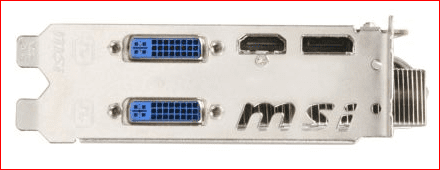
We've used the MSI R6850 Cyclone, which is a pretty hefty card with the most ridiculous fan on it.

Anyway, we're having an awful lot of trouble getting it to detect the second DVI port.

We're using 2x the same monitor, I've tested all of the cables and DVI-VGA adapters and they all work great, so does the second monitor if I plug it into the primary port.

Unplugging the primary monitor in windows makes the plug and play "dun-dun" noise as you would expect, but the second port seems to do nothing.

Theres nothing that I can spot in CCC that would be able to detect the second monitor, it's not being picked up by device manager either.

I'm an nVidia fanboy myself, so I don't know if this is actually broken, or if I have simply overlooked something major.

Last resort is to plug the graphics card into my own machine and test it, I can't be bothered with switching from nvidia to ati drivers and back again to do so though.

Any ways that I can run a decent test on this before I send it back?

I have also been looking around on the web, it would appear that this particular card has 1xsingle link dvi and 1xdual link, the dvi adapters that came with the graphics card are single link and the ports are both shaped for single link too, could this be whats causing the issue? Is it worth me running out and getting a dual-link dvi to vga adapter just to test the thing with?
 

My Computer My Computer

OS
Windows 7 Professional x64
CPU
AMD Phenom II X6 1090T @ 3.20ghz
Motherboard
Asus M4A88T-V Evo
Memory
Corsair 2x4gb DDR3 @ 1333
Graphics Card(s)
MSI R6850 Cyclone
Monitor(s) Displays
LG Flatron E2260
Hard Drives
Seagate 500gb Hybrid (4gb SSD)
PSU
700w
Case
Coolermaster Scout (with psu)
Cooling
Standard
It sounds to me like you might have gotten a bad card. I have an MSI cyclone myself, and haven't experienced any of the issues you are describing, but I am using DVI cables, and haven't tested adapters...

Do your monitors not have DVI ports?
 

My Computer My Computer

Computer Manufacturer/Model Number
Pugh Technologies
OS
W7 Professional x64
CPU
AMD Athlon II X3 445 Rana 3.10 GHz
Motherboard
MSI 870A-G54
Memory
PNY XLR DDR3 1600 4x2GB
Graphics Card(s)
NVIDIA GeForce GTS 450 (fermi) 1GB GDDR5
Sound Card
Realtek ALC892 onboard
Monitor(s) Displays
ASUS VE205t, Viewsonic VX2035WM
Screen Resolution
1600x900, 1600x1050
Hard Drives
977GB Hitachi Hitachi HDS721010CLA332
244GB Western Digital WDC WD2500AAJS-65B4A0
488GB Western Digital WDC WD5000AAJS-00A8B0
488GB Western Digital WDC WD5000AAKS-00UU3A0
PSU
Antec EarthWatts EA650 650W
Case
ThermalTake Armor A90 Mid Tower
Cooling
3x 120mm in, 1x 120mm & 200mm out, self built hydro-cooler
Keyboard
Logitec 55
Mouse
Razer Deathadder
Internet Speed
20 Mbps D/L, 9 Mbps U/L
Anyway, we're having an awful lot of trouble getting it to detect the second DVI port.

We're using 2x the same monitor, I've tested all of the cables and DVI-VGA adapters
Wouldn't happen to be using that adapter on the second DVI port would you? If so that would be why, as the card only supports VGA via adapter from one of the DVI ports,

msi6850.PNG
 

My Computer My Computer

Computer type
PC/Desktop
Computer Manufacturer/Model Number
Me
OS
Win 7 Ultimate x64
CPU
FX-8350 @ 4.6 GHz so far
Motherboard
Asus M5A97 EVO
Memory
ADATA XPG V1 Series Black 8GB DDR3 1600
Graphics Card(s)
Sapphire R9 270x Dual-X
Sound Card
Xonar DGX w/ Corsair Vengence 1300
Monitor(s) Displays
Acer S232HL Abid
Screen Resolution
1920x1080
Hard Drives
120 GB OCZ Vertex 3
500 GB Seagate 7200.12
PSU
Antec Earthwatts 650W Green
Case
Antec Three Hundred
Cooling
Cooler Master 212 EVO
Keyboard
Logitech G510
Mouse
Logitech G500s
Internet Speed
35000/3000
That would make sense, none of the 8 monitors in this place have a DVI port!

I have 2 more questions:

1. Would a XFX HD 6870 have similar issues?
2. Where would you find this kind of information about a particular card without having to browse through all of the reviews? I couldn't see it listed on the immediate spec of the card.

As for the 2 monitors we aquired for this rig, they are LG Flatron E226's, and they are absolutely beautiful, but yeah, no dvi, only vga.
 

My Computer My Computer

OS
Windows 7 Professional x64
CPU
AMD Phenom II X6 1090T @ 3.20ghz
Motherboard
Asus M4A88T-V Evo
Memory
Corsair 2x4gb DDR3 @ 1333
Graphics Card(s)
MSI R6850 Cyclone
Monitor(s) Displays
LG Flatron E2260
Hard Drives
Seagate 500gb Hybrid (4gb SSD)
PSU
700w
Case
Coolermaster Scout (with psu)
Cooling
Standard
Yes the HD 6870 would do the same thing. In fact I think you will find that is the case with just about any card from AMD or Nvidia any more. Biggest problem is that VGA is going the way of the dodo and for the most part you're lucky that the card manufacturers are leaving one of the ports VGA compatible.

Flatron E2260? According to the spec sheet,

View attachment LG-Flatron-E2260-fullspec.pdf

it has all three ports available; VGA, HDMI and DVI.
 

My Computer My Computer

Computer type
PC/Desktop
Computer Manufacturer/Model Number
Me
OS
Win 7 Ultimate x64
CPU
FX-8350 @ 4.6 GHz so far
Motherboard
Asus M5A97 EVO
Memory
ADATA XPG V1 Series Black 8GB DDR3 1600
Graphics Card(s)
Sapphire R9 270x Dual-X
Sound Card
Xonar DGX w/ Corsair Vengence 1300
Monitor(s) Displays
Acer S232HL Abid
Screen Resolution
1920x1080
Hard Drives
120 GB OCZ Vertex 3
500 GB Seagate 7200.12
PSU
Antec Earthwatts 650W Green
Case
Antec Three Hundred
Cooling
Cooler Master 212 EVO
Keyboard
Logitech G510
Mouse
Logitech G500s
Internet Speed
35000/3000

My Computer My Computer

OS
Windows 7 Professional x64
CPU
AMD Phenom II X6 1090T @ 3.20ghz
Motherboard
Asus M4A88T-V Evo
Memory
Corsair 2x4gb DDR3 @ 1333
Graphics Card(s)
MSI R6850 Cyclone
Monitor(s) Displays
LG Flatron E2260
Hard Drives
Seagate 500gb Hybrid (4gb SSD)
PSU
700w
Case
Coolermaster Scout (with psu)
Cooling
Standard
I've had a great experience with LG, NEC, Viewsonic, and ASUS monitors, if that is the direction you are going to take. I believe that most video cards are going to have the same issue, especially the dual DVI cards.
 

My Computer My Computer

Computer Manufacturer/Model Number
Pugh Technologies
OS
W7 Professional x64
CPU
AMD Athlon II X3 445 Rana 3.10 GHz
Motherboard
MSI 870A-G54
Memory
PNY XLR DDR3 1600 4x2GB
Graphics Card(s)
NVIDIA GeForce GTS 450 (fermi) 1GB GDDR5
Sound Card
Realtek ALC892 onboard
Monitor(s) Displays
ASUS VE205t, Viewsonic VX2035WM
Screen Resolution
1600x900, 1600x1050
Hard Drives
977GB Hitachi Hitachi HDS721010CLA332
244GB Western Digital WDC WD2500AAJS-65B4A0
488GB Western Digital WDC WD5000AAJS-00A8B0
488GB Western Digital WDC WD5000AAKS-00UU3A0
PSU
Antec EarthWatts EA650 650W
Case
ThermalTake Armor A90 Mid Tower
Cooling
3x 120mm in, 1x 120mm & 200mm out, self built hydro-cooler
Keyboard
Logitec 55
Mouse
Razer Deathadder
Internet Speed
20 Mbps D/L, 9 Mbps U/L
Well thanks for all the help guys, I haven't put a rig together for a couple of years now, so I'm a bit out of the loop.
 

My Computer My Computer

OS
Windows 7 Professional x64
CPU
AMD Phenom II X6 1090T @ 3.20ghz
Motherboard
Asus M4A88T-V Evo
Memory
Corsair 2x4gb DDR3 @ 1333
Graphics Card(s)
MSI R6850 Cyclone
Monitor(s) Displays
LG Flatron E2260
Hard Drives
Seagate 500gb Hybrid (4gb SSD)
PSU
700w
Case
Coolermaster Scout (with psu)
Cooling
Standard
Back
Top