ATI Catalyst 9.9

what do you guys mean just press f8? am i suppose to do something else after pressing f8? because if i can remember f8 just gives you some option to put in safe mode etc.

unless theres something i'm missing
 

My Computer

OS
Windows 7 Ultimate 32bit
CPU
Intel Duo Core E6850 @ 3.00GHz
Motherboard
Gigabyte EP35-DS3L
Memory
3GB
Graphics Card(s)
ATI 4850
Monitor(s) Displays
Samsung LED 40" ; Acer P241w
Screen Resolution
1900x1080; 1900x1200
what do you guys mean just press f8? am i suppose to do something else after pressing f8? because if i can remember f8 just gives you some option to put in safe mode etc.

unless theres something i'm missing

Keep pressing it until you get a black screen with about 10 different options.
 

My Computer

Computer Manufacturer/Model Number
Desktop
OS
Windows 7 Professional x64
CPU
Intel i5-2500k @ 3.3Ghz
Motherboard
Gigabyte GA-Z77X-UD5H
Memory
4GB DDR3
Graphics Card(s)
Nvidia GTS250 1GB
Monitor(s) Displays
Sony SDM S95A
Screen Resolution
1280x1024
Hard Drives
1x 1TB, 2x 250GB HDDs
PSU
Corsair HX850W
Case
Cooler Master 690 II
Cooling
Thermalright True Spirit 140mm & 3x 120mm & 3x 140mm Fans
Keyboard
Logitech Media Keyboard
Mouse
Microsoft Intellimouse
Internet Speed
8MB
:confused: i can see but what option do i pick to solve this problem or it doesn't?
 

My Computer

OS
Windows 7 Ultimate 32bit
CPU
Intel Duo Core E6850 @ 3.00GHz
Motherboard
Gigabyte EP35-DS3L
Memory
3GB
Graphics Card(s)
ATI 4850
Monitor(s) Displays
Samsung LED 40" ; Acer P241w
Screen Resolution
1900x1080; 1900x1200
:confused: i can see but what option do i pick to solve this problem or it doesn't?

The very bottom one saying start windows without driver signature or something like that.
 

My Computer

Computer Manufacturer/Model Number
Desktop
OS
Windows 7 Professional x64
CPU
Intel i5-2500k @ 3.3Ghz
Motherboard
Gigabyte GA-Z77X-UD5H
Memory
4GB DDR3
Graphics Card(s)
Nvidia GTS250 1GB
Monitor(s) Displays
Sony SDM S95A
Screen Resolution
1280x1024
Hard Drives
1x 1TB, 2x 250GB HDDs
PSU
Corsair HX850W
Case
Cooler Master 690 II
Cooling
Thermalright True Spirit 140mm & 3x 120mm & 3x 140mm Fans
Keyboard
Logitech Media Keyboard
Mouse
Microsoft Intellimouse
Internet Speed
8MB
I had the same problem with W7 64 bit and ATI 4870 running CCC 9.9

  • Click Start (Windows symbol)
  • type gpedit.msc into the search bar
  • navigate to: User Configuration, Administrative Templates, System, Driver Installation
  • Double click Code Signing For Device Drivers
  • Check the Enabled radio button
  • under Options, select Ignore in the drop down box
  • Reboot
  • Re-install CCC 9.9
 

My Computer

OS
XP Pro/Vista Ultimate (64)/Windows 7 Ultimate Signature Edition(64)
CPU
Core 2 Duo E8500 @ stock
Motherboard
Gigabyte EP45-UD3R
Memory
8Gb (4 X 2Gb) Corsair Dominator 1066Mhz DDR2
Graphics Card(s)
XFX ATI Radeon 4870 1Gb
Sound Card
Onboard 7.1
Monitor(s) Displays
BenQ E2200Hd, Asus VW161D, HP L1506
Screen Resolution
1920 X 1080
Hard Drives
Seagate 7200.12 500Gb
2 X Hitachi 1Tb
PSU
CoolerMaster 650 EPD
Case
Thermaltake
Cooling
2 X Noctua 120mm's, Stock Intel
Keyboard
Logitech
Mouse
Logitech
I can't seem to fix this problem. I've tried all the things that's been discussed here, but it still won't work. @Orpheus: when i'm searching for gpedit.msc it doesn't find anything. I asked someone who did it and it worked and he said it would be in C:\Windows\System32\ so i looked there but there was no msc-files at all. Found one namned gpedit.dll though.

When i press f8 during the booting and all that it doesn't work either. Still goes back to the "welcome"-screen in CCC.

This problem is driving me crazy...
 

My Computer

Computer Manufacturer/Model Number
Dell Studio XPS 1640
OS
Windows 7 64-bit
CPU
Intel C2D P8600
Graphics Card(s)
ATI Mobility Radeon HD4670
I am also having the problem of returning to the welcome screen, any more advice anyone?
 

My Computer

OS
Windows 7 home edition
Solved it!

Everything worked fine for me after uninstalling all drivers then installing the new 9.12 suite (Drivers & Support | GAME.AMD.COM) and then installing the 9.9 catalyst control center! :D
 

My Computer

Computer Manufacturer/Model Number
Dell Studio XPS 1640
OS
Windows 7 64-bit
CPU
Intel C2D P8600
Graphics Card(s)
ATI Mobility Radeon HD4670
I have Win 7 and I had the same problem with the 1 inch border (underscan) and I tried everything here and it didn't work I read some where that Vista drivers work with win 7 so I did just that removed the latest win 7 drivers from ati and installed the latest Vista Drivers and now when I click on desktop and displays and right clicked on the little tv on the bottom left of the screen and clicked configure like previously mentioned it brought me to the home screen but now it works and I can click on scaling options and adjust underscan and overscan. Hope this helps:D
 

My Computer

Computer Manufacturer/Model Number
Gateway
OS
Windows 7
CPU
amd phenom x4
Memory
8 Gigs
Graphics Card(s)
His Ati 4670
Sound Card
onboard
Monitor(s) Displays
25" hannspree
Hard Drives
1 tb
PSU
300 watt
I had the same problem with the 1 inch border and you are correct it is a scaling problem. Go into CCC and click on "desktops and displays", There will be a small monitor in the lower left hand corner, click on the arrow over that display, click on configure, you will see a tab for "scaling options" that will let you adjust underscan and overscan. I set mine to zero and it solved the problem for me. Best of luck to ya but I do believe this setting will only be available if you are using a HDMI cable to your monitor.

I just downloaded the latest version of CCC and now the scaling option won't "fix"; I have to reset it every time I boot. I'm using an HDMI cable to the Dell 23" monitor. Any ideas? If not, how do I revert to the previous version of CCC?
 

My Computer

Computer type
PC/Desktop
Computer Manufacturer/Model Number
Dell Inspiron 580
OS
Windows 7 Professional 64-bit SP1
CPU
Intel Quad Core i5 750 2.67Ghz 8Mb
Motherboard
Dell 033FF6 A00
Memory
6Gb DDR3 Dual Channel
Graphics Card(s)
1Gb ATI Radeon HD 5450
Sound Card
Integrated 7.1
Monitor(s) Displays
Dell 23" ST 2310 HDMI; Samsung 21" HDMI
Screen Resolution
1920 x 1080; 1920 x 1080
Hard Drives
1TB WD Serial ATA 7200RPM
Iomega 500Gb Remote
PSU
300w
Case
Dell
Cooling
1 x Case; 1 x Processor; 1 x Video Card
Keyboard
Microsoft Comfort Curve 3000
Mouse
Microsoft Wireless Touch (Intellipoint)
Internet Speed
down 200Mb; up 12Mb (Virgin Media SuperHub 2)
Antivirus
MSE
Browser
IE11, Google Chrome
Other Info
HP Photosmart Premium 309g-m
Compaq Presario Laptop CQ70 with 7 Pro 32-bit.
Huawei MediaPad 32GB
Several Raspberry Pi's B2,B3 and Zero
Several varieties of Arduinos
Go into CCC and click on "desktops and displays", There will be a small monitor in the lower left hand corner, click on the arrow over that display, click on configure, Go to Hdtv support first at bottom. I had to click on 1920x1080p 50 hz cause thats what my monitor will display then click on apply format. Then I was able to go to scaling options and change it , don't forget to click apply when you get your screen size right. Before I did this scaling options was there but it was gosted and would not let me change it.Hope this helps! let me know
 

My Computer

Computer Manufacturer/Model Number
Gateway
OS
Windows 7
CPU
amd phenom x4
Memory
8 Gigs
Graphics Card(s)
His Ati 4670
Sound Card
onboard
Monitor(s) Displays
25" hannspree
Hard Drives
1 tb
PSU
300 watt
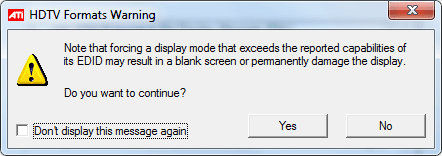
Thanks HD. My HDMI options are only for 30 and 60Hz. I was loath to make any changes, (see attached screenshots). I'm thinking of reinstalling an earlier version of CCC if that's possible. The issue is an annoyance rather than a problem.
 

Attachments

  • HDTV.png
    HDTV.png
    32.4 KB · Views: 14
  • Display.png
    Display.png
    7.6 KB · Views: 1

My Computer

Computer type
PC/Desktop
Computer Manufacturer/Model Number
Dell Inspiron 580
OS
Windows 7 Professional 64-bit SP1
CPU
Intel Quad Core i5 750 2.67Ghz 8Mb
Motherboard
Dell 033FF6 A00
Memory
6Gb DDR3 Dual Channel
Graphics Card(s)
1Gb ATI Radeon HD 5450
Sound Card
Integrated 7.1
Monitor(s) Displays
Dell 23" ST 2310 HDMI; Samsung 21" HDMI
Screen Resolution
1920 x 1080; 1920 x 1080
Hard Drives
1TB WD Serial ATA 7200RPM
Iomega 500Gb Remote
PSU
300w
Case
Dell
Cooling
1 x Case; 1 x Processor; 1 x Video Card
Keyboard
Microsoft Comfort Curve 3000
Mouse
Microsoft Wireless Touch (Intellipoint)
Internet Speed
down 200Mb; up 12Mb (Virgin Media SuperHub 2)
Antivirus
MSE
Browser
IE11, Google Chrome
Other Info
HP Photosmart Premium 309g-m
Compaq Presario Laptop CQ70 with 7 Pro 32-bit.
Huawei MediaPad 32GB
Several Raspberry Pi's B2,B3 and Zero
Several varieties of Arduinos
Back
Top