ATI HD3470 Mobility HDMI Audio output not working!!!

Naz

New member
Local time
12:42 PM
Messages
2
Hey guys I have a ASUS M51vr Notebook Running windows 7,
I have the latest ATI Drivers for my ATI HD3470 mobility
Plus latest Realtek HD drivers.

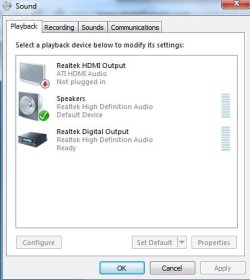
My problem is when i plug in my hdmi output via my hdmi cable it doesn't make the new device detected sound it would make on vista then allow me to choose to extend or duplicate to the new monitor. When i plug in my hdmi cable in, there is no picture until i reboot the computer then the picture comes. But i still am not able to have audio coming out from the HDMI output. On Vista i would connect the cable and then the new device sound would beep and it will allow me to choose extend options and the sound will work without a problem.. Now i see this is a comman problem and i been doing my head in trying to fix it the past 2 months, i'll post my Computer details and images of the HDMI cable not detected as it is currently connected.


Chipset
-------------------------------------------------------------------------

Northbridge Intel PM45 rev. 07
Southbridge Intel 82801IM (ICH9-M) rev. 03
Graphic Interface PCI-Express

Monitoring
-------------------------------------------------------------------------

Mainboard Model M51Vr (0x0000017B - 0x00029C20)

LPCIO
-------------------------------------------------------------------------

Hardware Monitors
-------------------------------------------------------------------------

Hardware monitor ACPI
Temperature 0 53°C (127°F) [0xCBE] (THRM)

Hardware monitor Intel Mobile Core 2 Duo P8600
Temperature 0 39°C (102°F) [0x3D] (Core #0)
Temperature 1 40°C (103°F) [0x3C] (Core #1)

Hardware monitor ATI Mobility Radeon HD 3400 Series
Temperature 0 52°C (125°F) (GPU Core)

DMI
-------------------------------------------------------------------------

DMI BIOS
vendor American Megatrends Inc.
version 211
date 11/17/2008

DMI System Information
manufacturer ASUSTeK Computer Inc.
product M51Vr
version 1.0
serial NF1S8831970253
UUID 9D3D81DD-4EDD236B-F7000022-157460F1

DMI Baseboard
vendor ASUSTeK Computer Inc.
model M51Vr
revision 1.0
serial BSN12345678901234567

DMI System Enclosure
manufacturer ASUSTeK Computer Inc.
chassis type Notebook
chassis serial CSN12345678901234567

Graphics
-------------------------------------------------------------------------

Number of adapters 1

Graphic APIs
-------------------------------------------------------------------------

API ATI OD5
API ATI I/O

Display Adapters
-------------------------------------------------------------------------

Display adapter 0
Manuf. API index 0
Display name \\.\DISPLAY1
Name ATI Mobility Radeon HD 3400 Series
Codename RV620LE
Technology 55 nm
Memory size 256 MB
Memory bus width 64 bits
GPU ref clock 27000
PCI device bus 1 (0x1), device 0 (0x0), function 0 (0x0)
Vendor ID 0x1002 (0x1043)
Model ID 0x95C4 (0x1875)
Performance Level 0
Core clock 300.0 MHz
Memory clock 400.0 MHz


Software
-------------------------------------------------------------------------

Windows Version Microsoft Windows 7 (6.1) Ultimate Edition (Build 7600)
DirectX Version 11.0


That is all the information, If you guys need more please let me know... This problem has been driving me insane..
 

Attachments
  • sound.jpg
    sound.jpg
    21 KB · Views: 64

My Computer My Computer

At a glance

Windows 7Processor Intel(R) Core(TM)2 Duo CPU P8600 @ ...Installed Physical Memory (RAM) 3.00 GBATI Mobility Radeon HD 3470
Computer Manufacturer/Model Number
Asus M51vr Notebook
OS
Windows 7
CPU
Processor Intel(R) Core(TM)2 Duo CPU P8600 @ 2.40GHz, 2
Motherboard
BIOS Version/Date American Megatrends Inc. 211, 17/11/2008
Memory
Installed Physical Memory (RAM) 3.00 GB
Graphics Card(s)
ATI Mobility Radeon HD 3470
Sound Card
Realtek High Definition Audio
Monitor(s) Displays
15.4" WXGA/WXGA+/WSXGA+ Color-Shine
Hard Drives
320GB
PSU
Laptop
I have the same problem with ati 3470. Maybe you solve your problem?
 

My Computer My Computer

At a glance

Windows 7 Ultimate x64
OS
Windows 7 Ultimate x64
You have to disable the main sound via right click and have the monitor with the hdmi cable on then right click enable the hdmi device simple as that

it isn't supposed to auto switch you have to do it yourself
 

My Computer My Computer

At a glance

Windows 10 Home Premium 64bit sp1Intel I7-6700K @ 4.6 Ghz 1.344 volts everyday OC32GB G-Skill TridentZ 3200mhz 16-18-18-38 DDR4Sli Gigabyte Windforce GTX 980 G1
Computer type
PC/Desktop
Computer Manufacturer/Model Number
CoreI7-6700K MrFingerIII Special Builds
OS
Windows 10 Home Premium 64bit sp1
CPU
Intel I7-6700K @ 4.6 Ghz 1.344 volts everyday OC
Motherboard
Asrock Fatality K6 Z170 Socket 1151
Memory
32GB G-Skill TridentZ 3200mhz 16-18-18-38 DDR4
Graphics Card(s)
Sli Gigabyte Windforce GTX 980 G1
Sound Card
AC97 Creative Rage Tactic 3D Headphones Bluetooth
Monitor(s) Displays
27" Asus ROG Swift PG278Q G-Sync 48" Vizio Smart HD TV
Screen Resolution
2560x1440p 27"- 48" Currently Gaming at 2560x1440p Res 2K
Hard Drives
250GB Samsung Evo840SSD Seagate baracuda 500 GB WD Mybook 500Gb 1TB Seagate Barracuda
PSU
HX1050w Corsair Silver 80plus certified crosfire/sli
Case
Enthod Pro Full Tower
Cooling
Corsair H110i GT 280 mm High Performance WaterBlock
Keyboard
Logitech wireless keyboard
Mouse
Logitech wireless mouse
Internet Speed
Cox Cable 100+ mb
Antivirus
WebRoot Spysweeper with Antivirus
Browser
IE-10, Chrome, Opera
Other Info
My Other Rig is a AMD FX8320E @4.6Ghz 16GB Ballistic Sport Ram
Mobo Asrock Fatality 990FX 120GB OCZ SSD 1TB Seagate Barracuda Corsair H75 Cooling PSU Corsair CX750
GPU GTX Gigabyte 970G1
I did that but it is still written that "ATI hdmi audio Not plugged in". I can see only video on my TV, no sound
 

My Computer My Computer

At a glance

Windows 7 Ultimate x64
OS
Windows 7 Ultimate x64
Have you actually selected the ATI HDMI as the "default" playback device? Try that and then see if it will work. On many systems you have to manually select the HDMI as the default playback device to get HDMI audio.
 

My Computer My Computer

At a glance

Windows 10 64 bitIntel i7 6700K16GB Corsair DominatorIntel CPU Graphics
Computer type
PC/Desktop
Computer Manufacturer/Model Number
My Own Build
OS
Windows 10 64 bit
CPU
Intel i7 6700K
Motherboard
ASUS ROG Maximus VIII Hero
Memory
16GB Corsair Dominator
Graphics Card(s)
Intel CPU Graphics
Sound Card
RealTek
Monitor(s) Displays
27" Dell S2719dgf
Screen Resolution
2560X1440
Hard Drives
1 TB Samsung 850 EVO SSD for Win 10 Pro
500GB Samsung 850 EVO SSD for Win 10 Insider
2 TB drive for backup
PSU
EVGA Supernova 750G2
Case
BeQuiet Silent Base 600
Cooling
Deepcool Captain 120EX
Keyboard
Microsoft Wireless 2000
Mouse
Microsoft wireless
Internet Speed
100 MB/sec (Cable)
Antivirus
Microsoft Defender and Malwarebytes
Browser
Edge/Firefox
Other Info
Cakewalk (Sonar) by BandLab and Studio One 4.1 Pro recording studio software. MOTU 896Mk3 Hybrid recording interface, Frontier Tranzport wireless control unit, Behringer X-Touch Control Surface.
Five USB connected optical drives for CD Audio production using Nero BurningROM
Where sould I do that? For ex. on VLC media player? Or where? Because on Realtek software I can choose only speakers and digital output.
 

My Computer My Computer

At a glance

Windows 7 Ultimate x64
OS
Windows 7 Ultimate x64
right click on the sound then right click play back

after that right click your main sound disable it

make sure the lcd with the hdmi is on then when you do this enable hdmi sound it should work because that is the only other deive for sound

if it doesnt you have a hardware issue that s how most all are set up especially using a ati card

I use mine in this fashion all the time and it seems everyone else uses the same when comming across the forums i read about this subject

good luck !
 

My Computer My Computer

At a glance

Windows 10 Home Premium 64bit sp1Intel I7-6700K @ 4.6 Ghz 1.344 volts everyday OC32GB G-Skill TridentZ 3200mhz 16-18-18-38 DDR4Sli Gigabyte Windforce GTX 980 G1
Computer type
PC/Desktop
Computer Manufacturer/Model Number
CoreI7-6700K MrFingerIII Special Builds
OS
Windows 10 Home Premium 64bit sp1
CPU
Intel I7-6700K @ 4.6 Ghz 1.344 volts everyday OC
Motherboard
Asrock Fatality K6 Z170 Socket 1151
Memory
32GB G-Skill TridentZ 3200mhz 16-18-18-38 DDR4
Graphics Card(s)
Sli Gigabyte Windforce GTX 980 G1
Sound Card
AC97 Creative Rage Tactic 3D Headphones Bluetooth
Monitor(s) Displays
27" Asus ROG Swift PG278Q G-Sync 48" Vizio Smart HD TV
Screen Resolution
2560x1440p 27"- 48" Currently Gaming at 2560x1440p Res 2K
Hard Drives
250GB Samsung Evo840SSD Seagate baracuda 500 GB WD Mybook 500Gb 1TB Seagate Barracuda
PSU
HX1050w Corsair Silver 80plus certified crosfire/sli
Case
Enthod Pro Full Tower
Cooling
Corsair H110i GT 280 mm High Performance WaterBlock
Keyboard
Logitech wireless keyboard
Mouse
Logitech wireless mouse
Internet Speed
Cox Cable 100+ mb
Antivirus
WebRoot Spysweeper with Antivirus
Browser
IE-10, Chrome, Opera
Other Info
My Other Rig is a AMD FX8320E @4.6Ghz 16GB Ballistic Sport Ram
Mobo Asrock Fatality 990FX 120GB OCZ SSD 1TB Seagate Barracuda Corsair H75 Cooling PSU Corsair CX750
GPU GTX Gigabyte 970G1
Still not working... I enable only hdmi, but it is still written "not plugged in"...
 

My Computer My Computer

At a glance

Windows 7 Ultimate x64
OS
Windows 7 Ultimate x64
Same problem - My fix is....

This is a pain in the rear for me but it is the only way to get the HDMI audio recognized as a valid option.

First - On my TV I have to actually select the HDMI channel that is connected to my PC
Second - I have to un-plug and plug-in the HDMI cable. (I can hear the W7 found hardware sound)
Third - Now I can select HDMI as my default device (everything works great)


I usually have to repeat this process any time the PC or TV gets shut off. I am going to repost this to a new topic to see if anyone has a better solution.

I guess the ATI card and W7 has to see a valid HDMI signal from the TV before it will enable the HDMI option.

This is not an intermittant issue - it is a matter of the ATI HDMI detecting the connection and is very repeatable and consistant. All drivers ATI and VIA audio are the latest to date as of today.
 
Last edited:

My Computer My Computer

At a glance

Windows 7 64bitI74GBATI
Computer Manufacturer/Model Number
ASUS
OS
Windows 7 64bit
CPU
I7
Motherboard
ASUS
Memory
4GB
Graphics Card(s)
ATI
Hello

I had intermittent detection of the HDMI in "Control Panel/Sound", and eventually no detection (the following solution may also work for those who were never able to obtain a signal at all). For me updating the audio driver fixed the problem. You can update the audio and video drivers by following the steps below (found these steps at Microsoft website). My computer is only 6 months old, but still needed the drivers updated. No special system setting are required as written in previous posts, if the driver is the problem (except setting HDMI as default device in Sound). I was also extremely frustrated with the ongoing problem and hope the driver updates work for you. Good luck!

  1. Open Device Manager by clicking the Start button
    4f6cbd09-148c-4dd8-b1f2-48f232a2fd33.png
    , clicking Control Panel, clicking System and Maintenance, and then clicking Device Manager.*
    18abb370-ac1e-4b6b-b663-e028a75bf05b.png
    If you are prompted for an administrator password or confirmation, type the password or provide confirmation.
  2. In Device Manager, locate the device you want to update, and then double-click the device name.
  3. Click sound video and gaming controller
  4. Open each audio controller in sound video and gaming (one at a time) and update by Clicking the Driver tab, and then click Update Driver and follow the instructions.
 
Last edited:

My Computer My Computer

At a glance

Windows 7 64bit
OS
Windows 7 64bit
With HDMI enabled on any ATI card first you must have the TV set to HDMI and it must be on it will not detect a signal if you just switch to HDMI and the TV is not on also it will loose signal if you shut the tv off so .........

after you make sure tv is on swtich to HDMI INPUT/OUTPUT then disable onboard sound and enable ATI HDMI sound then you will have sound and connection and the feature of the enable disable sounds are in the playback right click on the sound icon

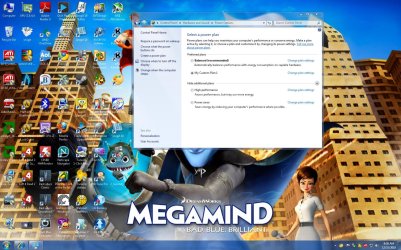
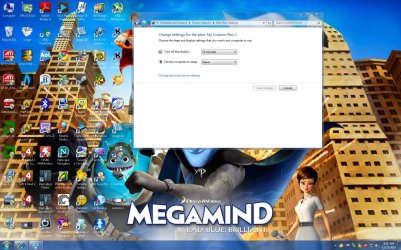
as far as the connection breaking use the power saving feature to turn the monitor off through windows like you would do a VGA monitor then you won't have connection breakage I hope this helps you all with you're issues and if your not sure about the power saver plans here is what it looks like


this is a old post wow i thought by now you would have fixed the issue you try a newer card ?
 

Attachments

  • custom 1.jpg
    custom 1.jpg
    268.3 KB · Views: 212
  • display 1.jpg
    display 1.jpg
    251.2 KB · Views: 188

My Computer My Computer

At a glance

Windows 10 Home Premium 64bit sp1Intel I7-6700K @ 4.6 Ghz 1.344 volts everyday OC32GB G-Skill TridentZ 3200mhz 16-18-18-38 DDR4Sli Gigabyte Windforce GTX 980 G1
Computer type
PC/Desktop
Computer Manufacturer/Model Number
CoreI7-6700K MrFingerIII Special Builds
OS
Windows 10 Home Premium 64bit sp1
CPU
Intel I7-6700K @ 4.6 Ghz 1.344 volts everyday OC
Motherboard
Asrock Fatality K6 Z170 Socket 1151
Memory
32GB G-Skill TridentZ 3200mhz 16-18-18-38 DDR4
Graphics Card(s)
Sli Gigabyte Windforce GTX 980 G1
Sound Card
AC97 Creative Rage Tactic 3D Headphones Bluetooth
Monitor(s) Displays
27" Asus ROG Swift PG278Q G-Sync 48" Vizio Smart HD TV
Screen Resolution
2560x1440p 27"- 48" Currently Gaming at 2560x1440p Res 2K
Hard Drives
250GB Samsung Evo840SSD Seagate baracuda 500 GB WD Mybook 500Gb 1TB Seagate Barracuda
PSU
HX1050w Corsair Silver 80plus certified crosfire/sli
Case
Enthod Pro Full Tower
Cooling
Corsair H110i GT 280 mm High Performance WaterBlock
Keyboard
Logitech wireless keyboard
Mouse
Logitech wireless mouse
Internet Speed
Cox Cable 100+ mb
Antivirus
WebRoot Spysweeper with Antivirus
Browser
IE-10, Chrome, Opera
Other Info
My Other Rig is a AMD FX8320E @4.6Ghz 16GB Ballistic Sport Ram
Mobo Asrock Fatality 990FX 120GB OCZ SSD 1TB Seagate Barracuda Corsair H75 Cooling PSU Corsair CX750
GPU GTX Gigabyte 970G1
This worked for me

Hello

I had intermittent detection of the HDMI in "Control Panel/Sound", and eventually no detection (the following solution may also work for those who were never able to obtain a signal at all). For me updating the audio driver fixed the problem. You can update the audio and video drivers by following the steps below (found these steps at Microsoft website). My computer is only 6 months old, but still needed the drivers updated. No special system setting are required as written in previous posts, if the driver is the problem. I was also extremely frustrated with the ongoing problem and hope the driver updates work for you. Good luck!

  1. Open Device Manager by clicking the Start button
    4f6cbd09-148c-4dd8-b1f2-48f232a2fd33.png
    , clicking Control Panel, clicking System and Maintenance, and then clicking Device Manager.*
    18abb370-ac1e-4b6b-b663-e028a75bf05b.png
    If you are prompted for an administrator password or confirmation, type the password or provide confirmation.
  2. In Device Manager, locate the device you want to update, and then double-click the device name.
  3. Click sound video and gaming controller
  4. Open each audio controller in sound video and gaming (one at a time) and update by Clicking the Driver tab, and then click Update Driver and follow the instructions.
 

My Computer My Computer

At a glance

Windows 7 64bit
OS
Windows 7 64bit
I have the same issue, I have uninstalled my graphics and my chipset drivers, re-installed them and still no speakers plugged in as per my notifications. I tried unplugging my TV and replugging in, no found hardware sound. I have a high end graphics card, up-to-date drivers, but still no sound. Still says ATI HDMI Output not plugged in, no sound through my TV. Any ideas? I tried the troubleshooting mentioned in this thread, and no joy.
Please help...

Thanks
 

My Computer My Computer

At a glance

Windows 7 Ultimate 64-BitAMD 10907Corsair Vengeance 8GB DDR3XFX Radeon 6950
Computer Manufacturer/Model Number
Custom 2
OS
Windows 7 Ultimate 64-Bit
CPU
AMD 10907
Motherboard
Asus Crosshair Formula IV
Memory
Corsair Vengeance 8GB DDR3
Graphics Card(s)
XFX Radeon 6950
Sound Card
Onboard
Monitor(s) Displays
VIZIO 26' LED
Screen Resolution
1080p
Hard Drives
1x OZC Vertex 2 120GB SSD (OS)
2x Seagate Baracuda 2TB
1x Hitatchi 1TB
PSU
Kingwin Mach 1 1000 watt modular
Case
Maelstrom
Cooling
Combo, Water/Air
Keyboard
Razer Black Widow Ultimate
Mouse
Razer Tron
Internet Speed
Comcastic 12mb/s
Back
Top