ATi TV wonder pro x64

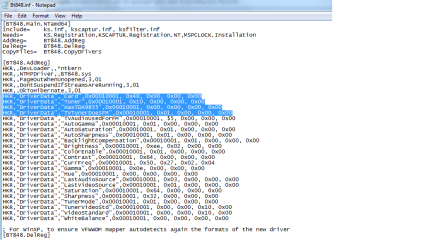
Here is an attachment of the modified inf file.
 

Attachments

  • modified inf file.png
    modified inf file.png
    21 KB · Views: 38

My Computer My Computer

At a glance

Windows 7 Premium x64AMD Phenom II 4x8 GB DDR2
Computer Manufacturer/Model Number
Custom build
OS
Windows 7 Premium x64
CPU
AMD Phenom II 4x
Motherboard
ASUS M3A78
Memory
8 GB DDR2
Monitor(s) Displays
HP S2031
I'll be back on my computer in an hour or so, so if don't reply that is why.
 

My Computer My Computer

At a glance

Windows 10 x64 ProfessionalAMD FX 6300 Black EditionPatriot Viper 8gbx2 DDR3EVGA Nvidia GeForce GTX 680
Computer type
PC/Desktop
Computer Manufacturer/Model Number
Custom
OS
Windows 10 x64 Professional
CPU
AMD FX 6300 Black Edition
Motherboard
MSI 970a SLI Krait Edition
Memory
Patriot Viper 8gbx2 DDR3
Graphics Card(s)
EVGA Nvidia GeForce GTX 680
Sound Card
Realtek onboard
Monitor(s) Displays
LG, Dynex 24" LCD TV
Screen Resolution
2560x1400 1920x1080
Hard Drives
Western Digital Velociraptor 500 GB WD5000HHTZ
PSU
Corsair CX850M
Case
Azza Solano 1000
Cooling
Extra intake antec 120mm blue led fan, thermaltake frio sile
Keyboard
Thermaltake
Mouse
Saitek Desktop Gaming Mouse
Other Info
ATi TV Wonder Pro PCI tv tuner video capture card,
Roxio Game Capture HD Pro
OK then
 

My Computer My Computer

At a glance

Windows 7 Premium x64AMD Phenom II 4x8 GB DDR2
Computer Manufacturer/Model Number
Custom build
OS
Windows 7 Premium x64
CPU
AMD Phenom II 4x
Motherboard
ASUS M3A78
Memory
8 GB DDR2
Monitor(s) Displays
HP S2031
Does your card have support for fm radio? In your screenshot you choose that value?
 

My Computer My Computer

At a glance

Windows 10 x64 ProfessionalAMD FX 6300 Black EditionPatriot Viper 8gbx2 DDR3EVGA Nvidia GeForce GTX 680
Computer type
PC/Desktop
Computer Manufacturer/Model Number
Custom
OS
Windows 10 x64 Professional
CPU
AMD FX 6300 Black Edition
Motherboard
MSI 970a SLI Krait Edition
Memory
Patriot Viper 8gbx2 DDR3
Graphics Card(s)
EVGA Nvidia GeForce GTX 680
Sound Card
Realtek onboard
Monitor(s) Displays
LG, Dynex 24" LCD TV
Screen Resolution
2560x1400 1920x1080
Hard Drives
Western Digital Velociraptor 500 GB WD5000HHTZ
PSU
Corsair CX850M
Case
Azza Solano 1000
Cooling
Extra intake antec 120mm blue led fan, thermaltake frio sile
Keyboard
Thermaltake
Mouse
Saitek Desktop Gaming Mouse
Other Info
ATi TV Wonder Pro PCI tv tuner video capture card,
Roxio Game Capture HD Pro
I put 0x01 there because I don't remember seeing tea5757 anywhere on the card. According to step 5, they say to do this if I don't have this. Am I wrong? I may have mis-understood what they mean by tea5757.
 

My Computer My Computer

At a glance

Windows 7 Premium x64AMD Phenom II 4x8 GB DDR2
Computer Manufacturer/Model Number
Custom build
OS
Windows 7 Premium x64
CPU
AMD Phenom II 4x
Motherboard
ASUS M3A78
Memory
8 GB DDR2
Monitor(s) Displays
HP S2031
I think you have to try without unless the card has fm radio tuner. Also, you'll have to uninstall it and install(clearing the driver files) like in my readme that I provided with my driver package. If you don't then sometimes the old inf file will be used and will fail to install.
 

My Computer My Computer

At a glance

Windows 10 x64 ProfessionalAMD FX 6300 Black EditionPatriot Viper 8gbx2 DDR3EVGA Nvidia GeForce GTX 680
Computer type
PC/Desktop
Computer Manufacturer/Model Number
Custom
OS
Windows 10 x64 Professional
CPU
AMD FX 6300 Black Edition
Motherboard
MSI 970a SLI Krait Edition
Memory
Patriot Viper 8gbx2 DDR3
Graphics Card(s)
EVGA Nvidia GeForce GTX 680
Sound Card
Realtek onboard
Monitor(s) Displays
LG, Dynex 24" LCD TV
Screen Resolution
2560x1400 1920x1080
Hard Drives
Western Digital Velociraptor 500 GB WD5000HHTZ
PSU
Corsair CX850M
Case
Azza Solano 1000
Cooling
Extra intake antec 120mm blue led fan, thermaltake frio sile
Keyboard
Thermaltake
Mouse
Saitek Desktop Gaming Mouse
Other Info
ATi TV Wonder Pro PCI tv tuner video capture card,
Roxio Game Capture HD Pro
So I will have to restart the computer after each uninstall?
 

My Computer My Computer

At a glance

Windows 7 Premium x64AMD Phenom II 4x8 GB DDR2
Computer Manufacturer/Model Number
Custom build
OS
Windows 7 Premium x64
CPU
AMD Phenom II 4x
Motherboard
ASUS M3A78
Memory
8 GB DDR2
Monitor(s) Displays
HP S2031
Unless the computer has a notice to restart, then you don't have to.
 

My Computer My Computer

At a glance

Windows 10 x64 ProfessionalAMD FX 6300 Black EditionPatriot Viper 8gbx2 DDR3EVGA Nvidia GeForce GTX 680
Computer type
PC/Desktop
Computer Manufacturer/Model Number
Custom
OS
Windows 10 x64 Professional
CPU
AMD FX 6300 Black Edition
Motherboard
MSI 970a SLI Krait Edition
Memory
Patriot Viper 8gbx2 DDR3
Graphics Card(s)
EVGA Nvidia GeForce GTX 680
Sound Card
Realtek onboard
Monitor(s) Displays
LG, Dynex 24" LCD TV
Screen Resolution
2560x1400 1920x1080
Hard Drives
Western Digital Velociraptor 500 GB WD5000HHTZ
PSU
Corsair CX850M
Case
Azza Solano 1000
Cooling
Extra intake antec 120mm blue led fan, thermaltake frio sile
Keyboard
Thermaltake
Mouse
Saitek Desktop Gaming Mouse
Other Info
ATi TV Wonder Pro PCI tv tuner video capture card,
Roxio Game Capture HD Pro
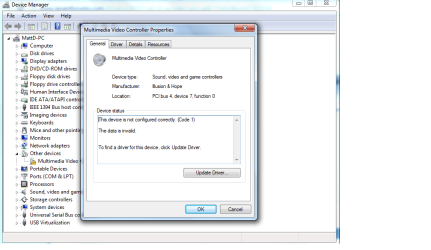
Now when I select to update the video driver for the unknown hardware, device manager says that it has determined that the driver is up to date.
 

My Computer My Computer

At a glance

Windows 7 Premium x64AMD Phenom II 4x8 GB DDR2
Computer Manufacturer/Model Number
Custom build
OS
Windows 7 Premium x64
CPU
AMD Phenom II 4x
Motherboard
ASUS M3A78
Memory
8 GB DDR2
Monitor(s) Displays
HP S2031
Here is another screenshot with the driver properties box.
 

Attachments

  • inf driver properties message.png
    inf driver properties message.png
    37.1 KB · Views: 38

My Computer My Computer

At a glance

Windows 7 Premium x64AMD Phenom II 4x8 GB DDR2
Computer Manufacturer/Model Number
Custom build
OS
Windows 7 Premium x64
CPU
AMD Phenom II 4x
Motherboard
ASUS M3A78
Memory
8 GB DDR2
Monitor(s) Displays
HP S2031
Do you still have the readmefirst from my driver package? It will show you how to do a clean uninstall. Remember to delete approriate driver file as well. If you uninstalled a different way. You might have to search for the inf that was made. Try to navigate C:\Windows\inf and look for the last oem "a number" .inf file and open to see if it is the driver inf. If there, delete that file and the pnf one as well.
 

My Computer My Computer

At a glance

Windows 10 x64 ProfessionalAMD FX 6300 Black EditionPatriot Viper 8gbx2 DDR3EVGA Nvidia GeForce GTX 680
Computer type
PC/Desktop
Computer Manufacturer/Model Number
Custom
OS
Windows 10 x64 Professional
CPU
AMD FX 6300 Black Edition
Motherboard
MSI 970a SLI Krait Edition
Memory
Patriot Viper 8gbx2 DDR3
Graphics Card(s)
EVGA Nvidia GeForce GTX 680
Sound Card
Realtek onboard
Monitor(s) Displays
LG, Dynex 24" LCD TV
Screen Resolution
2560x1400 1920x1080
Hard Drives
Western Digital Velociraptor 500 GB WD5000HHTZ
PSU
Corsair CX850M
Case
Azza Solano 1000
Cooling
Extra intake antec 120mm blue led fan, thermaltake frio sile
Keyboard
Thermaltake
Mouse
Saitek Desktop Gaming Mouse
Other Info
ATi TV Wonder Pro PCI tv tuner video capture card,
Roxio Game Capture HD Pro
It is best to uninstall driver, updating I noticed didn't work for me in these cases.
 

My Computer My Computer

At a glance

Windows 10 x64 ProfessionalAMD FX 6300 Black EditionPatriot Viper 8gbx2 DDR3EVGA Nvidia GeForce GTX 680
Computer type
PC/Desktop
Computer Manufacturer/Model Number
Custom
OS
Windows 10 x64 Professional
CPU
AMD FX 6300 Black Edition
Motherboard
MSI 970a SLI Krait Edition
Memory
Patriot Viper 8gbx2 DDR3
Graphics Card(s)
EVGA Nvidia GeForce GTX 680
Sound Card
Realtek onboard
Monitor(s) Displays
LG, Dynex 24" LCD TV
Screen Resolution
2560x1400 1920x1080
Hard Drives
Western Digital Velociraptor 500 GB WD5000HHTZ
PSU
Corsair CX850M
Case
Azza Solano 1000
Cooling
Extra intake antec 120mm blue led fan, thermaltake frio sile
Keyboard
Thermaltake
Mouse
Saitek Desktop Gaming Mouse
Other Info
ATi TV Wonder Pro PCI tv tuner video capture card,
Roxio Game Capture HD Pro
What I did was use the uninstall button under properties and refreshed the screen. After refreshing the unknown hardware was gone. I then selected to scan for hardware changes and it found the unknown hardware. That is when I attempted to use the update option but this time instead of it saying that the driver wasn't right, it just told me that the driver was up to date.
 

My Computer My Computer

At a glance

Windows 7 Premium x64AMD Phenom II 4x8 GB DDR2
Computer Manufacturer/Model Number
Custom build
OS
Windows 7 Premium x64
CPU
AMD Phenom II 4x
Motherboard
ASUS M3A78
Memory
8 GB DDR2
Monitor(s) Displays
HP S2031
Here is from my readme file.

Uninstall of driver:

Go to device manager, highlight the entry where the card is, right click and click uninstall, check the "delete the driver software for this device" and click ok. Then delete the driver sys file from windows/system32/drivers.

If you didn't do the method above, it is probably still looking at the old inf file and driver. Those must be deleted to start a new install.
 

My Computer My Computer

At a glance

Windows 10 x64 ProfessionalAMD FX 6300 Black EditionPatriot Viper 8gbx2 DDR3EVGA Nvidia GeForce GTX 680
Computer type
PC/Desktop
Computer Manufacturer/Model Number
Custom
OS
Windows 10 x64 Professional
CPU
AMD FX 6300 Black Edition
Motherboard
MSI 970a SLI Krait Edition
Memory
Patriot Viper 8gbx2 DDR3
Graphics Card(s)
EVGA Nvidia GeForce GTX 680
Sound Card
Realtek onboard
Monitor(s) Displays
LG, Dynex 24" LCD TV
Screen Resolution
2560x1400 1920x1080
Hard Drives
Western Digital Velociraptor 500 GB WD5000HHTZ
PSU
Corsair CX850M
Case
Azza Solano 1000
Cooling
Extra intake antec 120mm blue led fan, thermaltake frio sile
Keyboard
Thermaltake
Mouse
Saitek Desktop Gaming Mouse
Other Info
ATi TV Wonder Pro PCI tv tuner video capture card,
Roxio Game Capture HD Pro
ok I did what you said and uninstalled the driver in device manager with the box below checked and found the bt878.sys file in the drivers folder in windows\system32\drivers and deleted it. I then refreshed the screen by scanning for hardware changes in device manager and it relocated the hardware. I then went in and selected to update driver and it gave me the same message again about the driver being up to date. I went back into the drivers folder and found that it recreated the file there. I repeated myself again and now I am going to reboot the computer to see if it stays gone before I select "scan for hardware changes". I do that because I don't know any way to install the hardware other then this way.
 

My Computer My Computer

At a glance

Windows 7 Premium x64AMD Phenom II 4x8 GB DDR2
Computer Manufacturer/Model Number
Custom build
OS
Windows 7 Premium x64
CPU
AMD Phenom II 4x
Motherboard
ASUS M3A78
Memory
8 GB DDR2
Monitor(s) Displays
HP S2031
You'll have to find the oem .inf file that needs to be deleted. It is probably the last one in the list. That will allow you to install driver. Also it is best not to scan for hardware changes in this case. I find that is better to install by manually by looking for the approriate inf file.
 

My Computer My Computer

At a glance

Windows 10 x64 ProfessionalAMD FX 6300 Black EditionPatriot Viper 8gbx2 DDR3EVGA Nvidia GeForce GTX 680
Computer type
PC/Desktop
Computer Manufacturer/Model Number
Custom
OS
Windows 10 x64 Professional
CPU
AMD FX 6300 Black Edition
Motherboard
MSI 970a SLI Krait Edition
Memory
Patriot Viper 8gbx2 DDR3
Graphics Card(s)
EVGA Nvidia GeForce GTX 680
Sound Card
Realtek onboard
Monitor(s) Displays
LG, Dynex 24" LCD TV
Screen Resolution
2560x1400 1920x1080
Hard Drives
Western Digital Velociraptor 500 GB WD5000HHTZ
PSU
Corsair CX850M
Case
Azza Solano 1000
Cooling
Extra intake antec 120mm blue led fan, thermaltake frio sile
Keyboard
Thermaltake
Mouse
Saitek Desktop Gaming Mouse
Other Info
ATi TV Wonder Pro PCI tv tuner video capture card,
Roxio Game Capture HD Pro
How do you run the .inf file? If I select it directly, it opens notepad. There use to be a "install hardware" icon in windows XP but I don't see that in windows 7. I'm still trying to figure 7 out.
 

My Computer My Computer

At a glance

Windows 7 Premium x64AMD Phenom II 4x8 GB DDR2
Computer Manufacturer/Model Number
Custom build
OS
Windows 7 Premium x64
CPU
AMD Phenom II 4x
Motherboard
ASUS M3A78
Memory
8 GB DDR2
Monitor(s) Displays
HP S2031
Also, what do you mean by oem? Are you referring to the driver that you linked for me to download?
 

My Computer My Computer

At a glance

Windows 7 Premium x64AMD Phenom II 4x8 GB DDR2
Computer Manufacturer/Model Number
Custom build
OS
Windows 7 Premium x64
CPU
AMD Phenom II 4x
Motherboard
ASUS M3A78
Memory
8 GB DDR2
Monitor(s) Displays
HP S2031
Inf file can be only used to install driver files. That is right when it opens in notepad. From my readme file.

To install this driver package, make sure you are in "disable driver signature enforcement mode". Just go to device manager (right click computer in the start menu or right click on my computer on the desktop, left click properties, left click device manager, ok the user account control (if you have it enabled), (you might have to be adminstrator to install the driver as well) and on the device where it says "multimedia video controller", right click that, left click "update driver software", left click "Browse my computer for driver software", left click "Browse" and navigate to directory where the driver package is, press ok, and left click next, windows will install it, if a windows security box pops up just click "install anyways". Press close after it says sucessfully installed.

It should only display the inf file and basically reads the file and installs the .sys file in the appropiate place.
 

My Computer My Computer

At a glance

Windows 10 x64 ProfessionalAMD FX 6300 Black EditionPatriot Viper 8gbx2 DDR3EVGA Nvidia GeForce GTX 680
Computer type
PC/Desktop
Computer Manufacturer/Model Number
Custom
OS
Windows 10 x64 Professional
CPU
AMD FX 6300 Black Edition
Motherboard
MSI 970a SLI Krait Edition
Memory
Patriot Viper 8gbx2 DDR3
Graphics Card(s)
EVGA Nvidia GeForce GTX 680
Sound Card
Realtek onboard
Monitor(s) Displays
LG, Dynex 24" LCD TV
Screen Resolution
2560x1400 1920x1080
Hard Drives
Western Digital Velociraptor 500 GB WD5000HHTZ
PSU
Corsair CX850M
Case
Azza Solano 1000
Cooling
Extra intake antec 120mm blue led fan, thermaltake frio sile
Keyboard
Thermaltake
Mouse
Saitek Desktop Gaming Mouse
Other Info
ATi TV Wonder Pro PCI tv tuner video capture card,
Roxio Game Capture HD Pro
ok, I'm going to have to reboot the computer again in order to disable the driver signature enforcement mode. I didn't know that I would have to do this with the other drivers that you linked to me. I figured that it only applied to your drivers.
 

My Computer My Computer

At a glance

Windows 7 Premium x64AMD Phenom II 4x8 GB DDR2
Computer Manufacturer/Model Number
Custom build
OS
Windows 7 Premium x64
CPU
AMD Phenom II 4x
Motherboard
ASUS M3A78
Memory
8 GB DDR2
Monitor(s) Displays
HP S2031
Back
Top