Attempting to install W7 on Dell XPS

WVMontani

New member
Local time
7:38 AM
Messages
6
My wife purchased a new Dell XPS which came with Windows 10 Home Edition. She doesn't like W10 so I'm attempting to install W7-64bit Professional.

I can boot from the W7 CD OK. It does copying files with with the white bar, then at the first screen where you select the language, etc. the installation appears to freeze; the mouse cursor disappears and the keyboard does not work either.

I read something about having to change some BIOS setting to do like a Legacy Boot and to turn off Safe Boot, but so far it does not work for me. Maybe I'm not setting the right combination of settings.

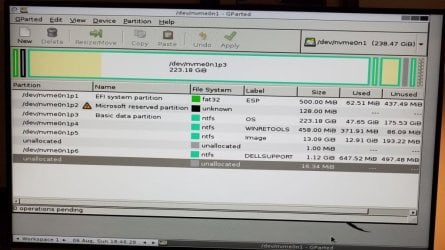
Also, the Dell factory partitions are still on the SSD C:\ drive but I don't know how to reformat/repartition.

Any thoughts? Thanks!
 

My Computer My Computer

At a glance

Windows 7 64
Computer type
PC/Desktop
OS
Windows 7 64
Welcome to the forum. Can you post a screenshot from disk manager showing all the partitions as there are a few option and we need to know the disk layout as it may be gpt or mbr disk
 

My Computer My Computer

At a glance

win 8 32 bit
Computer type
PC/Desktop
OS
win 8 32 bit
Welcome to the forum. Can you post a screenshot from disk manager showing all the partitions as there are a few option and we need to know the disk layout as it may be gpt or mbr disk

Well, that's a problem. I can't run Disk Manager because there is no working OS on the hard drive.

Right now I am burning an Ubuntu CD and I downloaded an app called GParted which I will try to use to look at the partitions.

Stay tuned.
 

My Computer My Computer

At a glance

Windows 7 64
Computer type
PC/Desktop
OS
Windows 7 64

My Computers My Computers

  • At a glance

    7 X64i5 84002x8gb 3200mhz
    Computer type
    PC/Desktop
    OS
    7 X64
    CPU
    i5 8400
    Motherboard
    gigabyte b365m ds3h
    Memory
    2x8gb 3200mhz
    Hard Drives
    various
    PSU
    pure power 11 400w cm
    Case
    Coolermaster
    Cooling
    cryorig m9i
  • At a glance

    7x64g54008gb ddr4 2400
    Computer type
    PC/Desktop
    OS
    7x64
    CPU
    g5400
    Motherboard
    ga b365m ds3h
    Memory
    8gb ddr4 2400
    PSU
    xfx pro 450w
Attached is the partition listings using that utility GParted.
 

Attachments

  • 20170806_194628.jpg
    20170806_194628.jpg
    74 KB · Views: 0

My Computer My Computer

At a glance

Windows 7 64
Computer type
PC/Desktop
OS
Windows 7 64
My suggestion is to create the factory recover disk as you still have the recovery partitions.
Even better is to do a factory recover. Once you have Win 10 back, do a image of the entire disk and save it on an external disk.
You can launch the recovery from BIOS.
Use Macrium Software | Your Image is Everything.

You have a M.2 nvme drive. Do you have another drive?
The installation seems to freeze because you don't have USB3.x.
Win 7 installation disk doesn't have USB3.x and nvme drivers. You must add them to the installation disk.
So fist you have to find out the brand and model of the M.2 nvme drive so you can get the drivers.
Read my tutorial Create a Windows 7 USB flash installation with new drives for new MB's - Windows 7 Help Forums

SIW2 has recently helped to install win 7 on a Dell XPS
 

My Computers My Computers

  • At a glance

    Windows 7 HP 64i5 6600K - 800MHz to 4200MHz4+4G GSkill DDR4 3000IG - Intel 530
    Computer type
    PC/Desktop
    Computer Manufacturer/Model Number
    custom build
    OS
    Windows 7 HP 64
    CPU
    i5 6600K - 800MHz to 4200MHz
    Motherboard
    GA-Z170-HD3P
    Memory
    4+4G GSkill DDR4 3000
    Graphics Card(s)
    IG - Intel 530
    Monitor(s) Displays
    Samsung 226BW
    Screen Resolution
    1680x1050
    Hard Drives
    (1) -1 SM951 – 128GB M.2 AHCI PCIe SSD drive for Windows 7 and Lubuntu
    (2) -1 WD SATA 3 - 1T for Data
    (3) -1 WD SATA 3 - 1T for backup
    PSU
    Thermaltake 450W TR2 gold
    Keyboard
    Old and good Chicony mechanical keyboard
    Mouse
    Logitech mX performance - 9 buttons (had to disable some)
    Internet Speed
    500Mb/s
    Browser
    Firefox 64
    Other Info
    TinyWall firewall
  • At a glance

    Windows 7 Proi7-4500U 800MHz to 3.0GHz(4+4)G DDR3 1600IG intel 4400 + NVIDIA GeForce GT 745M
    Computer type
    Laptop
    System Manufacturer/Model Number
    Asus Q550LF
    OS
    Windows 7 Pro
    CPU
    i7-4500U 800MHz to 3.0GHz
    Motherboard
    Asus Q550LF
    Memory
    (4+4)G DDR3 1600
    Graphics Card(s)
    IG intel 4400 + NVIDIA GeForce GT 745M
    Sound Card
    Realtek
    Monitor(s) Displays
    LG Display LP156WF4-SPH1
    Screen Resolution
    1920 x 1080
    Hard Drives
    BX500 120G SSD for Windows and programs +
    1T HDD for data
    Internet Speed
    500 Mb/s
    Browser
    Firefox
    Other Info
    TinyWall firewall
My suggestion is to create the factory recover disk as you still have the recovery partitions.
Even better is to do a factory recover. Once you have Win 10 back, do a image of the entire disk and save it on an external disk.
You can launch the recovery from BIOS.
Use Macrium Software | Your Image is Everything.

You have a M.2 nvme drive. Do you have another drive?
The installation seems to freeze because you don't have USB3.x.
Win 7 installation disk doesn't have USB3.x and nvme drivers. You must add them to the installation disk.
So fist you have to find out the brand and model of the M.2 nvme drive so you can get the drivers.
Read my tutorial Create a Windows 7 USB flash installation with new drives for new MB's - Windows 7 Help Forums

SIW2 has recently helped to install win 7 on a Dell XPS

Wow! Sounds like some of this is a little out of my league.

Why can't I just delete the existing partitions and create one big partition?

Suppose I replace the drive and start from scratch?
 

My Computer My Computer

At a glance

Windows 7 64
Computer type
PC/Desktop
OS
Windows 7 64
You should return it to the original Win 10 configuration - use the recovery partition as previously noted. As its new, if a problem develops Dell support may (and from experience working the Dell forums on some problems likely will) not do warranty support if it has something other than Win 10 installed on it. If you want to (try) run Win 7, install a different drive and install Win 7 (iffy if you can get all the hardware devices working) on the new drive. Then if you ever need warranty support you can swap the drives back to the Win 10, for Dell warranty support.

Another potential issue. If it came with an M.2 drive there may not be hardware (cabling and holder) to install a hard drive or full size SSD. Only option in that case is another M.2 drive. I have that exact problem on a new Dell Inspiron 15 (5577) that I just got. It came with a 256GB M.2 drive (a Sandisk X400 M.2 2280). As I will be using this for my recording studio I need a larger drive, but as it came from the factory with the M.2 SSD as standard for this model, the cabling (SATA and power) for a hard drive or full size SSD are not there. My option is to install a larger M.2 2280 drive.
 

My Computer My Computer

At a glance

Windows 10 64 bitIntel i7 6700K16GB Corsair DominatorIntel CPU Graphics
Computer type
PC/Desktop
Computer Manufacturer/Model Number
My Own Build
OS
Windows 10 64 bit
CPU
Intel i7 6700K
Motherboard
ASUS ROG Maximus VIII Hero
Memory
16GB Corsair Dominator
Graphics Card(s)
Intel CPU Graphics
Sound Card
RealTek
Monitor(s) Displays
27" Dell S2719dgf
Screen Resolution
2560X1440
Hard Drives
1 TB Samsung 850 EVO SSD for Win 10 Pro
500GB Samsung 850 EVO SSD for Win 10 Insider
2 TB drive for backup
PSU
EVGA Supernova 750G2
Case
BeQuiet Silent Base 600
Cooling
Deepcool Captain 120EX
Keyboard
Microsoft Wireless 2000
Mouse
Microsoft wireless
Internet Speed
100 MB/sec (Cable)
Antivirus
Microsoft Defender and Malwarebytes
Browser
Edge/Firefox
Other Info
Cakewalk (Sonar) by BandLab and Studio One 4.1 Pro recording studio software. MOTU 896Mk3 Hybrid recording interface, Frontier Tranzport wireless control unit, Behringer X-Touch Control Surface.
Five USB connected optical drives for CD Audio production using Nero BurningROM
So the bottom line is I need to create a bootable USB drive and copy the Windows 7 installation files from the CD to that USB drive, and copy USB3 drivers as well. Correct?
 

My Computer My Computer

At a glance

Windows 7 64
Computer type
PC/Desktop
OS
Windows 7 64
What we are telling you is that installing Win 7 on it isn't an easy task.
- Does the XPS came with only the M.2 drive or it has a HDD?
- You should, as I wrote on post #6 and Fireberd also suggested, restore win 10 (factory restore) and do a M.2 disk Image on an external disk. If something goes wrong, you can restore as it came from Dell.
- To create a Win 7 installation disk for a M.2 nvme drive isn't a simple task. Read my tutorial.
 

My Computers My Computers

  • At a glance

    Windows 7 HP 64i5 6600K - 800MHz to 4200MHz4+4G GSkill DDR4 3000IG - Intel 530
    Computer type
    PC/Desktop
    Computer Manufacturer/Model Number
    custom build
    OS
    Windows 7 HP 64
    CPU
    i5 6600K - 800MHz to 4200MHz
    Motherboard
    GA-Z170-HD3P
    Memory
    4+4G GSkill DDR4 3000
    Graphics Card(s)
    IG - Intel 530
    Monitor(s) Displays
    Samsung 226BW
    Screen Resolution
    1680x1050
    Hard Drives
    (1) -1 SM951 – 128GB M.2 AHCI PCIe SSD drive for Windows 7 and Lubuntu
    (2) -1 WD SATA 3 - 1T for Data
    (3) -1 WD SATA 3 - 1T for backup
    PSU
    Thermaltake 450W TR2 gold
    Keyboard
    Old and good Chicony mechanical keyboard
    Mouse
    Logitech mX performance - 9 buttons (had to disable some)
    Internet Speed
    500Mb/s
    Browser
    Firefox 64
    Other Info
    TinyWall firewall
  • At a glance

    Windows 7 Proi7-4500U 800MHz to 3.0GHz(4+4)G DDR3 1600IG intel 4400 + NVIDIA GeForce GT 745M
    Computer type
    Laptop
    System Manufacturer/Model Number
    Asus Q550LF
    OS
    Windows 7 Pro
    CPU
    i7-4500U 800MHz to 3.0GHz
    Motherboard
    Asus Q550LF
    Memory
    (4+4)G DDR3 1600
    Graphics Card(s)
    IG intel 4400 + NVIDIA GeForce GT 745M
    Sound Card
    Realtek
    Monitor(s) Displays
    LG Display LP156WF4-SPH1
    Screen Resolution
    1920 x 1080
    Hard Drives
    BX500 120G SSD for Windows and programs +
    1T HDD for data
    Internet Speed
    500 Mb/s
    Browser
    Firefox
    Other Info
    TinyWall firewall
What we are telling you is that installing Win 7 on it isn't an easy task.
- Does the XPS came with only the M.2 drive or it has a HDD?
- You should, as I wrote on post #6 and Fireberd also suggested, restore win 10 (factory restore) and do a M.2 disk Image on an external disk. If something goes wrong, you can restore as it came from Dell.
- To create a Win 7 installation disk for a M.2 nvme drive isn't a simple task. Read my tutorial.

Thanks.
 

My Computer My Computer

At a glance

Windows 7 64
Computer type
PC/Desktop
OS
Windows 7 64
The Dell backup reinstall drive (Flash Drive) procedure that came with my new Inspiron Laptop with an M.2 drive allows restoring to the M.2 drive if needed.
 

My Computer My Computer

At a glance

Windows 10 64 bitIntel i7 6700K16GB Corsair DominatorIntel CPU Graphics
Computer type
PC/Desktop
Computer Manufacturer/Model Number
My Own Build
OS
Windows 10 64 bit
CPU
Intel i7 6700K
Motherboard
ASUS ROG Maximus VIII Hero
Memory
16GB Corsair Dominator
Graphics Card(s)
Intel CPU Graphics
Sound Card
RealTek
Monitor(s) Displays
27" Dell S2719dgf
Screen Resolution
2560X1440
Hard Drives
1 TB Samsung 850 EVO SSD for Win 10 Pro
500GB Samsung 850 EVO SSD for Win 10 Insider
2 TB drive for backup
PSU
EVGA Supernova 750G2
Case
BeQuiet Silent Base 600
Cooling
Deepcool Captain 120EX
Keyboard
Microsoft Wireless 2000
Mouse
Microsoft wireless
Internet Speed
100 MB/sec (Cable)
Antivirus
Microsoft Defender and Malwarebytes
Browser
Edge/Firefox
Other Info
Cakewalk (Sonar) by BandLab and Studio One 4.1 Pro recording studio software. MOTU 896Mk3 Hybrid recording interface, Frontier Tranzport wireless control unit, Behringer X-Touch Control Surface.
Five USB connected optical drives for CD Audio production using Nero BurningROM

My Computers My Computers

  • At a glance

    7 X64i5 84002x8gb 3200mhz
    Computer type
    PC/Desktop
    OS
    7 X64
    CPU
    i5 8400
    Motherboard
    gigabyte b365m ds3h
    Memory
    2x8gb 3200mhz
    Hard Drives
    various
    PSU
    pure power 11 400w cm
    Case
    Coolermaster
    Cooling
    cryorig m9i
  • At a glance

    7x64g54008gb ddr4 2400
    Computer type
    PC/Desktop
    OS
    7x64
    CPU
    g5400
    Motherboard
    ga b365m ds3h
    Memory
    8gb ddr4 2400
    PSU
    xfx pro 450w
Back
Top