Audacity: Recording directly from laptop

Raith

New member
Local time
7:04 PM
Messages
23
I just downloaded the latest version of Audacity, and I am running Windows 7. I want to be able to record sound directly out of the computer, not the external. There's a catch, I have a built-in, internal mic, if I disable the mic, I cannot record as it is my recording device. Anyone have a tutorial on how to go about this? I cannot find it in Google, or someone offer advice? Thanks.
 

My Computer My Computer

OS
Windows 7 Home Premium
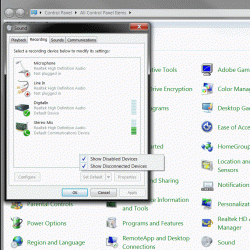
Control Panel .. Sound >> Recording Options >> Show Disabled devices .. Enable Stereo Mix.

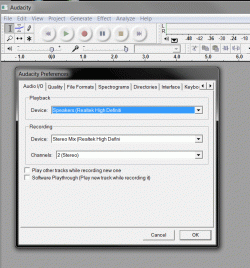
Audacity >> Edit >> Preferences >> Set Stereo mix as input ..

Some of this may depend on your Sound device and drivers .
 

Attachments

  • Clip1.gif
    Clip1.gif
    93.1 KB · Views: 405
  • Clip2.gif
    Clip2.gif
    113 KB · Views: 341

My Computer My Computer

Computer Manufacturer/Model Number
HP d4996t (upgraded)
OS
XP MCE .... XP Pro 64 .... W7 U x64
CPU
E6750, 2.67GHz C2D
Memory
4GB, PC2 6400
Graphics Card(s)
GeForce 9400GT
Monitor(s) Displays
Twin Samsung 2443BWT
Screen Resolution
1920x1200
Hard Drives
Many .. 3 Installed
PSU
460W
Internet Speed
Cable
Thanks for the help but I don't have anything that does "enable stereo mix." I have provided screenshots so you're able to help. My microphone is internal, no way to shut it out. When I am recording, it seems as though I am recording FROM the mic itself.

r1k5zk.jpg


6yjj9x.jpg
 

My Computer My Computer

OS
Windows 7 Home Premium
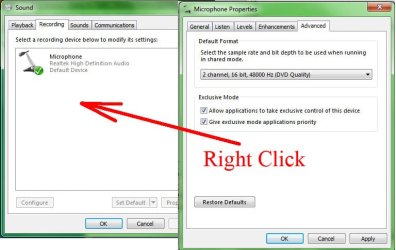
Right Click as shown ... and see if you can enable Hidden devices .. that should show Stereo mix.

You might want to check for a sound driver update.
 

Attachments

  • Clip.jpg
    Clip.jpg
    76.2 KB · Views: 197

My Computer My Computer

Computer Manufacturer/Model Number
HP d4996t (upgraded)
OS
XP MCE .... XP Pro 64 .... W7 U x64
CPU
E6750, 2.67GHz C2D
Memory
4GB, PC2 6400
Graphics Card(s)
GeForce 9400GT
Monitor(s) Displays
Twin Samsung 2443BWT
Screen Resolution
1920x1200
Hard Drives
Many .. 3 Installed
PSU
460W
Internet Speed
Cable
Hi, thanks. I am not a novice but still cannot figure it out. I have set everything to shown already as shown in screenshot:

14toh03.jpg


I downloaded the sound drivers already, updated it. This is all that's available to me at the moment:
Sony eSupport - VGN-CS110E - Software Updates & Drivers
 

My Computer My Computer

OS
Windows 7 Home Premium
Last I heard .. (in Vista) .. M$ has removed the sound mapper.
So far, I've been lucky, But I've heard that many can not setup their audio to record what the computer is playing.
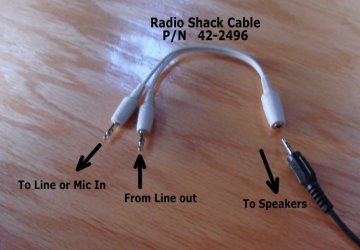
They have to Wire Around .. the Line Out > back to Line In .. The adapter is attached.
But, I'm confused .. You don't even show a "Line In" as a recording source.

Is this a Laptop ???

Which version of Audacity did you get ???
 

Attachments

  • Split1.jpg
    Split1.jpg
    43.5 KB · Views: 79

My Computer My Computer

Computer Manufacturer/Model Number
HP d4996t (upgraded)
OS
XP MCE .... XP Pro 64 .... W7 U x64
CPU
E6750, 2.67GHz C2D
Memory
4GB, PC2 6400
Graphics Card(s)
GeForce 9400GT
Monitor(s) Displays
Twin Samsung 2443BWT
Screen Resolution
1920x1200
Hard Drives
Many .. 3 Installed
PSU
460W
Internet Speed
Cable
Yes sir, this is a laptop. The version I got is:

Windows 98/ME/2000/XP/Vista: Audacity 1.2.6 installer (.exe file, 2.1 MB) - The latest version of the free Audacity audio editor. Audacity: Windows

My other computer, which is an XP (desktoP), using another version of Audacity works fine, I am not sure what I can do with this. I mean, all it's doing right now, when I record using Audacity is recording from the mic, I can record internally because it's playing through the speaking, HOWEVER, I am recording the external stuff as well. I know about the wire, that's one resort I do not want to go to since my needs are just basically recording some kind of internal audio, it's fine though. I'll just sit in a quiet place and record what I need internally when it comes down to that.

Thanks again.
 

My Computer My Computer

OS
Windows 7 Home Premium
Thanks for the guide noyb. I upgraded this week had the same problem yesterday.

Your solution worked perfectly!

Many thanks.

:)
 

My Computer My Computer

OS
win7
Back
Top