Audacity - Unable to record

Tiber

New member
Local time
10:08 AM
Messages
7
Since I have started using Windows 7 I can no longer record radio shows, etc from my PC using Audacity, (or anything else for that matter!)

Previously this was a simple matter of opening Audacity, making sure the correct input was being used and pressing the record button.

When I right click the speaker icon in the taskbar and open "Recording Devices" I see two Microphones and one CD Audio, nothing else.

I have read, elsewhere, conflicting reports about Microsoft bowing to pressure and making direct recording no longer possible. Is this the problem or is it something else?

Audacity is my application of choice for recording and editing and I would like to stick with it if I can.

Any advice/ideas/comments?


My Computer

Computer Manufacturer/Model Number
Compaq Presario C350EA
OS
Windows 7 Ultimate
CPU
[email protected]
Are you using an on-board sound card? It might be your hardware. I have an external m-audio sound card and audacity with no problems recording live or anything else.
 

My Computer

Computer Manufacturer/Model Number
Custom
OS
W7
CPU
Q6600
Memory
4Gb
Graphics Card(s)
2x XFX 9800 GTX+ SLI
Sound Card
M-Audio Firewire 410
Monitor(s) Displays
2x Samsung 226BW
Screen Resolution
1680 x 1050
Hard Drives
4 x 1Tb
PSU
Silverstone 1000w
Case
Antec p180
Cooling
Farts
Keyboard
Logitech
Mouse
MX518
Internet Speed
8Mb
Other Info
I have a mole on my bum
Are you using an on-board sound card? It might be your hardware. I have an external m-audio sound card and audacity with no problems recording live or anything else.

Thanks. That's interesting. I am using the soundcard installed on my laptop but the problem only arose with the installation of Windows 7.

At least I now know that Audacity should be able to record properly.
 

My Computer

Computer Manufacturer/Model Number
Compaq Presario C350EA
OS
Windows 7 Ultimate
CPU
[email protected]
I believe you may be the victim of the default Driver problem,

It is unfortunately not unknown for the out of box drivers for hardware to be without some functionality that is available with the customized drivers provided by the manufacturers.

This is often the case with sound cards, (and on-board chips), where the basic driver supplied to Microsoft for inclusion in the box or on Windows update, is without the "what you hear" type of recording input.

The only thing I can suggest is that you search for a driver from the motherboard manufacturer or chip supplier that provides this functionality. This may actually mean going to a Vista driver rather than the Windows 7 one as most manufacturers will not be issuing Windows 7 drivers directly until RTM if at all. (we all remember the Creative fiasco with Vista :mad:)
 

My Computers

System One System Two

  • Computer type
    PC/Desktop
    Computer Manufacturer/Model Number
    ChillBlast - Custom to my design
    OS
    Windows 11 Pro x64 [Latest Release and Release Preview]
    CPU
    Ryzen 9 5950X, 3.8 - 5.2 MHz
    Motherboard
    Asus Prime X570-Pro
    Memory
    64GB [2 x 32GB] DDR4 3200MHz
    Graphics Card(s)
    4GB NVIDIA GEFORCE GTX 1650 Ti
    Sound Card
    On-board SPDIF to 5.1 System + HDMI [5.1 system]
    Monitor(s) Displays
    32" UHD 32 Bit HDR Monitor + 43" UHD 4K 32Bit HDR TV
    Screen Resolution
    2 x 3840 x 2160 @60Hz
    Hard Drives
    1TB M2 SSD OS, 500GB Fast Access SSD, 2 x 8TB Data + Various Externals from 1TB to 4TB, 10TB NAS
    PSU
    NZXT C750 80 PLUS Gold 750W Modular PSU
    Case
    Workstation Case [Matt Black]
    Cooling
    NZXT Kraken X63 280mm CPU Cooler +2x Quiet Case fans
    Keyboard
    Logitech Wireless MX Keys & K400 + others
    Mouse
    Logitech Wireless MX Master 3S
    Internet Speed
    920 MB Down 50 MB Up
    Antivirus
    BitDefender Total Security Pro
    Browser
    Chrome (always run latest Non-Beta)
    Other Info
    Also run ...
    Laptop - Quad 8GB - Windows 10 Pro x64
    Nexus 7 Android tablet x2
    Samsung 10.2" tablet
    Blackview TAB 8 4G Android Tablet c/w Keyboard
    Wacom Intuos Pro Medium Pen Pad
    Wacom Intuos Pro Small Pen Pad
    Wacom Expresskeys Remote
    Loopdeck+ Graphics Controller
    Shuttle Pro v2 Control
  • Computer type
    Laptop
    System Manufacturer/Model Number
    Dell XPS 17 10750H
    OS
    Windows 11 Pro x64 Latest RP
    CPU
    Intel I7 10750H 5.0GHz
    Motherboard
    Dell XPS
    Memory
    32GB [2x16GB] DDR4 2933 MHz
    Graphics Card(s)
    nVidia GTX1650Ti 4 GB GDDR6
    Sound Card
    Stock [Realtek] 4 Speaker
    Monitor(s) Displays
    17" IPS UHD+ Infinity Edge Touchscreen
    Screen Resolution
    3840 x 2400
    Hard Drives
    2TB M2 NVMe, 4TB External + various 500GB & 1TB External NVMe (also have access to spinner HDD from
    PSU
    Stock
    Case
    Stock XPS Aluminium & Carbon Fibre
    Cooling
    Stock - Active Fan Control
    Keyboard
    Backlit + Various Logitech
    Mouse
    Stock Track Pad + Logitech MX Trackball
    Internet Speed
    72 MB Down 18MB Up
    Browser
    Chrome
    Other Info
    Also run ...
    Laptop - Quad 8GB - Windows 10 Pro x64
    Nexus 7 Android tablet x2
    10.2" tablet
    Sony Z3 Android Smartphone
    Wacom Intuos Pro Medium Pen Pad
    Wacom Intuos Pro Small Pen Pad
    Wacom Expresskeys Remote
    Loopdeck+ Graphics Controller
    Shuttle Pro v2 Control Pad
    10TB NAS
Yeah i agree with barman. When i was testing 7 on my laptop a few weeks ago i had some major sound problems. I was lucky enough to get an update through windows 7 updates which made everything run hundreds. On top of that i also installed ASIO4ALL to get rid of latency and alot of 'clicks' and 'pops' with recording audio in cubase and midi reason. A bit off topic but yeah
 

My Computer

Computer Manufacturer/Model Number
Custom
OS
W7
CPU
Q6600
Memory
4Gb
Graphics Card(s)
2x XFX 9800 GTX+ SLI
Sound Card
M-Audio Firewire 410
Monitor(s) Displays
2x Samsung 226BW
Screen Resolution
1680 x 1050
Hard Drives
4 x 1Tb
PSU
Silverstone 1000w
Case
Antec p180
Cooling
Farts
Keyboard
Logitech
Mouse
MX518
Internet Speed
8Mb
Other Info
I have a mole on my bum
As I'm not really sure where to start looking for the relevant driver(s) and as everything worked just fine before I installed Windows 7, I may as well revert back to XP.
 

My Computer

Computer Manufacturer/Model Number
Compaq Presario C350EA
OS
Windows 7 Ultimate
CPU
[email protected]
There is a simple solution to this

Open Control Panel and click Sound
Click the Recording tab
In the white area right-click and tick Show Disabled Devices
Stereo Mix appears
Right-click and enable it
Restart Audacity
 

My Computer

OS
Windows 7
I tried this and when I check "Show Disabled Devices," I don't see Stereo Mix (see http://stevesideas-storage.s3.amazonaws.com/Capture.JPG) - what am I doing wrong?

There is a simple solution to this

Open Control Panel and click Sound
Click the Recording tab
In the white area right-click and tick Show Disabled Devices
Stereo Mix appears
Right-click and enable it
Restart Audacity
 

My Computer

Computer Manufacturer/Model Number
HP
OS
win 7 64, win 7 32
CPU
quad pentium
Memory
4mb
You're probably doing nothing wrong. I've since been unable to do this on another computer.
Hopefully the people who make Audacity will find a way.
 

My Computer

OS
Windows 7
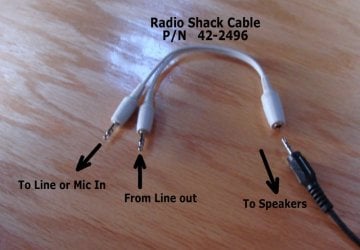
If your Laptop has a Line out (headphone) and a separate Line/Mic in ...
And you can record from Line/Mike in ... (I can't tell from the HP specs ???) ..

Then you should be able to wire around ( Line out >> Line in) ....
With one of These .. and record what you're playing...
Until you can find a working driver with Stereo mix.

You will Not be able to use the internal speakers to monitor the audio ...
They will probably be shut off when you plug into Headphone out.
 

Attachments

  • A Split1.jpg
    A Split1.jpg
    43.5 KB · Views: 61

My Computer

Computer Manufacturer/Model Number
HP d4996t (upgraded)
OS
XP MCE .... XP Pro 64 .... W7 U x64
CPU
E6750, 2.67GHz C2D
Memory
4GB, PC2 6400
Graphics Card(s)
GeForce 9400GT
Monitor(s) Displays
Twin Samsung 2443BWT
Screen Resolution
1920x1200
Hard Drives
Many .. 3 Installed
PSU
460W
Internet Speed
Cable
That's an interesting idea - my pc has a "Line-in," as well as a "Mic-in," and it has something called SPDIF out - I don't know if SPDIF will work for the "Line-out" function or not - of course, I also have a "Speaker" output, but I suspect the level would be much too high on that connection -

I think I have one of those Y-adapters around here somewhere, guess I need to dig through the boxes - thanks for the idea, maybe it'll work!

If your Laptop has a Line out (headphone) and a separate Line/Mic in ...
And you can record from Line/Mike in ... (I can't tell from the HP specs ???) ..

Then you should be able to wire around ( Line out >> Line in) ....
With one of These .. and record what you're playing...
Until you can find a working driver with Stereo mix.

You will Not be able to use the internal speakers to monitor the audio ...
They will probably be shut off when you plug into Headphone out.
 

My Computer

Computer Manufacturer/Model Number
HP
OS
win 7 64, win 7 32
CPU
quad pentium
Memory
4mb
Installing windows 7 probably overwrote or added some codecs that causes issues with Audacity. Try uninstalling your sound card drivers and reinstalling them. I've had to do this with other apps after installing Windows 7. Uninstall and re-install Audacity too
 
Last edited:

My Computer

OS
Windows 7 Premium
There is a simple solution to this

Open Control Panel and click Sound
Click the Recording tab
In the white area right-click and tick Show Disabled Devices
Stereo Mix appears
Right-click and enable it
Restart Audacity

Thanks Nood! This was the solution on my computer! :)
 

My Computer

OS
Windows 7 Home Premium 64bit
its not windows 7 fault

I have a Gateway NV 52 Laptop Vista / upgraded to windows 7 Conexant HD Stereo Driver. I also would like to use Audacity to record thur the on-board sound chip. There is no stereo mixer or multimedia controller. :cry:

I have tried using the speaker out and mic. That won't work. The solution I found was to download Freecorder :)

Freecorder 5 - Free Video Downloader
 

My Computer

Computer Manufacturer/Model Number
Gateway NV52 Laptop
OS
windows 7 x64
CPU
AMD Athlon 2.3
Memory
4 gb DDR2
Graphics Card(s)
ATi Radon
Sound Card
Conexant onboard sound chip
Monitor(s) Displays
15.6
Screen Resolution
16:9 HD LED LCD
Hard Drives
320 GB
Are you using an on-board sound card? It might be your hardware. I have an external m-audio sound card and audacity with no problems recording live or anything else.


well i am using my m-audio synchroscience conectiv card, however when i try to record any mix i make i just hear straigh feedback or static. i dont know what is going on. everyone tells me to set the sample rates but i still have no idea on how to do that and its been going on to 4 days trying to figure this out. can you explain to me what you did?
 

My Computer

OS
windows 7 32bit
I used to use Audacity on my older Win XP Pro laptop all the time to record radio shows but on my new Win 7 64 bit machine I was having all kinds of trouble (really low audio when played back, hissing, etc) when trying to record the same shows, until a few minutes ago. This is what I tried and it worked for me. I uninstalled it and when reinstalling I right clicked and selected the "Run as administrator" option. The playback volume still isn't perfect because I have to amplify it, but this setup is pretty close to what I was used to on my Win XP laptop. Hope it works for you guyss too.
 

My Computer

Computer Manufacturer/Model Number
HP Pavilion dv6
OS
Windows 7 Home Premium 64bit
I've got the Audacity SE and have tried the "show disabled" solution but "stereo mix" never appers as a choice. Help if anyone has an idea. Win 7 64
 

My Computer

Computer Manufacturer/Model Number
Dell
OS
Windows 7 Home Premium 64bit
CPU
2.4 Intel
Graphics Card(s)
Gforce on board
Sound Card
Creative Audigy
I had the same problem (missing "Stereo Mix" for recording w/Win 7, on-board RealTek sound) and fixed it, after much fiddling, by trying various driver versions until it showed up. Apparently the absence of "Stereo Mix" is purposeful and done as part of the DMCA fiasco.

On the off chance that you've got a RealTek setup, here's the driver version that shows "Stereo Mix" for recording (from Device Mangler):
Provider: Realtek Semiconductor Corp.
Date: 8/30/2011
Version: 6.0.1.6449
 

My Computer

Computer Manufacturer/Model Number
eMachines ET1831-7
OS
Windows 7 Ultimate
CPU
Pentium Dual-Core CPU E5400 @ 2.70GHz
Motherboard
EMCP73VT-PM
Memory
4096M
Graphics Card(s)
nVidia 8400GS
Sound Card
built-in Realtek
Monitor(s) Displays
Acer 20"
Screen Resolution
1680x1050
Hard Drives
Seagate ST3750528AS ATA 500G
Other Info
Dual-boot with Linux.
Hello, my 1st post on this great forum (have been reading a lot). Had to register just to tell the tale about my quest for w7 stereomix recording (never had any problems with xp recording).

This pc is a HP laptop, amd + ADI soundmax. All sound worked well, with either Soundmax or MS driver. First, figured out quickly that the stock MS driver had no stereomix, hidden or not. The Soundmax driver had it hidden, & no problem in getting it active and setting it to default. But still no recording luck, neither Audacity or any other recording programs got any signal, & the stereomix barmeter in control panel > sound > recording was there, but showing no signal.

After some mad reinstallation of drivers and all kinds of experiments and 150 reboots :cry: with no luck, when on the verge of reinstalling w7 I found the solution for this particular case: the modem (yes, telephone line) was disabled in bios, and had influence on parts of the audio system. Got a clue when I looked at the 'communications' in sound control ("When windows detects communication activity" > mute all > reduce volume etc). Enabling the modem and restart: Stereo mix alive and well ! Jez.

This may not be of help to anyone with different systems, but it shows how frustrating the setup of stereo recording can be in w7, and it seems like different pc's may need their own special solution. But, at least I can safely say that whatyouhear recording in w7 is possible and works, just a matter of solving riddles.
 

My Computer

Computer type
Laptop
Computer Manufacturer/Model Number
Dell \ Lenovo\ HP \ Toshiba
OS
W7, W8.1
Antivirus
MSE, Malwarebytes
Browser
FF
...I found the solution for this particular case: the modem (yes, telephone line) was disabled in bios, ...

I have no sound when the "Power" service isn't running. Does that make any sense?
 

My Computer

Computer Manufacturer/Model Number
eMachines ET1831-7
OS
Windows 7 Ultimate
CPU
Pentium Dual-Core CPU E5400 @ 2.70GHz
Motherboard
EMCP73VT-PM
Memory
4096M
Graphics Card(s)
nVidia 8400GS
Sound Card
built-in Realtek
Monitor(s) Displays
Acer 20"
Screen Resolution
1680x1050
Hard Drives
Seagate ST3750528AS ATA 500G
Other Info
Dual-boot with Linux.
Back
Top