Audio Honks with WinAmp/Firefox

compupix

New member
Local time
6:35 AM
Messages
14
When moving the mouse or scrolling a page within Firefox, Internet Explorer, or Word my audio honks (loud static) and the page and mouse momentarily locks up.
These are the applications that are open when this happens
* Firefox with multiple pages including CNN.com Live's video stream (sound on mute)
* WinAmp playing music from my hard drive
When these are open in addition to the above, the mouse locking up and honking noise happens in them too:
* Word
* Internet Explorer

Individually each of these applications works just fine.
I have plenty of RAM and plenty of processing power.
The system is behaving as if it is bumping up against some resource limit.
The CPU usage when this happens is about 15%
The memory is at about 30%.

System Description:
Windows 7 Home Premium
Dell Studio XPS 9000, Intel Core i7-920 processor (8MB L3 Cache 2.66GHz)
12GB DDR3 SDRAM at 1066MHz
Creative Soundblaster X-Fi Titanium

Aside from not having WinAmp playing while watching CNN.com Live, is there another solution?

Thanks,
Drew
 

My Computer My Computer

Computer Manufacturer/Model Number
Dell XPS-9000
OS
windows 7
CPU
Intel Core i7 920 2.67GHz
Graphics Card(s)
Nvidea
Sound Card
SoundBlaster
Monitor(s) Displays
Dell 23"
I see that rig has an Intel on-board sound chip, and an option for the Soundblaster card.

While it is possible to run both sound devices, you might try to disable the Intel sound chip in your device manager to see if that changes anything. If it does, then we can look at possible solutions to run both devices.
 

My Computer My Computer

Computer type
PC/Desktop
Computer Manufacturer/Model Number
Home Built - Jan 2013
OS
Windows 7 64 Bit Home Premium SP1
CPU
i7-3820
Motherboard
Asus P9X79-PRO - Bios 4608
Memory
GSkill F3-14900CL9Q - 16GB
Graphics Card(s)
EVGA GeForce GTX660 - Driver 352.86
Sound Card
On board Realtek ALC898
Monitor(s) Displays
Acer S271HL
Screen Resolution
1920 x 1080
Hard Drives
#1- Samsung 840 Pro Series
#2- Western Digital WD1002FAEX Sata3 Black
#3- Western Digital WD1002FAEX Sata3 Black
PSU
Corsair CMPSU-850TX-V2 - 850 watt (by Seasonic)
Case
Corsair Obsidian 550D
Cooling
Standard 3 120mm case fans, Cooler Master Hyper 212 EVO
Keyboard
MS KC-0405
Mouse
Intellimouse 5-button
Internet Speed
56 Mbits/Sec (on a good day)
Antivirus
Avast & Malwarebytes
Browser
Firefox
Other Info
Asus DVD - DRW-24B1ST 24X
Under Sound, video and game controllers, only Creative SB-X-Fi and my modem are listed.

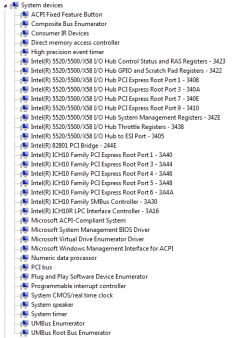
Attached is a list of all of the System Devices.

Thanks,
Drew
 

Attachments

  • Temp System Devices.PNG
    Temp System Devices.PNG
    12.4 KB · Views: 11

My Computer My Computer

Computer Manufacturer/Model Number
Dell XPS-9000
OS
windows 7
CPU
Intel Core i7 920 2.67GHz
Graphics Card(s)
Nvidea
Sound Card
SoundBlaster
Monitor(s) Displays
Dell 23"
So much for an easy fix. Most likely the good folks at Dell disabled the Intel sound chip in your BIOS.

My first guess was that conflicting device drivers were the cause. The freezing mouse is the clue.

You might check the settings for the sound card and the mouse. If you find that turning off a setting, or dialing down performance settings causes the problem to stop or diminish that would be valuable.

Be aware that there have been issues reported with Winamp and 64 bit versions of W7.
Windows 7 Compatibility for Winamp version 5: Nullsoft. Drivers, Updates, Downloads
I run Winamp Lite on my 64 bit system and experience annoyance glitches, but nothing like yours.

You might try using Windows Media Player for a while just to see if you can eliminate Winamp as a cause.
 

My Computer My Computer

Computer type
PC/Desktop
Computer Manufacturer/Model Number
Home Built - Jan 2013
OS
Windows 7 64 Bit Home Premium SP1
CPU
i7-3820
Motherboard
Asus P9X79-PRO - Bios 4608
Memory
GSkill F3-14900CL9Q - 16GB
Graphics Card(s)
EVGA GeForce GTX660 - Driver 352.86
Sound Card
On board Realtek ALC898
Monitor(s) Displays
Acer S271HL
Screen Resolution
1920 x 1080
Hard Drives
#1- Samsung 840 Pro Series
#2- Western Digital WD1002FAEX Sata3 Black
#3- Western Digital WD1002FAEX Sata3 Black
PSU
Corsair CMPSU-850TX-V2 - 850 watt (by Seasonic)
Case
Corsair Obsidian 550D
Cooling
Standard 3 120mm case fans, Cooler Master Hyper 212 EVO
Keyboard
MS KC-0405
Mouse
Intellimouse 5-button
Internet Speed
56 Mbits/Sec (on a good day)
Antivirus
Avast & Malwarebytes
Browser
Firefox
Other Info
Asus DVD - DRW-24B1ST 24X
The audio static (honking) and mouse lock-up occurs when moving the mouse, listening to Windows Media Player, and watching CNN.com live also.
I have my mouse speed and acceleration turned up to max. I'm going to try backing those settings down a little.
Thanks for all of your assistance.
 

My Computer My Computer

Computer Manufacturer/Model Number
Dell XPS-9000
OS
windows 7
CPU
Intel Core i7 920 2.67GHz
Graphics Card(s)
Nvidea
Sound Card
SoundBlaster
Monitor(s) Displays
Dell 23"
Backing off the mouse settings didn't help.
 

My Computer My Computer

Computer Manufacturer/Model Number
Dell XPS-9000
OS
windows 7
CPU
Intel Core i7 920 2.67GHz
Graphics Card(s)
Nvidea
Sound Card
SoundBlaster
Monitor(s) Displays
Dell 23"
I'm fixating on the drivers as a possible cause. But I'm only guessing now. Your problem is not typical.

You may try reinstalling the audio drivers clean (completely uninstalling them first, then installing them fresh). You could also check the Dell or Creative website to see if there are updated drivers for your card (I would look a Creative myself).

You could also uninstall the mouse drivers and reboot and have those reinstalled also after the new sound drivers are done.

Also, you could completely uninstall and reinstall Winamp and Firefox. The idea here is that your symptoms could be cause by a bad or corrupted installation of any of these devices and programs. By cleanly reinstalling them you would be eliminating that prospect as the cause.

What sounds like is happening is that the signal from the mouse is "bleeding" into the signal from the audio and/or vice versa. That could also be caused by a defective component, or the southbridge on the motherboard itself. Let's hope it is just a bad driver.
 

My Computer My Computer

Computer type
PC/Desktop
Computer Manufacturer/Model Number
Home Built - Jan 2013
OS
Windows 7 64 Bit Home Premium SP1
CPU
i7-3820
Motherboard
Asus P9X79-PRO - Bios 4608
Memory
GSkill F3-14900CL9Q - 16GB
Graphics Card(s)
EVGA GeForce GTX660 - Driver 352.86
Sound Card
On board Realtek ALC898
Monitor(s) Displays
Acer S271HL
Screen Resolution
1920 x 1080
Hard Drives
#1- Samsung 840 Pro Series
#2- Western Digital WD1002FAEX Sata3 Black
#3- Western Digital WD1002FAEX Sata3 Black
PSU
Corsair CMPSU-850TX-V2 - 850 watt (by Seasonic)
Case
Corsair Obsidian 550D
Cooling
Standard 3 120mm case fans, Cooler Master Hyper 212 EVO
Keyboard
MS KC-0405
Mouse
Intellimouse 5-button
Internet Speed
56 Mbits/Sec (on a good day)
Antivirus
Avast & Malwarebytes
Browser
Firefox
Other Info
Asus DVD - DRW-24B1ST 24X
I've uninstalled (completely) and reinstalled the sound drivers, with the latest version.
I've uninstalled (completely) and reinstalled the video drivers, with the version recommended by Dell.
The problem continues... now, I don't even have to launch the CNN.com Live player to get the honk.
Next up:
Trying a different mouse, the mouse drivers, and trying to surf only using Internet Explorer (ugh.)
 

My Computer My Computer

Computer Manufacturer/Model Number
Dell XPS-9000
OS
windows 7
CPU
Intel Core i7 920 2.67GHz
Graphics Card(s)
Nvidea
Sound Card
SoundBlaster
Monitor(s) Displays
Dell 23"
Some more ideas:

Check your mouse and speaker wires and separate them as far as possible. Poorly shielded cables can cause signal bleed.

Mute your speakers in Windows but turn up the volume on your speakers. Do you still hear anything?

Mute your speakers: (Is the sound coming from the motherboard speaker?)

Mute your mic in sound control and test.

Turn down all the volume levels to 50% on all devices: Line in, master volume, stereo mix, etc. and test.

Some people say that installing a sound card right next to the video card can cause interference, and separating them made the sounds go away. But I haven't heard that one in years

If this only occurs using Firefox, reinstall Firefox.

Also see here: Ground loop (electricity) - Wikipedia, the free encyclopedia.
Double check all your connections and re-seat the cards.
 

My Computer My Computer

Computer type
PC/Desktop
Computer Manufacturer/Model Number
Home Built - Jan 2013
OS
Windows 7 64 Bit Home Premium SP1
CPU
i7-3820
Motherboard
Asus P9X79-PRO - Bios 4608
Memory
GSkill F3-14900CL9Q - 16GB
Graphics Card(s)
EVGA GeForce GTX660 - Driver 352.86
Sound Card
On board Realtek ALC898
Monitor(s) Displays
Acer S271HL
Screen Resolution
1920 x 1080
Hard Drives
#1- Samsung 840 Pro Series
#2- Western Digital WD1002FAEX Sata3 Black
#3- Western Digital WD1002FAEX Sata3 Black
PSU
Corsair CMPSU-850TX-V2 - 850 watt (by Seasonic)
Case
Corsair Obsidian 550D
Cooling
Standard 3 120mm case fans, Cooler Master Hyper 212 EVO
Keyboard
MS KC-0405
Mouse
Intellimouse 5-button
Internet Speed
56 Mbits/Sec (on a good day)
Antivirus
Avast & Malwarebytes
Browser
Firefox
Other Info
Asus DVD - DRW-24B1ST 24X
You are not going to believe this....

The Google Toolbar was causing the problem. It may have been one particular part of the toolbar. But, disabling the Google Toolbar stopped the mouse lock-ups and honking (static / bad audio.)

I discovered this by enabling the Google Toolbar in Internet Explorer and encountered the same problem as in Firefox. Since Internet Explorer had been working fine for a day and a half, it was a good indication of the cause of the problem.

Today, I went a whole day without the honking and mouse-locking up problem and I was using Firefox.

The only need I have for the Google Toolbar is the Page Rank (PR) function. So, I'll leave the Google Toolbar off until and when I need it.

I know that it is possible that it was just one of the functions of the Google Toolbar that was causing this problem. But, since I only use it rarely, I currently am not motivated to troubleshoot this problem any further. But, if I do, I'll be sure to report my findings.

Thanks for all of your help,
Drew
 

My Computer My Computer

Computer Manufacturer/Model Number
Dell XPS-9000
OS
windows 7
CPU
Intel Core i7 920 2.67GHz
Graphics Card(s)
Nvidea
Sound Card
SoundBlaster
Monitor(s) Displays
Dell 23"
Glad you found it. Congrats.

And this info will help others should this type of problem come up again for someone else. Good to know.
 

My Computer My Computer

Computer type
PC/Desktop
Computer Manufacturer/Model Number
Home Built - Jan 2013
OS
Windows 7 64 Bit Home Premium SP1
CPU
i7-3820
Motherboard
Asus P9X79-PRO - Bios 4608
Memory
GSkill F3-14900CL9Q - 16GB
Graphics Card(s)
EVGA GeForce GTX660 - Driver 352.86
Sound Card
On board Realtek ALC898
Monitor(s) Displays
Acer S271HL
Screen Resolution
1920 x 1080
Hard Drives
#1- Samsung 840 Pro Series
#2- Western Digital WD1002FAEX Sata3 Black
#3- Western Digital WD1002FAEX Sata3 Black
PSU
Corsair CMPSU-850TX-V2 - 850 watt (by Seasonic)
Case
Corsair Obsidian 550D
Cooling
Standard 3 120mm case fans, Cooler Master Hyper 212 EVO
Keyboard
MS KC-0405
Mouse
Intellimouse 5-button
Internet Speed
56 Mbits/Sec (on a good day)
Antivirus
Avast & Malwarebytes
Browser
Firefox
Other Info
Asus DVD - DRW-24B1ST 24X
The problem has returned. Turning off the Google Toolbar has somehow made the system less likely to do it... but, the problem continues.
Most recently with the following programs open:
* Several Firefox windows
* MS Word (2003)
* CNN.com Live Player streaming audio and video (in a Firefox window)
* WinAmp (minimized & not playing... closing it entirely didn't help)
With all of these programs open, moving the mouse especially to scroll a window, causes audio honking (static) and mouse lock-ups (clap-trap.)

The next step is to try a different mouse.
 

My Computer My Computer

Computer Manufacturer/Model Number
Dell XPS-9000
OS
windows 7
CPU
Intel Core i7 920 2.67GHz
Graphics Card(s)
Nvidea
Sound Card
SoundBlaster
Monitor(s) Displays
Dell 23"
How about the CNN Live Player? You might want to try uninstalling that and see if it could be the cause of the conflict before spending money on new parts.
 

My Computer My Computer

Computer type
PC/Desktop
Computer Manufacturer/Model Number
Home Built - Jan 2013
OS
Windows 7 64 Bit Home Premium SP1
CPU
i7-3820
Motherboard
Asus P9X79-PRO - Bios 4608
Memory
GSkill F3-14900CL9Q - 16GB
Graphics Card(s)
EVGA GeForce GTX660 - Driver 352.86
Sound Card
On board Realtek ALC898
Monitor(s) Displays
Acer S271HL
Screen Resolution
1920 x 1080
Hard Drives
#1- Samsung 840 Pro Series
#2- Western Digital WD1002FAEX Sata3 Black
#3- Western Digital WD1002FAEX Sata3 Black
PSU
Corsair CMPSU-850TX-V2 - 850 watt (by Seasonic)
Case
Corsair Obsidian 550D
Cooling
Standard 3 120mm case fans, Cooler Master Hyper 212 EVO
Keyboard
MS KC-0405
Mouse
Intellimouse 5-button
Internet Speed
56 Mbits/Sec (on a good day)
Antivirus
Avast & Malwarebytes
Browser
Firefox
Other Info
Asus DVD - DRW-24B1ST 24X
The mouse is on-hand. No purchase was needed.
The CNN.com Live player uses Flash within Firefox.
Flash might be the cause of this problem.
After testing out the new mouse for a while, or until the problem returns, I'll try running Firefox with the absolute minimum number of add-ons to survive. I've got a lot of add-ons and one or more of them could be conflicting with the CNN.com Live Flash player.
 

My Computer My Computer

Computer Manufacturer/Model Number
Dell XPS-9000
OS
windows 7
CPU
Intel Core i7 920 2.67GHz
Graphics Card(s)
Nvidea
Sound Card
SoundBlaster
Monitor(s) Displays
Dell 23"
The latest Flash release is 10.1.53.64, which was tagged an "important" update by Mozilla. Just check to see if you are running that version, and the latest update of Firefox.

And you may be right about the add ons. In Firefox you can disable them one at a time to test, which will avoid having to uninstall and reinstall each of them.
 

My Computer My Computer

Computer type
PC/Desktop
Computer Manufacturer/Model Number
Home Built - Jan 2013
OS
Windows 7 64 Bit Home Premium SP1
CPU
i7-3820
Motherboard
Asus P9X79-PRO - Bios 4608
Memory
GSkill F3-14900CL9Q - 16GB
Graphics Card(s)
EVGA GeForce GTX660 - Driver 352.86
Sound Card
On board Realtek ALC898
Monitor(s) Displays
Acer S271HL
Screen Resolution
1920 x 1080
Hard Drives
#1- Samsung 840 Pro Series
#2- Western Digital WD1002FAEX Sata3 Black
#3- Western Digital WD1002FAEX Sata3 Black
PSU
Corsair CMPSU-850TX-V2 - 850 watt (by Seasonic)
Case
Corsair Obsidian 550D
Cooling
Standard 3 120mm case fans, Cooler Master Hyper 212 EVO
Keyboard
MS KC-0405
Mouse
Intellimouse 5-button
Internet Speed
56 Mbits/Sec (on a good day)
Antivirus
Avast & Malwarebytes
Browser
Firefox
Other Info
Asus DVD - DRW-24B1ST 24X
Back
Top