Occasionally, I get a continuous reverberation through my sound system when I finish
watching a movie with Mplayer. Closing Mplayer has no effect, so it is hardware or
system related.
Sound and video are provided through an HDMI connector to a 56" projection Samsung
HD TV. Nothing in the logs or in Control Panel of this Win 7 system suggest that there is
any kind of problem.
Anyone have any idea what causes this phenomenom and what I can do to correct it?
My Computer
At a glance
Windows Home Premium 32bitAMD Athlon II X2 255 Regor 3.1GHz Socket AM3Kingston ValueRAM 2GB (2x1GB) DDR3 1333 Dual ...Sapphire 100287L Radeon HD5670 512MB PCI Expr...
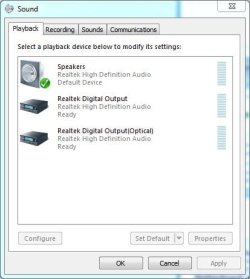
With an HDMI connection, the PC's "sound card" (RealTek) is not used, HDMI uses the sound generated by the Video Card. Is the TV's sound the one that has the reverb or is it the PC sound (RealTek) and speakers where you get the reverb?
My Computer
At a glance
Windows 10 64 bitIntel i7 6700K16GB Corsair DominatorIntel CPU Graphics
Computer type
PC/Desktop
Computer Manufacturer/Model Number
My Own Build
OS
Windows 10 64 bit
CPU
Intel i7 6700K
Motherboard
ASUS ROG Maximus VIII Hero
Memory
16GB Corsair Dominator
Graphics Card(s)
Intel CPU Graphics
Sound Card
RealTek
Monitor(s) Displays
27" Dell S2719dgf
Screen Resolution
2560X1440
Hard Drives
1 TB Samsung 850 EVO SSD for Win 10 Pro
500GB Samsung 850 EVO SSD for Win 10 Insider
2 TB drive for backup
PSU
EVGA Supernova 750G2
Case
BeQuiet Silent Base 600
Cooling
Deepcool Captain 120EX
Keyboard
Microsoft Wireless 2000
Mouse
Microsoft wireless
Internet Speed
100 MB/sec (Cable)
Antivirus
Microsoft Defender and Malwarebytes
Browser
Edge/Firefox
Other Info
Cakewalk (Sonar) by BandLab and Studio One 4.1 Pro recording studio software. MOTU 896Mk3 Hybrid recording interface, Frontier Tranzport wireless control unit, Behringer X-Touch Control Surface.
Five USB connected optical drives for CD Audio production using Nero BurningROM
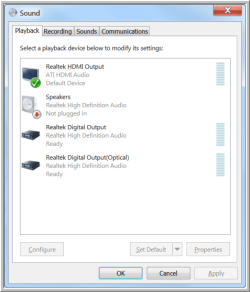
Noy quite sure what you're asking or trying to get at! The audio driver is listed in Control Panel under
Sound as Realtek HDMI Output - ATI HDMI Audio. I have a Radeon (ATI) HD5670 512MB PCI Express
2.0 x16 Video Card. If what you say is true, then it is probably the video card causing the reverb, since
the sound only comes through the TV speakers!
Any sugggestions?
My Computer
At a glance
Windows Home Premium 32bitAMD Athlon II X2 255 Regor 3.1GHz Socket AM3Kingston ValueRAM 2GB (2x1GB) DDR3 1333 Dual ...Sapphire 100287L Radeon HD5670 512MB PCI Expr...
Here is mine. I have the HDMI disabled in the Device Manager as I don't use it.
Attachments
Capture.JPG
31 KB
· Views: 7
My Computer
At a glance
Windows 10 64 bitIntel i7 6700K16GB Corsair DominatorIntel CPU Graphics
Computer type
PC/Desktop
Computer Manufacturer/Model Number
My Own Build
OS
Windows 10 64 bit
CPU
Intel i7 6700K
Motherboard
ASUS ROG Maximus VIII Hero
Memory
16GB Corsair Dominator
Graphics Card(s)
Intel CPU Graphics
Sound Card
RealTek
Monitor(s) Displays
27" Dell S2719dgf
Screen Resolution
2560X1440
Hard Drives
1 TB Samsung 850 EVO SSD for Win 10 Pro
500GB Samsung 850 EVO SSD for Win 10 Insider
2 TB drive for backup
PSU
EVGA Supernova 750G2
Case
BeQuiet Silent Base 600
Cooling
Deepcool Captain 120EX
Keyboard
Microsoft Wireless 2000
Mouse
Microsoft wireless
Internet Speed
100 MB/sec (Cable)
Antivirus
Microsoft Defender and Malwarebytes
Browser
Edge/Firefox
Other Info
Cakewalk (Sonar) by BandLab and Studio One 4.1 Pro recording studio software. MOTU 896Mk3 Hybrid recording interface, Frontier Tranzport wireless control unit, Behringer X-Touch Control Surface.
Five USB connected optical drives for CD Audio production using Nero BurningROM
The "Realtek HDMI Output" has me confused. All others that I've seen with an HDMI output will show "AMD" or "NVIDIA" but not Realtek or whatever the PC's sound is.
However, check the Realtek HD Audio Control Panel to see if any Sound Enhancements are enabled.
My Computer
At a glance
Windows 10 64 bitIntel i7 6700K16GB Corsair DominatorIntel CPU Graphics
Computer type
PC/Desktop
Computer Manufacturer/Model Number
My Own Build
OS
Windows 10 64 bit
CPU
Intel i7 6700K
Motherboard
ASUS ROG Maximus VIII Hero
Memory
16GB Corsair Dominator
Graphics Card(s)
Intel CPU Graphics
Sound Card
RealTek
Monitor(s) Displays
27" Dell S2719dgf
Screen Resolution
2560X1440
Hard Drives
1 TB Samsung 850 EVO SSD for Win 10 Pro
500GB Samsung 850 EVO SSD for Win 10 Insider
2 TB drive for backup
PSU
EVGA Supernova 750G2
Case
BeQuiet Silent Base 600
Cooling
Deepcool Captain 120EX
Keyboard
Microsoft Wireless 2000
Mouse
Microsoft wireless
Internet Speed
100 MB/sec (Cable)
Antivirus
Microsoft Defender and Malwarebytes
Browser
Edge/Firefox
Other Info
Cakewalk (Sonar) by BandLab and Studio One 4.1 Pro recording studio software. MOTU 896Mk3 Hybrid recording interface, Frontier Tranzport wireless control unit, Behringer X-Touch Control Surface.
Five USB connected optical drives for CD Audio production using Nero BurningROM
Well, under Realtek HDMI Output it does say ATI HDMI Audio. Since Realtek makes the chip
and driver for the HDMI output, I'm not sure there is any problem there.
There are no enhanced sounds set under the Realtek HD Audio Manager in Control Panel. Just
the basic setup.
My Computer
At a glance
Windows Home Premium 32bitAMD Athlon II X2 255 Regor 3.1GHz Socket AM3Kingston ValueRAM 2GB (2x1GB) DDR3 1333 Dual ...Sapphire 100287L Radeon HD5670 512MB PCI Expr...
Must just be that model with the Realtek chip. I have an AMD Radeon HD7770 and it just shows AMD HDMI, not "Realtek". I had an older HD4400 series and it too just listed AMD HDMI.
However, it may not be the HDMI sound that is the problem. It could be the player. I've seen (heard) sound do similar to what you are hearing from a program hanging up and causing it.
My Computer
At a glance
Windows 10 64 bitIntel i7 6700K16GB Corsair DominatorIntel CPU Graphics
Computer type
PC/Desktop
Computer Manufacturer/Model Number
My Own Build
OS
Windows 10 64 bit
CPU
Intel i7 6700K
Motherboard
ASUS ROG Maximus VIII Hero
Memory
16GB Corsair Dominator
Graphics Card(s)
Intel CPU Graphics
Sound Card
RealTek
Monitor(s) Displays
27" Dell S2719dgf
Screen Resolution
2560X1440
Hard Drives
1 TB Samsung 850 EVO SSD for Win 10 Pro
500GB Samsung 850 EVO SSD for Win 10 Insider
2 TB drive for backup
PSU
EVGA Supernova 750G2
Case
BeQuiet Silent Base 600
Cooling
Deepcool Captain 120EX
Keyboard
Microsoft Wireless 2000
Mouse
Microsoft wireless
Internet Speed
100 MB/sec (Cable)
Antivirus
Microsoft Defender and Malwarebytes
Browser
Edge/Firefox
Other Info
Cakewalk (Sonar) by BandLab and Studio One 4.1 Pro recording studio software. MOTU 896Mk3 Hybrid recording interface, Frontier Tranzport wireless control unit, Behringer X-Touch Control Surface.
Five USB connected optical drives for CD Audio production using Nero BurningROM
Yes, it's probably the player! It doesn't seem to make any difference whether I issue a STOP or
just EXIT. It happens periodically either way. I guess I'll have to see if I can glean anything from
an MPlayer forum.
Thanks for your help!
My Computer
At a glance
Windows Home Premium 32bitAMD Athlon II X2 255 Regor 3.1GHz Socket AM3Kingston ValueRAM 2GB (2x1GB) DDR3 1333 Dual ...Sapphire 100287L Radeon HD5670 512MB PCI Expr...
I'd try some other movie player and see if it happens with that one.
My Computer
At a glance
Windows 10 64 bitIntel i7 6700K16GB Corsair DominatorIntel CPU Graphics
Computer type
PC/Desktop
Computer Manufacturer/Model Number
My Own Build
OS
Windows 10 64 bit
CPU
Intel i7 6700K
Motherboard
ASUS ROG Maximus VIII Hero
Memory
16GB Corsair Dominator
Graphics Card(s)
Intel CPU Graphics
Sound Card
RealTek
Monitor(s) Displays
27" Dell S2719dgf
Screen Resolution
2560X1440
Hard Drives
1 TB Samsung 850 EVO SSD for Win 10 Pro
500GB Samsung 850 EVO SSD for Win 10 Insider
2 TB drive for backup
PSU
EVGA Supernova 750G2
Case
BeQuiet Silent Base 600
Cooling
Deepcool Captain 120EX
Keyboard
Microsoft Wireless 2000
Mouse
Microsoft wireless
Internet Speed
100 MB/sec (Cable)
Antivirus
Microsoft Defender and Malwarebytes
Browser
Edge/Firefox
Other Info
Cakewalk (Sonar) by BandLab and Studio One 4.1 Pro recording studio software. MOTU 896Mk3 Hybrid recording interface, Frontier Tranzport wireless control unit, Behringer X-Touch Control Surface.
Five USB connected optical drives for CD Audio production using Nero BurningROM