
Audio setup with new PC

Quadrider10

Banned
Local time
12:22 AM
Messages
818
hello people. so i need some help/advice. im building a new rig with 8 channel audio supported by the mobo
MSI 970A-G43 AM3+ AMD 970 SATA 6Gb/s USB 3.0 ATX AMD Motherboard - Newegg.com

my audio setup rite now is as it

pioneer VSX-816 7.1 (for all speakers except sub)
awia 2 channel reciever (for sub)
2 main L&R 3 way speakers (tweet, mid, sub)
2 tower speakers
1 subwoofer


this is how i have my laptop connected.

im using just 1 audio jack on the side of my laptop, and is setup to stereo L & R in realtek audio.

from my laptop, it is currently connected to a LR RCA cable into aux input. from there, the front LR 3 way speakers are hooked up to the front LR out put on the receiver, and the 2 tower speakers are hooked up the surround back output. the subwoofer is connected to the preout channel on the receiver and then from there connected into the awia amp, then out to the sub.

for this new build, i want to be able to use all the speakers i have. so i think thats 4.1 channel? how would i go about doing that?
 

My Computer

Computer type
PC/Desktop
Computer Manufacturer/Model Number
Custom Build
OS
Windows 7 Professional x64
CPU
AMD FX 4300 @ 4.2 GHZ
Motherboard
MSI 970A-G43
Memory
G.SKILL Ripjaws X Series 8GB
Graphics Card(s)
PNY GTX 560 Ti OC
Sound Card
Realtek ALC892
Monitor(s) Displays
20" Hanns-G HL203
Screen Resolution
1600x900
Hard Drives
WD Caviar Black 500GB 7200RPM
PSU
Corsair CX500M
Case
Athena Power- Black Widow
Cooling
Cooler Master GeminII S524
Keyboard
Logitech K360 LE
Mouse
Rocketfish Nano
Internet Speed
60Mbps Down 8Mbps Up
Other Info
Dell Studio 1458 Laptop Setup:

Windows 7 Home Premium~
Intel Core i5 560M @3.2GHZ~
6GB DDR3 RAM~
ATI Mobility Radeon 540v 512MB~
Intel 330 Sata III 120GB SSD~
Illuminated Keyboard
I haven't done that in a long time. I would use the optical digital if your motherboard or soundcard has it.

:ar: Connect guide
 

My Computer

Computer type
PC/Desktop
Computer Manufacturer/Model Number
Dude Build
OS
Windows 10 Pro X64
CPU
Intel(R) Core(TM) i5-3570K CPU OC@ 4.5GHZ Turbo
Motherboard
MSI Z77A-G45 Gaming
Memory
8.00 GB DDR3 1600Mhz
Graphics Card(s)
MSI Gaming X GTX 1070
Sound Card
Realtek High Definition
Monitor(s) Displays
Dell S23O9W, HP L1710
Screen Resolution
DELL-1920 x 1080 HP-1280 x1024
Hard Drives
Crucial m4 256 SSD, WD 7200RPM 500GB WD 1TB
PSU
Seasonic X650 GOLD
Case
Zalman Z12
Cooling
Antec Kuhler 920
Keyboard
Logitech
Mouse
MSI DS100 Interceptor
Internet Speed
50 down and 5 up
Antivirus
MSE
Browser
Chrome, IE 11
Other Info
Logitech X-620 Speakers
alright im just going to use stereo lol. simple and complete.
 

My Computer

Computer type
PC/Desktop
Computer Manufacturer/Model Number
Custom Build
OS
Windows 7 Professional x64
CPU
AMD FX 4300 @ 4.2 GHZ
Motherboard
MSI 970A-G43
Memory
G.SKILL Ripjaws X Series 8GB
Graphics Card(s)
PNY GTX 560 Ti OC
Sound Card
Realtek ALC892
Monitor(s) Displays
20" Hanns-G HL203
Screen Resolution
1600x900
Hard Drives
WD Caviar Black 500GB 7200RPM
PSU
Corsair CX500M
Case
Athena Power- Black Widow
Cooling
Cooler Master GeminII S524
Keyboard
Logitech K360 LE
Mouse
Rocketfish Nano
Internet Speed
60Mbps Down 8Mbps Up
Other Info
Dell Studio 1458 Laptop Setup:

Windows 7 Home Premium~
Intel Core i5 560M @3.2GHZ~
6GB DDR3 RAM~
ATI Mobility Radeon 540v 512MB~
Intel 330 Sata III 120GB SSD~
Illuminated Keyboard
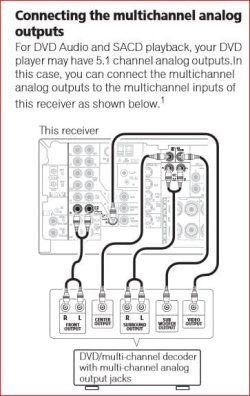
No need to use a digital connection with that receiver. Just had a look at the manual and it has 5.1 multichannel inputs,

51multi.JPG

All you would need to make it work is three of these,

Belkin Pure AV - Y Audio cable (12 FEET) - Newegg.com

One for the front out, one for the rear out, and one for the center/sub out. About the only problem that will crop up is not knowing which of the RCA jacks will be for the sub and which for the center until you hook them up.
 

My Computer

Computer type
PC/Desktop
Computer Manufacturer/Model Number
Me
OS
Win 7 Ultimate x64
CPU
FX-8350 @ 4.6 GHz so far
Motherboard
Asus M5A97 EVO
Memory
ADATA XPG V1 Series Black 8GB DDR3 1600
Graphics Card(s)
Sapphire R9 270x Dual-X
Sound Card
Xonar DGX w/ Corsair Vengence 1300
Monitor(s) Displays
Acer S232HL Abid
Screen Resolution
1920x1080
Hard Drives
120 GB OCZ Vertex 3
500 GB Seagate 7200.12
PSU
Antec Earthwatts 650W Green
Case
Antec Three Hundred
Cooling
Cooler Master 212 EVO
Keyboard
Logitech G510
Mouse
Logitech G500s
Internet Speed
35000/3000
No need to use a digital connection with that receiver. Just had a look at the manual and it has 5.1 multichannel inputs,

View attachment 268713

All you would need to make it work is three of these,

Belkin Pure AV - Y Audio cable (12 FEET) - Newegg.com

One for the front out, one for the rear out, and one for the center/sub out. About the only problem that will crop up is not knowing which of the RCA jacks will be for the sub and which for the center until you hook them up.


yupp thought about that. i might just do it. red is sub. lol funny tho i just saved the exact SS like 2 hrs ago. lol
 

My Computer

Computer type
PC/Desktop
Computer Manufacturer/Model Number
Custom Build
OS
Windows 7 Professional x64
CPU
AMD FX 4300 @ 4.2 GHZ
Motherboard
MSI 970A-G43
Memory
G.SKILL Ripjaws X Series 8GB
Graphics Card(s)
PNY GTX 560 Ti OC
Sound Card
Realtek ALC892
Monitor(s) Displays
20" Hanns-G HL203
Screen Resolution
1600x900
Hard Drives
WD Caviar Black 500GB 7200RPM
PSU
Corsair CX500M
Case
Athena Power- Black Widow
Cooling
Cooler Master GeminII S524
Keyboard
Logitech K360 LE
Mouse
Rocketfish Nano
Internet Speed
60Mbps Down 8Mbps Up
Other Info
Dell Studio 1458 Laptop Setup:

Windows 7 Home Premium~
Intel Core i5 560M @3.2GHZ~
6GB DDR3 RAM~
ATI Mobility Radeon 540v 512MB~
Intel 330 Sata III 120GB SSD~
Illuminated Keyboard
Back
Top