Audio/Video stutter during games, videos. Suspect ethernet driver

DanielBlakemore

New member
Local time
11:43 AM
Messages
15
Location
On top of a mountain
I first built this desktop last May and immediately played Crysis on it to test the graphics and whatnot. I occasionally noticed some audio stuttering and the game would freeze up for a split second, then it would be fine. I knew the hardware could handle it (my system spec but with an AMD Phenom II X4 965 Black Edition and an M4A89GTD PRO/USB3 motherboard), so it must be a software problem.

It turns out that Windows Update installed some bogus driver for my onboard Realtek Ethernet controller. So, I rolled the driver back, installed the version on the motherboard CD, and that was that. No more stutter.

Well, now I have a new processor, motherboard, and Windows installation and I've found myself in the same boat, except I can't fix the problem the same way. This is especially annoying since I don't even use my ethernet at all (not by choice, just no wiring). I have an ASUS PCI wireless card (which I was using on my previous computer when I fixed the problem) and I have updated the driver for that too (after trying the one on the disk). I have also updated the HD audio driver and the ethernet driver after reinstalling from the motherboard disk didn't help. I got the drivers from Biostar's website, not through windows update.

I've read that there may be interrupt line conflicts between the graphics card and the ethernet controller (IRQ conflicts), but if those are shared, they are supposed to be (at least as far as my experience with embedded systems programming has taught me). Either way, I can't change them in the bios, so it doesn't matter.

Does anyone have any clue what could be causing this problem?
 

My Computer My Computer

At a glance

Windows 7 Professional x64Intel Core i5 3570K 3.4GHz16 GB G.Skill RipjawsPalit GeForce GTX 560 ti
OS
Windows 7 Professional x64
CPU
Intel Core i5 3570K 3.4GHz
Motherboard
Biostar TZ77B
Memory
16 GB G.Skill Ripjaws
Graphics Card(s)
Palit GeForce GTX 560 ti
Monitor(s) Displays
Apple 23" HD Cinema Display
Screen Resolution
1920x1200
Hard Drives
1xSeagate Barracuda 3TB 7200 RPM SATA 6.0Gb/s
1xOCZ Agility 3 60GB SATA III MLC SSD
PSU
Corsair 750TX
Case
Antex DF-85
Cooling
Stock
Keyboard
Microsoft Sidewinder X4
Mouse
Razer Deathadder
Internet Speed
20D/0.8U Gbps
Seeing as you're not using it, have you tried disabling the onboard ethernet controller in the bios and see if the problem goes away?
 

My Computer My Computer

At a glance

Win 7 Ultimate x64FX-8350 @ 4.6 GHz so farADATA XPG V1 Series Black 8GB DDR3 1600Sapphire R9 270x Dual-X
Computer type
PC/Desktop
Computer Manufacturer/Model Number
Me
OS
Win 7 Ultimate x64
CPU
FX-8350 @ 4.6 GHz so far
Motherboard
Asus M5A97 EVO
Memory
ADATA XPG V1 Series Black 8GB DDR3 1600
Graphics Card(s)
Sapphire R9 270x Dual-X
Sound Card
Xonar DGX w/ Corsair Vengence 1300
Monitor(s) Displays
Acer S232HL Abid
Screen Resolution
1920x1080
Hard Drives
120 GB OCZ Vertex 3
500 GB Seagate 7200.12
PSU
Antec Earthwatts 650W Green
Case
Antec Three Hundred
Cooling
Cooler Master 212 EVO
Keyboard
Logitech G510
Mouse
Logitech G500s
Internet Speed
35000/3000
I'll try that now and report back with my findings.
 

My Computer My Computer

At a glance

Windows 7 Professional x64Intel Core i5 3570K 3.4GHz16 GB G.Skill RipjawsPalit GeForce GTX 560 ti
OS
Windows 7 Professional x64
CPU
Intel Core i5 3570K 3.4GHz
Motherboard
Biostar TZ77B
Memory
16 GB G.Skill Ripjaws
Graphics Card(s)
Palit GeForce GTX 560 ti
Monitor(s) Displays
Apple 23" HD Cinema Display
Screen Resolution
1920x1200
Hard Drives
1xSeagate Barracuda 3TB 7200 RPM SATA 6.0Gb/s
1xOCZ Agility 3 60GB SATA III MLC SSD
PSU
Corsair 750TX
Case
Antex DF-85
Cooling
Stock
Keyboard
Microsoft Sidewinder X4
Mouse
Razer Deathadder
Internet Speed
20D/0.8U Gbps
No luck. Disabled it in the BIOS, and I still get the stuttering.
Anyone have any ideas or experience with this issue?

For now, I am going to experiment with the beta driver for my card (if there is one).
 

My Computer My Computer

At a glance

Windows 7 Professional x64Intel Core i5 3570K 3.4GHz16 GB G.Skill RipjawsPalit GeForce GTX 560 ti
OS
Windows 7 Professional x64
CPU
Intel Core i5 3570K 3.4GHz
Motherboard
Biostar TZ77B
Memory
16 GB G.Skill Ripjaws
Graphics Card(s)
Palit GeForce GTX 560 ti
Monitor(s) Displays
Apple 23" HD Cinema Display
Screen Resolution
1920x1200
Hard Drives
1xSeagate Barracuda 3TB 7200 RPM SATA 6.0Gb/s
1xOCZ Agility 3 60GB SATA III MLC SSD
PSU
Corsair 750TX
Case
Antex DF-85
Cooling
Stock
Keyboard
Microsoft Sidewinder X4
Mouse
Razer Deathadder
Internet Speed
20D/0.8U Gbps
No luck. The driver had no effect on the stuttering.

Any insight would be appreciated. Thanks
 

My Computer My Computer

At a glance

Windows 7 Professional x64Intel Core i5 3570K 3.4GHz16 GB G.Skill RipjawsPalit GeForce GTX 560 ti
OS
Windows 7 Professional x64
CPU
Intel Core i5 3570K 3.4GHz
Motherboard
Biostar TZ77B
Memory
16 GB G.Skill Ripjaws
Graphics Card(s)
Palit GeForce GTX 560 ti
Monitor(s) Displays
Apple 23" HD Cinema Display
Screen Resolution
1920x1200
Hard Drives
1xSeagate Barracuda 3TB 7200 RPM SATA 6.0Gb/s
1xOCZ Agility 3 60GB SATA III MLC SSD
PSU
Corsair 750TX
Case
Antex DF-85
Cooling
Stock
Keyboard
Microsoft Sidewinder X4
Mouse
Razer Deathadder
Internet Speed
20D/0.8U Gbps
Hello Daniel,

Just a shot in the dark.

Try downloading this DPC Latency checker from the link below, run your videos/games in windowed mode to induce the stuttering, run the software, then take a screenshot of the the software after 1 - 3 minutes while the stuttering occurs and upload it in your next reply please.

http://www.thesycon.de/dpclat/dpclat.exe

How to snip the screenshot:-

How to Use the Snipping Tool in Vista - Vista Forums

How to upload the screenshot:-

http://www.sevenforums.com/tutorials/9733-screenshots-files-upload-post-seven-forums.html

Thanks for your cooperation.
 

My Computer My Computer

At a glance

Windows 7 x64 Professional SP1Intel C2D T9550 2.66 GHz @ 2.793 GHz (Thanks ...8 GB DDR3ATI MOBILITY RADEON 4670
Computer Manufacturer/Model Number
DELL SXPS 1640
OS
Windows 7 x64 Professional SP1
CPU
Intel C2D T9550 2.66 GHz @ 2.793 GHz (Thanks ThrottleStop!!)
Motherboard
Intel PM45
Memory
8 GB DDR3
Graphics Card(s)
ATI MOBILITY RADEON 4670
Sound Card
CREATIVE XFI AUDIO NOTEBOOK
Monitor(s) Displays
16.1 WLED
Screen Resolution
1920x1080
Hard Drives
Seagate ST9500420AS 500GB (465GiBi) 7200 RPM Drive

External Drives:-
2 TB WD Essentials x 3
1 TB WD Mybook Gen 1
1 TB WD Mybook Gen 2
1 TB Seagate
1 TB Seagate
320 GB WD Scorpio Black (enclosed)
PSU
90W Dell Power Brick
Case
Dell Chassis
Cooling
Coolermaster Cooling Pad
Keyboard
Built-in backlighted Keyboard
Mouse
Logitech Wireless Mini Mouse
Internet Speed
4/0.5
First, I should clarify. The stuttering is not so much an -ing, as it is single stutters separated by ~5 to ~15 minutes. They last less than a second and seem to have no correlation with system load. The only reason I specified games and video is that that is when they are most annoying or noticeable. But they also happen on startup (sometimes the Windows startup noise is interrupted) and when chatting in Mumble (like Ventrilo: VoIP).

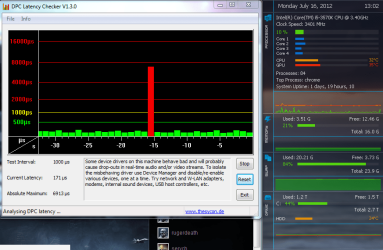
Anyway, I ran DPC Latency Checker and before I even got a game running, I saw this spike:
unprovoked spike.png

Then while I was playing, I saw several like these:
bf3 spike.png
bf3 spike 2.png
All separated by several minutes.

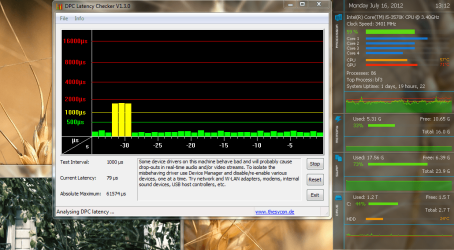
I also saw this twice:
yellow no stutter.PNG
Once out of nowhere, once when snipping tool froze (i suspect this was unrelated, but included it here just in case).
 

My Computer My Computer

At a glance

Windows 7 Professional x64Intel Core i5 3570K 3.4GHz16 GB G.Skill RipjawsPalit GeForce GTX 560 ti
OS
Windows 7 Professional x64
CPU
Intel Core i5 3570K 3.4GHz
Motherboard
Biostar TZ77B
Memory
16 GB G.Skill Ripjaws
Graphics Card(s)
Palit GeForce GTX 560 ti
Monitor(s) Displays
Apple 23" HD Cinema Display
Screen Resolution
1920x1200
Hard Drives
1xSeagate Barracuda 3TB 7200 RPM SATA 6.0Gb/s
1xOCZ Agility 3 60GB SATA III MLC SSD
PSU
Corsair 750TX
Case
Antex DF-85
Cooling
Stock
Keyboard
Microsoft Sidewinder X4
Mouse
Razer Deathadder
Internet Speed
20D/0.8U Gbps
Thanks for your reply Daniel.

Tracking down the source of your spikes as shown in the DPC Latency Checker would be quite tricky since the spikes occur between long intervals of time.

The usual procedure i would recommend is using xperf to analyse and track down the source of the spike(s), which is a command line based tool from Microsoft's Windows Performance Toolkit as in the following post:-

http://www.sevenforums.com/graphic-...-4350-gives-high-cpu-svchost.html#post1987320

But in your particular case, the ETL files produced would be enormous (in the GBs), and data sifting would be unfeasible as the tracing would have to be in a period of 5 - 15 minutes (not the usual 1 - 3 minutes).

Instead, what we'll do next is to use this free tool called LatencyMon:-

http://www.resplendence.com/download/LatencyMon.exe

Download the software, install it and run it.

When you're ready to go, press the green play button above the report tab.

It's also best to have a DPC Latency Checker Window open simultaneously to have a point of reference.

Click on the Drivers tab, and sort the results by Highest Execution count (ms) (scroll the screen to the right if you can't find it)

Take a note of which Driver file(s) is reporting the highest numbers, and report back in your next reply (with some screenshots if appropriate), especially when a spike occurs in the DPC Latency Checker window.

Thanks for your patience, and we hope to hear from you soon.
 
Last edited:

My Computer My Computer

At a glance

Windows 7 x64 Professional SP1Intel C2D T9550 2.66 GHz @ 2.793 GHz (Thanks ...8 GB DDR3ATI MOBILITY RADEON 4670
Computer Manufacturer/Model Number
DELL SXPS 1640
OS
Windows 7 x64 Professional SP1
CPU
Intel C2D T9550 2.66 GHz @ 2.793 GHz (Thanks ThrottleStop!!)
Motherboard
Intel PM45
Memory
8 GB DDR3
Graphics Card(s)
ATI MOBILITY RADEON 4670
Sound Card
CREATIVE XFI AUDIO NOTEBOOK
Monitor(s) Displays
16.1 WLED
Screen Resolution
1920x1080
Hard Drives
Seagate ST9500420AS 500GB (465GiBi) 7200 RPM Drive

External Drives:-
2 TB WD Essentials x 3
1 TB WD Mybook Gen 1
1 TB WD Mybook Gen 2
1 TB Seagate
1 TB Seagate
320 GB WD Scorpio Black (enclosed)
PSU
90W Dell Power Brick
Case
Dell Chassis
Cooling
Coolermaster Cooling Pad
Keyboard
Built-in backlighted Keyboard
Mouse
Logitech Wireless Mini Mouse
Internet Speed
4/0.5
Hi Daniel

Just as another shot in the dark. :D
Try to download the latest codec and install it (K-Lite ver. 5 will do), and see if it works.

Hope that helps.

Kevin
 

My Computers My Computers

  • At a glance

    Windows 11 PrereleaseCORE i5 1040016GBGTX 750Ti
    Computer type
    PC/Desktop
    Computer Manufacturer/Model Number
    MSI
    OS
    Windows 11 Prerelease
    CPU
    CORE i5 10400
    Motherboard
    MSI H510M Pro
    Memory
    16GB
    Graphics Card(s)
    GTX 750Ti
    Sound Card
    Realtek HD Integrated
    Monitor(s) Displays
    Samsung Curved 24"; Samsung TV 50"
    Screen Resolution
    1920 x 1080
    Hard Drives
    Vi-Gen NVMe 256GB
    WD 3 TB
    Seagate 2 TB
    Seagate 4TB
    PSU
    Power Striker
    Case
    VBR
    Cooling
    Conventional
    Keyboard
    Logitech Wireless
    Mouse
    Logitech Wireless
    Internet Speed
    2MBPs
  • At a glance

    BigSurCore i58 GB
    Computer type
    Laptop
    System Manufacturer/Model Number
    Apple MacBook
    OS
    BigSur
    CPU
    Core i5
    Memory
    8 GB
    Monitor(s) Displays
    13 "
    Screen Resolution
    1366 x 768
    Hard Drives
    SSD 256 GB
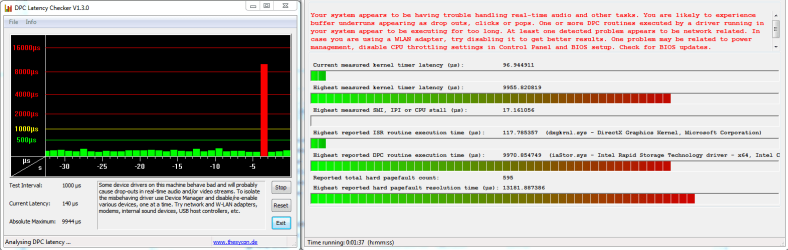
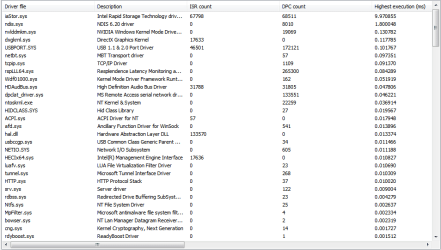
I have found the culprit. Thanks to LatencyMon, I was able to correlate the spikes in DPC Latency Checker with the long execution time of calls made by iaStor.sys. This is the Intel Rapid Storage Technology driver. Intel Rapid Storage Technology is software that allows me to do SSD caching (since I have an SSD and a Z77 chipset motherboard).
SSD Caching originally came out on the Z68 chipset, so it has been around for a bit.

I tried rolling back the driver to the version on the Intel site (10.8.0.1033-11/11/2011) which had no effect. I then reinstalled the version from Biostar (11.0.0.1032-16/03/2012) and I still have the problem.

Here is a screenshot of the lag occurring while being monitored by both latency programs:
iaStor_Spike.PNG

And here is the driver list:
Driver_List.png

I'm not sure where to go from here. On a hunch, I have changed the caching mode from "Maximized" to "Enhanced" (fastest to less fast).
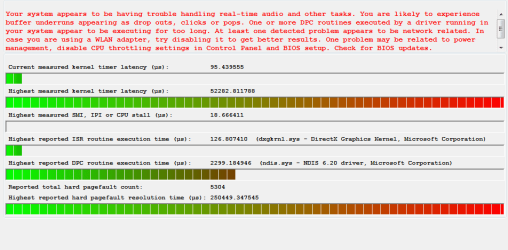
Now that I have it in the slower mode, I saw a similar spike, but there was no corresponding long execution of iaStor.sys calls. Instead, it just says that the spike was kernel timer latency.
Here is a screenshot:
kernel_latency.PNG
The slow DPC call was a Network Driver Interface Specification (NDIS 6.20) driver delay, and was only yellow on DPC Latency Checker.
The iaStor.sys driver is behaving "normally" now.

Any thoughts?

Also, I'd rather not leave it in Enhanced mode since the real performance gains are in Maximized, and the lag happens anyway.
 

My Computer My Computer

At a glance

Windows 7 Professional x64Intel Core i5 3570K 3.4GHz16 GB G.Skill RipjawsPalit GeForce GTX 560 ti
OS
Windows 7 Professional x64
CPU
Intel Core i5 3570K 3.4GHz
Motherboard
Biostar TZ77B
Memory
16 GB G.Skill Ripjaws
Graphics Card(s)
Palit GeForce GTX 560 ti
Monitor(s) Displays
Apple 23" HD Cinema Display
Screen Resolution
1920x1200
Hard Drives
1xSeagate Barracuda 3TB 7200 RPM SATA 6.0Gb/s
1xOCZ Agility 3 60GB SATA III MLC SSD
PSU
Corsair 750TX
Case
Antex DF-85
Cooling
Stock
Keyboard
Microsoft Sidewinder X4
Mouse
Razer Deathadder
Internet Speed
20D/0.8U Gbps
@solarmystic
Thanks for the software link. I was able to identify which were actually eating away for CPU!

@DanielBlakemore
I too had a similar problem like yours. Try uninstalling intel RST.
 

My Computer My Computer

At a glance

Windows 7 Ultimate x64
OS
Windows 7 Ultimate x64
Back
Top