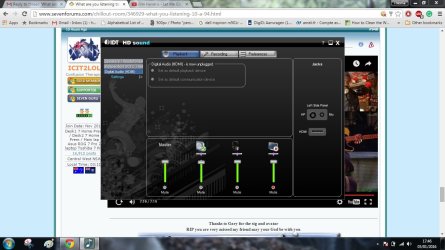
I have moved from the other thread " Disabling headphone Jack Detection", ( because it was a dead end ), to this one, also in Sound & Audio.
This because I have found evidence of failure happening around the date ( 23/05/2015 ) my sound from my internal speakers packed it in.
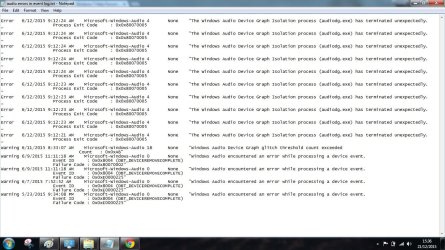
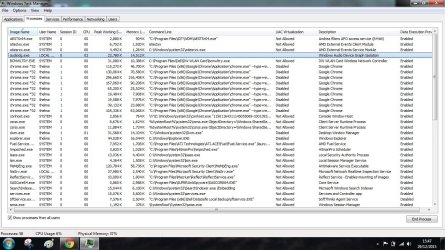
This is caused by a mistake in the " Audiodg.exe ", which lives in " c:\Windows\System32\audiodg.exe."
Windows Audio Device Graph Isolation process ( audiodg.exe ) has terminated unexpectedly.
Process Exit code : 0x0x80070005.
Audiodg Termination code 2147942405.

Audiodg.exe handles Digital Signal Processing and Digital Rights management.
the svc host cannot do it.
Incorrectly designed application that uses the audio system incorrectly, or a defect in Windows.
NON MY WORDS.
Has to do with sound cards, or as the PC here is a Laptop audio processor.
The audiodg.exe properties show that it was created on 27/5/2015 and modified on 03/02/2015 Microsoft Application.
My laptop is dated end 2010 so there should be an older version to roll back to, but I don't get that option.
This is uptill now, all the info I have managed to get together.
Will now look for solutions ( delete, uninstall find new file version somewhere ?
DELL, Microsoft, Windows 7 forums .....................
This because I have found evidence of failure happening around the date ( 23/05/2015 ) my sound from my internal speakers packed it in.
This is caused by a mistake in the " Audiodg.exe ", which lives in " c:\Windows\System32\audiodg.exe."
Windows Audio Device Graph Isolation process ( audiodg.exe ) has terminated unexpectedly.
Process Exit code : 0x0x80070005.
Audiodg Termination code 2147942405.
Audiodg.exe handles Digital Signal Processing and Digital Rights management.
the svc host cannot do it.
Incorrectly designed application that uses the audio system incorrectly, or a defect in Windows.
NON MY WORDS.
Has to do with sound cards, or as the PC here is a Laptop audio processor.
The audiodg.exe properties show that it was created on 27/5/2015 and modified on 03/02/2015 Microsoft Application.
My laptop is dated end 2010 so there should be an older version to roll back to, but I don't get that option.
This is uptill now, all the info I have managed to get together.
Will now look for solutions ( delete, uninstall find new file version somewhere ?
DELL, Microsoft, Windows 7 forums .....................
My Computer
At a glance
windows 7 professional 64 bitCPU Genuine Intel (R) CPU [email protected]RAM 3 GBToshiba MK2555 GSX ATA
- Computer type
- Laptop
- Computer Manufacturer/Model Number
- HP Presario CQ70
- OS
- windows 7 professional 64 bit
- CPU
- CPU Genuine Intel (R) CPU [email protected]
- Motherboard
- APCI x 64 - based PC
- Memory
- RAM 3 GB
- Graphics Card(s)
- Toshiba MK2555 GSX ATA
- Sound Card
- Conexant High Def Smart Audio 221,
- Monitor(s) Displays
- monitor Generic PnP.
- Screen Resolution
- ?
- Hard Drives
- HDAUDIO Soft Data Fax Modern with smart CP
- PSU
- ?
- Keyboard
- Standard PS/2 keyboard
- Mouse
- PS/2 Compatible mouse
- Antivirus
- Hyjackthis and Superanti spyware, Mamb Ccleaner
- Browser
- Google Chrome
 as I have been around asking info.)