Auto Arrange?

Status
Not open for further replies.
I think you guys have misunderstood me :b

I dont mean that i can move my folders around like on the desktop. Like I have some folders in the right corner, and some in the left corner.

I mean that if i have the auto-arrange on, to set my folders in order. For exampel, 5 folders: 1, 2, 3, 4, 5. Then i want to move my number four, so its the last one in the order. Then is the order. 1, 2, 3, 5, 4. Know what i mean.

I know you can do this in Vista and XP. But i can't do it in Windows 7.

'kooNz'
 

My Computer

OS
Windows XP / Windows 7
I don't know if this helps you but you can drag folders into the favorites section on the left pane and arrange them in any order you like, although that only works with folders.
 

My Computer

Computer Manufacturer/Model Number
Home Brew
OS
Windows 7 Ultimate Vista Ultimate x64
CPU
Core 2 Duo E8500 3.16Ghz @ 3.8Ghz
Motherboard
eVGA 750i FTW
Memory
2x2Gigs Patriot PC2-6400 LL
Graphics Card(s)
Inno3D GeForce GTX260 216 SP
Monitor(s) Displays
ASUS VW222U 22" 2ms Response time
Screen Resolution
1680x1050
Hard Drives
SATA 150GB
SATA II 250GB
USB IDE 750GB Ext.
PSU
HYTEC 600W & Thermaltake 650W Toughpower Power Exp
Case
Thermaltake Armor LCS (Liquid Cooling System)
Cooling
Liquid Cooling System
Keyboard
Logitech G15 Gaming Keyboard
Mouse
Logitech G9 Gaming Mouse
Thank you (:

But not what im looking for either /:
 

My Computer

OS
Windows XP / Windows 7
I think you guys have misunderstood me :b

I dont mean that i can move my folders around like on the desktop. Like I have some folders in the right corner, and some in the left corner.

I mean that if i have the auto-arrange on, to set my folders in order. For exampel, 5 folders: 1, 2, 3, 4, 5. Then i want to move my number four, so its the last one in the order. Then is the order. 1, 2, 3, 5, 4. Know what i mean.

I know you can do this in Vista and XP. But i can't do it in Windows 7.

'kooNz'

KooNz,

Yes, I we misunderstood what you meant completely. :o

See if this may be able to help you instead.

Sort Order - Numbers in File and Folder Names - Vista Forums
 

My Computer

Computer type
PC/Desktop
Computer Manufacturer/Model Number
Self built custom
OS
64-bit Windows 11 Pro for Workstations
CPU
Intel i7-8700K OC'd to 5 GHz
Motherboard
ASUS ROG Maximus XI Formula Z390
Memory
64 GB (4x16GB) G.SKILL TridentZ RGB DDR4 3600 MHz
Graphics Card(s)
ASUS ROG-STRIX-GTX1080TI-O11G-GAMING
Sound Card
Integrated
Monitor(s) Displays
2 x Samsung Odyssey G7 27"
Screen Resolution
2560x1440
Hard Drives
1TB Samsung 990 PRO M.2,
4TB Samsung 990 PRO PRO M.2,
TerraMaster F8 SSD Plus NAS
PSU
Seasonic Prime Titanium 850W
Case
Thermaltake Core P3
Cooling
Corsair Hydro H115i
Keyboard
Logitech wireless K800
Mouse
Logitech MX Master 4
Internet Speed
2 Gb/s Download and 100 Mb/s Upload
Antivirus
Malwarebyte Anti-Malware Premium
Browser
Google Chrome
Other Info
Logitech Z625 speaker system,
Logitech BRIO 4K Pro webcam,
HP Color LaserJet Pro MFP M477fdn,
APC SMART-UPS RT 1000 XL - SURT1000XLI,
Galaxy S23 Plus phone
Should that be a link, or? hehe'

if it should, then i can't get it to redirect me /:

But great you understand me now (: sorry my bad explanation s:

but the numbers on the folders was just an exampel. I want to do the same thing, with all my folders. Also if they are named: Games, Documents, Movies. (:

Hope you understand (:

and thank you for your help and patience (:

'kooNz'
 

My Computer

OS
Windows XP / Windows 7

My Computer

Computer type
PC/Desktop
Computer Manufacturer/Model Number
Self built custom
OS
64-bit Windows 11 Pro for Workstations
CPU
Intel i7-8700K OC'd to 5 GHz
Motherboard
ASUS ROG Maximus XI Formula Z390
Memory
64 GB (4x16GB) G.SKILL TridentZ RGB DDR4 3600 MHz
Graphics Card(s)
ASUS ROG-STRIX-GTX1080TI-O11G-GAMING
Sound Card
Integrated
Monitor(s) Displays
2 x Samsung Odyssey G7 27"
Screen Resolution
2560x1440
Hard Drives
1TB Samsung 990 PRO M.2,
4TB Samsung 990 PRO PRO M.2,
TerraMaster F8 SSD Plus NAS
PSU
Seasonic Prime Titanium 850W
Case
Thermaltake Core P3
Cooling
Corsair Hydro H115i
Keyboard
Logitech wireless K800
Mouse
Logitech MX Master 4
Internet Speed
2 Gb/s Download and 100 Mb/s Upload
Antivirus
Malwarebyte Anti-Malware Premium
Browser
Google Chrome
Other Info
Logitech Z625 speaker system,
Logitech BRIO 4K Pro webcam,
HP Color LaserJet Pro MFP M477fdn,
APC SMART-UPS RT 1000 XL - SURT1000XLI,
Galaxy S23 Plus phone
FWIW - both links go to the same place for me, Shawn.
 

My Computers

System One System Two

  • Computer type
    PC/Desktop
    Computer Manufacturer/Model Number
    The Beast Model A (homebrew)
    OS
    Windows 11 21H2 Current build
    CPU
    AMD Ryzen 9 3950X
    Motherboard
    MSI MEG X570 GODLIKE
    Memory
    4 * 32 GB - Corsair Vengeance 3600 MHz
    Graphics Card(s)
    EVGA GeForce RTX 3080 Ti XC3 ULTRA GAMING (12G-P5-3955-KR)
    Sound Card
    Realtek® ALC1220 Codec
    Monitor(s) Displays
    2x Eve Spectrum ES07D03 4K Gaming Monitor (Matte) | Eve Spec
    Screen Resolution
    3x 3840 x 2160
    Hard Drives
    3x Samsung 980 Pro NVMe PCIe 4 M.2 2 TB SSD (MZ-V8P2T0B/AM) } 3x Sabrent Rocket NVMe 4.0 1 TB SSD
    PSU
    PC Power & Cooling’s Silencer Series 1050 Watt, 80 Plus Plat
    Case
    Fractal Design Define 7 XL Dark ATX Full Tower Case
    Cooling
    SteelSeries Apex Pro Wired Gaming Keyboard
    Keyboard
    SteelSeries Apex Pro
    Mouse
    Logitech MX Master 3S | MX Master 3 for business
    Internet Speed
    AT&T LightSpeed Gigabit Duplex Ftth
    Antivirus
    Windows Defender + MB 3
    Browser
    Nightly (default) + Firefox (stable),Chrome, Edge
  • Computer type
    PC/Desktop
    System Manufacturer/Model Number
    Dell Latitude E5470
    OS
    ChromeOS Flex Dev Channel (current)
    CPU
    Intel(R) Core(TM) i5-6300U CPU @ 2.40GHz, 2501 Mhz, 2 Core(s), 4 Logical Processor(s)
    Motherboard
    Dell
    Memory
    16 GB
    Graphics Card(s)
    Intel(R) HD Graphics 520
    Sound Card
    Intel(R) HD Graphics 520 + RealTek Audio
    Monitor(s) Displays
    Dell laptop display 15"
    Screen Resolution
    1920 * 1080
    Hard Drives
    Toshiba 128GB M.2 22300 drive
    INTEL Cherryville 520 Series SSDSC2CW180A 180 GB SATA III SSD
    PSU
    Dell
    Case
    Dell
    Cooling
    Dell
    Keyboard
    Dell
    Mouse
    Logitech MX Master 3S (shared w. Sys 1) | Dell TouchPad
    Internet Speed
    AT&T LightSpeed Gigabit Duplex Ftth
Thank you John. I thought I may have missing something there for a moment. LOL
 

My Computer

Computer type
PC/Desktop
Computer Manufacturer/Model Number
Self built custom
OS
64-bit Windows 11 Pro for Workstations
CPU
Intel i7-8700K OC'd to 5 GHz
Motherboard
ASUS ROG Maximus XI Formula Z390
Memory
64 GB (4x16GB) G.SKILL TridentZ RGB DDR4 3600 MHz
Graphics Card(s)
ASUS ROG-STRIX-GTX1080TI-O11G-GAMING
Sound Card
Integrated
Monitor(s) Displays
2 x Samsung Odyssey G7 27"
Screen Resolution
2560x1440
Hard Drives
1TB Samsung 990 PRO M.2,
4TB Samsung 990 PRO PRO M.2,
TerraMaster F8 SSD Plus NAS
PSU
Seasonic Prime Titanium 850W
Case
Thermaltake Core P3
Cooling
Corsair Hydro H115i
Keyboard
Logitech wireless K800
Mouse
Logitech MX Master 4
Internet Speed
2 Gb/s Download and 100 Mb/s Upload
Antivirus
Malwarebyte Anti-Malware Premium
Browser
Google Chrome
Other Info
Logitech Z625 speaker system,
Logitech BRIO 4K Pro webcam,
HP Color LaserJet Pro MFP M477fdn,
APC SMART-UPS RT 1000 XL - SURT1000XLI,
Galaxy S23 Plus phone
I'm glad that I'm not the only one annoyed by the removal of this feature in Windows 7.

Those links do not solve the problem.

Just to be 100% clear on the problem, say you have a folder called "Music" on your desktop. Inside that folder are folders called "The Beatles", "The Rolling Stones", "Foo Fighters", "Pearl Jam", etc.

I want to arrange those folders in any order I want. In Windows 95, Windows 98, Windows 2000, Windows XP, and Windows Vista I can do this without any problem. I drag the folder wherever the hell I want it to go.

Windows 7 on the other hand forces me to arrange by date, size, name, etc.

It's annoying as hell.
 

My Computer

OS
7
I'm glad that I'm not the only one annoyed by the removal of this feature in Windows 7.

Those links do not solve the problem.

Just to be 100% clear on the problem, say you have a folder called "Music" on your desktop. Inside that folder are folders called "The Beatles", "The Rolling Stones", "Foo Fighters", "Pearl Jam", etc.

I want to arrange those folders in any order I want. In Windows 95, Windows 98, Windows 2000, Windows XP, and Windows Vista I can do this without any problem. I drag the folder wherever the hell I want it to go.

Windows 7 on the other hand forces me to arrange by date, size, name, etc.

It's annoying as hell.

I don't see how that could be so annoying, why would arranging them by name be a problem unless you don't know your alphabet.
 

My Computer

Computer Manufacturer/Model Number
Home Brew
OS
Windows 7 Ultimate Vista Ultimate x64
CPU
Core 2 Duo E8500 3.16Ghz @ 3.8Ghz
Motherboard
eVGA 750i FTW
Memory
2x2Gigs Patriot PC2-6400 LL
Graphics Card(s)
Inno3D GeForce GTX260 216 SP
Monitor(s) Displays
ASUS VW222U 22" 2ms Response time
Screen Resolution
1680x1050
Hard Drives
SATA 150GB
SATA II 250GB
USB IDE 750GB Ext.
PSU
HYTEC 600W & Thermaltake 650W Toughpower Power Exp
Case
Thermaltake Armor LCS (Liquid Cooling System)
Cooling
Liquid Cooling System
Keyboard
Logitech G15 Gaming Keyboard
Mouse
Logitech G9 Gaming Mouse
OK, here's a reason for it being annoying.
I have a folder with a whole load of documents in. As I work my way through them, I move them to the right so I know it's done.
In W7, the only workarounds I can see for this is to either work from the desktop (no way, too many docs!) or create a subfolder called 'done' and drag the files in there.

Another reason it's annoying is if you have a folder with 1000 files in, scrolling around looking for the two or three you use 95% of the time is a pain, I like to drag that those to the top while leaving the rest in alphanumeric order. Yes, I could create shortcuts to them, but if I do that for all the different folders I use regularly I'm going to end up with a mess of shortcuts.
 

My Computer

OS
Windows 7
Bingo!

I've always placed important files and folders in the upper left corner of a window, while less important files and folders got bumped down the line towards the bottom right.

If I want an important folder or an important document to be located in the upper left corner of a window, then I damn well better be able to place it in the upper left corner of a window and have it stay there, as opposed to Windows 7 forcing me to arrange my files and folders by date, size, name, etc.

Why would you remove a feature that's been in Windows (if I remember correctly) since 3.1?
 

My Computer

OS
7
Sorry my late reply. But Spungo is right. This doesn't solve the problem but thanks for the help.

And YES Spungo that is annoying as hell (:

I hope they will get it fixed!

'kooNz'
 

My Computer

OS
Windows XP / Windows 7
I was searching the web for a solution to this problem and found this site and thread. Yes, it is very annoying and I doubt if I will move to Windows 7 if it remains like this.

The auto-arrange (or not) option IS available on Vista (under the folder view tab) as was on a all previous Windows versions I've worked with. On W7 it is a forced auto-arrange whether you like it or not.

If there is a folder with many files, folders, and if there is one you frequently work with, it is convenient to be able to drag it to a certain place or corner where it sticks. In Windows 7, you cant do that. And users may not always remember the name of the folder to be able to quickly find it by name (ie, my expenses, expenses, work expenses, etc).

Why remove a common user preference that was in use for so long? I can only hope it was an oversight that will be corrected. Otherwise, looks like I'll be on Vista till Windows 8. :confused:
 

My Computer

OS
W7 x64
It's truly a silly ommision by MS, even If I don't have a problem with it and love organizing folders in 7.
 

My Computer

Computer Manufacturer/Model Number
Compaq CQ50-107NR
OS
Windows 7 Build 7077 x64
CPU
AMD Athlon Dual Core QL-60 - 1.9Ghz
Memory
2GB
Graphics Card(s)
NVIDIA GeForce 8200 M G
Screen Resolution
1280 x 800
Hard Drives
120GB, Not sure of RPM but prolly 5400 or lower.
Any news on this? It annoys the c..p out of me that whenever I move / rename a file the whole flippin' thing rearranges.... Also, pls, pls pls give me a way to have a simple, uncluttered explorer window.... I don't want the rubbish on the left of my screen - I don't want graphic, snazzy indicators showing how much I've used of my disc space - STOP treating me like a child who has to have "the world" look like what my daddy (that's MS) tells me... pls, pls pls pls pls....:mad:
 

My Computer

OS
win7
Any news on this? It annoys the c..p out of me that whenever I move / rename a file the whole flippin' thing rearranges.... Also, pls, pls pls give me a way to have a simple, uncluttered explorer window.... I don't want the rubbish on the left of my screen - I don't want graphic, snazzy indicators showing how much I've used of my disc space - STOP treating me like a child who has to have "the world" look like what my daddy (that's MS) tells me... pls, pls pls pls pls....:mad:

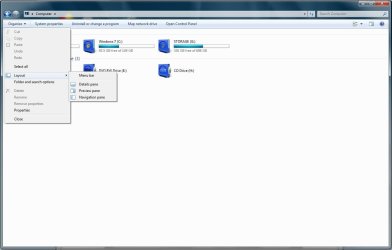
Auto arrange toggle for explorer has still not been included in build 7600 and it's looking like it wont be for now, as far as all the extra panes go you can customize that easily by changing the layout options on the Organize tab.

2009-07-15_123657.jpg
 

My Computer

Computer Manufacturer/Model Number
Home Brew
OS
Windows 7 Ultimate Vista Ultimate x64
CPU
Core 2 Duo E8500 3.16Ghz @ 3.8Ghz
Motherboard
eVGA 750i FTW
Memory
2x2Gigs Patriot PC2-6400 LL
Graphics Card(s)
Inno3D GeForce GTX260 216 SP
Monitor(s) Displays
ASUS VW222U 22" 2ms Response time
Screen Resolution
1680x1050
Hard Drives
SATA 150GB
SATA II 250GB
USB IDE 750GB Ext.
PSU
HYTEC 600W & Thermaltake 650W Toughpower Power Exp
Case
Thermaltake Armor LCS (Liquid Cooling System)
Cooling
Liquid Cooling System
Keyboard
Logitech G15 Gaming Keyboard
Mouse
Logitech G9 Gaming Mouse
Mate, thx for the direction here - thought 'tools/options' was the place to look...
I sit corrected... still hanging for a 'stop-auto-rearrange/re-sort' solution - but at
least I can have my simple view of life back again!.
Thx.
 

My Computer

OS
win7
Mate, thx for the direction here - thought 'tools/options' was the place to look...
I sit corrected... still hanging for a 'stop-auto-rearrange/re-sort' solution - but at
least I can have my simple view of life back again!.
Thx.

Your welcome, I'm sure you are one of many who are annoyed that it was removed and what was the point, how does it benefit anyone by removing this option which many people couldn't live without, makes no sense to me.
 

My Computer

Computer Manufacturer/Model Number
Home Brew
OS
Windows 7 Ultimate Vista Ultimate x64
CPU
Core 2 Duo E8500 3.16Ghz @ 3.8Ghz
Motherboard
eVGA 750i FTW
Memory
2x2Gigs Patriot PC2-6400 LL
Graphics Card(s)
Inno3D GeForce GTX260 216 SP
Monitor(s) Displays
ASUS VW222U 22" 2ms Response time
Screen Resolution
1680x1050
Hard Drives
SATA 150GB
SATA II 250GB
USB IDE 750GB Ext.
PSU
HYTEC 600W & Thermaltake 650W Toughpower Power Exp
Case
Thermaltake Armor LCS (Liquid Cooling System)
Cooling
Liquid Cooling System
Keyboard
Logitech G15 Gaming Keyboard
Mouse
Logitech G9 Gaming Mouse
: (

I also hate the fact that i cannot freely re-arrange files in folders (and yes, it was possible in Vista) .. it is especially annoying with pictures, when the desired order is often not the date - filename - or any other option !! :mad:

i hope Ms takes all these comments into consideration before the official 7 release .. :(
 

My Computer

OS
Windows 7
Status
Not open for further replies.
Back
Top