Auto Delete downloaded file

knightofdawn

New member
Local time
9:18 AM
Messages
11
I cannot find my file after download. I observe it by downloading a large file through firefox and internet explorer however after completion the file was remove or deleted. I try to remove my AV(nod32) but issue still exists. This was also observe downloading torrent files.

Can some one help me resolve this i cannot download any file/s. :cry:
 

My Computer

OS
Windows 7 Ultimate x64
Do you click "save as..." or "run"?

Also, check to see which directory the download manager points to in order to find your file.
 

My Computer

Computer Manufacturer/Model Number
Vostro
OS
Windows 7 Ultimate (SP1)
CPU
AMD Sempron 3600+
Graphics Card(s)
ATI Radeon Xpress 1150
Screen Resolution
1200 x 800
Hard Drives
WD Scorpio Blue 500 GB
yup done that sir! but same result..
 

My Computer

OS
Windows 7 Ultimate x64
Right click on the file and choose "save target as...". Then choose a download folder you can find later. Go to that folder after download and arrange the listing by "date modified" after setting the "View" to "details". It can be placed at the top that way.
 

My Computer

Computer type
PC/Desktop
Computer Manufacturer/Model Number
OQO 2+
OS
Windows 8 Pro w/MC 32-bit
CPU
Intel Atom 1.86 GHz
Motherboard
OQO 2+
Memory
2 GB
Graphics Card(s)
Intel GMA 500
Sound Card
IDT
Monitor(s) Displays
LCD
Screen Resolution
800 x 480 (portable) 1280 x 1024 (docked)
Hard Drives
64 GB SSD
PSU
9 Ah Battery (portable) or OQO Brick (docked)
Case
Shirt Pocket Sized
Cooling
Tiny Fan
Keyboard
Slide out (portable) DiNovo Edge (docked)
Mouse
Eraser head (portable) Logitech Bluetooth (docked)
Internet Speed
WWAN or 802.11G (portable) T1 (docked)
Browser
IE 10
Other Info
DVD-RW OQO Docking Station
Sir done that for both Firefox and ie same result. I can see the file (for 1mb up) but it was immediately been deleted permanently as I cannot see it in recycle bin.
 

My Computer

OS
Windows 7 Ultimate x64
Sir done that for both Firefox and ie same result. I can see the file (for 1mb up) but it was immediately been deleted permanently as I cannot see it in recycle bin.
If you UNcheck the option to "close window when download completes" and then when it completes choose "open folder" what happens? Try it for this 1.86MB file: http://www.cringely.com/podcast/20101229.mp3
(Sometimes the download doesn't complete, but even in that case you would see the downloaded file but with a smaller file size, in which case just download again to replace the too-small file.)
 

My Computer

Computer type
PC/Desktop
Computer Manufacturer/Model Number
OQO 2+
OS
Windows 8 Pro w/MC 32-bit
CPU
Intel Atom 1.86 GHz
Motherboard
OQO 2+
Memory
2 GB
Graphics Card(s)
Intel GMA 500
Sound Card
IDT
Monitor(s) Displays
LCD
Screen Resolution
800 x 480 (portable) 1280 x 1024 (docked)
Hard Drives
64 GB SSD
PSU
9 Ah Battery (portable) or OQO Brick (docked)
Case
Shirt Pocket Sized
Cooling
Tiny Fan
Keyboard
Slide out (portable) DiNovo Edge (docked)
Mouse
Eraser head (portable) Logitech Bluetooth (docked)
Internet Speed
WWAN or 802.11G (portable) T1 (docked)
Browser
IE 10
Other Info
DVD-RW OQO Docking Station
I like the Libraries feature in Seven, but it needs some time to get used to. I'm not saying this is the reason why your downloads disappear, I'm just saying it might be the reason.

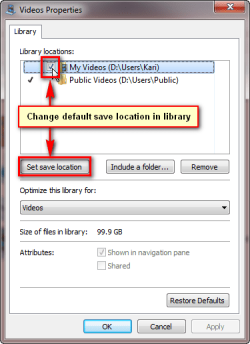
Just an example: You click a download link for instance to download a movie. You choose Save As, and select Libraries\Videos as save location. When download is finished, you go to your user folder, open My Videos folder and the movie you just downloaded is nowhere to see.

It's because the library Videos has another folder selected as default save location, in this example Users\Public\Public Videos. User assumes that a downloaded movie which is saved in Libraries\Videos is of course afterwards to be found in Users\Username\My Videos, but because Videos library properties show default library save location as Users\Public\Public Videos, that's where the movie has gone.

Kari
 

Attachments

  • Libraries_default_save_1.png
    Libraries_default_save_1.png
    13.1 KB · Views: 22
  • Libraries_default_save_2.png
    Libraries_default_save_2.png
    15.9 KB · Views: 18

My Computer

Computer type
Laptop
Computer Manufacturer/Model Number
HP ENVY 17-1150eg
OS
Windows 10 Pro x64 EN-GB
CPU
1.6 GHz Intel Core i7-720QM Processor
Memory
6 GB
Graphics Card(s)
ATI Mobility Radeon HD 5850 Graphics
Sound Card
Beats sound system with integrated subwoofer
Monitor(s) Displays
17" laptop display, 22" LED and 32" Full HD TV through HDMI
Screen Resolution
1600*900 (1), 1920*1080 (2&3)
Hard Drives
Internal: 2 x 500 GB SATA Hard Disk Drive 7200 rpm
External: 2TB for backups, 3TB USB3 network drive for media
Cooling
As Envy runs a bit warm, I have it on a Cooler Master pad
Keyboard
Logitech diNovo Media Desktop Laser (bluetooth)
Mouse
Logitech Performance Mouse MX
Internet Speed
50/10 Mbps VDSL
Antivirus
Windows Defender 4.3.9431.0
Browser
Maxthon 3.5.2., IE11
Good point. I hide the Library folders myself and just view and use the User folders.
 

My Computer

Computer type
PC/Desktop
Computer Manufacturer/Model Number
OQO 2+
OS
Windows 8 Pro w/MC 32-bit
CPU
Intel Atom 1.86 GHz
Motherboard
OQO 2+
Memory
2 GB
Graphics Card(s)
Intel GMA 500
Sound Card
IDT
Monitor(s) Displays
LCD
Screen Resolution
800 x 480 (portable) 1280 x 1024 (docked)
Hard Drives
64 GB SSD
PSU
9 Ah Battery (portable) or OQO Brick (docked)
Case
Shirt Pocket Sized
Cooling
Tiny Fan
Keyboard
Slide out (portable) DiNovo Edge (docked)
Mouse
Eraser head (portable) Logitech Bluetooth (docked)
Internet Speed
WWAN or 802.11G (portable) T1 (docked)
Browser
IE 10
Other Info
DVD-RW OQO Docking Station
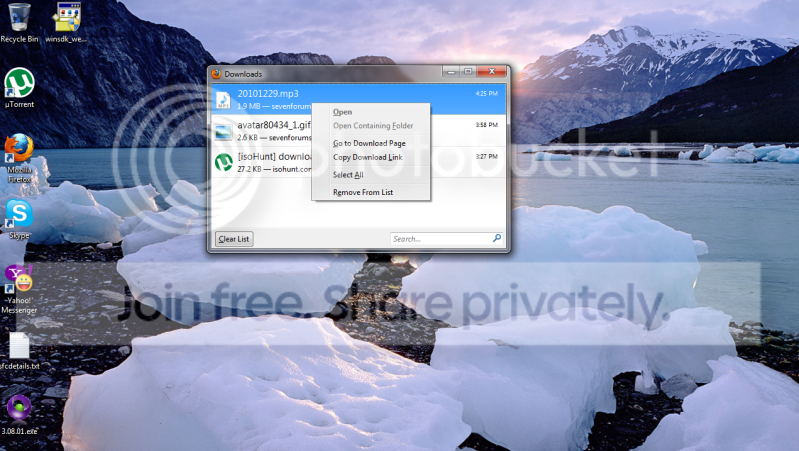
Downloading mp3 file for firefox, here's a snaps. see the "open" and "open containing folder" is disable.

autodelete.png


I've check the property location it pointing out on the user however i cannot see those tick box.
 
Last edited:

My Computer

OS
Windows 7 Ultimate x64
Here's how it works in Firefox:

When clicking a download link you are asked if you want to open (run) the file you are downloading or save it. If you select Open it is temporarily stored to default %TEMP% folder. This is because Windows (Firefox) thinks you don't want to save the file, you just want to run in once from download location. Because this is not possible, Windows needs to move it to Temp, run it from there, and forget that the file existed ;) That's why context menu option Open Containing Folder is not enabled.

Variable %TEMP% (shows the default TEMP folder) has a default value C:\Users\Your_Username_\AppData\Local\Temp, that's where you should look for your missing downloads.

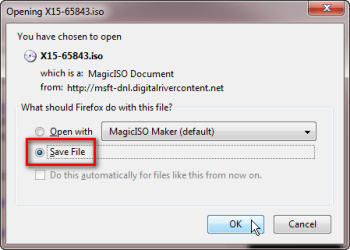
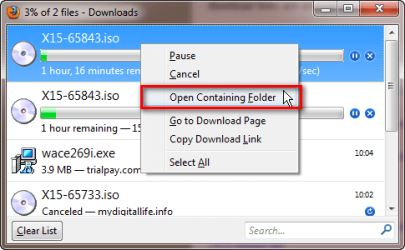
When you choose to save the file, it is saved to the default download save location if you have not changed that. Default location is C:\Users\Your_Username\Downloads.

Same with pics:

I've chosen to open an ISO image with Magic ISO Maker, instead of saving it for later use:
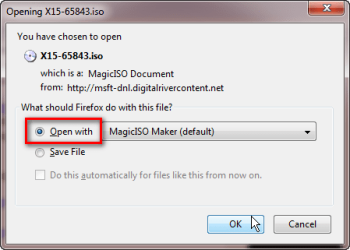
Firefox_download_1.png

Because I did not ask Windows to save the file, just to run it once, the file location can not be opened i.e. context menu selection Open Containing Folder is grayed out:
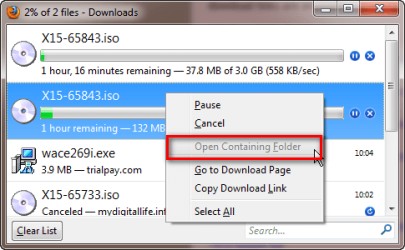
Firefox_download_3.png

Same file, same download location. This time I choose to save the file:
Firefox_download_2.png

Because the file is this time really saved, also the Open Containing Folder option is enabled:
Firefox_download_4.png

That's it.

Kari
 

My Computer

Computer type
Laptop
Computer Manufacturer/Model Number
HP ENVY 17-1150eg
OS
Windows 10 Pro x64 EN-GB
CPU
1.6 GHz Intel Core i7-720QM Processor
Memory
6 GB
Graphics Card(s)
ATI Mobility Radeon HD 5850 Graphics
Sound Card
Beats sound system with integrated subwoofer
Monitor(s) Displays
17" laptop display, 22" LED and 32" Full HD TV through HDMI
Screen Resolution
1600*900 (1), 1920*1080 (2&3)
Hard Drives
Internal: 2 x 500 GB SATA Hard Disk Drive 7200 rpm
External: 2TB for backups, 3TB USB3 network drive for media
Cooling
As Envy runs a bit warm, I have it on a Cooler Master pad
Keyboard
Logitech diNovo Media Desktop Laser (bluetooth)
Mouse
Logitech Performance Mouse MX
Internet Speed
50/10 Mbps VDSL
Antivirus
Windows Defender 4.3.9431.0
Browser
Maxthon 3.5.2., IE11
Yup agree that's how it work for browser however after download both are disable as it won't locate the actual file for temp and actual location.
 

My Computer

OS
Windows 7 Ultimate x64
Are you sure you have chosen to save? Not just open? Did you know that quite often when you choose Open or Run, your downloads window shows the real name of that app or file, but the temp file has a completely other name. For instance, let's say you download application ThisIsMyApp.exe, selecting Open. Firefox downloads shows ThisIsMyApp.exe being downloaded, but in fact the file that is saved in TEMP is something like 34kjh2345kjhgq35mS6D8G9F6A.TMP.

Anyway, I checked Firefox now on two Seven PC's and one XP, all work as they should: if I have selected to save the file, I can open folder location from context menu also from older downloads. If I have chosen Open, the option is grayed out.
 

My Computer

Computer type
Laptop
Computer Manufacturer/Model Number
HP ENVY 17-1150eg
OS
Windows 10 Pro x64 EN-GB
CPU
1.6 GHz Intel Core i7-720QM Processor
Memory
6 GB
Graphics Card(s)
ATI Mobility Radeon HD 5850 Graphics
Sound Card
Beats sound system with integrated subwoofer
Monitor(s) Displays
17" laptop display, 22" LED and 32" Full HD TV through HDMI
Screen Resolution
1600*900 (1), 1920*1080 (2&3)
Hard Drives
Internal: 2 x 500 GB SATA Hard Disk Drive 7200 rpm
External: 2TB for backups, 3TB USB3 network drive for media
Cooling
As Envy runs a bit warm, I have it on a Cooler Master pad
Keyboard
Logitech diNovo Media Desktop Laser (bluetooth)
Mouse
Logitech Performance Mouse MX
Internet Speed
50/10 Mbps VDSL
Antivirus
Windows Defender 4.3.9431.0
Browser
Maxthon 3.5.2., IE11
yup i'm pretty sure i had those option and tried it on both ie and ff. That's why i'm posting it here, weird... but this is a newly installed w7 on my laptop...at first all are okay until a window updates...i confirm this via a system restore... i'm not sure which is which does that...
 
Last edited:

My Computer

OS
Windows 7 Ultimate x64
Did you try to download the file linked to in post #6 with IE8 following the prodedure described in that post?
 

My Computer

Computer type
PC/Desktop
Computer Manufacturer/Model Number
OQO 2+
OS
Windows 8 Pro w/MC 32-bit
CPU
Intel Atom 1.86 GHz
Motherboard
OQO 2+
Memory
2 GB
Graphics Card(s)
Intel GMA 500
Sound Card
IDT
Monitor(s) Displays
LCD
Screen Resolution
800 x 480 (portable) 1280 x 1024 (docked)
Hard Drives
64 GB SSD
PSU
9 Ah Battery (portable) or OQO Brick (docked)
Case
Shirt Pocket Sized
Cooling
Tiny Fan
Keyboard
Slide out (portable) DiNovo Edge (docked)
Mouse
Eraser head (portable) Logitech Bluetooth (docked)
Internet Speed
WWAN or 802.11G (portable) T1 (docked)
Browser
IE 10
Other Info
DVD-RW OQO Docking Station
yup done that same thing happen it won't locate the file. Right now, i do a clean installed stop the auto update. have all work okay on ie8. Installed the FF and issue encounter as the file is automatically deleted on a the download folder or a specific folder I choice.
 

My Computer

OS
Windows 7 Ultimate x64
gone revive this one. Issue still exists...i cannot download any file from my laptop for both browsers...please some one help are there any local policy that does that.. I have already tried changing permission for current user and system to deny deletion on the folder security but file auto delete...
 

My Computer

OS
Windows 7 Ultimate x64
yup done that same thing happen it won't locate the file. Right now, i do a clean installed stop the auto update. have all work okay on ie8. Installed the FF and issue encounter as the file is automatically deleted on a the download folder or a specific folder I choice.

If the issue arises when you install FF, then just don't use it for now.I know that's just a workaround, but it'll accomplish what you want
 

My Computer

Computer Manufacturer/Model Number
Vostro
OS
Windows 7 Ultimate (SP1)
CPU
AMD Sempron 3600+
Graphics Card(s)
ATI Radeon Xpress 1150
Screen Resolution
1200 x 800
Hard Drives
WD Scorpio Blue 500 GB
Firefox has a built in mini virus scanner / general scanner I think? Perhaps it is the scanner removing the files.

Disable Automatic Virus Scan in Firefox 3 [How To] | Software Guides | Windows Tools, Help & Guides

Of course if disabling that option turns out to allow files to download normally, then I'd be concerned about why Firefox is treating your downloaded content as infected.

yup done that same thing happen it won't locate the file. Right now, i do a clean installed stop the auto update. have all work okay on ie8. Installed the FF and issue encounter as the file is automatically deleted on a the download folder or a specific folder I choice.
 

My Computer

Computer Manufacturer/Model Number
HP DV6 1330sa
OS
Windows 7 Professional 64 Bit SP1
CPU
INTEL DUAL CORE 2.1Ghz
Motherboard
N/A
Memory
4GB DDR3
Graphics Card(s)
INTEL
Sound Card
LAPTOP
Monitor(s) Displays
2
Screen Resolution
3200x1080
Hard Drives
250GB
PSU
LAPTOP
Case
LAPTOP
Cooling
LAPTOP
Keyboard
SOLID YEAR 260U
Mouse
USB
Internet Speed
20 MB/S
Firefox has a built in mini virus scanner / general scanner I think? Perhaps it is the scanner removing the files.

Disable Automatic Virus Scan in Firefox 3 [How To] | Software Guides | Windows Tools, Help & Guides

Of course if disabling that option turns out to allow files to download normally, then I'd be concerned about why Firefox is treating your downloaded content as infected.

yup done that same thing happen it won't locate the file. Right now, i do a clean installed stop the auto update. have all work okay on ie8. Installed the FF and issue encounter as the file is automatically deleted on a the download folder or a specific folder I choice.

Thanks you Lost Colonist! You solve it for Firefox :D but how about on IE 8 are there config similar to it?
 

My Computer

OS
Windows 7 Ultimate x64
I have no idea, sorry. It's not a browser I use, but maybe someone else here knows? Well, at least one of the browsers is working normally again :)

Firefox has a built in mini virus scanner / general scanner I think? Perhaps it is the scanner removing the files.

Disable Automatic Virus Scan in Firefox 3 [How To] | Software Guides | Windows Tools, Help & Guides

Of course if disabling that option turns out to allow files to download normally, then I'd be concerned about why Firefox is treating your downloaded content as infected.

yup done that same thing happen it won't locate the file. Right now, i do a clean installed stop the auto update. have all work okay on ie8. Installed the FF and issue encounter as the file is automatically deleted on a the download folder or a specific folder I choice.

Thanks you Lost Colonist! You solve it for Firefox :D but how about on IE 8 are there config similar to it?
 

My Computer

Computer Manufacturer/Model Number
HP DV6 1330sa
OS
Windows 7 Professional 64 Bit SP1
CPU
INTEL DUAL CORE 2.1Ghz
Motherboard
N/A
Memory
4GB DDR3
Graphics Card(s)
INTEL
Sound Card
LAPTOP
Monitor(s) Displays
2
Screen Resolution
3200x1080
Hard Drives
250GB
PSU
LAPTOP
Case
LAPTOP
Cooling
LAPTOP
Keyboard
SOLID YEAR 260U
Mouse
USB
Internet Speed
20 MB/S
Back
Top