
joechesster
New member
- Local time
- 12:57 PM
- Messages
- 2
I searched the threads and could not find my specific question, so I apologize if this is a repeat.
I have my LCD TV hooked up to my PC via HDMI cable for both video and audio. I occasionally plug in headphones into the front audio jack. I can manually switch the default sound to hear audio through my headphones, but otherwise I hear nothing. Is there anyway to have the audio automatically switch to my headphones when they're plugged in?
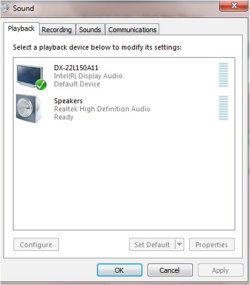
Here's a picture of my sound devices when I right click on my volume and go to "Playback Devices." The top is my HDMI output (default), and the bottom is my speakers, which I only use when headphones are hooked up. I can click on speakers and then "Set Default" to change it, but there must be an automatic way. Any help here would be appreciated.
I have my LCD TV hooked up to my PC via HDMI cable for both video and audio. I occasionally plug in headphones into the front audio jack. I can manually switch the default sound to hear audio through my headphones, but otherwise I hear nothing. Is there anyway to have the audio automatically switch to my headphones when they're plugged in?
Here's a picture of my sound devices when I right click on my volume and go to "Playback Devices." The top is my HDMI output (default), and the bottom is my speakers, which I only use when headphones are hooked up. I can click on speakers and then "Set Default" to change it, but there must be an automatic way. Any help here would be appreciated.
My Computer
At a glance
Windows 7 Home Premium 64bitIntel Core i3 CPU 530 @2.93GHz6.00 GBIntel Graphics Media Accelerator HD
- Computer Manufacturer/Model Number
- Gateway/DX4831
- OS
- Windows 7 Home Premium 64bit
- CPU
- Intel Core i3 CPU 530 @2.93GHz
- Memory
- 6.00 GB
- Graphics Card(s)
- Intel Graphics Media Accelerator HD
- Sound Card
- Intel Display Audio, Realtek High Definition Audio
- Monitor(s) Displays
- HD LCD TV
- Hard Drives
- 1 TB


