Autoplay Menu - Missing/Incorrect Items

AbSoluTc

New member
Local time
2:00 AM
Messages
9
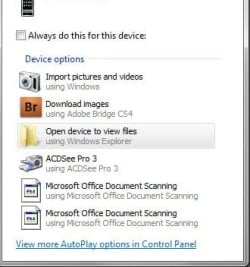
This is a fresh, newly done machine from scratch. I notice these 2 bottom items when I plug in my iPhone to sync. I can't seem to figure out why they are showing in the list with those icons, let alone why they are there to begin with. I attempted to remove them through the registry and that was a no go. Caused autoplay to stop working for my phone period. I uninstalled the the MS Office document scanning option from office and that had no effect.

Pic below.

What am I missing? Any help would be appreciated.

Thanks

attachment.php
 

Attachments

  • Clip.jpg
    Clip.jpg
    18.6 KB · Views: 4,807

My Computer

Computer Manufacturer/Model Number
Dell Studio XPS 9000
OS
Windows 7 Pro 64bit
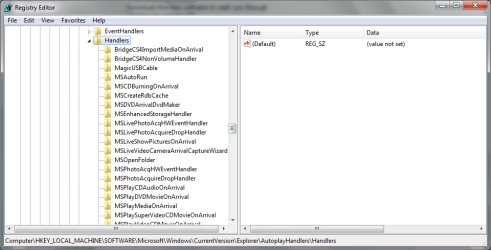
You can delete them from the registry...

HKEY_LOCAL_MACHINE\Software\Microsoft\Windows\CurrentVersion\Explorer\AutoplayHandlers\Handlers\

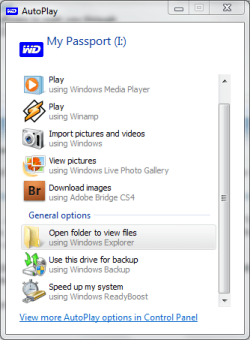
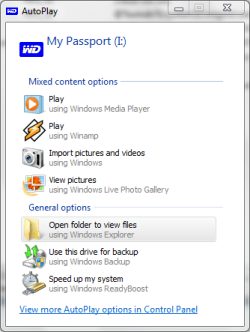
I've just removed Adobe Bridge from my autoplay menu. The attachments are before and after snips...
 

Attachments

  • brdg.PNG
    brdg.PNG
    18.8 KB · Views: 101
  • reg.PNG
    reg.PNG
    21.7 KB · Views: 533
  • apaft.PNG
    apaft.PNG
    16.5 KB · Views: 133
  • regaft.PNG
    regaft.PNG
    26.5 KB · Views: 420

My Computer

Computer Manufacturer/Model Number
Sony Vaio FZ21Z
OS
Windows 7 Ultimate x64 ®™
CPU
Intel Core 2 Duo (2.2 GHz)
Motherboard
Sony (Intel Chipset)
Memory
2x 2GB Corsair (667 MHz)
Graphics Card(s)
NVIDIA 8600M GS (256MB)
Sound Card
Sigmatel
Monitor(s) Displays
15.4" TFT X-Black
Screen Resolution
1280x800
Hard Drives
Western Digital 300GB Scorpio Black (7200rpm)
Mouse
Logitech Anywhere MX
Internet Speed
Sky 5MB
The autoplay fixer program does not see any issues. It also does not see those two things.

As posted in my original post, removing those two entries from the registry, causes autoplay to no longer work with my phone. If I remove then, autoplay does not pop up when I connect the phone. Putting the registry keys back, that phone works.

I have no idea what the issue is or why it's doing that. Restarts after removing the registry keys result in the same issue. Nothing.
 

My Computer

Computer Manufacturer/Model Number
Dell Studio XPS 9000
OS
Windows 7 Pro 64bit
What if you remove the entries from the registry, and try to configure the options in Control Panel\All Control Panel Items\AutoPlay?
 

My Computer

Computer Manufacturer/Model Number
Sony Vaio FZ21Z
OS
Windows 7 Ultimate x64 ®™
CPU
Intel Core 2 Duo (2.2 GHz)
Motherboard
Sony (Intel Chipset)
Memory
2x 2GB Corsair (667 MHz)
Graphics Card(s)
NVIDIA 8600M GS (256MB)
Sound Card
Sigmatel
Monitor(s) Displays
15.4" TFT X-Black
Screen Resolution
1280x800
Hard Drives
Western Digital 300GB Scorpio Black (7200rpm)
Mouse
Logitech Anywhere MX
Internet Speed
Sky 5MB
Just deleted both registry keys again and set to open folder when I plug in my phone. Nada, nothing. iTunes will sync up just fine, but windows 7 does nothing. It's rather odd to be honest.

The keys in the registry are like this..

First key:


[HKEY_LOCAL_MACHINE\SOFTWARE\Microsoft\Windows\CurrentVersion\Explorer\AutoplayHandlers\Handlers\WIA_{5133AC0F-6018-409C-BD14-456A78EF595C}]
"DefaultIcon"="C:\\Program Files (x86)\\Common Files\\Microsoft Shared\\MODI\\12.0\\MSPSCAN.EXE,1"
"Action"="Microsoft Office Document Scanning"
"InitCmdLine"="/WiaCmd;C:\\Program Files (x86)\\Common Files\\Microsoft Shared\\MODI\\12.0\\MSPSCAN.EXE;"
"Provider"="Microsoft Office Document Scanning"
"CLSID"="{A55803CC-4D53-404c-8557-FD63DBA95D24}"


Second key:


[HKEY_LOCAL_MACHINE\SOFTWARE\Microsoft\Windows\CurrentVersion\Explorer\AutoplayHandlers\Handlers\WIA_{7F79E229-4B44-4A21-83C6-DFF1FFBB12FC}]
"DefaultIcon"="C:\\Program Files (x86)\\Common Files\\Microsoft Shared\\MODI\\12.0\\MSPSCAN.EXE,1"
"Action"="Microsoft Office Document Scanning"
"InitCmdLine"="/WiaCmd;C:\\Program Files (x86)\\Common Files\\Microsoft Shared\\MODI\\12.0\\MSPSCAN.EXE;"
"Provider"="Microsoft Office Document Scanning"
"CLSID"="{A55803CC-4D53-404c-8557-FD63DBA95D24}"
 

My Computer

Computer Manufacturer/Model Number
Dell Studio XPS 9000
OS
Windows 7 Pro 64bit
Did you try to configure it after in autoplay options.
 

My Computer

Computer Manufacturer/Model Number
Sony Vaio FZ21Z
OS
Windows 7 Ultimate x64 ®™
CPU
Intel Core 2 Duo (2.2 GHz)
Motherboard
Sony (Intel Chipset)
Memory
2x 2GB Corsair (667 MHz)
Graphics Card(s)
NVIDIA 8600M GS (256MB)
Sound Card
Sigmatel
Monitor(s) Displays
15.4" TFT X-Black
Screen Resolution
1280x800
Hard Drives
Western Digital 300GB Scorpio Black (7200rpm)
Mouse
Logitech Anywhere MX
Internet Speed
Sky 5MB
Yes. Now it seems autoplay is no longer working for the phone. Lol. Might have to restart.
 

My Computer

Computer Manufacturer/Model Number
Dell Studio XPS 9000
OS
Windows 7 Pro 64bit

My Computer

Computer type
PC/Desktop
Computer Manufacturer/Model Number
Dell OP7010
OS
Windows 7 Enterprise (x64); Windows Server 2008 R2 (x64)
Memory
16GB
Monitor(s) Displays
4 Dell 24" LCD
Screen Resolution
1280x1024
Keyboard
Dell
Mouse
Dell Optical
Internet Speed
40meg


No.

The issue I see is, the registry entries are duplicated. Not sure why there needs to be 2 of them. Removing either one results in the phone no longer having autoplay pop up.

Now it is not working at all. Even with the registry settings in there like it was before. I even reinstalled the MS Office Tools - Document and Scanning stuff. Still did nothing.

Removing the ",1" at the end of the DEFAULT ICON line in the registry makes the icon show up. Great. However, autoplay does not work and why are there two of the same things in there? Lastly, why is it when I delete them altogether, the phone quits autoplaying?

Ugh.
 

My Computer

Computer Manufacturer/Model Number
Dell Studio XPS 9000
OS
Windows 7 Pro 64bit
Have you tried uninstalling then reinstalling the iPod?
 

My Computer

Computer Manufacturer/Model Number
Sony Vaio FZ21Z
OS
Windows 7 Ultimate x64 ®™
CPU
Intel Core 2 Duo (2.2 GHz)
Motherboard
Sony (Intel Chipset)
Memory
2x 2GB Corsair (667 MHz)
Graphics Card(s)
NVIDIA 8600M GS (256MB)
Sound Card
Sigmatel
Monitor(s) Displays
15.4" TFT X-Black
Screen Resolution
1280x800
Hard Drives
Western Digital 300GB Scorpio Black (7200rpm)
Mouse
Logitech Anywhere MX
Internet Speed
Sky 5MB
Yeah, tried uninstalling the iphone driver and reinstalling. No go.
 

My Computer

Computer Manufacturer/Model Number
Dell Studio XPS 9000
OS
Windows 7 Pro 64bit
Don't know what else to suggest, sorry.
 

My Computer

Computer Manufacturer/Model Number
Sony Vaio FZ21Z
OS
Windows 7 Ultimate x64 ®™
CPU
Intel Core 2 Duo (2.2 GHz)
Motherboard
Sony (Intel Chipset)
Memory
2x 2GB Corsair (667 MHz)
Graphics Card(s)
NVIDIA 8600M GS (256MB)
Sound Card
Sigmatel
Monitor(s) Displays
15.4" TFT X-Black
Screen Resolution
1280x800
Hard Drives
Western Digital 300GB Scorpio Black (7200rpm)
Mouse
Logitech Anywhere MX
Internet Speed
Sky 5MB
Yeah, I made a post on Apple forums to see where it goes. I have no clue either other than reloading everything and I am not doing that.
 

My Computer

Computer Manufacturer/Model Number
Dell Studio XPS 9000
OS
Windows 7 Pro 64bit
More info..

It appears, if I delete ANYTHING out of the registry for "HANDLERS" - iPhone autoplay stops - period. I deleted the Adobe CS bridge and it stopped. Not sure what the hell is causing that.

I have tried everything.
 

My Computer

Computer Manufacturer/Model Number
Dell Studio XPS 9000
OS
Windows 7 Pro 64bit
Just deleted both registry keys again and set to open folder when I plug in my phone. Nada, nothing. iTunes will sync up just fine, but windows 7 does nothing. It's rather odd to be honest.

The keys in the registry are like this..

First key:


[HKEY_LOCAL_MACHINE\SOFTWARE\Microsoft\Windows\CurrentVersion\Explorer\AutoplayHandlers\Handlers\WIA_{5133AC0F-6018-409C-BD14-456A78EF595C}]
"DefaultIcon"="C:\\Program Files (x86)\\Common Files\\Microsoft Shared\\MODI\\12.0\\MSPSCAN.EXE,1"
"Action"="Microsoft Office Document Scanning"
"InitCmdLine"="/WiaCmd;C:\\Program Files (x86)\\Common Files\\Microsoft Shared\\MODI\\12.0\\MSPSCAN.EXE;"
"Provider"="Microsoft Office Document Scanning"
"CLSID"="{A55803CC-4D53-404c-8557-FD63DBA95D24}"


Second key:


[HKEY_LOCAL_MACHINE\SOFTWARE\Microsoft\Windows\CurrentVersion\Explorer\AutoplayHandlers\Handlers\WIA_{7F79E229-4B44-4A21-83C6-DFF1FFBB12FC}]
"DefaultIcon"="C:\\Program Files (x86)\\Common Files\\Microsoft Shared\\MODI\\12.0\\MSPSCAN.EXE,1"
"Action"="Microsoft Office Document Scanning"
"InitCmdLine"="/WiaCmd;C:\\Program Files (x86)\\Common Files\\Microsoft Shared\\MODI\\12.0\\MSPSCAN.EXE;"
"Provider"="Microsoft Office Document Scanning"
"CLSID"="{A55803CC-4D53-404c-8557-FD63DBA95D24}"

The registry keys look fine. In my registry I have many keys that look like duplicates but do different things. You have 2 different GUID numbers so they are different.

However I don't know why this would effect your iPhone's autoplay.
 

My Computer

Computer type
PC/Desktop
Computer Manufacturer/Model Number
Dell OP7010
OS
Windows 7 Enterprise (x64); Windows Server 2008 R2 (x64)
Memory
16GB
Monitor(s) Displays
4 Dell 24" LCD
Screen Resolution
1280x1024
Keyboard
Dell
Mouse
Dell Optical
Internet Speed
40meg
Strange that I can't get rid of them at all.
 

My Computer

Computer Manufacturer/Model Number
Dell Studio XPS 9000
OS
Windows 7 Pro 64bit

My Computer

Computer type
PC/Desktop
Computer Manufacturer/Model Number
Dell OP7010
OS
Windows 7 Enterprise (x64); Windows Server 2008 R2 (x64)
Memory
16GB
Monitor(s) Displays
4 Dell 24" LCD
Screen Resolution
1280x1024
Keyboard
Dell
Mouse
Dell Optical
Internet Speed
40meg
I came across this issue after upgrading from Office 2007 to 2010 and found the fix.

I removed the corresponding WIA entries under the following section and it worked for my system.

HKEY_LOCAL_MACHINE\SOFTWARE\Microsoft\Windows\CurrentVersion\Explorer\AutoplayHandlers\EventHandlers\WPD\Compat\WiaDeviceConnected
 

My Computer

OS
Windows 7 Enterprise x64
Missing icon for autoplay fix

I registered just to reply to this thread. The registry keys you are all mentioning are correct, but you do not need to delete them. Doing so will cause the auoplay to malfunction and probably stop working for that device.

I have an iPod Touch and was missing the Microsoft Office Document Scanning icon as are many others. Go to the registry keys mentioned prior to this reply but do not delete them. Access the default icon portion and remove the ",1" after the MPSCAN.EXE

The icon appears.
 

My Computer

OS
Windows 7 Ultimate 64-Bit
Back
Top