Auugh PC will come on but not boot!!!

Have you or do you have another display you can test? I can't recall if that was already looked into.
I have tried another display and it says in the monitor: power saving mode. Idk what to do. [emoji17]
 

My Computer My Computer

At a glance

Windows 10 64-bitLenovo8gigs
Computer type
PC/Desktop
Computer Manufacturer/Model Number
Hp PC on an Acer motherboard so it's a mixed mutt. ;)
OS
Windows 10 64-bit
CPU
Lenovo
Motherboard
Lenovo
Memory
8gigs
Monitor(s) Displays
Acer 17''
Hard Drives
512 MB
Case
Lenovo case
Keyboard
Lifeworks backlit wired keyboard
Mouse
Soongo blue wured mouse
Antivirus
AVG Anti-Virus
Browser
Brave v 1.60.118
Can you tell me what CPU you have, what graphics card and what PSU you have.
 

My Computers My Computers

  • At a glance

    Windows 11 ProRyzen 9 5900X32GB G Skill DDR4-3600EVGA RTX 3080 FTW 3 Ultra
    Computer type
    PC/Desktop
    Computer Manufacturer/Model Number
    ALWAYS UNDER CONSTRUCTION
    OS
    Windows 11 Pro
    CPU
    Ryzen 9 5900X
    Motherboard
    Asus X570 Crosshair Viii Hero
    Memory
    32GB G Skill DDR4-3600
    Graphics Card(s)
    EVGA RTX 3080 FTW 3 Ultra
    Sound Card
    On Board/Sennheiser PC37X Headset
    Monitor(s) Displays
    3 X Asus 27"
    Screen Resolution
    2560x1440
    Hard Drives
    2 X 1 TB NVME drives
    PSU
    EVGA 850
    Case
    Phanteks Eclipse P400A
    Cooling
    EVGA 280 AIO
    Keyboard
    Logitech G510s/ Logitech G13
    Mouse
    Logitech G502
    Internet Speed
    24/1
    Antivirus
    ESET/MBAM Pro/SAS Pro
    Browser
    Chrome/ Firefox/ Edge
  • At a glance

    Windows 11 ProIntel Ultra 9 288V32 GB LPDDR5X 8533
    Computer type
    Laptop
    System Manufacturer/Model Number
    Dell 16 Plus
    OS
    Windows 11 Pro
    CPU
    Intel Ultra 9 288V
    Memory
    32 GB LPDDR5X 8533
    Monitor(s) Displays
    16" Mini-LED HDR600 Touch 90 Hz
    Screen Resolution
    2560X1600
    Hard Drives
    1 TB NVME
Can you tell me what CPU you have, what graphics card and what PSU you have.

I have an Acer motherboard and it's running on HP I think as CPU. I think the graphics card is Nvida or something like that. And what's PSU? Also, I will just delete the other thread. Sorry.
 

My Computer My Computer

At a glance

Windows 10 64-bitLenovo8gigs
Computer type
PC/Desktop
Computer Manufacturer/Model Number
Hp PC on an Acer motherboard so it's a mixed mutt. ;)
OS
Windows 10 64-bit
CPU
Lenovo
Motherboard
Lenovo
Memory
8gigs
Monitor(s) Displays
Acer 17''
Hard Drives
512 MB
Case
Lenovo case
Keyboard
Lifeworks backlit wired keyboard
Mouse
Soongo blue wured mouse
Antivirus
AVG Anti-Virus
Browser
Brave v 1.60.118
Have you or do you have another display you can test? I can't recall if that was already looked into.

Chris, I was able to test on another monitor and it still gives me "Power Saving Mode" on the display. :cry: I am at wits end with this computer :cry:
 

My Computer My Computer

At a glance

Windows 10 64-bitLenovo8gigs
Computer type
PC/Desktop
Computer Manufacturer/Model Number
Hp PC on an Acer motherboard so it's a mixed mutt. ;)
OS
Windows 10 64-bit
CPU
Lenovo
Motherboard
Lenovo
Memory
8gigs
Monitor(s) Displays
Acer 17''
Hard Drives
512 MB
Case
Lenovo case
Keyboard
Lifeworks backlit wired keyboard
Mouse
Soongo blue wured mouse
Antivirus
AVG Anti-Virus
Browser
Brave v 1.60.118
Boot rom the Windows 7 Installation DVD nd see if you can get graphics then or use a live Linux CD and boot from that and see if the graphics work. Puppy Linux is probably the smallest download http://www.puppylinux.com/

Download the ISO file from another computer and burn it to a blank CD. Then boot from th CD not the hard drive.
 

My Computers My Computers

  • At a glance

    Windows 11 ProRyzen 9 5900X32GB G Skill DDR4-3600EVGA RTX 3080 FTW 3 Ultra
    Computer type
    PC/Desktop
    Computer Manufacturer/Model Number
    ALWAYS UNDER CONSTRUCTION
    OS
    Windows 11 Pro
    CPU
    Ryzen 9 5900X
    Motherboard
    Asus X570 Crosshair Viii Hero
    Memory
    32GB G Skill DDR4-3600
    Graphics Card(s)
    EVGA RTX 3080 FTW 3 Ultra
    Sound Card
    On Board/Sennheiser PC37X Headset
    Monitor(s) Displays
    3 X Asus 27"
    Screen Resolution
    2560x1440
    Hard Drives
    2 X 1 TB NVME drives
    PSU
    EVGA 850
    Case
    Phanteks Eclipse P400A
    Cooling
    EVGA 280 AIO
    Keyboard
    Logitech G510s/ Logitech G13
    Mouse
    Logitech G502
    Internet Speed
    24/1
    Antivirus
    ESET/MBAM Pro/SAS Pro
    Browser
    Chrome/ Firefox/ Edge
  • At a glance

    Windows 11 ProIntel Ultra 9 288V32 GB LPDDR5X 8533
    Computer type
    Laptop
    System Manufacturer/Model Number
    Dell 16 Plus
    OS
    Windows 11 Pro
    CPU
    Intel Ultra 9 288V
    Memory
    32 GB LPDDR5X 8533
    Monitor(s) Displays
    16" Mini-LED HDR600 Touch 90 Hz
    Screen Resolution
    2560X1600
    Hard Drives
    1 TB NVME
Boot rom the Windows 7 Installation DVD nd see if you can get graphics then or use a live Linux CD and boot from that and see if the graphics work. Puppy Linux is probably the smallest download http://www.puppylinux.com/

Download the ISO file from another computer and burn it to a blank CD. Then boot from th CD not the hard drive.
Ok I will try that and see then will let you know. I do have a windows 7 cd.
 

My Computer My Computer

At a glance

Windows 10 64-bitLenovo8gigs
Computer type
PC/Desktop
Computer Manufacturer/Model Number
Hp PC on an Acer motherboard so it's a mixed mutt. ;)
OS
Windows 10 64-bit
CPU
Lenovo
Motherboard
Lenovo
Memory
8gigs
Monitor(s) Displays
Acer 17''
Hard Drives
512 MB
Case
Lenovo case
Keyboard
Lifeworks backlit wired keyboard
Mouse
Soongo blue wured mouse
Antivirus
AVG Anti-Virus
Browser
Brave v 1.60.118
So your computer will boot properly, just when it gets to Starting Windows, that's when the problem arises?
 

My Computer My Computer

At a glance

Windows 10 Home x64AMD FX-8320 @ 3.5 GHz4 x 2 GB G Skill Ripjaws DDR3-1600EVGA Nvidia GTX 550 Ti 1 GB
Computer type
PC/Desktop
Computer Manufacturer/Model Number
Custom Build
OS
Windows 10 Home x64
CPU
AMD FX-8320 @ 3.5 GHz
Motherboard
Gigabyte GA-990FXA-UD3 (rev. 4.0)
Memory
4 x 2 GB G Skill Ripjaws DDR3-1600
Graphics Card(s)
EVGA Nvidia GTX 550 Ti 1 GB
Sound Card
Realtek
Monitor(s) Displays
Acer S201HL
Screen Resolution
1600x900
Hard Drives
1 x 240 GB OCZ SSD
1 x 60 GB Intel SSD
1 x 1 TB Samsung HDD
PSU
Silverstone Strider 750w Modular
Case
Antec 300 Illusion
Cooling
Air
Keyboard
Microsoft
Mouse
HP
Antivirus
Microsoft Security Essentials
Browser
Google Chrome
So your computer will boot properly, just when it gets to Starting Windows, that's when the problem arises?
The thing is, it doesn't show the Windows icon or nothing it just like it sits there. It does not beep like it normally does. And I tried using the installation cd but will try other 2 I had and get nothing. Power Saving Mode :(
 

My Computer My Computer

At a glance

Windows 10 64-bitLenovo8gigs
Computer type
PC/Desktop
Computer Manufacturer/Model Number
Hp PC on an Acer motherboard so it's a mixed mutt. ;)
OS
Windows 10 64-bit
CPU
Lenovo
Motherboard
Lenovo
Memory
8gigs
Monitor(s) Displays
Acer 17''
Hard Drives
512 MB
Case
Lenovo case
Keyboard
Lifeworks backlit wired keyboard
Mouse
Soongo blue wured mouse
Antivirus
AVG Anti-Virus
Browser
Brave v 1.60.118
could it be the cmos battery needs to be replaced??? or another thing i was thinking is maybe the motherboard has failed... or cpu got to hot and is no longer good..
 

My Computer My Computer

At a glance

Win-7 H-Prem-x64 Linux-M-Mate-x64intel i7 4770kCorsair Dominator Platinum DDR3 16 GB (1,866 ...GIGABYTE GeForce GTX 1060 GV-N1060G1 GAMING-3...
Computer type
PC/Desktop
Computer Manufacturer/Model Number
Custom Build (Monster*212)
OS
Win-7 H-Prem-x64 Linux-M-Mate-x64
CPU
intel i7 4770k
Motherboard
Gigabyte z78x-hd3 gaming
Memory
Corsair Dominator Platinum DDR3 16 GB (1,866 MHz)
Graphics Card(s)
GIGABYTE GeForce GTX 1060 GV-N1060G1 GAMING-3GD 2
Sound Card
NVIDIA High Definition Audio
Monitor(s) Displays
HP 2711x LED 1080p
Screen Resolution
1920x1080
Hard Drives
SAMSUNG 850 EVO 2.5" 250GB SSD
1tb 7200RPM HDD
250GB 7200RPM HDD
PSU
EVGA 600wattB 80+
Case
Cougar Panzer Max
Cooling
CORSAIR H60 liquid cooling
Keyboard
Logitech
Mouse
logitech
Internet Speed
Cable
Antivirus
Avast
Browser
Chrome
Other Info
LG Bluray reader
So your computer will boot properly, just when it gets to Starting Windows, that's when the problem arises?
The thing is, it doesn't show the Windows icon or nothing it just like it sits there. It does not beep like it normally does. And I tried using the installation cd but will try other 2 I had and get nothing. Power Saving Mode :(

If your computer won't even reach POST (Power-On Self Test) and you don't hear the Windows log-on music, then I'd go with motherboard, assuming you don't hear anything on top of the screen not turning on properly.
 

My Computer My Computer

At a glance

Windows 10 Home x64AMD FX-8320 @ 3.5 GHz4 x 2 GB G Skill Ripjaws DDR3-1600EVGA Nvidia GTX 550 Ti 1 GB
Computer type
PC/Desktop
Computer Manufacturer/Model Number
Custom Build
OS
Windows 10 Home x64
CPU
AMD FX-8320 @ 3.5 GHz
Motherboard
Gigabyte GA-990FXA-UD3 (rev. 4.0)
Memory
4 x 2 GB G Skill Ripjaws DDR3-1600
Graphics Card(s)
EVGA Nvidia GTX 550 Ti 1 GB
Sound Card
Realtek
Monitor(s) Displays
Acer S201HL
Screen Resolution
1600x900
Hard Drives
1 x 240 GB OCZ SSD
1 x 60 GB Intel SSD
1 x 1 TB Samsung HDD
PSU
Silverstone Strider 750w Modular
Case
Antec 300 Illusion
Cooling
Air
Keyboard
Microsoft
Mouse
HP
Antivirus
Microsoft Security Essentials
Browser
Google Chrome
Lascot mate try this
Using HW Info
PART A:
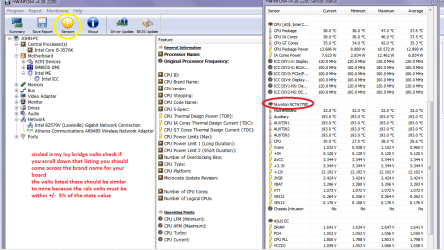
You can test the volts on the PSU with HW Info HWiNFO, HWiNFO32/64 - Download < download the right bit version and close the right hand window select Sensors and scroll down to the power section where you will see what the volts are doing see my pic.
The original right hand window shows the machine running and is handy for that but for looking at the components in some detail close it and use the main left hand side panel
FOR OTHER COMPONENTS
PART B:
Open each small square with + in it on the section the components are in and then click on the individual component/s (it will highlight in blue) - in the right hand side will appear all sorts of details including brands speeds and other essential info that particular device. See pic for example.
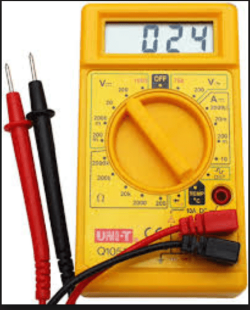
If you can boot at all otherwise get a small digital multimeter and test the volts at the 24 pin plug see this
Power supply unit (computer - Wikipedia, the free encyclopedia) test the volts by using the black lead on any of the 24 pin plug's black leads and the red lead on the colours.

Now the volts must be within 5% +/- of the stated rail voltages or the machine will not work correctly if at al. If there is power to the board there should be some LED's that glow anyway but see this
Voltage Rails - Power Supply 101: A Reference Of Specifications

 

Attachments

  • HW Info PSU VOLTS DESKTOP.PNG
    HW Info PSU VOLTS DESKTOP.PNG
    51.7 KB · Views: 2
  • DIGITAL METER.PNG
    DIGITAL METER.PNG
    102.3 KB · Views: 20

My Computer My Computer

At a glance

Desk1 7 Home Prem / Desk2 10 Pro / Main lap A...Desk1 i5 3750K / Laptop i7 GTX 860M / Desk2 i...Desk1 8GB (1866) / Desk2 16GB (1333) / Laptop...Desk 1& 2NVidia GTX 650 & Laptops on board Intel
Computer type
PC/Desktop
Computer Manufacturer/Model Number
Own build (new) Desk1 / Asus ROG Win 7 / Desk2 1st build
OS
Desk1 7 Home Prem / Desk2 10 Pro / Main lap Asus ROG 10 Pro 2 laptop Toshiba 7 Pro Asus P2520 7 & 10
CPU
Desk1 i5 3750K / Laptop i7 GTX 860M / Desk2 i5 2500
Motherboard
Desk1 Asus P877-V / Desk2 Gigabyte H67 UD3H / Laptop ?
Memory
Desk1 8GB (1866) / Desk2 16GB (1333) / Laptop 8Gb DDR3
Graphics Card(s)
Desk 1& 2NVidia GTX 650 & Laptops on board Intel
Sound Card
Desk 1 & 2 -XONAR DG Realtek High Def audio Laptop
Monitor(s) Displays
Desk 1 Benq HD 2450 / Desk2 Philips 24" / Laptop 17.5"
Screen Resolution
1920x1080 D1 & D2 & Laptop 1
Hard Drives
Desk1 Samsung 120GB 830 SSD
Asus ROG 256GB 850 Pro SSD
Desk2 Samsung 840 256 SSD
Toshiba 120GB EVO
PSU
Desk 1 Corsair HX 1050/ Laptop ? / Desk 2 Corsair HX 650
Case
Desk 1 Cooler HAF XM ? Toshiba laptop / Desk2 Coolermaster
Cooling
Fans on all Desk1 -2 Desk2 - all Coolermasters 5 Laptop ?
Keyboard
Desk 1 MS Sidewinder X6 Desk 2 MS Sidewinder X 4
Mouse
Desk 1&2 - Gigabyte MS 900 gamer - laptop - Logitec wireless
Internet Speed
ADSL2+
Other Info
One other Desktop (tester) and spare Toshba laptop both with SSD's
Running Kaspersky 2016 ISS on all machines config'd identically
Logitec audio stereo systems on each machine (x3)
Canon MG5250MFC
Router/modem TP-Link running WPA2SK
So your computer will boot properly, just when it gets to Starting Windows, that's when the problem arises?
The thing is, it doesn't show the Windows icon or nothing it just like it sits there. It does not beep like it normally does. And I tried using the installation cd but will try other 2 I had and get nothing. Power Saving Mode :(

If your computer won't even reach POST (Power-On Self Test) and you don't hear the Windows log-on music, then I'd go with motherboard, assuming you don't hear anything on top of the screen not turning on properly.
I found out what happened. The guy I got the PC from told me what it was. It was something probably to do with the power supply so he's gonna replace it today. Thanks guys so much for your help and if all goes well with it being fixed I will update you on it if its ok and close this thread.
 

My Computer My Computer

At a glance

Windows 10 64-bitLenovo8gigs
Computer type
PC/Desktop
Computer Manufacturer/Model Number
Hp PC on an Acer motherboard so it's a mixed mutt. ;)
OS
Windows 10 64-bit
CPU
Lenovo
Motherboard
Lenovo
Memory
8gigs
Monitor(s) Displays
Acer 17''
Hard Drives
512 MB
Case
Lenovo case
Keyboard
Lifeworks backlit wired keyboard
Mouse
Soongo blue wured mouse
Antivirus
AVG Anti-Virus
Browser
Brave v 1.60.118
Lascot mate try this
Using HW Info
PART A:
You can test the volts on the PSU with HW Info HWiNFO, HWiNFO32/64 - Download < download the right bit version and close the right hand window select Sensors and scroll down to the power section where you will see what the volts are doing see my pic.
The original right hand window shows the machine running and is handy for that but for looking at the components in some detail close it and use the main left hand side panel
FOR OTHER COMPONENTS
PART B:
Open each small square with + in it on the section the components are in and then click on the individual component/s (it will highlight in blue) - in the right hand side will appear all sorts of details including brands speeds and other essential info that particular device. See pic for example.
If you can boot at all otherwise get a small digital multimeter and test the volts at the 24 pin plug see this
Power supply unit (computer - Wikipedia, the free encyclopedia) test the volts by using the black lead on any of the 24 pin plug's black leads and the red lead on the colours.

Now the volts must be within 5% +/- of the stated rail voltages or the machine will not work correctly if at al. If there is power to the board there should be some LED's that glow anyway but see this
Voltage Rails - Power Supply 101: A Reference Of Specifications
Thanks man. I found out its a power supply issue and they'll fix it. BTW I'm a female lol. Unless that's what you call everybody? [emoji2]
 

My Computer My Computer

At a glance

Windows 10 64-bitLenovo8gigs
Computer type
PC/Desktop
Computer Manufacturer/Model Number
Hp PC on an Acer motherboard so it's a mixed mutt. ;)
OS
Windows 10 64-bit
CPU
Lenovo
Motherboard
Lenovo
Memory
8gigs
Monitor(s) Displays
Acer 17''
Hard Drives
512 MB
Case
Lenovo case
Keyboard
Lifeworks backlit wired keyboard
Mouse
Soongo blue wured mouse
Antivirus
AVG Anti-Virus
Browser
Brave v 1.60.118
He he yes "mate" is non gender out here my girl LOL!! The PSU well shame you couldn't try the HW or test it yourself but anyway at least it is in the right direction. I was just trying to save you a bit of money cos I know how much techies cost and why I got into building etc;)
 

My Computer My Computer

At a glance

Desk1 7 Home Prem / Desk2 10 Pro / Main lap A...Desk1 i5 3750K / Laptop i7 GTX 860M / Desk2 i...Desk1 8GB (1866) / Desk2 16GB (1333) / Laptop...Desk 1& 2NVidia GTX 650 & Laptops on board Intel
Computer type
PC/Desktop
Computer Manufacturer/Model Number
Own build (new) Desk1 / Asus ROG Win 7 / Desk2 1st build
OS
Desk1 7 Home Prem / Desk2 10 Pro / Main lap Asus ROG 10 Pro 2 laptop Toshiba 7 Pro Asus P2520 7 & 10
CPU
Desk1 i5 3750K / Laptop i7 GTX 860M / Desk2 i5 2500
Motherboard
Desk1 Asus P877-V / Desk2 Gigabyte H67 UD3H / Laptop ?
Memory
Desk1 8GB (1866) / Desk2 16GB (1333) / Laptop 8Gb DDR3
Graphics Card(s)
Desk 1& 2NVidia GTX 650 & Laptops on board Intel
Sound Card
Desk 1 & 2 -XONAR DG Realtek High Def audio Laptop
Monitor(s) Displays
Desk 1 Benq HD 2450 / Desk2 Philips 24" / Laptop 17.5"
Screen Resolution
1920x1080 D1 & D2 & Laptop 1
Hard Drives
Desk1 Samsung 120GB 830 SSD
Asus ROG 256GB 850 Pro SSD
Desk2 Samsung 840 256 SSD
Toshiba 120GB EVO
PSU
Desk 1 Corsair HX 1050/ Laptop ? / Desk 2 Corsair HX 650
Case
Desk 1 Cooler HAF XM ? Toshiba laptop / Desk2 Coolermaster
Cooling
Fans on all Desk1 -2 Desk2 - all Coolermasters 5 Laptop ?
Keyboard
Desk 1 MS Sidewinder X6 Desk 2 MS Sidewinder X 4
Mouse
Desk 1&2 - Gigabyte MS 900 gamer - laptop - Logitec wireless
Internet Speed
ADSL2+
Other Info
One other Desktop (tester) and spare Toshba laptop both with SSD's
Running Kaspersky 2016 ISS on all machines config'd identically
Logitec audio stereo systems on each machine (x3)
Canon MG5250MFC
Router/modem TP-Link running WPA2SK
He he yes "mate" is non gender out here my girl LOL!! The PSU well shame you couldn't try the HW or test it yourself but anyway at least it is in the right direction. I was just trying to save you a bit of money cos I know how much techies cost and why I got into building etc;)
Lol. No problem. This guy will do it for free since he did build the PC for me. I just never had chance to contact him about the issue. Once again thanks [emoji2]
 

My Computer My Computer

At a glance

Windows 10 64-bitLenovo8gigs
Computer type
PC/Desktop
Computer Manufacturer/Model Number
Hp PC on an Acer motherboard so it's a mixed mutt. ;)
OS
Windows 10 64-bit
CPU
Lenovo
Motherboard
Lenovo
Memory
8gigs
Monitor(s) Displays
Acer 17''
Hard Drives
512 MB
Case
Lenovo case
Keyboard
Lifeworks backlit wired keyboard
Mouse
Soongo blue wured mouse
Antivirus
AVG Anti-Virus
Browser
Brave v 1.60.118
Its not as easy to troubleshoot over the internet but sometimes you make a guess on the simple things first :)
 

Attachments

  • ps.JPG
    ps.JPG
    17.6 KB · Views: 1

My Computer My Computer

At a glance

Windows 7 Professional X64 Service Pack 1AMD Phenom II X4 955 3.20GHz8GGX550 Ti
Computer type
PC/Desktop
Computer Manufacturer/Model Number
Self Build
OS
Windows 7 Professional X64 Service Pack 1
CPU
AMD Phenom II X4 955 3.20GHz
Motherboard
Gigabyte GA-MA790X-UD4P
Memory
8G
Graphics Card(s)
GX550 Ti
Sound Card
On board
Monitor(s) Displays
Asus VW246H & Syncmaster 2243swx
Screen Resolution
1920x1080 & 1920x1080
Hard Drives
M4-CT128 SSD2, Samsung 840 256GB, 1 WDC 1TB
PSU
Corsair TX750W-V2
Case
Antec
Cooling
2 120mm fan
Keyboard
Microsoft Wireless 3050
Mouse
Microsoft Wireless 5000
Internet Speed
72/6Mbs (Cable)
Other Info
Asus AC1900 router, 8 port Trendnet Switch - Logitech Webcam Pro 9000
Its not as easy to troubleshoot over the internet but sometimes you make a guess on the simple things first :)
I agree but it is sometimes faster than going to the techies - unless one knows them very well.

Personally as you pointed out I more often than not look at PSU's first because as Scott Mueller has quoted in his editorials the power supply is probably the most underrated cause of problems that one gives credence to.

I am not sure without ploughing back through this thread if I quoted part of one his books -
Power Supply 101: A Reference Of Specifications - Power Supplies < to read probably the most relevant section go to section 2. "A Reference of Specifications"
 

My Computer My Computer

At a glance

Desk1 7 Home Prem / Desk2 10 Pro / Main lap A...Desk1 i5 3750K / Laptop i7 GTX 860M / Desk2 i...Desk1 8GB (1866) / Desk2 16GB (1333) / Laptop...Desk 1& 2NVidia GTX 650 & Laptops on board Intel
Computer type
PC/Desktop
Computer Manufacturer/Model Number
Own build (new) Desk1 / Asus ROG Win 7 / Desk2 1st build
OS
Desk1 7 Home Prem / Desk2 10 Pro / Main lap Asus ROG 10 Pro 2 laptop Toshiba 7 Pro Asus P2520 7 & 10
CPU
Desk1 i5 3750K / Laptop i7 GTX 860M / Desk2 i5 2500
Motherboard
Desk1 Asus P877-V / Desk2 Gigabyte H67 UD3H / Laptop ?
Memory
Desk1 8GB (1866) / Desk2 16GB (1333) / Laptop 8Gb DDR3
Graphics Card(s)
Desk 1& 2NVidia GTX 650 & Laptops on board Intel
Sound Card
Desk 1 & 2 -XONAR DG Realtek High Def audio Laptop
Monitor(s) Displays
Desk 1 Benq HD 2450 / Desk2 Philips 24" / Laptop 17.5"
Screen Resolution
1920x1080 D1 & D2 & Laptop 1
Hard Drives
Desk1 Samsung 120GB 830 SSD
Asus ROG 256GB 850 Pro SSD
Desk2 Samsung 840 256 SSD
Toshiba 120GB EVO
PSU
Desk 1 Corsair HX 1050/ Laptop ? / Desk 2 Corsair HX 650
Case
Desk 1 Cooler HAF XM ? Toshiba laptop / Desk2 Coolermaster
Cooling
Fans on all Desk1 -2 Desk2 - all Coolermasters 5 Laptop ?
Keyboard
Desk 1 MS Sidewinder X6 Desk 2 MS Sidewinder X 4
Mouse
Desk 1&2 - Gigabyte MS 900 gamer - laptop - Logitec wireless
Internet Speed
ADSL2+
Other Info
One other Desktop (tester) and spare Toshba laptop both with SSD's
Running Kaspersky 2016 ISS on all machines config'd identically
Logitec audio stereo systems on each machine (x3)
Canon MG5250MFC
Router/modem TP-Link running WPA2SK
Thanks guys. I ended up giving PC back to PC guy. Now we have a Laptop now. Thanks guys. This thread is closed. Haven't been on here in a while.
 

My Computer My Computer

At a glance

Windows 10 64-bitLenovo8gigs
Computer type
PC/Desktop
Computer Manufacturer/Model Number
Hp PC on an Acer motherboard so it's a mixed mutt. ;)
OS
Windows 10 64-bit
CPU
Lenovo
Motherboard
Lenovo
Memory
8gigs
Monitor(s) Displays
Acer 17''
Hard Drives
512 MB
Case
Lenovo case
Keyboard
Lifeworks backlit wired keyboard
Mouse
Soongo blue wured mouse
Antivirus
AVG Anti-Virus
Browser
Brave v 1.60.118
Thats good then at least you are up and running thanks for letting us know :)
 

My Computer My Computer

At a glance

Desk1 7 Home Prem / Desk2 10 Pro / Main lap A...Desk1 i5 3750K / Laptop i7 GTX 860M / Desk2 i...Desk1 8GB (1866) / Desk2 16GB (1333) / Laptop...Desk 1& 2NVidia GTX 650 & Laptops on board Intel
Computer type
PC/Desktop
Computer Manufacturer/Model Number
Own build (new) Desk1 / Asus ROG Win 7 / Desk2 1st build
OS
Desk1 7 Home Prem / Desk2 10 Pro / Main lap Asus ROG 10 Pro 2 laptop Toshiba 7 Pro Asus P2520 7 & 10
CPU
Desk1 i5 3750K / Laptop i7 GTX 860M / Desk2 i5 2500
Motherboard
Desk1 Asus P877-V / Desk2 Gigabyte H67 UD3H / Laptop ?
Memory
Desk1 8GB (1866) / Desk2 16GB (1333) / Laptop 8Gb DDR3
Graphics Card(s)
Desk 1& 2NVidia GTX 650 & Laptops on board Intel
Sound Card
Desk 1 & 2 -XONAR DG Realtek High Def audio Laptop
Monitor(s) Displays
Desk 1 Benq HD 2450 / Desk2 Philips 24" / Laptop 17.5"
Screen Resolution
1920x1080 D1 & D2 & Laptop 1
Hard Drives
Desk1 Samsung 120GB 830 SSD
Asus ROG 256GB 850 Pro SSD
Desk2 Samsung 840 256 SSD
Toshiba 120GB EVO
PSU
Desk 1 Corsair HX 1050/ Laptop ? / Desk 2 Corsair HX 650
Case
Desk 1 Cooler HAF XM ? Toshiba laptop / Desk2 Coolermaster
Cooling
Fans on all Desk1 -2 Desk2 - all Coolermasters 5 Laptop ?
Keyboard
Desk 1 MS Sidewinder X6 Desk 2 MS Sidewinder X 4
Mouse
Desk 1&2 - Gigabyte MS 900 gamer - laptop - Logitec wireless
Internet Speed
ADSL2+
Other Info
One other Desktop (tester) and spare Toshba laptop both with SSD's
Running Kaspersky 2016 ISS on all machines config'd identically
Logitec audio stereo systems on each machine (x3)
Canon MG5250MFC
Router/modem TP-Link running WPA2SK
Back
Top