AV Testing

The issue is about best AV's.

Im using Avast Free.

Its about the AV's Result.

One member says Avast did worst in detecting. Norton won.

Its fine for that.

But im sure Norton has no sandbox right?
 

My Computer My Computer

At a glance

Windows 7 Ultimate 64 Bit SP1Pentium Dual Core E6500 2.93 Ghz2 Gig DDR2ATI Radeon HD 4300 Series
OS
Windows 7 Ultimate 64 Bit SP1
CPU
Pentium Dual Core E6500 2.93 Ghz
Memory
2 Gig DDR2
Graphics Card(s)
ATI Radeon HD 4300 Series
Hard Drives
160 Gig
Its really funny.

Avast Free compared to Paid Norton Internet Security:D

Did you try Avast Internet Security? I mean did you try sandbox?

I do hope norton has sandbox?

100% of your system is safe using sandbox even new malware.

AV's cant detect new malwares it need to update your AV's right?

Sandbox dont need to update. Even latest malware cant harm your system.

If Norton has sandbox then i would agree norton is the safest AV's or Internet Security of all.;)

The testing I conducted has nothing to do with firewalls or sandbox's. It is AV testing.
 

My Computer My Computer

At a glance

Windows 7 Home Premium 64-bitIntel Core2 Quad Q6600 @ 2.40 Ghz8GB RAMATI Radeon HD 4600
Computer Manufacturer/Model Number
HP
OS
Windows 7 Home Premium 64-bit
CPU
Intel Core2 Quad Q6600 @ 2.40 Ghz
Memory
8GB RAM
Graphics Card(s)
ATI Radeon HD 4600
Monitor(s) Displays
HP w2007
Screen Resolution
1680 x 1050
Hard Drives
700 GB
Its really funny.

Avast Free compared to Paid Norton Internet Security:D

Did you try Avast Internet Security? I mean did you try sandbox?

I do hope norton has sandbox?

100% of your system is safe using sandbox even new malware.

AV's cant detect new malwares it need to update your AV's right?

Sandbox dont need to update. Even latest malware cant harm your system.

If Norton has sandbox then i would agree norton is the safest AV's or Internet Security of all.;)

The testing I conducted has nothing to do with firewalls or sandbox's. It is AV testing.

Yep i know.

I just commented for Norton.

Its really Funny for that comparing full features VS Avast free:D

He says Norton Internet Security 2010 sonar detected that Norton 360 missed.
 

My Computer My Computer

At a glance

Windows 7 Ultimate 64 Bit SP1Pentium Dual Core E6500 2.93 Ghz2 Gig DDR2ATI Radeon HD 4300 Series
OS
Windows 7 Ultimate 64 Bit SP1
CPU
Pentium Dual Core E6500 2.93 Ghz
Memory
2 Gig DDR2
Graphics Card(s)
ATI Radeon HD 4300 Series
Hard Drives
160 Gig
Its really funny.

Avast Free compared to Paid Norton Internet Security:D

Did you try Avast Internet Security? I mean did you try sandbox?

I do hope norton has sandbox?

100% of your system is safe using sandbox even new malware.

AV's cant detect new malwares it need to update your AV's right?

Sandbox dont need to update. Even latest malware cant harm your system.

If Norton has sandbox then i would agree norton is the safest AV's or Internet Security of all.;)

Problem with Avast sandbox is that it's not yet finished and it's far from being perfect.
There were a lots of feedback from users that sandbox isn't working as supposed and that there a bypasses from sandbox and slowdowns of system.
So, it's can't guarantee 100% security as you say...

And in may opinion sandboxie works better then Avast sandbox :(
Unfortunately we have to wait until developer fix all issues and finish the product.

Quote from Avast Global moderator:
http://forum.avast.com/index.php?topic=53791.0 said:
ace11, I don't know if you're the author of the video but in any case, thanks for posting a link to it.

It's indeed interesting.

We have been testing the sandbox with many malware samples and it usually did a good job at stopping them (i.e. isolated them). On the other hand, there are still weaker spots which we are, and will be, trying address to continuously (remember that the product has been released just yesterday).

But frankly, I don't believe the product will ever get to a state where it will be "perfect". I mean, I don't believe in silver bullets, and especially when it comes to security.

The sandbox is an extra layer of protection which makes great sense as it works differently than the other layers, and therefore has different strengths and weaknesses. It does a good job at stopping (or shall we say shielding) many samples that could be missed by the other layers. But no, it does not provide a 100% security (and whoever tells you their product provides a 100% security, don't believe him; all these systems work on a "best effort" basis, i.e. they're all penetrable).

Now, again, I'm not trying to discount the findings of the video, it's definitely worth looking into and that's exactly what we will do.

Thanks
Vlk
 

My Computer My Computer

At a glance

Windows 7 Ultimate x86 SP1
OS
Windows 7 Ultimate x86 SP1
Actually im using Avast Free, MBAM and Sandbox.

About your post. Its dated Jan 20. Its over a month already.

I dont want to debate but i think its fixed already?

Im not sure about his but it seems no more complain about Avast Sandbox now? Right?

Peace!:)
 

My Computer My Computer

At a glance

Windows 7 Ultimate 64 Bit SP1Pentium Dual Core E6500 2.93 Ghz2 Gig DDR2ATI Radeon HD 4300 Series
OS
Windows 7 Ultimate 64 Bit SP1
CPU
Pentium Dual Core E6500 2.93 Ghz
Memory
2 Gig DDR2
Graphics Card(s)
ATI Radeon HD 4300 Series
Hard Drives
160 Gig

My Computer My Computer

At a glance

Windows 7
OS
Windows 7
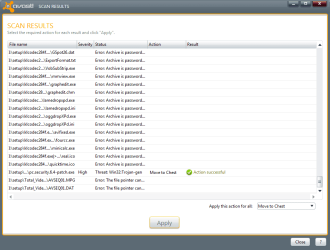
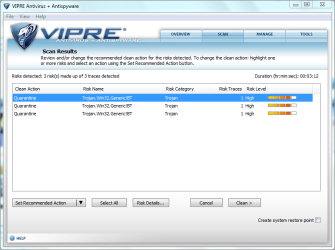
Today I scanned 1 infected flash drive using Avast and Vipre AV>
While Avast managed to catch just 2 infections, Vipre caught 4 infections.
avast.PNG

vipre.PNG

Vipre also blocked 5-6 files from automatically opening while Avast didn't notify about any infection.
I still dont mean that Vipre is better than Avast or vice-versa. All I want to say is that no AV is 100% perfect. ;)
 

My Computer My Computer

At a glance

Windows® 8 Pro (64-bit)Intel® Core™ i5 Processor 2467M (1.60GHz, 3MB...6GB DDR3 System Memory at 1,333MHz (on BD 4GB...AMD Radeon™ HD7550M 1GB DDR3 (Ext. Graphic)
Computer Manufacturer/Model Number
Samsung NP530U4B-S02IN
OS
Windows® 8 Pro (64-bit)
CPU
Intel® Core™ i5 Processor 2467M (1.60GHz, 3MB L3 Cache)
Motherboard
Samsung Electronics
Memory
6GB DDR3 System Memory at 1,333MHz (on BD 4GB + 2GB x 1)
Graphics Card(s)
AMD Radeon™ HD7550M 1GB DDR3 (Ext. Graphic)
Sound Card
Realtek High Definition Audio
Monitor(s) Displays
35.56cm (14.0) SuperBright 300nit HD LED Display
Screen Resolution
1366x768
Hard Drives
1TB S-ATA II Hard Drive (5400RPM) with ExpressCache 16GB SSD
Internet Speed
sucks
Antivirus
Microsoft Security Essentials
Browser
Google Chrome (Sync enabled)
OK, so some interesting results last night. Finished up pretty late so posting the results this morning. Included in the test (I ran out of time for any others) were:

  1. Avast Free 5
  2. ClamWin
  3. G Data
  4. Immunet Protect
  5. Kaspersky
  6. Norman
  7. Norton AntiVirus 2010
  8. Panda AntiVirus Pro

All latest versions I could download, all allowed to update any required information (program and signatures) and all set to default out-of-the-box settings. All tested in shadow mode using Shadow Defender and all done on Windows 7 64-bit.

Used 25 malware links that were found that day (some consider these zero day threats, while others may say one day threats). Included in those were rogues, bots, droppers, etc. No real focus on any one thing. Just lots of nasties, including a rogue AV called PC Defender. Not really sure how nasty it was, but it got by everyone except for one.

Stopped/Reported means just that, the AV reported there was a threat and it had been stopped or dealt with. No Reported Threat means the AV didn't say anything and it appeared the threat got through. How dangerous the threat was is anyone's guess. MBAM Infections Found means that once the test was over, Malwareybytes Antimalware was loaded, updated and ran (just a simple quick scan) and the # of infections found was reported.

Results (Worst to Best):

8. ClamWin

Stopped/Reported: 0
No Reported Threat: 25
MBAM Infections Found: 45

Overall: 0%

7. Immunet Protect

Stopped/Reported: 5
No Reported Threat: 20
MBAM Infections Found: 35

Overall: 20%

6. Norman

Stopped/Reported: 5
No Reported Threat: 20
MBAM Infections Found: 33

Overall: 20%

5. Panda AntiVirus Pro

Stopped/Reported: 12
No Reported Threat: 13
MBAM Infections Found: 35

Overall: 48%

4. Norton AntiVirus 2010

Stopped/Reported: 13
No Reported Threat: 12
MBAM Infections Found: 22

Overall: 52%

3. Avast

Stopped/Reported: 16
No Reported Threat: 9
MBAM Infections Found: 27

Overall: 64%

2. G Data

Stopped/Reported: 18
No Reported Threat: 7
MBAM Infections Found: 22

Overall: 72%

1. Kaspersky

Stopped/Reported: 20
No Reported Threat: 5
MBAM Infections Found: 2

Overall: 80%

So there you have it. Avast finally not perfect anymore and neither is Kaspersky, although Kaspersky did an excellent job and was the ONLY one to not allow the rogue AV PC Defender to get in and start displaying pop-ups and tray alerts. Kaspersky also had a note that a reboot was required, so it might have even removed the other two upon a reboot, but I could not reboot to see while running in shadow mode. I think it would be fair to almost give Kaspersky an honorary 100%.

Couple of other side notes. G Data was a huge download, and was the only one that required a reboot after install as well as a reboot after updating. What a pain. It did really well though, although it did also give me a prompt when downloading and installing MBAM (looked like some sort of HIPS prompt), so I'm not sure if it was prompting for just about everything, or it truly was doing as well as it did.

Also, I had to go on the hunt for something to uninstall Panda because it immediately displayed an error when I tried to uninstall it. That was also a pain. Even a reinstall and another uninstall would not work. It's great if the AV does not require a reboot after installing because all of it can be done in shadow mode, allowing me to simply reboot and move on the the next test, although I installed Panda by accident not in shadow mode, thus the trouble.

So again, not saying one is any better than the other and these tests are not professional or scientific by any means, but more links used this time. So take from this test what you will.

 

My Computer My Computer

At a glance

Windows 7 Home Premium 64-bitIntel Core2 Quad Q6600 @ 2.40 Ghz8GB RAMATI Radeon HD 4600
Computer Manufacturer/Model Number
HP
OS
Windows 7 Home Premium 64-bit
CPU
Intel Core2 Quad Q6600 @ 2.40 Ghz
Memory
8GB RAM
Graphics Card(s)
ATI Radeon HD 4600
Monitor(s) Displays
HP w2007
Screen Resolution
1680 x 1050
Hard Drives
700 GB
Apparently it was an assumption on my part that AV software actually acts as AV software and has realtime protection, but nope, ClamWin does not, so I guess we can ignore the results of ClamWin. Wow, what a waste of time. From their site: Please note that ClamWin Free Antivirus does not include an on-access real-time scanner. You need to manually scan a file in order to detect a virus or spyware
 

My Computer My Computer

At a glance

Windows 7 Home Premium 64-bitIntel Core2 Quad Q6600 @ 2.40 Ghz8GB RAMATI Radeon HD 4600
Computer Manufacturer/Model Number
HP
OS
Windows 7 Home Premium 64-bit
CPU
Intel Core2 Quad Q6600 @ 2.40 Ghz
Memory
8GB RAM
Graphics Card(s)
ATI Radeon HD 4600
Monitor(s) Displays
HP w2007
Screen Resolution
1680 x 1050
Hard Drives
700 GB
Hi, how is G Data according to you?
 

My Computer My Computer

At a glance

Windows® 8 Pro (64-bit)Intel® Core™ i5 Processor 2467M (1.60GHz, 3MB...6GB DDR3 System Memory at 1,333MHz (on BD 4GB...AMD Radeon™ HD7550M 1GB DDR3 (Ext. Graphic)
Computer Manufacturer/Model Number
Samsung NP530U4B-S02IN
OS
Windows® 8 Pro (64-bit)
CPU
Intel® Core™ i5 Processor 2467M (1.60GHz, 3MB L3 Cache)
Motherboard
Samsung Electronics
Memory
6GB DDR3 System Memory at 1,333MHz (on BD 4GB + 2GB x 1)
Graphics Card(s)
AMD Radeon™ HD7550M 1GB DDR3 (Ext. Graphic)
Sound Card
Realtek High Definition Audio
Monitor(s) Displays
35.56cm (14.0) SuperBright 300nit HD LED Display
Screen Resolution
1366x768
Hard Drives
1TB S-ATA II Hard Drive (5400RPM) with ExpressCache 16GB SSD
Internet Speed
sucks
Antivirus
Microsoft Security Essentials
Browser
Google Chrome (Sync enabled)
Hi, how is G Data according to you?

I've got some extra notes in there about G Data:

Couple of other side notes. G Data was a huge download, and was the only one that required a reboot after install as well as a reboot after updating. What a pain. It did really well though, although it did also give me a prompt when downloading and installing MBAM (looked like some sort of HIPS prompt), so I'm not sure if it was prompting for just about everything, or it truly was doing as well as it did.
 

My Computer My Computer

At a glance

Windows 7 Home Premium 64-bitIntel Core2 Quad Q6600 @ 2.40 Ghz8GB RAMATI Radeon HD 4600
Computer Manufacturer/Model Number
HP
OS
Windows 7 Home Premium 64-bit
CPU
Intel Core2 Quad Q6600 @ 2.40 Ghz
Memory
8GB RAM
Graphics Card(s)
ATI Radeon HD 4600
Monitor(s) Displays
HP w2007
Screen Resolution
1680 x 1050
Hard Drives
700 GB
i checked out your shadow defender, to be honest i'll keep my rollbackrx.
 

My Computer My Computer

At a glance

Windows 7
OS
Windows 7
i checked out your shadow defender, to be honest i'll keep my rollbackrx.

Well, it's not my Shadow Defender. I simply like and use the product. Why didn't you like it? Works perfectly for me every time.
 

My Computer My Computer

At a glance

Windows 7 Home Premium 64-bitIntel Core2 Quad Q6600 @ 2.40 Ghz8GB RAMATI Radeon HD 4600
Computer Manufacturer/Model Number
HP
OS
Windows 7 Home Premium 64-bit
CPU
Intel Core2 Quad Q6600 @ 2.40 Ghz
Memory
8GB RAM
Graphics Card(s)
ATI Radeon HD 4600
Monitor(s) Displays
HP w2007
Screen Resolution
1680 x 1050
Hard Drives
700 GB
the impression from the info on the site is that you do everything in virtual mode then decide what you do and do not want to keep. rollbackrx is more like the system restore that comes with windows. you launch it pick a restore point and it restarts the system and does the restore. i started using it because more times than not to get the windows system restore to work i would have to go into safe mode and run it. if i could not get into safe mode i was out of luck. with rollbackrx i cannot get into windows or windows safe mode i can just enter the rollbackrx command console prior to windows booting, no need to try to get into safe mode.
 

My Computer My Computer

At a glance

Windows 7
OS
Windows 7
the impression from the info on the site is that you do everything in virtual mode then decide what you do and do not want to keep.

Right, which is exactly what Shadow Defender is and claims to do. It does it very well and allows me to actually test things in a "virtual" environment without issue. It works very well.

Also, you can tell it to leave certain folders alone and any downloads for example, you can store there if you want to keep them while surfing.

It's also a great tool to allow you to install something and test to make sure all is fine. If not, you can simply reboot and it's gone. Or, if everything is fine, you can reboot, stay out of shadow mode and install the program to keep.
 

My Computer My Computer

At a glance

Windows 7 Home Premium 64-bitIntel Core2 Quad Q6600 @ 2.40 Ghz8GB RAMATI Radeon HD 4600
Computer Manufacturer/Model Number
HP
OS
Windows 7 Home Premium 64-bit
CPU
Intel Core2 Quad Q6600 @ 2.40 Ghz
Memory
8GB RAM
Graphics Card(s)
ATI Radeon HD 4600
Monitor(s) Displays
HP w2007
Screen Resolution
1680 x 1050
Hard Drives
700 GB

My Computer My Computer

At a glance

Windows® 8 Pro (64-bit)Intel® Core™ i5 Processor 2467M (1.60GHz, 3MB...6GB DDR3 System Memory at 1,333MHz (on BD 4GB...AMD Radeon™ HD7550M 1GB DDR3 (Ext. Graphic)
Computer Manufacturer/Model Number
Samsung NP530U4B-S02IN
OS
Windows® 8 Pro (64-bit)
CPU
Intel® Core™ i5 Processor 2467M (1.60GHz, 3MB L3 Cache)
Motherboard
Samsung Electronics
Memory
6GB DDR3 System Memory at 1,333MHz (on BD 4GB + 2GB x 1)
Graphics Card(s)
AMD Radeon™ HD7550M 1GB DDR3 (Ext. Graphic)
Sound Card
Realtek High Definition Audio
Monitor(s) Displays
35.56cm (14.0) SuperBright 300nit HD LED Display
Screen Resolution
1366x768
Hard Drives
1TB S-ATA II Hard Drive (5400RPM) with ExpressCache 16GB SSD
Internet Speed
sucks
Antivirus
Microsoft Security Essentials
Browser
Google Chrome (Sync enabled)
Hey Dinesh, how could Hitman Pro detect the links? There is no realtime protection with Hitman Pro.
 

My Computer My Computer

At a glance

Windows 7 Home Premium 64-bitIntel Core2 Quad Q6600 @ 2.40 Ghz8GB RAMATI Radeon HD 4600
Computer Manufacturer/Model Number
HP
OS
Windows 7 Home Premium 64-bit
CPU
Intel Core2 Quad Q6600 @ 2.40 Ghz
Memory
8GB RAM
Graphics Card(s)
ATI Radeon HD 4600
Monitor(s) Displays
HP w2007
Screen Resolution
1680 x 1050
Hard Drives
700 GB
Hey Dinesh, how could Hitman Pro detect the links? There is no realtime protection with Hitman Pro.
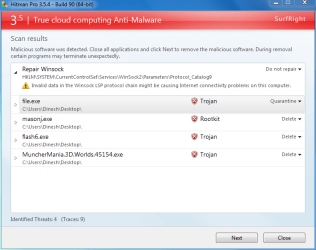
It didnt detect the links. I downloaded the files without any AV. Then scanned my PC with Hitman.

EDIT: A best feature of Hitman Pro is to hold the left CTRL key and then open Hitman Pro. It will forcefully end useless processes (including Explorer.exe). Its useful when the system is badly infected.
 

My Computer My Computer

At a glance

Windows® 8 Pro (64-bit)Intel® Core™ i5 Processor 2467M (1.60GHz, 3MB...6GB DDR3 System Memory at 1,333MHz (on BD 4GB...AMD Radeon™ HD7550M 1GB DDR3 (Ext. Graphic)
Computer Manufacturer/Model Number
Samsung NP530U4B-S02IN
OS
Windows® 8 Pro (64-bit)
CPU
Intel® Core™ i5 Processor 2467M (1.60GHz, 3MB L3 Cache)
Motherboard
Samsung Electronics
Memory
6GB DDR3 System Memory at 1,333MHz (on BD 4GB + 2GB x 1)
Graphics Card(s)
AMD Radeon™ HD7550M 1GB DDR3 (Ext. Graphic)
Sound Card
Realtek High Definition Audio
Monitor(s) Displays
35.56cm (14.0) SuperBright 300nit HD LED Display
Screen Resolution
1366x768
Hard Drives
1TB S-ATA II Hard Drive (5400RPM) with ExpressCache 16GB SSD
Internet Speed
sucks
Antivirus
Microsoft Security Essentials
Browser
Google Chrome (Sync enabled)
Hey Dinesh, how could Hitman Pro detect the links? There is no realtime protection with Hitman Pro.

well they all are .exe files

hey dinesh it would be nice to know which engine detects the files in hitman pro

dinesh said:
A best feature of Hitman Pro is to hold the left CTRL key and then open Hitman Pro. It will forcefully end useless processes (including Explorer.exe). Its useful when the system is badly infected.
its called Force Breach....http://www.wilderssecurity.com/showthread.php?t=265202&highlight=hitman
 

My Computer My Computer

At a glance

windows 7 ultimate 64 bit,Windows 7 ultimate ...
OS
windows 7 ultimate 64 bit,Windows 7 ultimate 32 bit,Windows XP sp3 home
Hey Dinesh, how could Hitman Pro detect the links? There is no realtime protection with Hitman Pro.
It didnt detect the links. I downloaded the files without any AV. Then scanned my PC with Hitman.

Ah, so an after the fact test, not really a link test as with ESET that you did...;)

EDIT: A best feature of Hitman Pro is to hold the left CTRL key and then open Hitman Pro. It will forcefully end useless processes (including Explorer.exe). Its useful when the system is badly infected.

Yep, a very cool feature.
 

My Computer My Computer

At a glance

Windows 7 Home Premium 64-bitIntel Core2 Quad Q6600 @ 2.40 Ghz8GB RAMATI Radeon HD 4600
Computer Manufacturer/Model Number
HP
OS
Windows 7 Home Premium 64-bit
CPU
Intel Core2 Quad Q6600 @ 2.40 Ghz
Memory
8GB RAM
Graphics Card(s)
ATI Radeon HD 4600
Monitor(s) Displays
HP w2007
Screen Resolution
1680 x 1050
Hard Drives
700 GB
Back
Top