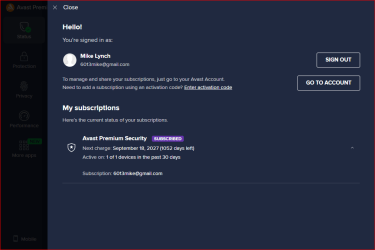
Yesterday evening I purchased an AVAST Premium 3 Year Subscription.
This morning, actually, just after Mid Night I opened a MS EDGE Browser window to check my Banking Information.
Where I would normally find multiple Shortcuts, there was nothing.
All I had done prior to this was the AVAST install so I call 1-844-973-3072, their Premium Support Line.
After speaking with the Agent in Manila for 37 minutes, to include a LogMeIn session, they determined they could not help me.
They did however try to refer me to their "Super Premium" support for over $200 per hour.
Yikes, talk about extorsion, AVAST has got it down to a science.
I declined and said I'd try calling their Corporate Office in the morning, after 9am EST.
I then thought I'd try an earlier Restore Point, which I did.
Well, that prover to be a waste of time.
There were no Shortcuts in the MS Edge Browser windows, just as it was after the AVAST install.
If any Forum Member has any insight on how to recover the Shortcuts I had on my MS Edge Browser window, please help.
As the AVAST Agent kept reiterating, you can re-create them manually yourself.
That may be true however, first I must remember ALL the Shortcuts and their particulars like USERNAME and PASSWORD.
The first one I did was this Forum, which made it fairly easy.
The tough ones will be like my Bank which I reference throughout the day.
I should have known better but I was searching for a replacement for NORTON and BITDEFENDER.
Any help would be appreciated.
Mike Lynch
This morning, actually, just after Mid Night I opened a MS EDGE Browser window to check my Banking Information.
Where I would normally find multiple Shortcuts, there was nothing.
All I had done prior to this was the AVAST install so I call 1-844-973-3072, their Premium Support Line.
After speaking with the Agent in Manila for 37 minutes, to include a LogMeIn session, they determined they could not help me.
They did however try to refer me to their "Super Premium" support for over $200 per hour.
Yikes, talk about extorsion, AVAST has got it down to a science.
I declined and said I'd try calling their Corporate Office in the morning, after 9am EST.
I then thought I'd try an earlier Restore Point, which I did.
Well, that prover to be a waste of time.
There were no Shortcuts in the MS Edge Browser windows, just as it was after the AVAST install.
If any Forum Member has any insight on how to recover the Shortcuts I had on my MS Edge Browser window, please help.
As the AVAST Agent kept reiterating, you can re-create them manually yourself.
That may be true however, first I must remember ALL the Shortcuts and their particulars like USERNAME and PASSWORD.
The first one I did was this Forum, which made it fairly easy.
The tough ones will be like my Bank which I reference throughout the day.
I should have known better but I was searching for a replacement for NORTON and BITDEFENDER.
Any help would be appreciated.
Mike Lynch
My Computer
At a glance
Microsoft Windows 7 Professional 64-bit 7601 ...Intel(R) Core(TM) i7-3770 CPU @ 3.40GHz8.00 GBIntel(R) HD Graphics 4000
- Computer type
- PC/Desktop
- Computer Manufacturer/Model Number
- Two HP Desktops. One in the Laundry Room / Bed Room.
- OS
- Microsoft Windows 7 Professional 64-bit 7601 Multiprocessor Free Service Pack 1
- CPU
- Intel(R) Core(TM) i7-3770 CPU @ 3.40GHz
- Motherboard
- Hewlett-Packard 3396
- Memory
- 8.00 GB
- Graphics Card(s)
- Intel(R) HD Graphics 4000
- Sound Card
- (1) Realtek High Definition Audio (2) Intel(R) Display Aud
- Monitor(s) Displays
- Hanns-G
- Screen Resolution
- 1440 x 900 x 32 bits (4294967296 colors) @ 59 Hz
- Hard Drives
- (1) ATA WDC WD40EZRX-00S SCSI Disk Device (2) HP Officejet Pro 86 USB Device (3) WD My Book 1230 USB Device
- PSU
- Whatever came with the CMT.
- Case
- HP CMT Black.
- Cooling
- Whatever came with the CMT.
- Keyboard
- Logitech K740.
- Mouse
- Microsoft Optical Mouse 1000.
- Internet Speed
- Spectrum 25Mbs.
- Antivirus
- WebRoot, Microsoft Security Essentials.
- Browser
- EDGE
- Other Info
- HP Officejet Pro 8600 Plus.
WD MyBook 4TB.