Average Overclocking

Pantz

New member
Member
VIP
Local time
4:08 AM
Messages
318
Hello Everyone, i have OC Before but its been a while since i have done it, i have read that i can OC via Either the Multiplier or HT/ FSB ? i am currently sitting at Default Setting with my Asus Sabertooth R2 and my FX 8320.

i have seen people really push their OC i have no intention on Pushing my OC. i would probably like to go to 3.8 safley with out upping the VID to much,

What would be the best way to achieve this ? via multiplexer or or HT / FSB

Thanks in advance.
 

My Computer My Computer

Computer type
PC/Desktop
Computer Manufacturer/Model Number
Personal build
OS
Genuine windows 7X64
CPU
AMD 8320 FX Processor
Motherboard
Asus Sabertoothe 990 FX R2.0 AM2+/AM2 AMD MB
Memory
8 Gigs Corsair Vengance DDR3 1886 MHZ
Graphics Card(s)
EVGA GTX 750 Ti FTW
Sound Card
On board
Monitor(s) Displays
ASUS VE247H 24 inch
Screen Resolution
HDMI
Hard Drives
Samsung 120GB 2.5-inch SSD 840 SATA III
PSU
Corsair 750 Watts
Case
Gigabyte case
Cooling
Zellman CNPS 10 Extreme
Internet Speed
50megs
Antivirus
AVG Free
What kind of cooling do you have on the 8320? I would definitely not do any overclocking on that CPU using the stock AMD cooler. The FX 83XX series chips run too hot to use anything but an aftermarket cooler, or preferably water cooling if you want to OC.
 

My Computer My Computer

Computer type
PC/Desktop
Computer Manufacturer/Model Number
Mellon Labs (custom build)
OS
Win 7 Pro x64/Win 10 Pro x64 dual boot
CPU
AMD FX 8350 Vishera @ 4200
Motherboard
ASUS M5A97 R2.0
Memory
16 GB Mushkin Blackline DDR3-2400 @ 1866 (9-10-10-10-31)
Graphics Card(s)
XFX Radeon R9 280 Double D Black Edition
Sound Card
Realtek HD Audio on MB. Sounds great.
Monitor(s) Displays
Acer 24", Acer 22"
Screen Resolution
3840 x 1080
Hard Drives
1 x Mushkin Chronos 120 GB SSD (Win 10)
1 x Samsung 850 EVO 250 GB SSD (Win 7)
1 x WD 1TB SATA Blue
1 x WD 1TB SATA Green
PSU
Corsair TX-750
Case
CoolerMaster HAF 912+
Cooling
Coolermaster Seidon 240M Liquid AIO. 6 case fans
Keyboard
Logitech G710+
Mouse
Logitech G500s
Internet Speed
Much better since I got fiber, but still way overpriced.
Antivirus
MSE, Malware Bytes for scanning
Browser
Firefox
Other Info
Corsair VOID USB headphones.

A Mellon Labs X-1 - LCD Smartie driven system status display.

Brought to you by the letter E
Things to consider about overclocking is do you have the hardware for it? As Mellon Head stated, I would not consider it with the stock heatsink supplied with the CPU. I have a drawer full of them, never used. They are that bad. Are the rest of your components up to the job? Do you have a quality brand PSU, is your air flow quite good. Overclocking will stress everything in your computer, so be ready. The best advice I ever received on overclocking is, if you can't afford to replace it, don't overclock it.
 

My Computers My Computers

System One System Two

  • Computer type
    PC/Desktop
    Computer Manufacturer/Model Number
    ALWAYS UNDER CONSTRUCTION
    OS
    Windows 11 Pro
    CPU
    Ryzen 9 5900X
    Motherboard
    Asus X570 Crosshair Viii Hero
    Memory
    32GB G Skill DDR4-3600
    Graphics Card(s)
    EVGA RTX 3080 FTW 3 Ultra
    Sound Card
    On Board/Sennheiser PC37X Headset
    Monitor(s) Displays
    3 X Asus 27"
    Screen Resolution
    2560x1440
    Hard Drives
    2 X 1 TB NVME drives
    PSU
    EVGA 850
    Case
    Phanteks Eclipse P400A
    Cooling
    EVGA 280 AIO
    Keyboard
    Logitech G510s/ Logitech G13
    Mouse
    Logitech G502
    Internet Speed
    24/1
    Antivirus
    ESET/MBAM Pro/SAS Pro
    Browser
    Chrome/ Firefox/ Edge
  • Computer type
    Laptop
    System Manufacturer/Model Number
    Dell 16 Plus
    OS
    Windows 11 Pro
    CPU
    Intel Ultra 9 288V
    Memory
    32 GB LPDDR5X 8533
    Monitor(s) Displays
    16" Mini-LED HDR600 Touch 90 Hz
    Screen Resolution
    2560X1600
    Hard Drives
    1 TB NVME

Attachments

  • current temps.JPG
    current temps.JPG
    40.6 KB · Views: 52

My Computer My Computer

Computer type
PC/Desktop
Computer Manufacturer/Model Number
Personal build
OS
Genuine windows 7X64
CPU
AMD 8320 FX Processor
Motherboard
Asus Sabertoothe 990 FX R2.0 AM2+/AM2 AMD MB
Memory
8 Gigs Corsair Vengance DDR3 1886 MHZ
Graphics Card(s)
EVGA GTX 750 Ti FTW
Sound Card
On board
Monitor(s) Displays
ASUS VE247H 24 inch
Screen Resolution
HDMI
Hard Drives
Samsung 120GB 2.5-inch SSD 840 SATA III
PSU
Corsair 750 Watts
Case
Gigabyte case
Cooling
Zellman CNPS 10 Extreme
Internet Speed
50megs
Antivirus
AVG Free
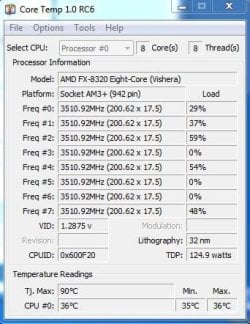
You still need better temps. Your TJ Max is 90 but I wouldn't let it get near that. The temps are being read by software which is notoriously wrong. So, stay a good bit away from the TJ Max.

When you change cases you will have to re paste the cooler, as I am sire you will have to remove the CPU cooler to do it. Take that opportunity and do it right. There are many philosophies on how to do it. If you use Artic Silver, which is a very popular thermal paste, find your CPU in the list here and get good instructions. This will show you one way which is very good and works well.


My Computers My Computers

System One System Two

  • Computer type
    PC/Desktop
    Computer Manufacturer/Model Number
    ALWAYS UNDER CONSTRUCTION
    OS
    Windows 11 Pro
    CPU
    Ryzen 9 5900X
    Motherboard
    Asus X570 Crosshair Viii Hero
    Memory
    32GB G Skill DDR4-3600
    Graphics Card(s)
    EVGA RTX 3080 FTW 3 Ultra
    Sound Card
    On Board/Sennheiser PC37X Headset
    Monitor(s) Displays
    3 X Asus 27"
    Screen Resolution
    2560x1440
    Hard Drives
    2 X 1 TB NVME drives
    PSU
    EVGA 850
    Case
    Phanteks Eclipse P400A
    Cooling
    EVGA 280 AIO
    Keyboard
    Logitech G510s/ Logitech G13
    Mouse
    Logitech G502
    Internet Speed
    24/1
    Antivirus
    ESET/MBAM Pro/SAS Pro
    Browser
    Chrome/ Firefox/ Edge
  • Computer type
    Laptop
    System Manufacturer/Model Number
    Dell 16 Plus
    OS
    Windows 11 Pro
    CPU
    Intel Ultra 9 288V
    Memory
    32 GB LPDDR5X 8533
    Monitor(s) Displays
    16" Mini-LED HDR600 Touch 90 Hz
    Screen Resolution
    2560X1600
    Hard Drives
    1 TB NVME
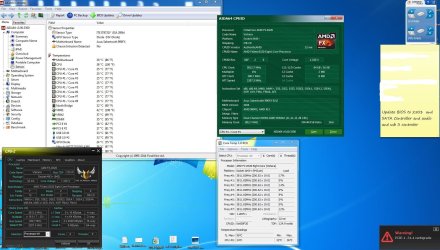
Hello Everyone, well its 2 Steps forward and one step backwards, i was finally able to figure out how to OC by using the Multiplier and reduce the temp substantially ( my CPU HS was at default ) i am now running at 3.8Mhz, i have yet to stress test, because i just found our that i need to Update my BIOS for my MB and SSD,

I am guessing i should do all available update before continuing ?

and will the BIOS updates and SSD Firmware Update wipe out all my hard work ??

Thanks in advance
 

Attachments

  • BIOS.JPG
    BIOS.JPG
    24.7 KB · Views: 1
  • current temps.JPG
    current temps.JPG
    236.2 KB · Views: 5

My Computer My Computer

Computer type
PC/Desktop
Computer Manufacturer/Model Number
Personal build
OS
Genuine windows 7X64
CPU
AMD 8320 FX Processor
Motherboard
Asus Sabertoothe 990 FX R2.0 AM2+/AM2 AMD MB
Memory
8 Gigs Corsair Vengance DDR3 1886 MHZ
Graphics Card(s)
EVGA GTX 750 Ti FTW
Sound Card
On board
Monitor(s) Displays
ASUS VE247H 24 inch
Screen Resolution
HDMI
Hard Drives
Samsung 120GB 2.5-inch SSD 840 SATA III
PSU
Corsair 750 Watts
Case
Gigabyte case
Cooling
Zellman CNPS 10 Extreme
Internet Speed
50megs
Antivirus
AVG Free
You should only update your BIOS if it is absolutely necessary, (i.e. to solve a problem). If your PC is running well, then I wouldn't do it. It's very easy to brick your motherboard if the BIOS upgrade goes wrong.

But yes, a BIOS upgrade will set all your BIOS entries to default, which will undo your OC.

As far as the SSD firmware goes, I would make a complete backup of your SSD before beginning to upgrade the firmware. Some firmware upgrades can affect the data on the SSD, some won't, but it's always a good idea to back up before you do it. The SSD firmware most likely won't affect your OC.

Use a good program like Macrium Reflect to image and back up your SSD before the upgrade.

Edit: Keep in mind that the core temp on a Vishera processor is a calculated value, and at idle they are notoriously low. (My FX 8350 consistently reads about 19 degrees C below the processor case temp at idle, which is impossible). AMD has stated that the core temperature is only accurate at full load (or nearly there), and when the core temp is above 40C to 45C (IIRC).

You can also ignore TJ MAX as stated by Core Temp. You never want to take that processor's core temperature over 60C for any length of time. Doing so will damage it irreparably. TJ MAX is more useful for Intel processors, where the TJ MAX rating and the core temperature as measured by Core Temp are actually meaningful.
 
Last edited:

My Computer My Computer

Computer type
PC/Desktop
Computer Manufacturer/Model Number
Mellon Labs (custom build)
OS
Win 7 Pro x64/Win 10 Pro x64 dual boot
CPU
AMD FX 8350 Vishera @ 4200
Motherboard
ASUS M5A97 R2.0
Memory
16 GB Mushkin Blackline DDR3-2400 @ 1866 (9-10-10-10-31)
Graphics Card(s)
XFX Radeon R9 280 Double D Black Edition
Sound Card
Realtek HD Audio on MB. Sounds great.
Monitor(s) Displays
Acer 24", Acer 22"
Screen Resolution
3840 x 1080
Hard Drives
1 x Mushkin Chronos 120 GB SSD (Win 10)
1 x Samsung 850 EVO 250 GB SSD (Win 7)
1 x WD 1TB SATA Blue
1 x WD 1TB SATA Green
PSU
Corsair TX-750
Case
CoolerMaster HAF 912+
Cooling
Coolermaster Seidon 240M Liquid AIO. 6 case fans
Keyboard
Logitech G710+
Mouse
Logitech G500s
Internet Speed
Much better since I got fiber, but still way overpriced.
Antivirus
MSE, Malware Bytes for scanning
Browser
Firefox
Other Info
Corsair VOID USB headphones.

A Mellon Labs X-1 - LCD Smartie driven system status display.

Brought to you by the letter E
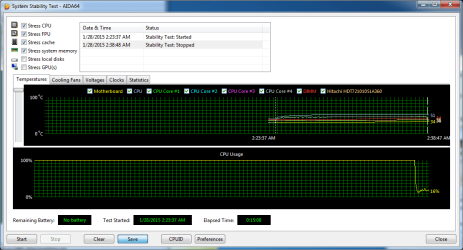
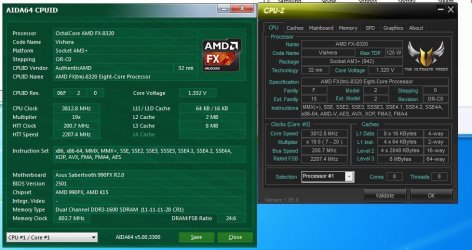
Hello Everyone,Thanks for the Reply Mellon Head.well i went ahead with Both BIOS updates, just to be Safe. ( both updates were successful ), i then did all the other available updates for the Motherboard.and they were also successful,

I then booted into the BIOS ant choose : performance setting , and then manually set up the Multiplier to X19, and tried to booted into Windows.and got the boot manager missing error, went back into the BIOS and Choose My SSD to boot from and was then able to get into windows,

originally my SSD had the UEFI Label across the SSD when i initally installed it, now the UEFI label seem to be missing fron the SSD in the BIOS, ( i am still having issues setting up the SSD to be the second boot device, after the CD rom )

i then did a limited stress test (15 Mins ) and it seem to have Held up pretty well @ 3.8 MHZ with temps not passing 45C on Core temp and 52 on AIDA.

i am going to save and run this setting for a while before attempting 4.0 Mhz

Thanks for everyone Help
 

Attachments

  • PRELEM stabilitytest.png
    PRELEM stabilitytest.png
    24.4 KB · Views: 1
  • PRELIM Core temp.JPG
    PRELIM Core temp.JPG
    42.3 KB · Views: 34

My Computer My Computer

Computer type
PC/Desktop
Computer Manufacturer/Model Number
Personal build
OS
Genuine windows 7X64
CPU
AMD 8320 FX Processor
Motherboard
Asus Sabertoothe 990 FX R2.0 AM2+/AM2 AMD MB
Memory
8 Gigs Corsair Vengance DDR3 1886 MHZ
Graphics Card(s)
EVGA GTX 750 Ti FTW
Sound Card
On board
Monitor(s) Displays
ASUS VE247H 24 inch
Screen Resolution
HDMI
Hard Drives
Samsung 120GB 2.5-inch SSD 840 SATA III
PSU
Corsair 750 Watts
Case
Gigabyte case
Cooling
Zellman CNPS 10 Extreme
Internet Speed
50megs
Antivirus
AVG Free
AIDA for 15 minutes is not really long enough to test for stability. It won't even tell you your max temps. AIDA needs over an hour to reach close to max temps. Run it for 12 hours and then you can say you think it's stable.
 

My Computers My Computers

System One System Two

  • Computer type
    PC/Desktop
    Computer Manufacturer/Model Number
    ALWAYS UNDER CONSTRUCTION
    OS
    Windows 11 Pro
    CPU
    Ryzen 9 5900X
    Motherboard
    Asus X570 Crosshair Viii Hero
    Memory
    32GB G Skill DDR4-3600
    Graphics Card(s)
    EVGA RTX 3080 FTW 3 Ultra
    Sound Card
    On Board/Sennheiser PC37X Headset
    Monitor(s) Displays
    3 X Asus 27"
    Screen Resolution
    2560x1440
    Hard Drives
    2 X 1 TB NVME drives
    PSU
    EVGA 850
    Case
    Phanteks Eclipse P400A
    Cooling
    EVGA 280 AIO
    Keyboard
    Logitech G510s/ Logitech G13
    Mouse
    Logitech G502
    Internet Speed
    24/1
    Antivirus
    ESET/MBAM Pro/SAS Pro
    Browser
    Chrome/ Firefox/ Edge
  • Computer type
    Laptop
    System Manufacturer/Model Number
    Dell 16 Plus
    OS
    Windows 11 Pro
    CPU
    Intel Ultra 9 288V
    Memory
    32 GB LPDDR5X 8533
    Monitor(s) Displays
    16" Mini-LED HDR600 Touch 90 Hz
    Screen Resolution
    2560X1600
    Hard Drives
    1 TB NVME
Hello Everyone,Thanks for the Reply Mellon Head.well i went ahead with Both BIOS updates, just to be Safe. ( both updates were successful ), i then did all the other available updates for the Motherboard.and they were also successful,

I then booted into the BIOS ant choose : performance setting , and then manually set up the Multiplier to X19, and tried to booted into Windows.and got the boot manager missing error, went back into the BIOS and Choose My SSD to boot from and was then able to get into windows,

originally my SSD had the UEFI Label across the SSD when i initally installed it, now the UEFI label seem to be missing fron the SSD in the BIOS, ( i am still having issues setting up the SSD to be the second boot device, after the CD rom )

i then did a limited stress test (15 Mins ) and it seem to have Held up pretty well @ 3.8 MHZ with temps not passing 45C on Core temp and 52 on AIDA.

i am going to save and run this setting for a while before attempting 4.0 Mhz

Thanks for everyone Help


Just remember the actual temp max is 62c for the CPU yes not 90c

TJ max is not correct

Also keep in mind with your Asus Board it can deliver good voltage hitting 4Ghz should be pretty easy i can tell you for what you are shooting for 1.38 to 1.41volts would be the target for stability for 4Ghz which is not a hefty oc by any means but it will drive your temps up 5 to 8c so keep a eye on those

It would be better to use water instead of air you have a better chance of longer life and better performance all around

I have ran many AMD machines and the only chips i never put water on was a Phenom II 925 and Phenom II 965BE when FX came out much different story

Anyway you can reach at least 4,8 Ghz with the right tools but for you a mild 4.0 Ghz or 4.2 can be done and it will be more than a modest push for your needs
 

My Computer My Computer

Computer type
PC/Desktop
Computer Manufacturer/Model Number
CoreI7-6700K MrFingerIII Special Builds
OS
Windows 10 Home Premium 64bit sp1
CPU
Intel I7-6700K @ 4.6 Ghz 1.344 volts everyday OC
Motherboard
Asrock Fatality K6 Z170 Socket 1151
Memory
32GB G-Skill TridentZ 3200mhz 16-18-18-38 DDR4
Graphics Card(s)
Sli Gigabyte Windforce GTX 980 G1
Sound Card
AC97 Creative Rage Tactic 3D Headphones Bluetooth
Monitor(s) Displays
27" Asus ROG Swift PG278Q G-Sync 48" Vizio Smart HD TV
Screen Resolution
2560x1440p 27"- 48" Currently Gaming at 2560x1440p Res 2K
Hard Drives
250GB Samsung Evo840SSD Seagate baracuda 500 GB WD Mybook 500Gb 1TB Seagate Barracuda
PSU
HX1050w Corsair Silver 80plus certified crosfire/sli
Case
Enthod Pro Full Tower
Cooling
Corsair H110i GT 280 mm High Performance WaterBlock
Keyboard
Logitech wireless keyboard
Mouse
Logitech wireless mouse
Internet Speed
Cox Cable 100+ mb
Antivirus
WebRoot Spysweeper with Antivirus
Browser
IE-10, Chrome, Opera
Other Info
My Other Rig is a AMD FX8320E @4.6Ghz 16GB Ballistic Sport Ram
Mobo Asrock Fatality 990FX 120GB OCZ SSD 1TB Seagate Barracuda Corsair H75 Cooling PSU Corsair CX750
GPU GTX Gigabyte 970G1
Hello Again, Thanks Solar, i am very aware that 62 C is my Max Temp, my Current Voltage on the CPU is 1.33v with my Current Mild OC. And yes i understand that a 15 Min is not long enough test to check for stability, but i also think that a 12 hour Test is overkill, I am not looking to break any Records, just a Stable 4.0 Mhz which most people seemed to have achieved with the 83XX Series.

i have Considered the Corsair H60, maybe later on i will get one,

Thanks in Advance
 

Attachments

  • VID.JPG
    VID.JPG
    91.9 KB · Views: 1

My Computer My Computer

Computer type
PC/Desktop
Computer Manufacturer/Model Number
Personal build
OS
Genuine windows 7X64
CPU
AMD 8320 FX Processor
Motherboard
Asus Sabertoothe 990 FX R2.0 AM2+/AM2 AMD MB
Memory
8 Gigs Corsair Vengance DDR3 1886 MHZ
Graphics Card(s)
EVGA GTX 750 Ti FTW
Sound Card
On board
Monitor(s) Displays
ASUS VE247H 24 inch
Screen Resolution
HDMI
Hard Drives
Samsung 120GB 2.5-inch SSD 840 SATA III
PSU
Corsair 750 Watts
Case
Gigabyte case
Cooling
Zellman CNPS 10 Extreme
Internet Speed
50megs
Antivirus
AVG Free
Hello Again, Thanks Solar, i am very aware that 62 C is my Max Temp, my Current Voltage on the CPU is 1.33v with my Current Mild OC. And yes i understand that a 15 Min is not long enough test to check for stability, but i also think that a 12 hour Test is overkill, I am not looking to break any Records, just a Stable 4.0 Mhz which most people seemed to have achieved with the 83XX Series.

i have Considered the Corsair H60, maybe later on i will get one,

Thanks in Advance
The 8350 Hits 4.2Ghz stock
 

My Computer My Computer

Computer type
PC/Desktop
Computer Manufacturer/Model Number
CoreI7-6700K MrFingerIII Special Builds
OS
Windows 10 Home Premium 64bit sp1
CPU
Intel I7-6700K @ 4.6 Ghz 1.344 volts everyday OC
Motherboard
Asrock Fatality K6 Z170 Socket 1151
Memory
32GB G-Skill TridentZ 3200mhz 16-18-18-38 DDR4
Graphics Card(s)
Sli Gigabyte Windforce GTX 980 G1
Sound Card
AC97 Creative Rage Tactic 3D Headphones Bluetooth
Monitor(s) Displays
27" Asus ROG Swift PG278Q G-Sync 48" Vizio Smart HD TV
Screen Resolution
2560x1440p 27"- 48" Currently Gaming at 2560x1440p Res 2K
Hard Drives
250GB Samsung Evo840SSD Seagate baracuda 500 GB WD Mybook 500Gb 1TB Seagate Barracuda
PSU
HX1050w Corsair Silver 80plus certified crosfire/sli
Case
Enthod Pro Full Tower
Cooling
Corsair H110i GT 280 mm High Performance WaterBlock
Keyboard
Logitech wireless keyboard
Mouse
Logitech wireless mouse
Internet Speed
Cox Cable 100+ mb
Antivirus
WebRoot Spysweeper with Antivirus
Browser
IE-10, Chrome, Opera
Other Info
My Other Rig is a AMD FX8320E @4.6Ghz 16GB Ballistic Sport Ram
Mobo Asrock Fatality 990FX 120GB OCZ SSD 1TB Seagate Barracuda Corsair H75 Cooling PSU Corsair CX750
GPU GTX Gigabyte 970G1
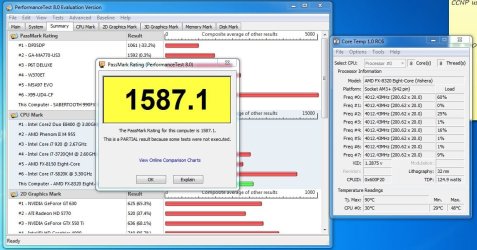
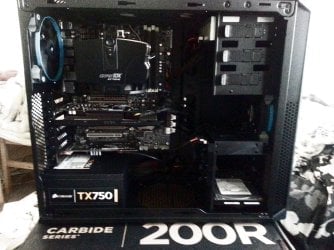
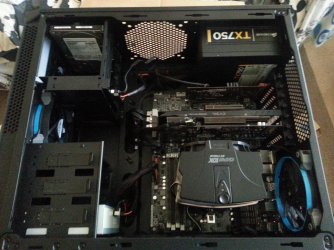
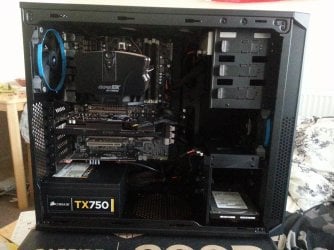
Hello Everyone, Well i finally got the stuff from my 2013 PC into the new case, after i Cleaned everything from the CPU HS, to the 2 fans from the old case, Everything came up without any Problems. My Temps seems a lot better even with the sides on, 2 Exhaust fans at the top of the case, 2 intake fans on the Front, and 1 side panel intake fan,

I did a quick Stability test and my temps never got above 48 C

I think i have a descent baseline to work from ?
 

Attachments

  • Performance test Capture.JPG
    Performance test Capture.JPG
    119.5 KB · Views: 1
  • case.jpg
    case.jpg
    759.3 KB · Views: 3
  • case 0.jpg
    case 0.jpg
    745.7 KB · Views: 1
  • case1.jpg
    case1.jpg
    684.4 KB · Views: 2
Last edited:

My Computer My Computer

Computer type
PC/Desktop
Computer Manufacturer/Model Number
Personal build
OS
Genuine windows 7X64
CPU
AMD 8320 FX Processor
Motherboard
Asus Sabertoothe 990 FX R2.0 AM2+/AM2 AMD MB
Memory
8 Gigs Corsair Vengance DDR3 1886 MHZ
Graphics Card(s)
EVGA GTX 750 Ti FTW
Sound Card
On board
Monitor(s) Displays
ASUS VE247H 24 inch
Screen Resolution
HDMI
Hard Drives
Samsung 120GB 2.5-inch SSD 840 SATA III
PSU
Corsair 750 Watts
Case
Gigabyte case
Cooling
Zellman CNPS 10 Extreme
Internet Speed
50megs
Antivirus
AVG Free
Hello Everyone, Well i finally got the stuff from my 2013 PC into the new case, after i Cleaned everything from the CPU HS, to the 2 fans from the old case, Everything came up without any Problems. My Temps seems a lot better even with the sides on, 2 Exhaust fans at the top of the case, 2 intake fans on the Front, and 1 side panel intake fan,

I did a quick Stability test and my temps never got above 48 C

I think i have a descent baseline to work from ?


That is one Sick cooler you have Bro :cool:
 

My Computer My Computer

Computer type
PC/Desktop
Computer Manufacturer/Model Number
CoreI7-6700K MrFingerIII Special Builds
OS
Windows 10 Home Premium 64bit sp1
CPU
Intel I7-6700K @ 4.6 Ghz 1.344 volts everyday OC
Motherboard
Asrock Fatality K6 Z170 Socket 1151
Memory
32GB G-Skill TridentZ 3200mhz 16-18-18-38 DDR4
Graphics Card(s)
Sli Gigabyte Windforce GTX 980 G1
Sound Card
AC97 Creative Rage Tactic 3D Headphones Bluetooth
Monitor(s) Displays
27" Asus ROG Swift PG278Q G-Sync 48" Vizio Smart HD TV
Screen Resolution
2560x1440p 27"- 48" Currently Gaming at 2560x1440p Res 2K
Hard Drives
250GB Samsung Evo840SSD Seagate baracuda 500 GB WD Mybook 500Gb 1TB Seagate Barracuda
PSU
HX1050w Corsair Silver 80plus certified crosfire/sli
Case
Enthod Pro Full Tower
Cooling
Corsair H110i GT 280 mm High Performance WaterBlock
Keyboard
Logitech wireless keyboard
Mouse
Logitech wireless mouse
Internet Speed
Cox Cable 100+ mb
Antivirus
WebRoot Spysweeper with Antivirus
Browser
IE-10, Chrome, Opera
Other Info
My Other Rig is a AMD FX8320E @4.6Ghz 16GB Ballistic Sport Ram
Mobo Asrock Fatality 990FX 120GB OCZ SSD 1TB Seagate Barracuda Corsair H75 Cooling PSU Corsair CX750
GPU GTX Gigabyte 970G1
Nice looking build. I know you will be happy with it.
 

My Computers My Computers

System One System Two

  • Computer type
    PC/Desktop
    Computer Manufacturer/Model Number
    ALWAYS UNDER CONSTRUCTION
    OS
    Windows 11 Pro
    CPU
    Ryzen 9 5900X
    Motherboard
    Asus X570 Crosshair Viii Hero
    Memory
    32GB G Skill DDR4-3600
    Graphics Card(s)
    EVGA RTX 3080 FTW 3 Ultra
    Sound Card
    On Board/Sennheiser PC37X Headset
    Monitor(s) Displays
    3 X Asus 27"
    Screen Resolution
    2560x1440
    Hard Drives
    2 X 1 TB NVME drives
    PSU
    EVGA 850
    Case
    Phanteks Eclipse P400A
    Cooling
    EVGA 280 AIO
    Keyboard
    Logitech G510s/ Logitech G13
    Mouse
    Logitech G502
    Internet Speed
    24/1
    Antivirus
    ESET/MBAM Pro/SAS Pro
    Browser
    Chrome/ Firefox/ Edge
  • Computer type
    Laptop
    System Manufacturer/Model Number
    Dell 16 Plus
    OS
    Windows 11 Pro
    CPU
    Intel Ultra 9 288V
    Memory
    32 GB LPDDR5X 8533
    Monitor(s) Displays
    16" Mini-LED HDR600 Touch 90 Hz
    Screen Resolution
    2560X1600
    Hard Drives
    1 TB NVME
Back
Top