
Solved AVG Anti-virus False Positive???

Summerbear5

New member
Member
VIP
Local time
8:00 PM
Messages
162
I am currently running a windows 7 machine (desktop). Fully updated via windows update. I have AVG Free Antivirus 2013 build 3272. I also have malewarebytes, both are fully updated as well.

So one day while running the antivirus scan I had two things pop up saying infected. pci.sys hooked import ntoskrnl.exe, both were the same exact thing. I hit remove and it said my computer needed to be restarted so I restarted the computer and ran the scan a second time to make sure the infection was cleared, But the same 2 infections keep coming up over and over.

I ran malewarebytes which didn't find anything. I also ran disk cleanup, disk defrag, and avg pc tuneup.

I contacted AVG and they said they were going to send me an email with a program to run and send them information about the specific infection. It's avg_autoruns_en.exe Which I ran but it keeps crashing and never gets to the point where I can send information. I've posted on the AVG forums and no one is helping me at all.

I've searched the internet and some say it's a false positive and some say it's an actual infection that needs to be removed manually. I'm not sure what to do and don't wanna go another day with this thing on my computer especially if it is a virus.

Thanks for reading. Hope I can get some help. Let me know if you need anymore information or files from me.
Summer
 

My Computer My Computer

Computer type
PC/Desktop
OS
Microsoft Windows 7 Home Premium 64-bit 7601 Multiprocessor Free Service Pack 1
CPU
Intel(R) Core(TM)2 Quad CPU Q6700 @ 2.66GHz
Motherboard
PEGATRON CORPORATION Benicia
Memory
8.00 GB
Graphics Card(s)
(1) NVIDIA GeForce GT 520 (2) LogMeIn Mirror Driver
Sound Card
(1) Realtek High Definition Audio (2) Logitech Mic (QuickC
Screen Resolution
1920 x 1080 x 32 bits (4294967296 colors) @ 60 Hz
Hard Drives
(1) WDC WD10EALS-00Z8A0 (2) Generic- Compact Flash USB Device (3) Generic- MS/MS-Pro USB Device (4) Generic- SD/MMC USB Device (5) Generic- SM/xD-Picture USB Device
Summerbear5,

Let's see what this hort scan shows...

Please download RogueKiller:
Tlcharger RogueKiller (Site Officiel)

When you get to the website, go to where it says:
(Download link) Lien de téléchargement:
rendu2.png

Select the version for your system: 64-bit
(The dark-blue button with x64)
Save to the Desktop.


Close all windows and browsers.

Right-click and select: Run as Administrator


At the program console, wait for the prescan to finish. (Under Status, it says: Prescan finished.)


Now, press: SCAN


When done, a report opens on the Desktop: RKreport.txt

Please provide the RKreport.txt (Mode: Scan) in your reply.

(Please do not remove anything yet.)


Also, is AVG your only AntiVirus?

Is this what you are getting:
Detection name: pci.sys, hooked import ntoskrl.exe IoAttachdeveiceToDeviceStack -> spqw.sys +0xXXXXX

Are you running Daemon Tools (Disk And Execution MONitor)?
 

My Computer My Computer

Computer type
PC/Desktop
Computer Manufacturer/Model Number
An ol' eMachines
OS
Windows 7 Home Premium
Internet Speed
Fine for me...I'm retired!
AVG and Malewarebytes and that is all...

I don't have Daemon Tools but I have alcohol 120%. Even with that though I never had this in AVG before, but with AVG always updating their definitions maybe that's why it's showing now.

Going to run the scan now I'll be back with the results.
 

My Computer My Computer

Computer type
PC/Desktop
OS
Microsoft Windows 7 Home Premium 64-bit 7601 Multiprocessor Free Service Pack 1
CPU
Intel(R) Core(TM)2 Quad CPU Q6700 @ 2.66GHz
Motherboard
PEGATRON CORPORATION Benicia
Memory
8.00 GB
Graphics Card(s)
(1) NVIDIA GeForce GT 520 (2) LogMeIn Mirror Driver
Sound Card
(1) Realtek High Definition Audio (2) Logitech Mic (QuickC
Screen Resolution
1920 x 1080 x 32 bits (4294967296 colors) @ 60 Hz
Hard Drives
(1) WDC WD10EALS-00Z8A0 (2) Generic- Compact Flash USB Device (3) Generic- MS/MS-Pro USB Device (4) Generic- SD/MMC USB Device (5) Generic- SM/xD-Picture USB Device
RogueKiller V8.5.4 _x64_ [Mar 18 2013] by Tigzy
mail : tigzyRK<at>gmail<dot>com
Feedback : RogueKiller - Geeks to Go Forums
Website : Download RogueKiller (Official website)
Blog : tigzy-RK

Operating System : Windows 7 (6.1.7601 Service Pack 1) 64 bits version
Started in : Normal mode
User : Christina [Admin rights]
Mode : Scan -- Date : 04/21/2013 13:38:17
| ARK || FAK || MBR |

¤¤¤ Bad processes : 0 ¤¤¤

¤¤¤ Registry Entries : 4 ¤¤¤
[TASK][SUSP PATH] ROC_REG_JAN_DELETE.job : C:\ProgramData\AVG January 2013 Campaign\ROC.exe /DELETE_FROM_SYSTEM=1 [7] -> FOUND
[TASK][SUSP PATH] ROC_REG_JAN_DELETE : C:\ProgramData\AVG January 2013 Campaign\ROC.exe /DELETE_FROM_SYSTEM=1 [7] -> FOUND
[HJ DESK] HKLM\[...]\NewStartPanel : {59031a47-3f72-44a7-89c5-5595fe6b30ee} (1) -> FOUND
[HJ DESK] HKLM\[...]\NewStartPanel : {20D04FE0-3AEA-1069-A2D8-08002B30309D} (1) -> FOUND

¤¤¤ Particular Files / Folders: ¤¤¤

¤¤¤ Driver : [NOT LOADED] ¤¤¤

¤¤¤ HOSTS File: ¤¤¤
--> C:\Windows\system32\drivers\etc\hosts

127.0.0.1 activate.adobe.com
127.0.0.1 practivate.adobe.com
127.0.0.1 ereg.adobe.com
127.0.0.1 activate.wip3.adobe.com
127.0.0.1 wip3.adobe.com
127.0.0.1 3dns-3.adobe.com
127.0.0.1 3dns-2.adobe.com
127.0.0.1 adobe-dns.adobe.com
127.0.0.1 adobe-dns-2.adobe.com
127.0.0.1 adobe-dns-3.adobe.com
127.0.0.1 ereg.wip3.adobe.com
127.0.0.1 activate-sea.adobe.com
127.0.0.1 wwis-dubc1-vip60.adobe.com
127.0.0.1 activate-sjc0.adobe.com
127.0.0.1 adobe.activate.com
127.0.0.1 adobeereg.com
127.0.0.1 Registration
127.0.0.1 wwis-dubc1-vip60.adobe.com
127.0.0.1 125.252.224.90
127.0.0.1 125.252.224.91
[...]


¤¤¤ MBR Check: ¤¤¤

+++++ PhysicalDrive0: WDC WD10EALS-00Z8A0 +++++
--- User ---
[MBR] 1a39d33d5ddfba14cc031a3021ae299a
[BSP] 3a19b8357cc298dbf173cd8b623cfd13 : Windows 7/8 MBR Code
Partition table:
0 - [ACTIVE] NTFS (0x07) [VISIBLE] Offset (sectors): 63 | Size: 943654 Mo
1 - [XXXXXX] NTFS (0x07) [VISIBLE] Offset (sectors): 1932603435 | Size: 10213 Mo
User = LL1 ... OK!
User = LL2 ... OK!

Finished : << RKreport[1]_S_04212013_02d1338.txt >>
RKreport[1]_S_04212013_02d1338.txt
 

My Computer My Computer

Computer type
PC/Desktop
OS
Microsoft Windows 7 Home Premium 64-bit 7601 Multiprocessor Free Service Pack 1
CPU
Intel(R) Core(TM)2 Quad CPU Q6700 @ 2.66GHz
Motherboard
PEGATRON CORPORATION Benicia
Memory
8.00 GB
Graphics Card(s)
(1) NVIDIA GeForce GT 520 (2) LogMeIn Mirror Driver
Sound Card
(1) Realtek High Definition Audio (2) Logitech Mic (QuickC
Screen Resolution
1920 x 1080 x 32 bits (4294967296 colors) @ 60 Hz
Hard Drives
(1) WDC WD10EALS-00Z8A0 (2) Generic- Compact Flash USB Device (3) Generic- MS/MS-Pro USB Device (4) Generic- SD/MMC USB Device (5) Generic- SM/xD-Picture USB Device
Alcohol is also software for mounting image files. This might not be a Rootkit, but, let's press on with the doubt...

Can you post a Screenshot of what AVG reports?
http://www.sevenforums.com/tutorials/9733-screenshots-files-upload-post-seven-forums.html


Also, please run aswMBR:
http://public.avast.com/~gmerek/aswMBR.exe
Save it to the Desktop.

>>Make sure your AntiVirus is temporarily disabled!!<<
For information on how to disable protective programs, refer to this Info:
How To Temporarily Disable Your Anti-virus, Firewall And Anti-malware Programs - Security Mini-Guides

Right-click aswMBR and select: Run as Administrator

When the program opens, you are promped with: This Application can use the Avast! Free AntiVirus for scanning...etc.
Select: Yes
The last line of the run in progress will provide the status of the Avast! scan.
It will say: Downloading Avast! virus definitiond database, etc.

When the Avast! scan is done, the last line changes to: Avast Engine definitions #####
At this point, click the Scan button on the lower left of the aswMBR screen.
The last line will now say Scanning while it is in progress.

Upon completion of the scan, click >Save log< and save it to the Desktop.
Note: Please do NOT attempt to fix anything!!
Exit the program.

Please post the aswMBR log in your reply.
 

My Computer My Computer

Computer type
PC/Desktop
Computer Manufacturer/Model Number
An ol' eMachines
OS
Windows 7 Home Premium
Internet Speed
Fine for me...I'm retired!
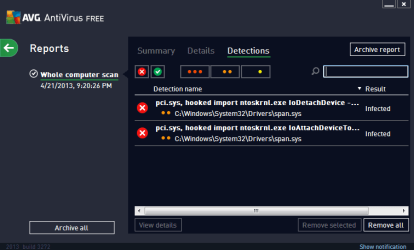
Here is a screenshot of AVG,

Going to run the other scan next.
 

Attachments

  • avgscanresults.PNG
    avgscanresults.PNG
    11.5 KB · Views: 22

My Computer My Computer

Computer type
PC/Desktop
OS
Microsoft Windows 7 Home Premium 64-bit 7601 Multiprocessor Free Service Pack 1
CPU
Intel(R) Core(TM)2 Quad CPU Q6700 @ 2.66GHz
Motherboard
PEGATRON CORPORATION Benicia
Memory
8.00 GB
Graphics Card(s)
(1) NVIDIA GeForce GT 520 (2) LogMeIn Mirror Driver
Sound Card
(1) Realtek High Definition Audio (2) Logitech Mic (QuickC
Screen Resolution
1920 x 1080 x 32 bits (4294967296 colors) @ 60 Hz
Hard Drives
(1) WDC WD10EALS-00Z8A0 (2) Generic- Compact Flash USB Device (3) Generic- MS/MS-Pro USB Device (4) Generic- SD/MMC USB Device (5) Generic- SM/xD-Picture USB Device
Here is aswMBR log
 

Attachments

My Computer My Computer

Computer type
PC/Desktop
OS
Microsoft Windows 7 Home Premium 64-bit 7601 Multiprocessor Free Service Pack 1
CPU
Intel(R) Core(TM)2 Quad CPU Q6700 @ 2.66GHz
Motherboard
PEGATRON CORPORATION Benicia
Memory
8.00 GB
Graphics Card(s)
(1) NVIDIA GeForce GT 520 (2) LogMeIn Mirror Driver
Sound Card
(1) Realtek High Definition Audio (2) Logitech Mic (QuickC
Screen Resolution
1920 x 1080 x 32 bits (4294967296 colors) @ 60 Hz
Hard Drives
(1) WDC WD10EALS-00Z8A0 (2) Generic- Compact Flash USB Device (3) Generic- MS/MS-Pro USB Device (4) Generic- SD/MMC USB Device (5) Generic- SM/xD-Picture USB Device
Duplicate post, please follow post below.
 
Last edited:

My Computer My Computer

Computer type
PC/Desktop
Computer Manufacturer/Model Number
An ol' eMachines
OS
Windows 7 Home Premium
Internet Speed
Fine for me...I'm retired!
AVG reports the rootkit at C:\Windows\System32\Drivers\span.sys
aswMBR is OK.

Alcohol, and other CD Emulation programs use a hidden driver detected as a Rootkit, and it interferes with diagnostic work, as well as removing infections. It falsifies the results of work tools by suggesting an infection when it actually does not exist.

To get around this, please do the following:

Start with the Defogger Download
It is a utility that allows you to temporarily disable CD or DVD emulation programs.

Save the program to your Desktop.
◾Double-click on the DeFogger icon to start the tool.
◾At Deffoger's console, click: Disable
◾When it prompts to continue, please click on: Yes
◾When the program is done, a Finished! message appears.
◾Click: OK (to exit the program)
◾If CD Emulation programs are present and disabled, DeFogger asks for a reboot.
◾Please do so by clicking: OK

Next, please run Malwarebytes Anti-Rootkit Download
Save to the Desktop (easy to find)
Right-click the file and select: Extract here...

In the MBAR folder that appears on the Desktop, open it, and double-click the MBAR application.

At the program console, follow the prompts to update and allow the program to SCAN the computer for threats.

If any threats are reported, DO NOT click on the Cleanup button to remove them!!!

At this point go back to the MBAR folder on the Desktop, and look for two reports:
1. system-log.txt
2. mbar-log-2013-04-22 (20-13-32).txt (corresponds to mbar-log-year-month-day (hour-minute-second).txt)

Please provide the mbar-log and the system-log in your reply.

Exit: MBAR
 

My Computer My Computer

Computer type
PC/Desktop
Computer Manufacturer/Model Number
An ol' eMachines
OS
Windows 7 Home Premium
Internet Speed
Fine for me...I'm retired!
If I'm not mistaken the driver that Alcohol and Daemon Tools is sptd.sys

Cottonball you could have the user uninstall Alcohol and remove the SPTD.sys driver then rescan with avg

:ar: TO REMOVE THE SPTD.sys DRIVER

NAME|
OPERATING SYSTEM​
|
DOWNLOAD​

SPTD|Windows 2000/XP/2003/Vista/Windows 7 (32 bit)|
Download


NAME|
OPERATING SYSTEM​
|
DOWNLOAD​

SPTD|Windows XP/2003/Vista/Windows 7 (64 bit)|
Download

 
Last edited:

My Computer My Computer

Computer Manufacturer/Model Number
Custom Built
OS
Windows 7 Ultimate 32-Bit & Windows 7 Ultimate 64-Bit
CPU
Intel Core i7 CPU 950 @ 3.07GHz
Motherboard
ASUS P6T DELUXE V2
Memory
OCZ 6GB (3 x 2GB) 240-Pin DDR3 SDRAM DDR3 1600 OCZ3X1600R2
Graphics Card(s)
ATI Radeon HD 5700 Series
Sound Card
OnBoard
Hard Drives
WD6400AACS-00M3B0 (640GB SATA )
PSU
CORSAIR 850w
Case
NZXT LEXA
Cooling
Intel Stock Heatsink Fan
Keyboard
Microsoft Wireless Laser Keyboard 7000
Mouse
Microsoft Wireless Laser Mouse 7000
@VistaKing,

Yes, I know.

Defogger temporarily disables emulation programs, so, I'm giving that a whirl first, since it is the least 'radical' change.

Want to see what MBAR brings.

May remove sptd.sys depending on what happens with MBAR...etc.
 

My Computer My Computer

Computer type
PC/Desktop
Computer Manufacturer/Model Number
An ol' eMachines
OS
Windows 7 Home Premium
Internet Speed
Fine for me...I'm retired!
I don't want to uninstall alcohol 120%, there is no point when I can simply disable it while I test whether or not this is a true false positive or virus.
Also I went to the actual folder c:/windows/system32/driver/ and the specific files that AVG is saying is infected aren't even in there. (not that I was going to delete them, just curious)
 

My Computer My Computer

Computer type
PC/Desktop
OS
Microsoft Windows 7 Home Premium 64-bit 7601 Multiprocessor Free Service Pack 1
CPU
Intel(R) Core(TM)2 Quad CPU Q6700 @ 2.66GHz
Motherboard
PEGATRON CORPORATION Benicia
Memory
8.00 GB
Graphics Card(s)
(1) NVIDIA GeForce GT 520 (2) LogMeIn Mirror Driver
Sound Card
(1) Realtek High Definition Audio (2) Logitech Mic (QuickC
Screen Resolution
1920 x 1080 x 32 bits (4294967296 colors) @ 60 Hz
Hard Drives
(1) WDC WD10EALS-00Z8A0 (2) Generic- Compact Flash USB Device (3) Generic- MS/MS-Pro USB Device (4) Generic- SD/MMC USB Device (5) Generic- SM/xD-Picture USB Device
Summerbear5,

I don't want to uninstall alcohol 120%, there is no point when I can simply disable it while I test whether or not this is a true false positive or virus.

That is exactly what Defogger will do. Uninstalling the emulation program is really not necessary at this point.

So far, I believe this issue is an AVG hiccup. However, just don't want you to have a 'surprise' down the road.

Defogger will also enable the emulation program when we are done.
 

My Computer My Computer

Computer type
PC/Desktop
Computer Manufacturer/Model Number
An ol' eMachines
OS
Windows 7 Home Premium
Internet Speed
Fine for me...I'm retired!
Here you go,

Said nothing found.
 

Attachments

My Computer My Computer

Computer type
PC/Desktop
OS
Microsoft Windows 7 Home Premium 64-bit 7601 Multiprocessor Free Service Pack 1
CPU
Intel(R) Core(TM)2 Quad CPU Q6700 @ 2.66GHz
Motherboard
PEGATRON CORPORATION Benicia
Memory
8.00 GB
Graphics Card(s)
(1) NVIDIA GeForce GT 520 (2) LogMeIn Mirror Driver
Sound Card
(1) Realtek High Definition Audio (2) Logitech Mic (QuickC
Screen Resolution
1920 x 1080 x 32 bits (4294967296 colors) @ 60 Hz
Hard Drives
(1) WDC WD10EALS-00Z8A0 (2) Generic- Compact Flash USB Device (3) Generic- MS/MS-Pro USB Device (4) Generic- SD/MMC USB Device (5) Generic- SM/xD-Picture USB Device
:thumbsup:

To re-enable the Emulation program using DeFogger:
Double-click on the DeFogger icon to start the tool.
At the Defogger console, click on: Enable
Click Yes to continue.

At the Finished! message, click on the OK button to exit the program.
If the Emulation program is enabled, DeFogger asks to reboot the machine.
Please allow by clicking on the OK button.


Now, please download SystemLook:
http://jpshortstuff.247Fixes.com/SystemLook_x64.exe
Save the file to the Desktop

  • Double-click SystemLook.exe to run it.
  • Copy/paste the content of the following quote box into the open field:
:filefind
span.sys
  • Click the Look button to start the scan.
  • When finished, a Notepad window opens with the results of the scan.
Please post the SystemLook.txt in your reply.
 

My Computer My Computer

Computer type
PC/Desktop
Computer Manufacturer/Model Number
An ol' eMachines
OS
Windows 7 Home Premium
Internet Speed
Fine for me...I'm retired!
Ok, now that I re-enabled it. AVG is saying it's a different file that's infected not the span.sys.
 

Attachments

  • avg2.PNG
    avg2.PNG
    2.5 KB · Views: 11

My Computer My Computer

Computer type
PC/Desktop
OS
Microsoft Windows 7 Home Premium 64-bit 7601 Multiprocessor Free Service Pack 1
CPU
Intel(R) Core(TM)2 Quad CPU Q6700 @ 2.66GHz
Motherboard
PEGATRON CORPORATION Benicia
Memory
8.00 GB
Graphics Card(s)
(1) NVIDIA GeForce GT 520 (2) LogMeIn Mirror Driver
Sound Card
(1) Realtek High Definition Audio (2) Logitech Mic (QuickC
Screen Resolution
1920 x 1080 x 32 bits (4294967296 colors) @ 60 Hz
Hard Drives
(1) WDC WD10EALS-00Z8A0 (2) Generic- Compact Flash USB Device (3) Generic- MS/MS-Pro USB Device (4) Generic- SD/MMC USB Device (5) Generic- SM/xD-Picture USB Device
Try SystemLook with the following:

:filefind
spxl.sys

Let's see if we are lucky this time.
 

My Computer My Computer

Computer type
PC/Desktop
Computer Manufacturer/Model Number
An ol' eMachines
OS
Windows 7 Home Premium
Internet Speed
Fine for me...I'm retired!
Ok here is the results
 

Attachments

My Computer My Computer

Computer type
PC/Desktop
OS
Microsoft Windows 7 Home Premium 64-bit 7601 Multiprocessor Free Service Pack 1
CPU
Intel(R) Core(TM)2 Quad CPU Q6700 @ 2.66GHz
Motherboard
PEGATRON CORPORATION Benicia
Memory
8.00 GB
Graphics Card(s)
(1) NVIDIA GeForce GT 520 (2) LogMeIn Mirror Driver
Sound Card
(1) Realtek High Definition Audio (2) Logitech Mic (QuickC
Screen Resolution
1920 x 1080 x 32 bits (4294967296 colors) @ 60 Hz
Hard Drives
(1) WDC WD10EALS-00Z8A0 (2) Generic- Compact Flash USB Device (3) Generic- MS/MS-Pro USB Device (4) Generic- SD/MMC USB Device (5) Generic- SM/xD-Picture USB Device
http://www.sevenforums.com/tutorials/394-hidden-files-folders-show-hide.html
Use the Show option.

Run SystemLook once again with the following:
:filefind
spxl.sys
span.sys

If the result is: No files found
I think AVG is playing games with us...

Would you consider uninstalling AVG and running a different AntiVirus program?

Avast Free Antivirus - CNET Download.com
Make sure it is the Free version.

Download Microsoft Security Essentials from Official Microsoft Download Center

Run whichever AV you wish, and do a Full Scan.

Please provide the results as a report, or a screenshot, if any malware is found.
 

My Computer My Computer

Computer type
PC/Desktop
Computer Manufacturer/Model Number
An ol' eMachines
OS
Windows 7 Home Premium
Internet Speed
Fine for me...I'm retired!
I personally like AVG, (even with it's little hiccups) I've been running it for years and never had a virus it didn't catch, and never had to system restore/recovery due to a virus.
I will look into Avast though thank you for suggesting it.

What is Microsoft Security Essentials?

I included the second scan report.
 

Attachments

My Computer My Computer

Computer type
PC/Desktop
OS
Microsoft Windows 7 Home Premium 64-bit 7601 Multiprocessor Free Service Pack 1
CPU
Intel(R) Core(TM)2 Quad CPU Q6700 @ 2.66GHz
Motherboard
PEGATRON CORPORATION Benicia
Memory
8.00 GB
Graphics Card(s)
(1) NVIDIA GeForce GT 520 (2) LogMeIn Mirror Driver
Sound Card
(1) Realtek High Definition Audio (2) Logitech Mic (QuickC
Screen Resolution
1920 x 1080 x 32 bits (4294967296 colors) @ 60 Hz
Hard Drives
(1) WDC WD10EALS-00Z8A0 (2) Generic- Compact Flash USB Device (3) Generic- MS/MS-Pro USB Device (4) Generic- SD/MMC USB Device (5) Generic- SM/xD-Picture USB Device
Back
Top