
You are using an out of date browser. It may not display this or other websites correctly.
You should upgrade or use an alternative browser.
You should upgrade or use an alternative browser.
AVG Search Toolbar ?
- Thread starter brightsun
- Start date
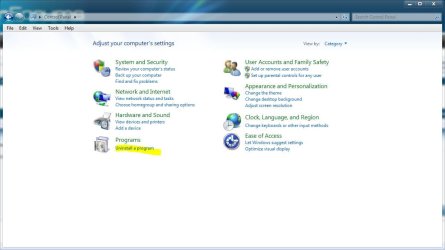
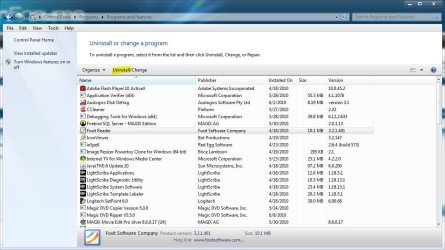
If you go to control panel, uninstall program, then select it from the list and choose uninstall from the top and follow the prompts.
(I have foxit reader highlighted just to show you the uninstall button on top)
If you have any other questions please ask.
(I have foxit reader highlighted just to show you the uninstall button on top)
If you have any other questions please ask.
Attachments
My Computer
- Computer type
- PC/Desktop
- Computer Manufacturer/Model Number
- Self Built
- OS
- Win 10 Pro x64
- CPU
- Intel I5-2500K @3.3GHz
- Motherboard
- Asrock P67 Extreme4
- Memory
- 16GB G.Skill Ripjaws X (4x4GB)
- Graphics Card(s)
- EVGA GeForce 750 Ti SC 2GB
- Sound Card
- ASUS Xonar DG 5.1 Channels 24-bit 96KHz PCI Interface Sound
- Monitor(s) Displays
- auria eq2367
- Screen Resolution
- 1920 x 1080
- Hard Drives
- 250GB Samsung 850 EVO SSD
1TB WD Blue
1TB Hitachi
- PSU
- SeaSonic X 650W 80 Plus Gold
- Case
- Corsair Obsidian 750D
- Cooling
- Corsair H60, Three 140mm case fans
- Keyboard
- Logitech Wireless Keyboard K520
- Mouse
- Logitech Wireless Mouse M310
- Internet Speed
- Wave Broadband ~ 100 dn 5 up
- Antivirus
- Windows Defender, Malwarebytes Premium
- Browser
- Edge, IE11, Chrome
- Other Info
- Laptop specs: HP g7-1365dx /
CPU: AMD A6-3420M APU with Radeon(tm) HD Graphics /
RAM: Crucial 8Gb (2x4Gb) /
SSD: Crucial M4-CT128M4SSD2 ATA Device/ FW 000F /
GFX: AMD Radeon HD 6520G /
OS: Windows 10 Pro x64

Corrine
Account closed
Hi, brightsun.
Please see this AVG FAQ: AVG Free - FAQ which indicates the following:
Please see this AVG FAQ: AVG Free - FAQ which indicates the following:
Please download the current installation file of AVG from the Download section of our website, and run it to start the installation process.
The installation process recognizes the existence of installed AVG and the Add/Remove Components, Repair installation and Uninstall options are offered.
This way the AVG Security Toolbar will be permanently uninstalled from your computer.
- Please close your Internet browser.
- Choose the "Repair installation" option.
- On the next page uncheck the "Yes, I wish to install the AVG Security Toolbar" option.
- Finish the installation wizard and update AVG.
My Computer
- OS
- Windows 7 & Windows Vista Ultimate
derekimo I went to control panel, do not know the program to uninstall AVG 9 completly ?
Are you trying to uninstall just the toolbar or all of AVG 9, If you just want to get rid of the toolbar see corrine's post above.
My Computer
- Computer type
- PC/Desktop
- Computer Manufacturer/Model Number
- Self Built
- OS
- Win 10 Pro x64
- CPU
- Intel I5-2500K @3.3GHz
- Motherboard
- Asrock P67 Extreme4
- Memory
- 16GB G.Skill Ripjaws X (4x4GB)
- Graphics Card(s)
- EVGA GeForce 750 Ti SC 2GB
- Sound Card
- ASUS Xonar DG 5.1 Channels 24-bit 96KHz PCI Interface Sound
- Monitor(s) Displays
- auria eq2367
- Screen Resolution
- 1920 x 1080
- Hard Drives
- 250GB Samsung 850 EVO SSD
1TB WD Blue
1TB Hitachi
- PSU
- SeaSonic X 650W 80 Plus Gold
- Case
- Corsair Obsidian 750D
- Cooling
- Corsair H60, Three 140mm case fans
- Keyboard
- Logitech Wireless Keyboard K520
- Mouse
- Logitech Wireless Mouse M310
- Internet Speed
- Wave Broadband ~ 100 dn 5 up
- Antivirus
- Windows Defender, Malwarebytes Premium
- Browser
- Edge, IE11, Chrome
- Other Info
- Laptop specs: HP g7-1365dx /
CPU: AMD A6-3420M APU with Radeon(tm) HD Graphics /
RAM: Crucial 8Gb (2x4Gb) /
SSD: Crucial M4-CT128M4SSD2 ATA Device/ FW 000F /
GFX: AMD Radeon HD 6520G /
OS: Windows 10 Pro x64
Corrine
Account closed
Hi, brightsun.
Did you see the instructions I posted above from AVG for removing the Toolbar? You won't be uninstalling AVG. Rather, you will select "Repair installation" and then you will UNCHECK the Toolbar.
Did you see the instructions I posted above from AVG for removing the Toolbar? You won't be uninstalling AVG. Rather, you will select "Repair installation" and then you will UNCHECK the Toolbar.
My Computer
- OS
- Windows 7 & Windows Vista Ultimate

ilesal
Banned
- Local time
- 3:45 AM
- Messages
- 137
I believe you may be using internet explorer as your web browser. To the left of the AVG toolbar is a "X" click on it, you will have a pop up with two options. Choose the second, the toolbar should disappear and not return.
My Computer
- OS
- Win7 7600 x64
- Memory
- 8gig
- Graphics Card(s)
- Nvidia
- Monitor(s) Displays
- dual wide screen 22inch each
- Hard Drives
- 2x 500gig
My Computer
- OS
- w7
ilesal
Banned
- Local time
- 3:45 AM
- Messages
- 137
When you install AVG it adds a yahoo toolbar, this can be deselected during installation or as I suggested above removed after installation.
My Computer
- OS
- Win7 7600 x64
- Memory
- 8gig
- Graphics Card(s)
- Nvidia
- Monitor(s) Displays
- dual wide screen 22inch each
- Hard Drives
- 2x 500gig
AVG Toolbar ?
[URL="http://www.sevenforums.com/member.php?u=11713"]ilesal[/URL]http://www.sevenforums.com/member.php?u=52389 is it hard to uninstall all of AVG 9, and reinstall it for someone who is not technical because I think not only the Toolbar I want uninstalled I do not know if the setting are right in my AVG 9 anyway ?
[URL="http://www.sevenforums.com/member.php?u=11713"]ilesal[/URL]http://www.sevenforums.com/member.php?u=52389 is it hard to uninstall all of AVG 9, and reinstall it for someone who is not technical because I think not only the Toolbar I want uninstalled I do not know if the setting are right in my AVG 9 anyway ?
My Computer
- OS
- w7
ilesal
Banned
- Local time
- 3:45 AM
- Messages
- 137
You should be able to fully uninstall AVG9 by selecting AVG from the add and remove software from control panel, once uninstalled it is advised you reboot your computer before reinstalling, to reinstall go here- Download AVG Free Edition 9.0.819 - FileHippo.com
My Computer
- OS
- Win7 7600 x64
- Memory
- 8gig
- Graphics Card(s)
- Nvidia
- Monitor(s) Displays
- dual wide screen 22inch each
- Hard Drives
- 2x 500gig
Corrine
Account closed
To uninstall AVG 9 and reinstall it would be the same as uninstalling any other software program. First be sure you have AVG 9 downloaded to your computer. Then disconnect from the internet and close all programs. You then need to exit AVG. Then, from Add/Remove programs uninstall AVG. I suggest a shutdown/restart after uninstalling any program, to complete the removal process. Next, reinstall AVG from the downloaded file, being careful, as ilesal said, to UNcheck the toolbar during installation. Allow AVG to update the definitions.
My Computer
- OS
- Windows 7 & Windows Vista Ultimate
ilesal
Banned
- Local time
- 3:45 AM
- Messages
- 137
I am running from my Linux Laptop. I will attempt to assist. After going to the link I gave just wait do not fill out the form, you may get a prompt at the top of screen to allow the download, click on it, choose run when prompted.
First screen will ask which language you want. Select English and click "next."
Next screen tick the box on the left. then Click accept.
I am unable to see further screens as I am running Linux not windows.
It should install, if any boxes appear with ticks in them read and remove if anything to do with toolbar.
First screen will ask which language you want. Select English and click "next."
Next screen tick the box on the left. then Click accept.
I am unable to see further screens as I am running Linux not windows.
It should install, if any boxes appear with ticks in them read and remove if anything to do with toolbar.
My Computer
- OS
- Win7 7600 x64
- Memory
- 8gig
- Graphics Card(s)
- Nvidia
- Monitor(s) Displays
- dual wide screen 22inch each
- Hard Drives
- 2x 500gig
ilesal
Banned
- Local time
- 3:45 AM
- Messages
- 137
Once installed you may get a AVG icon on your desktop, this can be deleted.
On your toolbar, bottom right you will see a AVG icon. Right click on this to see update/ scan options. The default settings should be fine. Good luck!
I also recommend getting (FREE) malwarebytes- Malwarebytes
On your toolbar, bottom right you will see a AVG icon. Right click on this to see update/ scan options. The default settings should be fine. Good luck!
I also recommend getting (FREE) malwarebytes- Malwarebytes
My Computer
- OS
- Win7 7600 x64
- Memory
- 8gig
- Graphics Card(s)
- Nvidia
- Monitor(s) Displays
- dual wide screen 22inch each
- Hard Drives
- 2x 500gig
AVG Toolbar ?
I will attempt to assist. After going to the link you gave me just wait do not fill out the form, you may get a prompt at the top of screen to allow the download, click on it, choose run when prompted.after I download it can I tell you then I need assist with the settingsafter installed ?
I will attempt to assist. After going to the link you gave me just wait do not fill out the form, you may get a prompt at the top of screen to allow the download, click on it, choose run when prompted.after I download it can I tell you then I need assist with the settingsafter installed ?
My Computer
- OS
- w7

JMH
Banned
- Local time
- 10:45 AM
- Messages
- 6,448
Derek & Corrine etc.....
You may like to pursue this link which is related to the help that you are endevouring to give.
http://www.sevenforums.com/system-security/88470-avg-9-update.html
You may like to pursue this link which is related to the help that you are endevouring to give.
http://www.sevenforums.com/system-security/88470-avg-9-update.html
Last edited:
My Computer
- Computer Manufacturer/Model Number
- LAPTOP. HP Pavilion dv7-4010TX .
- OS
- Win 7 Ultimate 64-bit. SP1.
- CPU
- Intel i7 -720QM.[1.6GHz Turbo Boost 2.8GHz. 6MB Cache.]
- Memory
- 8 DDR 3 RAM. 1066MHZ
- Graphics Card(s)
- ATI 1024 MB. DDR3. Radeon HD5650
- Monitor(s) Displays
- 17.3" High Definition Brightview LCD. LED Backlit.
- Screen Resolution
- 1600 x 900.
- Hard Drives
- 640GB
- Case
- Laptop / notebook.
- Mouse
- Logitech Anywhere mouse. MX.
- Internet Speed
- ADSL [ but too slow ]
Corrine
Account closed
Thanks, Jan. Since I personally do not use AVG, I'll stay out of that thread and let those who do assist. The question here was about uninstalling the Toolbar, which seems to have turned into removing and re-installing AVG.
My Computer
- OS
- Windows 7 & Windows Vista Ultimate