AVI thumbnails on x64 Windows 7

BlackBuzz

New member
Local time
8:13 AM
Messages
27
Hey guys!

Got a really annoying problem with my thumbnails not generating correctly for avi files. It uses the first frame of the video so they are therefore usually black!

I have tried loads of things to fix it.. including numerous codec packs including the x64 Vista codec pack but with no luck!

Anyone have any idea what I could do to fix it?
 

My Computer

Computer Manufacturer/Model Number
Corona
OS
Windows 7 x64
CPU
Pentium Dual Core E5200 2.5ghz
Motherboard
Gigabyte GA-73PVM-S2H
Memory
4GB
Graphics Card(s)
ATI Radeon HD 4670 w/
Monitor(s) Displays
2 x LG M198WA HD Widescreen 1440x900
Screen Resolution
2880*900
Hard Drives
1x Hitachi Deskstar 500GB
1x Hitachi Deskstar 1TB
PSU
Titan 650W Neon PSU
Cooling
CoolerMaster Hyper TX 2
Sounds like the same issue as in Vista 64.

See HERE for a workaround. (Generate the thumbnails in 32 bit Explorer)
 

My Computer

Computer Manufacturer/Model Number
Self built
OS
Windows 7 Ultimate 32 & 64 -(Boot Camped Snow Leopard on a Mac Mini)
CPU
AMD Athlon A64 X2 6000+ 3.1GHz
Motherboard
DFI LanParty Jr 790GX M2RS
Memory
4GB Corsair XMS RAM
Graphics Card(s)
Gigabyte ATI Radeon HD4550/512MB/DDR3 passive cooled
Sound Card
latest RealTek HD/HDMI drivers
Monitor(s) Displays
Samsung LN40A550 (primary); Zalman 7" LCD (secondary)
Screen Resolution
1920x1080 ; 800x600
Hard Drives
WD Raptor for OS
Seagate 7211 640GB
Two Samsung EcoGreens for TV in RAID 0 = 3TB
Two WD MyBook 1TB externals for B/U and Movies
Optical Drive:
LG GGC-H20L Super Multi Blue BluRay/HD-DVD internal
PSU
Corsair HX520W
Case
Zalman HD160XT
Cooling
Zalman CNPS9500Cu on processor - Four Nexus case fans
Keyboard
Gyration wireless Media Center Keyboard
Mouse
Gyration Cordless Optical Air Mouse
Internet Speed
6344 kbps Down/1043 kbps Up (Comcast cable)
Other Info
HDMI audio/video out to Yamaha RX-V1065 receiver.
All controlled by a Harmony One universal remote.

Four other home built computers plus a Mac Mini, but this is my main Win7 testbed.
Thanks for the reply dragonfly but unfortunately i've already tried that and it doesn't work. I did have the same problem with 64bit vista and fixed it using a 64 bit codec pack but it doesn't work on windows 7 :(
 

My Computer

Computer Manufacturer/Model Number
Corona
OS
Windows 7 x64
CPU
Pentium Dual Core E5200 2.5ghz
Motherboard
Gigabyte GA-73PVM-S2H
Memory
4GB
Graphics Card(s)
ATI Radeon HD 4670 w/
Monitor(s) Displays
2 x LG M198WA HD Widescreen 1440x900
Screen Resolution
2880*900
Hard Drives
1x Hitachi Deskstar 500GB
1x Hitachi Deskstar 1TB
PSU
Titan 650W Neon PSU
Cooling
CoolerMaster Hyper TX 2
I haven't checked my x86 install to see if it reads avi thumbnails correctly, but I'll give it a shot later this afternoon. Hopefully (for me) it's just an x64 problem.
 

My Computer

Computer Manufacturer/Model Number
Self built
OS
Windows 7 Ultimate 32 & 64 -(Boot Camped Snow Leopard on a Mac Mini)
CPU
AMD Athlon A64 X2 6000+ 3.1GHz
Motherboard
DFI LanParty Jr 790GX M2RS
Memory
4GB Corsair XMS RAM
Graphics Card(s)
Gigabyte ATI Radeon HD4550/512MB/DDR3 passive cooled
Sound Card
latest RealTek HD/HDMI drivers
Monitor(s) Displays
Samsung LN40A550 (primary); Zalman 7" LCD (secondary)
Screen Resolution
1920x1080 ; 800x600
Hard Drives
WD Raptor for OS
Seagate 7211 640GB
Two Samsung EcoGreens for TV in RAID 0 = 3TB
Two WD MyBook 1TB externals for B/U and Movies
Optical Drive:
LG GGC-H20L Super Multi Blue BluRay/HD-DVD internal
PSU
Corsair HX520W
Case
Zalman HD160XT
Cooling
Zalman CNPS9500Cu on processor - Four Nexus case fans
Keyboard
Gyration wireless Media Center Keyboard
Mouse
Gyration Cordless Optical Air Mouse
Internet Speed
6344 kbps Down/1043 kbps Up (Comcast cable)
Other Info
HDMI audio/video out to Yamaha RX-V1065 receiver.
All controlled by a Harmony One universal remote.

Four other home built computers plus a Mac Mini, but this is my main Win7 testbed.
Any other 64bit users seeing similar problems with avi thumbnails?
 

My Computer

Computer Manufacturer/Model Number
Corona
OS
Windows 7 x64
CPU
Pentium Dual Core E5200 2.5ghz
Motherboard
Gigabyte GA-73PVM-S2H
Memory
4GB
Graphics Card(s)
ATI Radeon HD 4670 w/
Monitor(s) Displays
2 x LG M198WA HD Widescreen 1440x900
Screen Resolution
2880*900
Hard Drives
1x Hitachi Deskstar 500GB
1x Hitachi Deskstar 1TB
PSU
Titan 650W Neon PSU
Cooling
CoolerMaster Hyper TX 2
Have you installed any new media software or are you still playing your AVI's with WMP by default?
 

My Computer

Computer Manufacturer/Model Number
Home Brew
OS
Windows 7 Ultimate Vista Ultimate x64
CPU
Core 2 Duo E8500 3.16Ghz @ 3.8Ghz
Motherboard
eVGA 750i FTW
Memory
2x2Gigs Patriot PC2-6400 LL
Graphics Card(s)
Inno3D GeForce GTX260 216 SP
Monitor(s) Displays
ASUS VW222U 22" 2ms Response time
Screen Resolution
1680x1050
Hard Drives
SATA 150GB
SATA II 250GB
USB IDE 750GB Ext.
PSU
HYTEC 600W & Thermaltake 650W Toughpower Power Exp
Case
Thermaltake Armor LCS (Liquid Cooling System)
Cooling
Liquid Cooling System
Keyboard
Logitech G15 Gaming Keyboard
Mouse
Logitech G9 Gaming Mouse
Hi Mr Grim! I have been using vlc player to play the avi files
 

My Computer

Computer Manufacturer/Model Number
Corona
OS
Windows 7 x64
CPU
Pentium Dual Core E5200 2.5ghz
Motherboard
Gigabyte GA-73PVM-S2H
Memory
4GB
Graphics Card(s)
ATI Radeon HD 4670 w/
Monitor(s) Displays
2 x LG M198WA HD Widescreen 1440x900
Screen Resolution
2880*900
Hard Drives
1x Hitachi Deskstar 500GB
1x Hitachi Deskstar 1TB
PSU
Titan 650W Neon PSU
Cooling
CoolerMaster Hyper TX 2
What you need is the Win 7 Codec Pack Shark007.net - Windows 7 Codecs as it seems your missing some codecs even though some were included with windows 7.
 

My Computer

Computer Manufacturer/Model Number
self built
OS
Windows 7 Professional 64-bit
CPU
Intel E8400 3GHz
Motherboard
Intel DX48BT2
Memory
Kingston PC3-10700H 4Gb
Graphics Card(s)
XFX Radeon HD 5850 BlackEd.
Sound Card
Asus Xonar DG
Monitor(s) Displays
2x Samsung SM-T220HD 22"
Screen Resolution
1680x1050 on two monitors
Hard Drives
OCZ Vertex 2 120gb 3.5" (OS)
Seagate Momentus XT 500gb
Samsung F3 1Tb (games)
2x Samsung F1 1Tb
PSU
Thermaltake ToughPower 850w
Case
Thermaltake Armor
Cooling
Scythe Mugen II
Keyboard
Microsoft Comfort Curve USB
Mouse
Razer Diamondback 3G
Internet Speed
8128/443
dam i thought you had the answer then!!

windows 7 codecs didn't work, even on a clean install. installed both 32bit and 64bit versions of the codec packs

any other suggestions?
 

My Computer

Computer Manufacturer/Model Number
Corona
OS
Windows 7 x64
CPU
Pentium Dual Core E5200 2.5ghz
Motherboard
Gigabyte GA-73PVM-S2H
Memory
4GB
Graphics Card(s)
ATI Radeon HD 4670 w/
Monitor(s) Displays
2 x LG M198WA HD Widescreen 1440x900
Screen Resolution
2880*900
Hard Drives
1x Hitachi Deskstar 500GB
1x Hitachi Deskstar 1TB
PSU
Titan 650W Neon PSU
Cooling
CoolerMaster Hyper TX 2
Try giving back WMP all of it's defaults to see if that works.
 

My Computer

Computer Manufacturer/Model Number
Home Brew
OS
Windows 7 Ultimate Vista Ultimate x64
CPU
Core 2 Duo E8500 3.16Ghz @ 3.8Ghz
Motherboard
eVGA 750i FTW
Memory
2x2Gigs Patriot PC2-6400 LL
Graphics Card(s)
Inno3D GeForce GTX260 216 SP
Monitor(s) Displays
ASUS VW222U 22" 2ms Response time
Screen Resolution
1680x1050
Hard Drives
SATA 150GB
SATA II 250GB
USB IDE 750GB Ext.
PSU
HYTEC 600W & Thermaltake 650W Toughpower Power Exp
Case
Thermaltake Armor LCS (Liquid Cooling System)
Cooling
Liquid Cooling System
Keyboard
Logitech G15 Gaming Keyboard
Mouse
Logitech G9 Gaming Mouse
tried that too.. they didnt work from a clean install with only the x64 win7 codecs installed.

i can't understand why it's just me this is happening too!

do your avi thumbnails work and if so which codecs did you use?

thanks for all the help so far guys!
 

My Computer

Computer Manufacturer/Model Number
Corona
OS
Windows 7 x64
CPU
Pentium Dual Core E5200 2.5ghz
Motherboard
Gigabyte GA-73PVM-S2H
Memory
4GB
Graphics Card(s)
ATI Radeon HD 4670 w/
Monitor(s) Displays
2 x LG M198WA HD Widescreen 1440x900
Screen Resolution
2880*900
Hard Drives
1x Hitachi Deskstar 500GB
1x Hitachi Deskstar 1TB
PSU
Titan 650W Neon PSU
Cooling
CoolerMaster Hyper TX 2
Personally I use MP3TagEditor to change all of my video files to static images of my choice (i.e. DVD covers) - i'm sure you could probably use that to select a specific frame of the video as your thumbnail as well.

I also highly endorse the Shark Win7 codec pack beta; it's enabled me to view things like m4v's and mkv's (and also generated thumbnails) where it hadn't done so before. If you're using Win7 x64, be sure to install both the Win7 codec pack and the x64 component add-on package. I still haven't figured out whether I like using Media Center in 32-bit or 64-bit mode better yet, but these installs make it easy to switch back and forth, and to change codecs for certain filetypes.
 

My Computer

OS
Windows 7 x64 Build 7000
Mine's doing the same thing, even with codecs installed and even in the 32-bit explorer. (Running x64)
 

My Computer

Computer Manufacturer/Model Number
Fx X04c
OS
Windows 7 Build 7100 (x64)
CPU
AMD Phenom 9950 Black Edition
Motherboard
ASUS M3A78-EM
Memory
4GB (2x2GB) OCZ Reaper
Graphics Card(s)
Palit Nvidia GeForce 9800GT 512MB
Sound Card
Onboard from M3A78-EM
Monitor(s) Displays
LG L206W
Screen Resolution
1680x1050x32bpp
Hard Drives
2.8TB of storage across 3 HDDs.
PSU
450W RaidMax
Case
Custom black w/ bluelight/blacklight
Cooling
Forced air intake
Keyboard
Logitech G15 MKII
Mouse
Logitech G5 Gaming Laser Mouse
Internet Speed
15mb dn/1mb up
Other Info
Enough spare parts to build another couple Windows-7-capable machines.
Mine's doing the same thing, even with codecs installed and even in the 32-bit explorer. (Running x64)

None of the solutions posted here have worked so far.. i've tried every solution I can think of! Surely we can't be the only 64bit users with the problem?!

If you find a solution it would be great if you could post it here... obviously i'll do the same!
 

My Computer

Computer Manufacturer/Model Number
Corona
OS
Windows 7 x64
CPU
Pentium Dual Core E5200 2.5ghz
Motherboard
Gigabyte GA-73PVM-S2H
Memory
4GB
Graphics Card(s)
ATI Radeon HD 4670 w/
Monitor(s) Displays
2 x LG M198WA HD Widescreen 1440x900
Screen Resolution
2880*900
Hard Drives
1x Hitachi Deskstar 500GB
1x Hitachi Deskstar 1TB
PSU
Titan 650W Neon PSU
Cooling
CoolerMaster Hyper TX 2
Here is what mine looks like, as you can see some are black, but they also start off black for the first couple of seconds.

2009-02-04_223632.jpg
 

My Computer

Computer Manufacturer/Model Number
Home Brew
OS
Windows 7 Ultimate Vista Ultimate x64
CPU
Core 2 Duo E8500 3.16Ghz @ 3.8Ghz
Motherboard
eVGA 750i FTW
Memory
2x2Gigs Patriot PC2-6400 LL
Graphics Card(s)
Inno3D GeForce GTX260 216 SP
Monitor(s) Displays
ASUS VW222U 22" 2ms Response time
Screen Resolution
1680x1050
Hard Drives
SATA 150GB
SATA II 250GB
USB IDE 750GB Ext.
PSU
HYTEC 600W & Thermaltake 650W Toughpower Power Exp
Case
Thermaltake Armor LCS (Liquid Cooling System)
Cooling
Liquid Cooling System
Keyboard
Logitech G15 Gaming Keyboard
Mouse
Logitech G9 Gaming Mouse
That's the same problem as me! Some frames at the start aren't completely black but still, isn't windows supposed to choose the brightest frame from the avi file for thumbnail generation? Glad to see it's not just me with the problem.
 

Attachments

  • Thumbnails.jpg
    Thumbnails.jpg
    102.2 KB · Views: 621

My Computer

Computer Manufacturer/Model Number
Corona
OS
Windows 7 x64
CPU
Pentium Dual Core E5200 2.5ghz
Motherboard
Gigabyte GA-73PVM-S2H
Memory
4GB
Graphics Card(s)
ATI Radeon HD 4670 w/
Monitor(s) Displays
2 x LG M198WA HD Widescreen 1440x900
Screen Resolution
2880*900
Hard Drives
1x Hitachi Deskstar 500GB
1x Hitachi Deskstar 1TB
PSU
Titan 650W Neon PSU
Cooling
CoolerMaster Hyper TX 2
no more ideas guys?

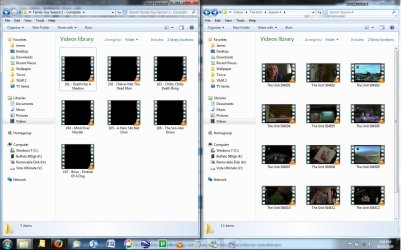
i've noticed something interesting... it could just be that these videos all start with non-black frames but look at the screenshot below... the thumbnails for the videos on the right seem fine... they are about the only ones in my video library that are!

wierd ey??
 

Attachments

  • thumbnails.jpg
    thumbnails.jpg
    146.2 KB · Views: 386

My Computer

Computer Manufacturer/Model Number
Corona
OS
Windows 7 x64
CPU
Pentium Dual Core E5200 2.5ghz
Motherboard
Gigabyte GA-73PVM-S2H
Memory
4GB
Graphics Card(s)
ATI Radeon HD 4670 w/
Monitor(s) Displays
2 x LG M198WA HD Widescreen 1440x900
Screen Resolution
2880*900
Hard Drives
1x Hitachi Deskstar 500GB
1x Hitachi Deskstar 1TB
PSU
Titan 650W Neon PSU
Cooling
CoolerMaster Hyper TX 2
Now that is strange, did you also notice the dimensions of the preview differ from the ones showing no previews unlike the ones I have that are blank that have all the same dimensions, just out of interest can you move those AVI's to the folder showing previews to see what happens.
 

My Computer

Computer Manufacturer/Model Number
Home Brew
OS
Windows 7 Ultimate Vista Ultimate x64
CPU
Core 2 Duo E8500 3.16Ghz @ 3.8Ghz
Motherboard
eVGA 750i FTW
Memory
2x2Gigs Patriot PC2-6400 LL
Graphics Card(s)
Inno3D GeForce GTX260 216 SP
Monitor(s) Displays
ASUS VW222U 22" 2ms Response time
Screen Resolution
1680x1050
Hard Drives
SATA 150GB
SATA II 250GB
USB IDE 750GB Ext.
PSU
HYTEC 600W & Thermaltake 650W Toughpower Power Exp
Case
Thermaltake Armor LCS (Liquid Cooling System)
Cooling
Liquid Cooling System
Keyboard
Logitech G15 Gaming Keyboard
Mouse
Logitech G9 Gaming Mouse
i think it's because the unit is broadcast in widescreen whereas that season of family guy is not!

there was no change when i moved a family guy episode to the folder showing thumbnails :(
 

My Computer

Computer Manufacturer/Model Number
Corona
OS
Windows 7 x64
CPU
Pentium Dual Core E5200 2.5ghz
Motherboard
Gigabyte GA-73PVM-S2H
Memory
4GB
Graphics Card(s)
ATI Radeon HD 4670 w/
Monitor(s) Displays
2 x LG M198WA HD Widescreen 1440x900
Screen Resolution
2880*900
Hard Drives
1x Hitachi Deskstar 500GB
1x Hitachi Deskstar 1TB
PSU
Titan 650W Neon PSU
Cooling
CoolerMaster Hyper TX 2
Dam I thought I was onto something then, LOL
 

My Computer

Computer Manufacturer/Model Number
Home Brew
OS
Windows 7 Ultimate Vista Ultimate x64
CPU
Core 2 Duo E8500 3.16Ghz @ 3.8Ghz
Motherboard
eVGA 750i FTW
Memory
2x2Gigs Patriot PC2-6400 LL
Graphics Card(s)
Inno3D GeForce GTX260 216 SP
Monitor(s) Displays
ASUS VW222U 22" 2ms Response time
Screen Resolution
1680x1050
Hard Drives
SATA 150GB
SATA II 250GB
USB IDE 750GB Ext.
PSU
HYTEC 600W & Thermaltake 650W Toughpower Power Exp
Case
Thermaltake Armor LCS (Liquid Cooling System)
Cooling
Liquid Cooling System
Keyboard
Logitech G15 Gaming Keyboard
Mouse
Logitech G9 Gaming Mouse
Back
Top