Solved Awful Experience Gap

In PeaZip...there is an Extract and and Extract All to... If I click on the Extract I get the 3 additional options. If I click on Extract All to then I need to have enough common sense to know which of all the folders it presents to assign this file to.

I don't seem to recall this extraction process being so confusing with WinZip. Maybe it was and I was just on rote.
 

My Computer

Computer type
PC/Desktop
Computer Manufacturer/Model Number
Custom built (eBay power seller); bought 11/29/2015
OS
Microsoft Windows 7 Home Premium 64-bit 7601 Multiprocessor Free Service Pack 1
CPU
AMD FX(tm)-4300 Quad-Core Processor
Motherboard
ASUSTeK Computer INC. M5A78L-M/USB3
Memory
4.00 GB
Graphics Card(s)
AMD 760G
Sound Card
(1) AMD High Definition Audio Device (2) VIA HD Audio
Screen Resolution
Del SE2416H 1920x1080 Pixel Resolution 23.8" LCD Display
Hard Drives
(1) ST31500524AS ATA Device (2) Generic Mini SD Reader USB Device (3) Generic STORAGE DEVICE USB Device (4) Multiple Flash Reader USB Device (5) Samsung M3 Portable USB Device
PSU
Forza NT-1011 UPS 120v 1000VA/500W
Antivirus
Emsisoft Internet Security
Browser
StartPage

My Computer

Computer type
PC/Desktop
Computer Manufacturer/Model Number
Custom assembled by me :}
OS
Win-7-Pro64bit 7-H-Prem-64bit
CPU
i7-5930K 2nd i9-9940x both water blocked VRM's too
Motherboard
ASUS SABERTOOTH X99 2nd ASUS x299 Apex
Memory
Trident-z 3200C14 2nd Trident-z 3600C16
Graphics Card(s)
EVGA 1080ti ftw3 2nd Titan Xp both water blocked
Sound Card
Built-in Realtek
Monitor(s) Displays
1-AOC G2460PG 24"G-Sync 144Hz/ 2nd 1-ASUS VG248QE 24" 144Hz
Screen Resolution
1920 x 1080 144Hz
Hard Drives
2-Samsung M.2 Evo & Evo Plus
2-Samsung 850 EVO 500GB SSD's/ 3-2.5 W.D. Black 1tb-&3-1tb/3-3.5 WD Black 1tb hdd's
PSU
EVGA SuperNOVA 1000-P2 2nd 1200-P2
Case
2-Corsair Obsidian Series 450D Black ATX Mid Tower
Cooling
Custom water loops
Keyboard
Logitech G710+/ 2nd Logitech G910
Mouse
2-RedDragon M901 Perdition 16400 dpi Gaming mouse = wired
Internet Speed
Comcast Ping 19ms 89.31mbps download speed 6.12mbps upload
Antivirus
Malwarebytes Pro/ Superantispyware Pro
Browser
FireFox & Pale moon
Other Info
2nd ASUS X299 Apex/Intel i9-9940x with Custom water loop/7H-Prem-x64/Corsair 450D case/Ram Trident-z 3600C16 4x8gb / Samsung970Evo plus 500gb SSD/Dual ssd EZ swap evo/PSU EVGA SuperNova 1200w-P2 80+Platinum/GPU Titan Xp /8-ML-140 on push-pull on 2-280GTX rads
So discouraging! I think I did what you said as far as the downloads are concerned. And I think you answered my concern about only one showing up per attempt. They still show up on the PeaZip though.

Problem is after I've done the 'Search' Services routine (which I really don't understand), there are still 195 updates showing when I go to do a Windows Update. For the last 2 hours it has sat on 0%. Why can't I just one by one execute these 3 files? My understanding (what there is) is that these are batch files containing all those 195 updates (or at least up to June, 2016).
 

My Computer

Computer type
PC/Desktop
Computer Manufacturer/Model Number
Custom built (eBay power seller); bought 11/29/2015
OS
Microsoft Windows 7 Home Premium 64-bit 7601 Multiprocessor Free Service Pack 1
CPU
AMD FX(tm)-4300 Quad-Core Processor
Motherboard
ASUSTeK Computer INC. M5A78L-M/USB3
Memory
4.00 GB
Graphics Card(s)
AMD 760G
Sound Card
(1) AMD High Definition Audio Device (2) VIA HD Audio
Screen Resolution
Del SE2416H 1920x1080 Pixel Resolution 23.8" LCD Display
Hard Drives
(1) ST31500524AS ATA Device (2) Generic Mini SD Reader USB Device (3) Generic STORAGE DEVICE USB Device (4) Multiple Flash Reader USB Device (5) Samsung M3 Portable USB Device
PSU
Forza NT-1011 UPS 120v 1000VA/500W
Antivirus
Emsisoft Internet Security
Browser
StartPage
Hi,
There are a couple issues all Microsoft fault
http://www.sevenforums.com/windows-...how-do-i-reset-windows-update-components.html

Although installing third party stuff before installing all windows updates is your fault :)

If you have a flash drive this would be a lot easier
Move or download all three updates to it.

After you install windows Without an internet connection and finally get to your new win-7 desktop
Insert the flash drive and install the updates.
 

My Computer

Computer type
PC/Desktop
Computer Manufacturer/Model Number
Custom assembled by me :}
OS
Win-7-Pro64bit 7-H-Prem-64bit
CPU
i7-5930K 2nd i9-9940x both water blocked VRM's too
Motherboard
ASUS SABERTOOTH X99 2nd ASUS x299 Apex
Memory
Trident-z 3200C14 2nd Trident-z 3600C16
Graphics Card(s)
EVGA 1080ti ftw3 2nd Titan Xp both water blocked
Sound Card
Built-in Realtek
Monitor(s) Displays
1-AOC G2460PG 24"G-Sync 144Hz/ 2nd 1-ASUS VG248QE 24" 144Hz
Screen Resolution
1920 x 1080 144Hz
Hard Drives
2-Samsung M.2 Evo & Evo Plus
2-Samsung 850 EVO 500GB SSD's/ 3-2.5 W.D. Black 1tb-&3-1tb/3-3.5 WD Black 1tb hdd's
PSU
EVGA SuperNOVA 1000-P2 2nd 1200-P2
Case
2-Corsair Obsidian Series 450D Black ATX Mid Tower
Cooling
Custom water loops
Keyboard
Logitech G710+/ 2nd Logitech G910
Mouse
2-RedDragon M901 Perdition 16400 dpi Gaming mouse = wired
Internet Speed
Comcast Ping 19ms 89.31mbps download speed 6.12mbps upload
Antivirus
Malwarebytes Pro/ Superantispyware Pro
Browser
FireFox & Pale moon
Other Info
2nd ASUS X299 Apex/Intel i9-9940x with Custom water loop/7H-Prem-x64/Corsair 450D case/Ram Trident-z 3600C16 4x8gb / Samsung970Evo plus 500gb SSD/Dual ssd EZ swap evo/PSU EVGA SuperNova 1200w-P2 80+Platinum/GPU Titan Xp /8-ML-140 on push-pull on 2-280GTX rads
So if I'm now understanding you correctly, these 3 updates have to be installed immediately after reinstalling Windows7? That would mean an uninstall and losing for my wife all of her stuff. Not trying to be funny but have you ever been married to a very bright but very organized 75 year old woman? I think she would wring my neck.
 

My Computer

Computer type
PC/Desktop
Computer Manufacturer/Model Number
Custom built (eBay power seller); bought 11/29/2015
OS
Microsoft Windows 7 Home Premium 64-bit 7601 Multiprocessor Free Service Pack 1
CPU
AMD FX(tm)-4300 Quad-Core Processor
Motherboard
ASUSTeK Computer INC. M5A78L-M/USB3
Memory
4.00 GB
Graphics Card(s)
AMD 760G
Sound Card
(1) AMD High Definition Audio Device (2) VIA HD Audio
Screen Resolution
Del SE2416H 1920x1080 Pixel Resolution 23.8" LCD Display
Hard Drives
(1) ST31500524AS ATA Device (2) Generic Mini SD Reader USB Device (3) Generic STORAGE DEVICE USB Device (4) Multiple Flash Reader USB Device (5) Samsung M3 Portable USB Device
PSU
Forza NT-1011 UPS 120v 1000VA/500W
Antivirus
Emsisoft Internet Security
Browser
StartPage
Hi,
No only KB3125574 is for a clean install which is where you said you were doing starting completely over.

These two are for a older existing installs KB3020369 & KB3172605
Of which you said KB3020369 was already installed and it should be it was issued in 2015 :)
Only one that might be missing is KB3172605 which you keep saying it says it does not apply to your system
Which I said possibly because you attempted to install the wrong bit 32 or 64 bit not sure which one you tried ?
 

My Computer

Computer type
PC/Desktop
Computer Manufacturer/Model Number
Custom assembled by me :}
OS
Win-7-Pro64bit 7-H-Prem-64bit
CPU
i7-5930K 2nd i9-9940x both water blocked VRM's too
Motherboard
ASUS SABERTOOTH X99 2nd ASUS x299 Apex
Memory
Trident-z 3200C14 2nd Trident-z 3600C16
Graphics Card(s)
EVGA 1080ti ftw3 2nd Titan Xp both water blocked
Sound Card
Built-in Realtek
Monitor(s) Displays
1-AOC G2460PG 24"G-Sync 144Hz/ 2nd 1-ASUS VG248QE 24" 144Hz
Screen Resolution
1920 x 1080 144Hz
Hard Drives
2-Samsung M.2 Evo & Evo Plus
2-Samsung 850 EVO 500GB SSD's/ 3-2.5 W.D. Black 1tb-&3-1tb/3-3.5 WD Black 1tb hdd's
PSU
EVGA SuperNOVA 1000-P2 2nd 1200-P2
Case
2-Corsair Obsidian Series 450D Black ATX Mid Tower
Cooling
Custom water loops
Keyboard
Logitech G710+/ 2nd Logitech G910
Mouse
2-RedDragon M901 Perdition 16400 dpi Gaming mouse = wired
Internet Speed
Comcast Ping 19ms 89.31mbps download speed 6.12mbps upload
Antivirus
Malwarebytes Pro/ Superantispyware Pro
Browser
FireFox & Pale moon
Other Info
2nd ASUS X299 Apex/Intel i9-9940x with Custom water loop/7H-Prem-x64/Corsair 450D case/Ram Trident-z 3600C16 4x8gb / Samsung970Evo plus 500gb SSD/Dual ssd EZ swap evo/PSU EVGA SuperNova 1200w-P2 80+Platinum/GPU Titan Xp /8-ML-140 on push-pull on 2-280GTX rads

My Computer

Computer type
PC/Desktop
Computer Manufacturer/Model Number
Skylake Special #666
OS
Windows 10 Pro x64
CPU
Intel Core i7 6700K
Motherboard
Asus Sabertooth Z170 Mark 1
Memory
GSkill TridentZ RGB 16GB 3600 16-16-16-36
Graphics Card(s)
EVGA GTX 980 Ti SC x2
Sound Card
Realtek High Definition
Monitor(s) Displays
AOC G2460PG
Screen Resolution
1920 x 1080 144Hz
Hard Drives
Samsung 860 Pro 256GB, Seagate Barracuda 4TB x2
PSU
EVGA 1000 P2, EVGA White Custom Braided Cables
Case
Corsair Vengeance C70 Gunmetal Black
Cooling
Corsair H100i v2, Corsair ML120 x2, Thermal Grizzly Kryonaut
Keyboard
Logitech G910 Orion Spectrum
Mouse
Logitech G700s
Internet Speed
Verizon Fios Quantum Gateway 75/75
Antivirus
Windows Defender, Malwarebytes Free 3.8.3
Browser
Chrome
Other Info
Corsair SP120 x4, LG Blu-ray Drive, Durabrand HT-395 100 Watt Dolby Digital Amp, Corsair H2100 Wireless 7.1 Headset
Sorry, I couldn't find where to continue the prior posts. I was told I was offline so this was the best I could do.:confused:

Thanks for all the replies and input. Sorry for the delay in responding. We've had incredibly serious/violent electrical storms here every evening since last Friday (Honduras)...like with electrical sparks flying at the GFI electrical outlets. Fried my internet router handling the fiber optic cable that delivers my internet service. See what you're missing by not living in Paradise?

Please give me a day or so to get my head back into these issues. There's several things going on with this computer (my wife's) at the same time. First of all you are correct...I should have installed those critical updates immediately after the computer shop installed the new Win7 Home Premium x64 O/S. I simply forgot! Second though is my scheduled Backups with Macrium are failing due to an 'XML Validation Error'. Don't have a clue what that means...and of course then I don't know what I have to do to solve the problem. As for another flash drive...no, but I do have a totally clean 256GB peripheral HD that's not doing anything. Can I back up those 3 updates to it...and then somehow get them over onto the 'C' Drive to bypass the demand for all of those 195 back updates?
 

My Computer

Computer type
PC/Desktop
Computer Manufacturer/Model Number
Custom built (eBay power seller); bought 11/29/2015
OS
Microsoft Windows 7 Home Premium 64-bit 7601 Multiprocessor Free Service Pack 1
CPU
AMD FX(tm)-4300 Quad-Core Processor
Motherboard
ASUSTeK Computer INC. M5A78L-M/USB3
Memory
4.00 GB
Graphics Card(s)
AMD 760G
Sound Card
(1) AMD High Definition Audio Device (2) VIA HD Audio
Screen Resolution
Del SE2416H 1920x1080 Pixel Resolution 23.8" LCD Display
Hard Drives
(1) ST31500524AS ATA Device (2) Generic Mini SD Reader USB Device (3) Generic STORAGE DEVICE USB Device (4) Multiple Flash Reader USB Device (5) Samsung M3 Portable USB Device
PSU
Forza NT-1011 UPS 120v 1000VA/500W
Antivirus
Emsisoft Internet Security
Browser
StartPage
Hi,
Yea you can download the updates anywhere really
Just don't connect the drive until you're ready to install them so the Installation media doesn't write the boot loader on the drive with them it might also erase the updates you have on it.
 

My Computer

Computer type
PC/Desktop
Computer Manufacturer/Model Number
Custom assembled by me :}
OS
Win-7-Pro64bit 7-H-Prem-64bit
CPU
i7-5930K 2nd i9-9940x both water blocked VRM's too
Motherboard
ASUS SABERTOOTH X99 2nd ASUS x299 Apex
Memory
Trident-z 3200C14 2nd Trident-z 3600C16
Graphics Card(s)
EVGA 1080ti ftw3 2nd Titan Xp both water blocked
Sound Card
Built-in Realtek
Monitor(s) Displays
1-AOC G2460PG 24"G-Sync 144Hz/ 2nd 1-ASUS VG248QE 24" 144Hz
Screen Resolution
1920 x 1080 144Hz
Hard Drives
2-Samsung M.2 Evo & Evo Plus
2-Samsung 850 EVO 500GB SSD's/ 3-2.5 W.D. Black 1tb-&3-1tb/3-3.5 WD Black 1tb hdd's
PSU
EVGA SuperNOVA 1000-P2 2nd 1200-P2
Case
2-Corsair Obsidian Series 450D Black ATX Mid Tower
Cooling
Custom water loops
Keyboard
Logitech G710+/ 2nd Logitech G910
Mouse
2-RedDragon M901 Perdition 16400 dpi Gaming mouse = wired
Internet Speed
Comcast Ping 19ms 89.31mbps download speed 6.12mbps upload
Antivirus
Malwarebytes Pro/ Superantispyware Pro
Browser
FireFox & Pale moon
Other Info
2nd ASUS X299 Apex/Intel i9-9940x with Custom water loop/7H-Prem-x64/Corsair 450D case/Ram Trident-z 3600C16 4x8gb / Samsung970Evo plus 500gb SSD/Dual ssd EZ swap evo/PSU EVGA SuperNova 1200w-P2 80+Platinum/GPU Titan Xp /8-ML-140 on push-pull on 2-280GTX rads
O.K. my Sunday project! Thanks for the direction. I'll post later to let you know. By the way, you've been very patient and I really appreciate that!
 

My Computer

Computer type
PC/Desktop
Computer Manufacturer/Model Number
Custom built (eBay power seller); bought 11/29/2015
OS
Microsoft Windows 7 Home Premium 64-bit 7601 Multiprocessor Free Service Pack 1
CPU
AMD FX(tm)-4300 Quad-Core Processor
Motherboard
ASUSTeK Computer INC. M5A78L-M/USB3
Memory
4.00 GB
Graphics Card(s)
AMD 760G
Sound Card
(1) AMD High Definition Audio Device (2) VIA HD Audio
Screen Resolution
Del SE2416H 1920x1080 Pixel Resolution 23.8" LCD Display
Hard Drives
(1) ST31500524AS ATA Device (2) Generic Mini SD Reader USB Device (3) Generic STORAGE DEVICE USB Device (4) Multiple Flash Reader USB Device (5) Samsung M3 Portable USB Device
PSU
Forza NT-1011 UPS 120v 1000VA/500W
Antivirus
Emsisoft Internet Security
Browser
StartPage
ThrashZone...I can see you're offline. When you're back could you again send a post with (not the clean install) two KB's (3172605 & 3020369)? The link above to your pen drive is no longer working. I believed I had the old Update issues solved but today MS wanted to update 172??? We've had about 2 weeks of terrific electrical storms that knocked out electricity and computers (even with genuine surge (Forza) protection. So something clearly happened to make these updates want to reload. Thanks!
 

My Computer

Computer type
PC/Desktop
Computer Manufacturer/Model Number
Custom built (eBay power seller); bought 11/29/2015
OS
Microsoft Windows 7 Home Premium 64-bit 7601 Multiprocessor Free Service Pack 1
CPU
AMD FX(tm)-4300 Quad-Core Processor
Motherboard
ASUSTeK Computer INC. M5A78L-M/USB3
Memory
4.00 GB
Graphics Card(s)
AMD 760G
Sound Card
(1) AMD High Definition Audio Device (2) VIA HD Audio
Screen Resolution
Del SE2416H 1920x1080 Pixel Resolution 23.8" LCD Display
Hard Drives
(1) ST31500524AS ATA Device (2) Generic Mini SD Reader USB Device (3) Generic STORAGE DEVICE USB Device (4) Multiple Flash Reader USB Device (5) Samsung M3 Portable USB Device
PSU
Forza NT-1011 UPS 120v 1000VA/500W
Antivirus
Emsisoft Internet Security
Browser
StartPage

My Computer

Computer type
PC/Desktop
Computer Manufacturer/Model Number
Skylake Special #666
OS
Windows 10 Pro x64
CPU
Intel Core i7 6700K
Motherboard
Asus Sabertooth Z170 Mark 1
Memory
GSkill TridentZ RGB 16GB 3600 16-16-16-36
Graphics Card(s)
EVGA GTX 980 Ti SC x2
Sound Card
Realtek High Definition
Monitor(s) Displays
AOC G2460PG
Screen Resolution
1920 x 1080 144Hz
Hard Drives
Samsung 860 Pro 256GB, Seagate Barracuda 4TB x2
PSU
EVGA 1000 P2, EVGA White Custom Braided Cables
Case
Corsair Vengeance C70 Gunmetal Black
Cooling
Corsair H100i v2, Corsair ML120 x2, Thermal Grizzly Kryonaut
Keyboard
Logitech G910 Orion Spectrum
Mouse
Logitech G700s
Internet Speed
Verizon Fios Quantum Gateway 75/75
Antivirus
Windows Defender, Malwarebytes Free 3.8.3
Browser
Chrome
Other Info
Corsair SP120 x4, LG Blu-ray Drive, Durabrand HT-395 100 Watt Dolby Digital Amp, Corsair H2100 Wireless 7.1 Headset
Two issues: 1) I'm being asked again to do all the past MSUpdates. 172 of them. As you likely know from earlier recent posts I had to get a new Win7 Home Premium O/S, a new Toshiba HD and a new EVGA650G2 psu. The install then required all the previous Windows7 updates to be obtained. ThrashZone gave me 3172605 & 3020369 to take care of the problem. His pen drive link apparently no longer contains these but I found them in my download just moments ago. I've copied the .zip files to an unused peripheral drive. This computer (my wife's) wants to associate these zips with PeaZip. I've been told that's not necessary but I now need to know what to do to unzip them in the proper order and to the 'C' drive to mass update all those past updates.

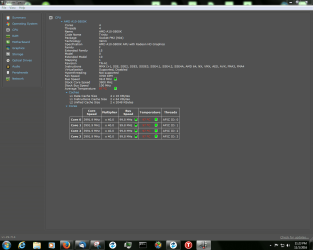
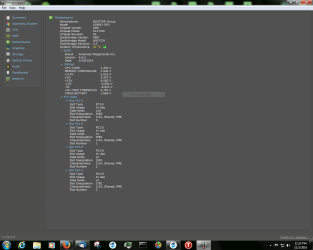
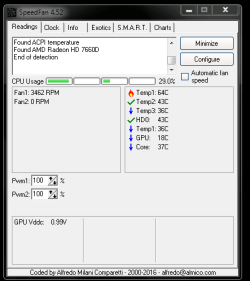
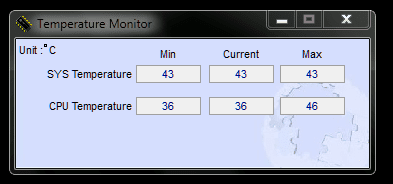
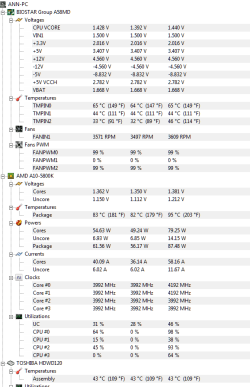
#2- I'm getting hot readings from HWiNFO64...SPECCY...and the BIOS (I think). I'm not very technical. You guys/gals have been terrific at helping me thru this lingering ordeal. Thank you very much!!!
Doc
 

My Computer

Computer type
PC/Desktop
Computer Manufacturer/Model Number
Custom built (eBay power seller); bought 11/29/2015
OS
Microsoft Windows 7 Home Premium 64-bit 7601 Multiprocessor Free Service Pack 1
CPU
AMD FX(tm)-4300 Quad-Core Processor
Motherboard
ASUSTeK Computer INC. M5A78L-M/USB3
Memory
4.00 GB
Graphics Card(s)
AMD 760G
Sound Card
(1) AMD High Definition Audio Device (2) VIA HD Audio
Screen Resolution
Del SE2416H 1920x1080 Pixel Resolution 23.8" LCD Display
Hard Drives
(1) ST31500524AS ATA Device (2) Generic Mini SD Reader USB Device (3) Generic STORAGE DEVICE USB Device (4) Multiple Flash Reader USB Device (5) Samsung M3 Portable USB Device
PSU
Forza NT-1011 UPS 120v 1000VA/500W
Antivirus
Emsisoft Internet Security
Browser
StartPage
The downloads from his links above work fine.

What is hot exactly ?

The bios is the only tool that will give you correct temp readings.
 

My Computer

Computer type
PC/Desktop
Computer Manufacturer/Model Number
Skylake Special #666
OS
Windows 10 Pro x64
CPU
Intel Core i7 6700K
Motherboard
Asus Sabertooth Z170 Mark 1
Memory
GSkill TridentZ RGB 16GB 3600 16-16-16-36
Graphics Card(s)
EVGA GTX 980 Ti SC x2
Sound Card
Realtek High Definition
Monitor(s) Displays
AOC G2460PG
Screen Resolution
1920 x 1080 144Hz
Hard Drives
Samsung 860 Pro 256GB, Seagate Barracuda 4TB x2
PSU
EVGA 1000 P2, EVGA White Custom Braided Cables
Case
Corsair Vengeance C70 Gunmetal Black
Cooling
Corsair H100i v2, Corsair ML120 x2, Thermal Grizzly Kryonaut
Keyboard
Logitech G910 Orion Spectrum
Mouse
Logitech G700s
Internet Speed
Verizon Fios Quantum Gateway 75/75
Antivirus
Windows Defender, Malwarebytes Free 3.8.3
Browser
Chrome
Other Info
Corsair SP120 x4, LG Blu-ray Drive, Durabrand HT-395 100 Watt Dolby Digital Amp, Corsair H2100 Wireless 7.1 Headset
Her computer started snapping off. I inquired about it (ANewman1) for her. Got all sorts of advice but the bottom line was that several of the tests 7Forums had me do and then snippet and send them showed problems with this new PSU...or at least that was what I was told. I was told that if this computer was one of the moderator's, he would shut it down and not start it up again until he replaced the PSU. I've also been told that they've never heard anything but terrific reports for this EVGA SuperNova. So I can't really tell you why it is heating...that's why I'm contacting 7Forums. I've been told this PSU is too large for my wife's home computer which doesn't make sense to me.

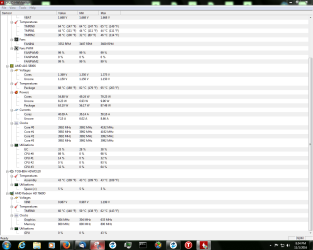
Here's some more tests I ran just a couple of hours ago. I'm dealing with a couple of different issues all at the same time and it's hard to keep the ball moving in the right direction. I've got Macrium 'XML Validation Error' on both computers for scheduled backups (since the new Win7 installs) and I don't know why (if) her computer is overheating and caused it to snap off. And finally is the MS Update mess...all the back updates since Win7 and I'm at a loss as to what to do with those 2KB's now that they're zipped and stored on a clean peripheral. MicroSoft in the meantime keeps wanting to give me updates but then locks up on the install of 172 updates. It's a catch-22 for me. If you can address each of these issues, I'll be very thankful.
Doc
 

Attachments

  • Speccy-CPU-100116.PNG
    Speccy-CPU-100116.PNG
    44.5 KB · Views: 2
  • Speccy-MotherBd-100116.PNG
    Speccy-MotherBd-100116.PNG
    46.9 KB · Views: 2
  • SpeedFan-100116.PNG
    SpeedFan-100116.PNG
    7.8 KB · Views: 12
  • SysTemp-100116.PNG
    SysTemp-100116.PNG
    8 KB · Views: 12
  • Temps&Voltage(1)-100116.PNG
    Temps&Voltage(1)-100116.PNG
    20.7 KB · Views: 1
  • Temps&Voltage-100116.PNG
    Temps&Voltage-100116.PNG
    50.8 KB · Views: 1

My Computer

Computer type
PC/Desktop
Computer Manufacturer/Model Number
Custom built (eBay power seller); bought 11/29/2015
OS
Microsoft Windows 7 Home Premium 64-bit 7601 Multiprocessor Free Service Pack 1
CPU
AMD FX(tm)-4300 Quad-Core Processor
Motherboard
ASUSTeK Computer INC. M5A78L-M/USB3
Memory
4.00 GB
Graphics Card(s)
AMD 760G
Sound Card
(1) AMD High Definition Audio Device (2) VIA HD Audio
Screen Resolution
Del SE2416H 1920x1080 Pixel Resolution 23.8" LCD Display
Hard Drives
(1) ST31500524AS ATA Device (2) Generic Mini SD Reader USB Device (3) Generic STORAGE DEVICE USB Device (4) Multiple Flash Reader USB Device (5) Samsung M3 Portable USB Device
PSU
Forza NT-1011 UPS 120v 1000VA/500W
Antivirus
Emsisoft Internet Security
Browser
StartPage
All of those programs say the PSU voltages are low, but you can`t go by them, you have to look at the voltages from within the bios, or test them with a volt meter.

I have a 1000 P2 and a 1200 P2, both are excellent, the 1000 is now my backup.

If there is anything wrong with them EVGA will replace them no questions asked.

Speccy says your CPU is nearly 100c, something is way wrong there.

I would install Core Temp, that`s the only program I would trust, other then the Bios.
 

My Computer

Computer type
PC/Desktop
Computer Manufacturer/Model Number
Skylake Special #666
OS
Windows 10 Pro x64
CPU
Intel Core i7 6700K
Motherboard
Asus Sabertooth Z170 Mark 1
Memory
GSkill TridentZ RGB 16GB 3600 16-16-16-36
Graphics Card(s)
EVGA GTX 980 Ti SC x2
Sound Card
Realtek High Definition
Monitor(s) Displays
AOC G2460PG
Screen Resolution
1920 x 1080 144Hz
Hard Drives
Samsung 860 Pro 256GB, Seagate Barracuda 4TB x2
PSU
EVGA 1000 P2, EVGA White Custom Braided Cables
Case
Corsair Vengeance C70 Gunmetal Black
Cooling
Corsair H100i v2, Corsair ML120 x2, Thermal Grizzly Kryonaut
Keyboard
Logitech G910 Orion Spectrum
Mouse
Logitech G700s
Internet Speed
Verizon Fios Quantum Gateway 75/75
Antivirus
Windows Defender, Malwarebytes Free 3.8.3
Browser
Chrome
Other Info
Corsair SP120 x4, LG Blu-ray Drive, Durabrand HT-395 100 Watt Dolby Digital Amp, Corsair H2100 Wireless 7.1 Headset
Hi
This is from the link AddRam posted they are direct download links no zip folders to play around with and not for the clean install this is for a existing install.

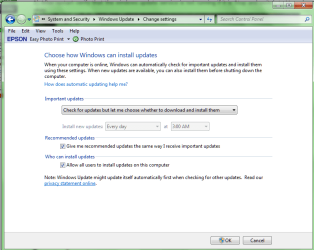
1) When manually installing updates you need to switch your update settings to Never check for updates and restart the machine first.
Windows Update Settings - Change

2) After restart verify that the windows update service is not running if it is Stop and switch to Manual apply and okay.


3) Make sure KB3020369 is installed if not manually install it this is the main article page with all versions,
https://support.microsoft.com/en-us/kb/3020369


4) which version of windows do you have installed 32 bit or 64 bit,
System Type - 32-bit (x86) or 64-bit (x64)

These other links do prompt you to download as soon as you click on them just to give you a heads up
smile.png

KB3020369

4b) download links,
Win-7 32 bit
https://download.microsoft.com/downl...020369-x86.msu

Win-7 64 bit
https://download.microsoft.com/downl...020369-x64.msu

5) Then manually install KB3172605 main article page with all versions,
https://support.microsoft.com/en-us/kb/3172605

KB3172605 download links,
Win-7 32 bit
https://download.microsoft.com/downl...172605-x86.msu

Win-7 64 bit
https://download.microsoft.com/downl...172605-x64.msu

6) After switch your windows update and service settings back to what you had prior and manually check for updates and the rest should show up shortly.

7) After all of the above is completed you can use Option 3 below to reset all of the windows updates components
Windows Update - Reset
 

My Computer

Computer type
PC/Desktop
Computer Manufacturer/Model Number
Custom assembled by me :}
OS
Win-7-Pro64bit 7-H-Prem-64bit
CPU
i7-5930K 2nd i9-9940x both water blocked VRM's too
Motherboard
ASUS SABERTOOTH X99 2nd ASUS x299 Apex
Memory
Trident-z 3200C14 2nd Trident-z 3600C16
Graphics Card(s)
EVGA 1080ti ftw3 2nd Titan Xp both water blocked
Sound Card
Built-in Realtek
Monitor(s) Displays
1-AOC G2460PG 24"G-Sync 144Hz/ 2nd 1-ASUS VG248QE 24" 144Hz
Screen Resolution
1920 x 1080 144Hz
Hard Drives
2-Samsung M.2 Evo & Evo Plus
2-Samsung 850 EVO 500GB SSD's/ 3-2.5 W.D. Black 1tb-&3-1tb/3-3.5 WD Black 1tb hdd's
PSU
EVGA SuperNOVA 1000-P2 2nd 1200-P2
Case
2-Corsair Obsidian Series 450D Black ATX Mid Tower
Cooling
Custom water loops
Keyboard
Logitech G710+/ 2nd Logitech G910
Mouse
2-RedDragon M901 Perdition 16400 dpi Gaming mouse = wired
Internet Speed
Comcast Ping 19ms 89.31mbps download speed 6.12mbps upload
Antivirus
Malwarebytes Pro/ Superantispyware Pro
Browser
FireFox & Pale moon
Other Info
2nd ASUS X299 Apex/Intel i9-9940x with Custom water loop/7H-Prem-x64/Corsair 450D case/Ram Trident-z 3600C16 4x8gb / Samsung970Evo plus 500gb SSD/Dual ssd EZ swap evo/PSU EVGA SuperNova 1200w-P2 80+Platinum/GPU Titan Xp /8-ML-140 on push-pull on 2-280GTX rads
It's Win7 Home Premium x64. So to be clear...I am able by following the snippet to determine the existence on my wife's system of any (all) of these Bulk Updates? Then if they are present I need to click on (x64) 2605 first and download it. To her 'C' drive? Then do the same for 0369? In that order? After the two are downloaded then I click to open 2605 and when it's done do the same for 0369.

Sorry to be so pressing on understanding all this. I don't want to screw it up.

Thanks much!
Doc
 

My Computer

Computer type
PC/Desktop
Computer Manufacturer/Model Number
Custom built (eBay power seller); bought 11/29/2015
OS
Microsoft Windows 7 Home Premium 64-bit 7601 Multiprocessor Free Service Pack 1
CPU
AMD FX(tm)-4300 Quad-Core Processor
Motherboard
ASUSTeK Computer INC. M5A78L-M/USB3
Memory
4.00 GB
Graphics Card(s)
AMD 760G
Sound Card
(1) AMD High Definition Audio Device (2) VIA HD Audio
Screen Resolution
Del SE2416H 1920x1080 Pixel Resolution 23.8" LCD Display
Hard Drives
(1) ST31500524AS ATA Device (2) Generic Mini SD Reader USB Device (3) Generic STORAGE DEVICE USB Device (4) Multiple Flash Reader USB Device (5) Samsung M3 Portable USB Device
PSU
Forza NT-1011 UPS 120v 1000VA/500W
Antivirus
Emsisoft Internet Security
Browser
StartPage
My options show differently for my Win7 Home Premium. I'm not given the Manual option. I can tell Windows never to update. I can tell it to simply notify me but do nothing. I can of course tell them to automatically download.

Right now I changed it to the snippet...just notify me. I suppose I could have chosen 'Never' since this should not take a great deal of time??? Anyway thought I'd wait for your reply to my last response and to this post before I try anything.
Doc
 

Attachments

  • Options 4 Windows Updates-100216.PNG
    Options 4 Windows Updates-100216.PNG
    29.8 KB · Views: 0

My Computer

Computer type
PC/Desktop
Computer Manufacturer/Model Number
Custom built (eBay power seller); bought 11/29/2015
OS
Microsoft Windows 7 Home Premium 64-bit 7601 Multiprocessor Free Service Pack 1
CPU
AMD FX(tm)-4300 Quad-Core Processor
Motherboard
ASUSTeK Computer INC. M5A78L-M/USB3
Memory
4.00 GB
Graphics Card(s)
AMD 760G
Sound Card
(1) AMD High Definition Audio Device (2) VIA HD Audio
Screen Resolution
Del SE2416H 1920x1080 Pixel Resolution 23.8" LCD Display
Hard Drives
(1) ST31500524AS ATA Device (2) Generic Mini SD Reader USB Device (3) Generic STORAGE DEVICE USB Device (4) Multiple Flash Reader USB Device (5) Samsung M3 Portable USB Device
PSU
Forza NT-1011 UPS 120v 1000VA/500W
Antivirus
Emsisoft Internet Security
Browser
StartPage
Hi,
Ouch no you listed them in opposite order :)
Do Not forget or ignore steps 1 though 3

First = 4) and 4b) download link KB3020369

Second 5) KB3172605 install this one after the above.

Then do 6) and 7)
 

My Computer

Computer type
PC/Desktop
Computer Manufacturer/Model Number
Custom assembled by me :}
OS
Win-7-Pro64bit 7-H-Prem-64bit
CPU
i7-5930K 2nd i9-9940x both water blocked VRM's too
Motherboard
ASUS SABERTOOTH X99 2nd ASUS x299 Apex
Memory
Trident-z 3200C14 2nd Trident-z 3600C16
Graphics Card(s)
EVGA 1080ti ftw3 2nd Titan Xp both water blocked
Sound Card
Built-in Realtek
Monitor(s) Displays
1-AOC G2460PG 24"G-Sync 144Hz/ 2nd 1-ASUS VG248QE 24" 144Hz
Screen Resolution
1920 x 1080 144Hz
Hard Drives
2-Samsung M.2 Evo & Evo Plus
2-Samsung 850 EVO 500GB SSD's/ 3-2.5 W.D. Black 1tb-&3-1tb/3-3.5 WD Black 1tb hdd's
PSU
EVGA SuperNOVA 1000-P2 2nd 1200-P2
Case
2-Corsair Obsidian Series 450D Black ATX Mid Tower
Cooling
Custom water loops
Keyboard
Logitech G710+/ 2nd Logitech G910
Mouse
2-RedDragon M901 Perdition 16400 dpi Gaming mouse = wired
Internet Speed
Comcast Ping 19ms 89.31mbps download speed 6.12mbps upload
Antivirus
Malwarebytes Pro/ Superantispyware Pro
Browser
FireFox & Pale moon
Other Info
2nd ASUS X299 Apex/Intel i9-9940x with Custom water loop/7H-Prem-x64/Corsair 450D case/Ram Trident-z 3600C16 4x8gb / Samsung970Evo plus 500gb SSD/Dual ssd EZ swap evo/PSU EVGA SuperNova 1200w-P2 80+Platinum/GPU Titan Xp /8-ML-140 on push-pull on 2-280GTX rads
Back
Top