It went smoothly. Both 0369 and 2605 are verified updates.
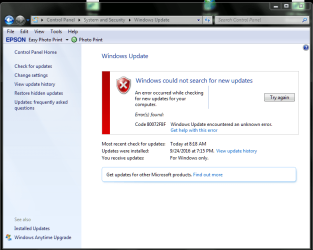
Problem occurred when I initiated another update after I changed the setting back to 'Automatic'. I've got the snippet for you. Please tell me how to correct this unidentified error.
Thanks!
Doc
Attachments
Windows Fresh Update-Code 80072F8F-Unknown-100216.PNG
39.9 KB
· Views: 1
My Computer
Computer type
PC/Desktop
Computer Manufacturer/Model Number
Custom built (eBay power seller); bought 11/29/2015
OS
Microsoft Windows 7 Home Premium 64-bit 7601 Multiprocessor Free Service Pack 1
CPU
AMD FX(tm)-4300 Quad-Core Processor
Motherboard
ASUSTeK Computer INC. M5A78L-M/USB3
Memory
4.00 GB
Graphics Card(s)
AMD 760G
Sound Card
(1) AMD High Definition Audio Device (2) VIA HD Audio
Screen Resolution
Del SE2416H 1920x1080 Pixel Resolution 23.8" LCD Display
Hard Drives
(1) ST31500524AS ATA Device (2) Generic Mini SD Reader USB Device (3) Generic STORAGE DEVICE USB Device (4) Multiple Flash Reader USB Device (5) Samsung M3 Portable USB Device
2nd ASUS X299 Apex/Intel i9-9940x with Custom water loop/7H-Prem-x64/Corsair 450D case/Ram Trident-z 3600C16 4x8gb / Samsung970Evo plus 500gb SSD/Dual ssd EZ swap evo/PSU EVGA SuperNova 1200w-P2 80+Platinum/GPU Titan Xp /8-ML-140 on push-pull on 2-280GTX rads
Custom built (eBay power seller); bought 11/29/2015
OS
Microsoft Windows 7 Home Premium 64-bit 7601 Multiprocessor Free Service Pack 1
CPU
AMD FX(tm)-4300 Quad-Core Processor
Motherboard
ASUSTeK Computer INC. M5A78L-M/USB3
Memory
4.00 GB
Graphics Card(s)
AMD 760G
Sound Card
(1) AMD High Definition Audio Device (2) VIA HD Audio
Screen Resolution
Del SE2416H 1920x1080 Pixel Resolution 23.8" LCD Display
Hard Drives
(1) ST31500524AS ATA Device (2) Generic Mini SD Reader USB Device (3) Generic STORAGE DEVICE USB Device (4) Multiple Flash Reader USB Device (5) Samsung M3 Portable USB Device
2nd ASUS X299 Apex/Intel i9-9940x with Custom water loop/7H-Prem-x64/Corsair 450D case/Ram Trident-z 3600C16 4x8gb / Samsung970Evo plus 500gb SSD/Dual ssd EZ swap evo/PSU EVGA SuperNova 1200w-P2 80+Platinum/GPU Titan Xp /8-ML-140 on push-pull on 2-280GTX rads
Like you said...Ouch! I haven't touched date/time so that one's a mystery. I've corrected it and will try the Update again. Hope that didn't screw up the 0369 and 2605 effort.
My Computer
Computer type
PC/Desktop
Computer Manufacturer/Model Number
Custom built (eBay power seller); bought 11/29/2015
OS
Microsoft Windows 7 Home Premium 64-bit 7601 Multiprocessor Free Service Pack 1
CPU
AMD FX(tm)-4300 Quad-Core Processor
Motherboard
ASUSTeK Computer INC. M5A78L-M/USB3
Memory
4.00 GB
Graphics Card(s)
AMD 760G
Sound Card
(1) AMD High Definition Audio Device (2) VIA HD Audio
Screen Resolution
Del SE2416H 1920x1080 Pixel Resolution 23.8" LCD Display
Hard Drives
(1) ST31500524AS ATA Device (2) Generic Mini SD Reader USB Device (3) Generic STORAGE DEVICE USB Device (4) Multiple Flash Reader USB Device (5) Samsung M3 Portable USB Device
Hi,
I doubt you did manually installing an update might not care
Each update would give an error if it did not install
The second would ask to restart to finish installing but the first wouldn't.
My Computer
Computer type
PC/Desktop
Computer Manufacturer/Model Number
Custom assembled by me :}
OS
Win-7-Pro64bit 7-H-Prem-64bit
CPU
i7-5930K 2nd i9-9940x both water blocked VRM's too
2nd ASUS X299 Apex/Intel i9-9940x with Custom water loop/7H-Prem-x64/Corsair 450D case/Ram Trident-z 3600C16 4x8gb / Samsung970Evo plus 500gb SSD/Dual ssd EZ swap evo/PSU EVGA SuperNova 1200w-P2 80+Platinum/GPU Titan Xp /8-ML-140 on push-pull on 2-280GTX rads
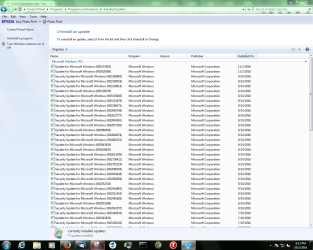
Bad news! The latest Update of record shows as 11/02/16 and that is along side of every one in the two batches. I'm surprised that Windows did not catch that date error during that process. It's anyone's guess as to how that date was entered. The Win7 install was about 7 weeks ago and I really did not catch it afterwards.
Now do I uninstall all those batch updates and do this all over again? By the way, I see as I'm posting this that Windows is doing its' automatic update attempt.
Doc
My Computer
Computer type
PC/Desktop
Computer Manufacturer/Model Number
Custom built (eBay power seller); bought 11/29/2015
OS
Microsoft Windows 7 Home Premium 64-bit 7601 Multiprocessor Free Service Pack 1
CPU
AMD FX(tm)-4300 Quad-Core Processor
Motherboard
ASUSTeK Computer INC. M5A78L-M/USB3
Memory
4.00 GB
Graphics Card(s)
AMD 760G
Sound Card
(1) AMD High Definition Audio Device (2) VIA HD Audio
Screen Resolution
Del SE2416H 1920x1080 Pixel Resolution 23.8" LCD Display
Hard Drives
(1) ST31500524AS ATA Device (2) Generic Mini SD Reader USB Device (3) Generic STORAGE DEVICE USB Device (4) Multiple Flash Reader USB Device (5) Samsung M3 Portable USB Device
2nd ASUS X299 Apex/Intel i9-9940x with Custom water loop/7H-Prem-x64/Corsair 450D case/Ram Trident-z 3600C16 4x8gb / Samsung970Evo plus 500gb SSD/Dual ssd EZ swap evo/PSU EVGA SuperNova 1200w-P2 80+Platinum/GPU Titan Xp /8-ML-140 on push-pull on 2-280GTX rads
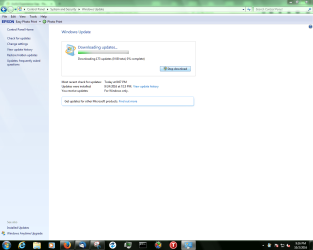
I've just checked and both of the 2 batch files show as installed on 11/02/16 (see snippet). Then to make matters more confusing, the Auto Update is saying the 172 updates needi to be installed again...and it's sitting trying to process but nothing happening.
Attachments
Batch Updates Unseen.PNG
61 KB
· Views: 1
Update Verification-Wrong System Date.PNG
66.8 KB
· Views: 0
My Computer
Computer type
PC/Desktop
Computer Manufacturer/Model Number
Custom built (eBay power seller); bought 11/29/2015
OS
Microsoft Windows 7 Home Premium 64-bit 7601 Multiprocessor Free Service Pack 1
CPU
AMD FX(tm)-4300 Quad-Core Processor
Motherboard
ASUSTeK Computer INC. M5A78L-M/USB3
Memory
4.00 GB
Graphics Card(s)
AMD 760G
Sound Card
(1) AMD High Definition Audio Device (2) VIA HD Audio
Screen Resolution
Del SE2416H 1920x1080 Pixel Resolution 23.8" LCD Display
Hard Drives
(1) ST31500524AS ATA Device (2) Generic Mini SD Reader USB Device (3) Generic STORAGE DEVICE USB Device (4) Multiple Flash Reader USB Device (5) Samsung M3 Portable USB Device
Whoa!!! Take that back. A quick glance and it's installing 3 of 173. I don't understand though. I thought that 2605 was to circumvent all of those back updates?
My Computer
Computer type
PC/Desktop
Computer Manufacturer/Model Number
Custom built (eBay power seller); bought 11/29/2015
OS
Microsoft Windows 7 Home Premium 64-bit 7601 Multiprocessor Free Service Pack 1
CPU
AMD FX(tm)-4300 Quad-Core Processor
Motherboard
ASUSTeK Computer INC. M5A78L-M/USB3
Memory
4.00 GB
Graphics Card(s)
AMD 760G
Sound Card
(1) AMD High Definition Audio Device (2) VIA HD Audio
Screen Resolution
Del SE2416H 1920x1080 Pixel Resolution 23.8" LCD Display
Hard Drives
(1) ST31500524AS ATA Device (2) Generic Mini SD Reader USB Device (3) Generic STORAGE DEVICE USB Device (4) Multiple Flash Reader USB Device (5) Samsung M3 Portable USB Device
2nd ASUS X299 Apex/Intel i9-9940x with Custom water loop/7H-Prem-x64/Corsair 450D case/Ram Trident-z 3600C16 4x8gb / Samsung970Evo plus 500gb SSD/Dual ssd EZ swap evo/PSU EVGA SuperNova 1200w-P2 80+Platinum/GPU Titan Xp /8-ML-140 on push-pull on 2-280GTX rads
I understood that about 5574. So the fact that 0369 & 2605 both are saddled with 11/02/16 install dates is no problem?
My Computer
Computer type
PC/Desktop
Computer Manufacturer/Model Number
Custom built (eBay power seller); bought 11/29/2015
OS
Microsoft Windows 7 Home Premium 64-bit 7601 Multiprocessor Free Service Pack 1
CPU
AMD FX(tm)-4300 Quad-Core Processor
Motherboard
ASUSTeK Computer INC. M5A78L-M/USB3
Memory
4.00 GB
Graphics Card(s)
AMD 760G
Sound Card
(1) AMD High Definition Audio Device (2) VIA HD Audio
Screen Resolution
Del SE2416H 1920x1080 Pixel Resolution 23.8" LCD Display
Hard Drives
(1) ST31500524AS ATA Device (2) Generic Mini SD Reader USB Device (3) Generic STORAGE DEVICE USB Device (4) Multiple Flash Reader USB Device (5) Samsung M3 Portable USB Device
Hi,
Not if you don't skip procedures it won't
I said to reset the update history again = I do not believe you did used option 3 again
Either way always review the date and time to be sure it is absolutely correct in the future
That alone will mess everything up as you have already seen with the error.
My Computer
Computer type
PC/Desktop
Computer Manufacturer/Model Number
Custom assembled by me :}
OS
Win-7-Pro64bit 7-H-Prem-64bit
CPU
i7-5930K 2nd i9-9940x both water blocked VRM's too
2nd ASUS X299 Apex/Intel i9-9940x with Custom water loop/7H-Prem-x64/Corsair 450D case/Ram Trident-z 3600C16 4x8gb / Samsung970Evo plus 500gb SSD/Dual ssd EZ swap evo/PSU EVGA SuperNova 1200w-P2 80+Platinum/GPU Titan Xp /8-ML-140 on push-pull on 2-280GTX rads
O.K., update. I'm at 92 of 173 installed updates right now. Looks like this is moving in the right direction. Apparently 0369 or 2605 were enabling updates. The actual updates are currently taking place. Am I right? And it doesn't matter that the wrong date was on the system when I downloaded and installed those two batch files.
And I will be very careful in the future!
Doc
My Computer
Computer type
PC/Desktop
Computer Manufacturer/Model Number
Custom built (eBay power seller); bought 11/29/2015
OS
Microsoft Windows 7 Home Premium 64-bit 7601 Multiprocessor Free Service Pack 1
CPU
AMD FX(tm)-4300 Quad-Core Processor
Motherboard
ASUSTeK Computer INC. M5A78L-M/USB3
Memory
4.00 GB
Graphics Card(s)
AMD 760G
Sound Card
(1) AMD High Definition Audio Device (2) VIA HD Audio
Screen Resolution
Del SE2416H 1920x1080 Pixel Resolution 23.8" LCD Display
Hard Drives
(1) ST31500524AS ATA Device (2) Generic Mini SD Reader USB Device (3) Generic STORAGE DEVICE USB Device (4) Multiple Flash Reader USB Device (5) Samsung M3 Portable USB Device
Hi...updates all completed successfully. All 173 of them. I've changed the update settings as you've suggested but your Win Version gives you other options that I don't have. Are you operating 10?
Now remember I'm a novice. How in the world can I hope to know what I'm looking at with any update and its' relevance to me and this computer? I've gone to MS for more detailed info on some of these in the past and it was very discouraging.
Thanks for all the help!
Doc
My Computer
Computer type
PC/Desktop
Computer Manufacturer/Model Number
Custom built (eBay power seller); bought 11/29/2015
OS
Microsoft Windows 7 Home Premium 64-bit 7601 Multiprocessor Free Service Pack 1
CPU
AMD FX(tm)-4300 Quad-Core Processor
Motherboard
ASUSTeK Computer INC. M5A78L-M/USB3
Memory
4.00 GB
Graphics Card(s)
AMD 760G
Sound Card
(1) AMD High Definition Audio Device (2) VIA HD Audio
Screen Resolution
Del SE2416H 1920x1080 Pixel Resolution 23.8" LCD Display
Hard Drives
(1) ST31500524AS ATA Device (2) Generic Mini SD Reader USB Device (3) Generic STORAGE DEVICE USB Device (4) Multiple Flash Reader USB Device (5) Samsung M3 Portable USB Device
No I`m not running 10. 10`s update page looks nothing like 7`s
If you want to know what an update is for, you simply high lite it, then on the right side of the page you`ll see the 2 words More Info, you simply click on that and it will take you to the Microsoft page that explains what the update is for.
Multiple updates usually only come out on Tuesdays.
I can`t post a shot of it because I`m fully updated.
It was a major concern to all of us when the free upgrade to Windows 10 was going on, but now that that is over life is much simpler
Hi,
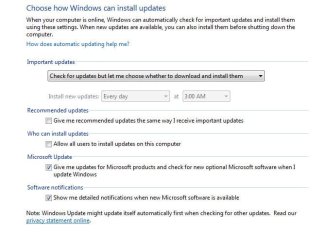
I believe the update settings are fine as is,
Win-10 free upgrade offer is over
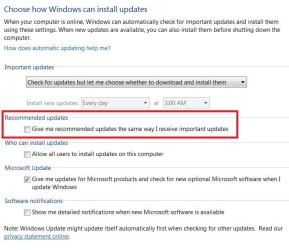
We would usually uncheck Give me recommended updates the same way as Important updates
You have the red outlined box checked
Once 11-2-2016 actually gets here it won't matter anymore besides KB3172605 was reissued in September so as long as it doesn't fail to install along with any other updates everything should be fine
My Computer
Computer type
PC/Desktop
Computer Manufacturer/Model Number
Custom assembled by me :}
OS
Win-7-Pro64bit 7-H-Prem-64bit
CPU
i7-5930K 2nd i9-9940x both water blocked VRM's too
2nd ASUS X299 Apex/Intel i9-9940x with Custom water loop/7H-Prem-x64/Corsair 450D case/Ram Trident-z 3600C16 4x8gb / Samsung970Evo plus 500gb SSD/Dual ssd EZ swap evo/PSU EVGA SuperNova 1200w-P2 80+Platinum/GPU Titan Xp /8-ML-140 on push-pull on 2-280GTX rads