Back/Forward button theming issues & an Aero Peek question

Hexile

New member
Hello.

I've been trying to replace the back/forward buttons in explorer, both by using pre-made DLL's and/or apply the theming myself using ResHack and using same procedure that's described in a tutorial i found here.

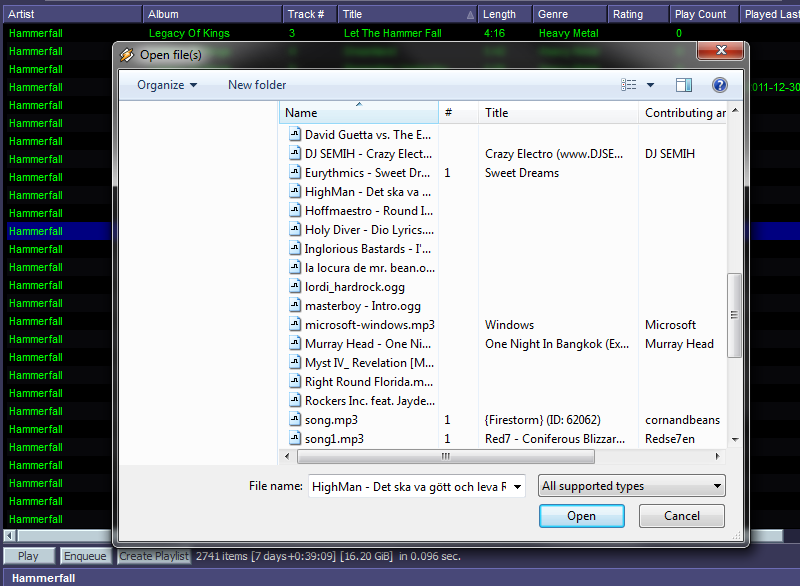
The main problem with this is that every "Open file/folder" dialog will look like this no matter what software i try to open something with:

(Click on it for a closer look)

I get zero response when clicking the white area.

How to solve that ?


And also:
I find the frame for Aero Peek somewhat ugly, is there a way to make it look more like this?:
Areo_Frame.png


(This is an Aero Peek effect rip-off that's available in Display Fusion with a custom taskbar which runs on my 2ndary monitor)
 

My Computer

Computer Manufacturer/Model Number
Acer Predator G3620
OS
Win7 Home Premium x64
CPU
Intel(R) Core(TM) i5-2320 CPU @ 3.00GHz
Motherboard
Acer Predator G3620 (mATX)
Memory
16GB: 2x4GB + 1x8GB
Graphics Card(s)
AMD Radeon HD7770 2GB REFERENCE
Sound Card
Realtek onboard crap. Awaiting new sound card...
Monitor(s) Displays
Samsung S22B350 [HDMI] 6ms + HP f1703 [DVI] 8ms
Screen Resolution
1920x1080 + 1280x1024 = 3200x1080
Hard Drives
1TB Seagate
PSU
430W Standard
Case
Acer Predator G3620
Cooling
Standard
Keyboard
Logitech G11
Mouse
Microsoft SideWinder Gaming Mouse (First Version)
Internet Speed
100Mbit/s Fiber
Other Info
Note to self: AMD CPU in next pc.

My Computer

Computer type
PC/Desktop
Computer Manufacturer/Model Number
Novatech iRush Pro
OS
Windows 7 Ultimate SP1 - 64 Bit
CPU
Intel Core i5 2500k
Motherboard
Foxconn H67M-S/H67M-V/H67
Memory
2x4GB DDR3 1333Hz
Graphics Card(s)
Ati Radeon 6770
Sound Card
None
Monitor(s) Displays
Samsung S22B150
Screen Resolution
1920x1080
Hard Drives
2x500GB
PSU
500W
Cooling
Fan
Keyboard
HP KU0316
Mouse
Wireless Logitech M185
Internet Speed
20MB/s
Antivirus
Avast Free
Browser
Google Chrome
Other Info
Logitech M185 Mouse
KU-M316 Keyboard
No thanks, that's different from what i would like to do.

Display Fusion's equivalent to Aero Peek only works with custom taskbars, else it would have been an option.


EDIT: The links issue described in the first part of this topic doesn't appear in Firefox/CometBird
 

My Computer

Computer Manufacturer/Model Number
Acer Predator G3620
OS
Win7 Home Premium x64
CPU
Intel(R) Core(TM) i5-2320 CPU @ 3.00GHz
Motherboard
Acer Predator G3620 (mATX)
Memory
16GB: 2x4GB + 1x8GB
Graphics Card(s)
AMD Radeon HD7770 2GB REFERENCE
Sound Card
Realtek onboard crap. Awaiting new sound card...
Monitor(s) Displays
Samsung S22B350 [HDMI] 6ms + HP f1703 [DVI] 8ms
Screen Resolution
1920x1080 + 1280x1024 = 3200x1080
Hard Drives
1TB Seagate
PSU
430W Standard
Case
Acer Predator G3620
Cooling
Standard
Keyboard
Logitech G11
Mouse
Microsoft SideWinder Gaming Mouse (First Version)
Internet Speed
100Mbit/s Fiber
Other Info
Note to self: AMD CPU in next pc.

My Computer

Computer type
Laptop
Computer Manufacturer/Model Number
Sager NP9170
OS
Win 7 Pro x64 / Win 10 Pro
CPU
Intel(R) Core(TM) i7-3630QM CPU @ 2.40GHz
Motherboard
CLEVO P170EM
Memory
12 GB
Graphics Card(s)
(1) Intel(R) HD Graphics 4000 (2) NVIDIA GeForce GTX 675M
Sound Card
(1) Realtek High Definition Audio (2) Intel(R) Display Aud
Monitor(s) Displays
17.3
Screen Resolution
1920x1080
Hard Drives
(1) Samsung 860 EVO 500GB(OS) (1) Samsung 860 EVO 500GB(Data)
Keyboard
Backlite
Antivirus
MSE, Malwarebytes Pro
Browser
Firefox
Other Info
DESKTOP: Custom-built.
OS: Win 10 Pro x64.
CASE: Rosewill R5.
CPU: Intel I5 4670K CPU @ 3.40GHz.
CPU COOLER: Cool Master Hyper 212 EVO.
MOTHERBOARD: Asus Z87-A.
MEMORY: Kingston HyperX 2x4 GB.
GPU: Nvidia Geforce 650 TI.
PSU: Corsair TX750.
DRIVES: (1) Samsung 840 120 GB SSD (2) Western Digital blue 500 GB 7200 RPM.
I don't need to do that, i just used:

Code:
del C:\windows\syswow64\explorerframe.dll
copy C:\windows\syswow64\explorerframe.bak C:\windows\syswow64\explorerframe.dll
in command prompt to revert it.

Whenever the process "explorer" is restarted after that it works like normal
 

My Computer

Computer Manufacturer/Model Number
Acer Predator G3620
OS
Win7 Home Premium x64
CPU
Intel(R) Core(TM) i5-2320 CPU @ 3.00GHz
Motherboard
Acer Predator G3620 (mATX)
Memory
16GB: 2x4GB + 1x8GB
Graphics Card(s)
AMD Radeon HD7770 2GB REFERENCE
Sound Card
Realtek onboard crap. Awaiting new sound card...
Monitor(s) Displays
Samsung S22B350 [HDMI] 6ms + HP f1703 [DVI] 8ms
Screen Resolution
1920x1080 + 1280x1024 = 3200x1080
Hard Drives
1TB Seagate
PSU
430W Standard
Case
Acer Predator G3620
Cooling
Standard
Keyboard
Logitech G11
Mouse
Microsoft SideWinder Gaming Mouse (First Version)
Internet Speed
100Mbit/s Fiber
Other Info
Note to self: AMD CPU in next pc.

My Computer

Computer type
Laptop
Computer Manufacturer/Model Number
Sager NP9170
OS
Win 7 Pro x64 / Win 10 Pro
CPU
Intel(R) Core(TM) i7-3630QM CPU @ 2.40GHz
Motherboard
CLEVO P170EM
Memory
12 GB
Graphics Card(s)
(1) Intel(R) HD Graphics 4000 (2) NVIDIA GeForce GTX 675M
Sound Card
(1) Realtek High Definition Audio (2) Intel(R) Display Aud
Monitor(s) Displays
17.3
Screen Resolution
1920x1080
Hard Drives
(1) Samsung 860 EVO 500GB(OS) (1) Samsung 860 EVO 500GB(Data)
Keyboard
Backlite
Antivirus
MSE, Malwarebytes Pro
Browser
Firefox
Other Info
DESKTOP: Custom-built.
OS: Win 10 Pro x64.
CASE: Rosewill R5.
CPU: Intel I5 4670K CPU @ 3.40GHz.
CPU COOLER: Cool Master Hyper 212 EVO.
MOTHERBOARD: Asus Z87-A.
MEMORY: Kingston HyperX 2x4 GB.
GPU: Nvidia Geforce 650 TI.
PSU: Corsair TX750.
DRIVES: (1) Samsung 840 120 GB SSD (2) Western Digital blue 500 GB 7200 RPM.
Back
Top