Windows Explorer: Back/Forward Button and Library Icon

neildevera

New member
Local time
8:29 AM
Messages
4
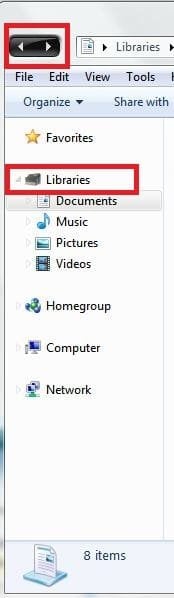
How to modify these items? or just reset it to default?
 

Attachments

  • Capture.JPG
    Capture.JPG
    20.5 KB · Views: 166

My Computer

OS
Windows 7
If you've modified your theme files you should have made backup copies of them. Replace the modified files with the backups either through the application you used to install the theme or manually.

You can reset default folder icons through this process:

Access the icon modification dialog by right-clicking on your desktop and pressing "Personalize," then click on "Change Desktop Icons" from the pane on the left.

Select the 7 icon for which you wish to restore the default, then press the "Restore Default" button.

Press "Apply" then "OK" to save your changes and exit.
Restoring Default Folder Icons

Right-click on the folder you wish to restore the default icon for and press "Properties" from the context menu.

Open the "Customize" tab and click on the "Change Icon" button to access the icon-modification tool.

Press "Restore Defaults" to reset the icon to 7's default selection, then press "Apply" and "OK" to save your changes and exit.

How to change library icons:
http://www.sevenforums.com/tutorials/3011-libraries-icons-change.html
 

My Computer

Computer Manufacturer/Model Number
Apple Macbook Pro (April 2009)
OS
W7 Ult. x64 | OS X
CPU
Intel Mobile Core 2 Duo 2.93Ghz [T9800 Penryn]
Motherboard
NVIDIA nForce 730i Rev. B1 [Mac-F2268EC8 (U2E1)]
Memory
4096MB Samsung DDR3 Dual Channel [PC3-8500F 1066Mhz]
Graphics Card(s)
NVIDIA GeForce 9600M GT 512MB [G96M Rev. C1]
Sound Card
SB X-Fi Surround 5.1 USB | Onboard Realtek (Disabled)
Monitor(s) Displays
Acer x223wbd 22" | Apple Anti-Glare 17" (Disabled)
Screen Resolution
{Current} 1440x900 {Acer} 1680x1050 {Apple} 1920x1200
Hard Drives
{Internal}
Seagate Momentus 320GB 2.5" 7200RPM [ST9320421AS]

{Externals}
LaCie 320GB USB 2.0 HDD [301284UR]
LaCie 750GB USB 2.0 FW400 eSATA HDD [301314U]
LaCie 1TB USB 2.0 HDD [301304UR]
PSU
Magsafe
Case
Aluminum/Unibody (MBP52)
Cooling
2 x 6000 RPM Fans
Keyboard
Logitech G-15v2 [PN 920-000379]
Mouse
Logitech G-9 [PN 910-000338]
Internet Speed
12Mbps/2.5Mbps w/ 24Mbps Speed Boost [Comcast]
Other Info
Logitech X-540 Speakers [PN 970223-0122]
Sennheiser PC-151 Headset
the library icon only... not the desktop icons... and "Libraries" folder not the "Document Library" nor "Picture Library" or whatsoever...

actually my lil bro installed a theme, and the theme changed everything to black.. but i cant restore the back/forward button and the "Libraries" folder icon...
 

My Computer

OS
Windows 7
There is a file (can't remember what it's called, will look) that handles these. It's a separate file from the theme, hidden in the system files, and it almost killed my laptop when I messed with it. Your little brother is very lucky he didn't destroy your system.

Anyway, you'll have to find this file and replace the current one with the new one in order to get it to work.

Next time your little brother messes with system files, tell him to make backups. Or to not mess with system files at all. That would be much better.
 

My Computer

Computer type
PC/Desktop
Computer Manufacturer/Model Number
Custom built
OS
Windows 8 Pro 64-bit
CPU
Intel Core i7 950 @4.4GHz
Motherboard
EVGA 131-GT-E767
Memory
12GB DDR3 1333MHz @1400 (9-9-9-24)
Graphics Card(s)
2x AMD Radeon HD 6770
Sound Card
Sound Blaster Audigy
Monitor(s) Displays
Acer S231HL + Acer E19T5W
Screen Resolution
1920x1080 + 1440x900
Hard Drives
128GB Samsung 840 Pro
1TB Seagate Barracuda 7200RPM 64mb
500GB Seagate Barracuda 7200RPM 16mb
PSU
Corsair GS800
Case
Custom-made
Cooling
CM Hyper212+, lots of fans
Keyboard
NMB RT8255C+
Mouse
Func MS-3
Internet Speed
30/1.5
Antivirus
Microsoft Security Essentials/Spybot SD/Malwarebytes
Browser
Google Chrome
Other Info
Onkyo TX-27 receiver & two Realistic Optimus T100s.
I think it's explorerframe.dll, but that's just a guess.
 

My Computer

Computer type
PC/Desktop
Computer Manufacturer/Model Number
Custom built
OS
Windows 8 Pro 64-bit
CPU
Intel Core i7 950 @4.4GHz
Motherboard
EVGA 131-GT-E767
Memory
12GB DDR3 1333MHz @1400 (9-9-9-24)
Graphics Card(s)
2x AMD Radeon HD 6770
Sound Card
Sound Blaster Audigy
Monitor(s) Displays
Acer S231HL + Acer E19T5W
Screen Resolution
1920x1080 + 1440x900
Hard Drives
128GB Samsung 840 Pro
1TB Seagate Barracuda 7200RPM 64mb
500GB Seagate Barracuda 7200RPM 16mb
PSU
Corsair GS800
Case
Custom-made
Cooling
CM Hyper212+, lots of fans
Keyboard
NMB RT8255C+
Mouse
Func MS-3
Internet Speed
30/1.5
Antivirus
Microsoft Security Essentials/Spybot SD/Malwarebytes
Browser
Google Chrome
Other Info
Onkyo TX-27 receiver & two Realistic Optimus T100s.
Its explorerframe.dll, located in Windows/System32. To fix it, make sure there is a backup explorerframe.dll, should be called explorerframe backup.dll or something in the same location. If its there, then delete explorerframe.dll, and rename the backup to just explorerframe.dll, and restart explorer.exe or the computer.
 

My Computer

Computer Manufacturer/Model Number
Custom Built
OS
Windows 7 Ultimate x86
CPU
Athlon II X2 OC'd to 3.4 Ghz
Motherboard
Zotac GF8100
Memory
2.5 GB DDR2
Graphics Card(s)
Radeon HD 3650
Sound Card
Realtek onboard 7.1 HD
Monitor(s) Displays
16:10 19 inch LCD
Hard Drives
150 GB Maxtor
PSU
400 Watts
Cooling
Cooler Master
thanks to you all... all i need now to give it a try, but i need to find some friends who have windows 7. cuz most of the PCs here in the phil is still migrating to vista, not to 7... isnt disturbing?? hahah
 

My Computer

OS
Windows 7
Back
Top