Back up onto partion

Mitch656

New member
Power User
VIP
Local time
4:02 PM
Messages
722
Location
Australia
Hi, i would like to do a clean instaill of Windows 7, as mine one freezes after waking from sleep, i dont have an external hard drive to back up all my stuff, so i was wondering, i have another partions that is used for XP that no longer works, if i put my files into that partion will and clean instaill 7, will all my files be be backed up in that partions ready to use in windows 7


btw, back up onto a CD wont work, and sorry for bad spelling
 

My Computer

Computer type
PC/Desktop
Computer Manufacturer/Model Number
Custom Build
OS
Windows 7 Professional 64bit
CPU
Intel Core i5 - 2500K @ 3.30GHz
Motherboard
Gigabyte Z77-HD3
Memory
4GB DDR3
Graphics Card(s)
EVGA Nvidia GeForce GT 740 2GB DDR3
Screen Resolution
1680 x 1050
Hard Drives
1T Samaung HD/ 1T toshiba external drive/ 1T western digital external drive/ 2T seagate external drive/ 250gb samaung SSD
PSU
Antec 430W
Keyboard
Microsoft Wireless Keyboard 800
Mouse
Microsoft Wireless Mouse 1000
Antivirus
AVG
Browser
Internet Explorer
You can also back up to a computer on your network if you have one.

If you want to format your empty partition for data, use Disk Management to delete it first, then format it NTFS Logical so it cannot be marked active to interfere with Win7 installer. Type a name in the box for it.

Then move your data over via explorer, confirm several times it is all there.

Now boot the Win7 DVD, select Custom install, use Drive Options (Advanced) to format over the Win7 partition before install. Before you click the format button, triple check that you have highlighted the Win7 partition and not the data partition.

If you do this then there is zero chance the data will be lost even if the install fails, unless the HD also fails.
 
I dont understand all that stuff you said LOL

im only 14 xD

So putting it onto the XP partion will save all my programs as long i make sure Windows 7 is getting installed on the right partion, in my case Vista, coz i never changed name
 

My Computer

Computer type
PC/Desktop
Computer Manufacturer/Model Number
Custom Build
OS
Windows 7 Professional 64bit
CPU
Intel Core i5 - 2500K @ 3.30GHz
Motherboard
Gigabyte Z77-HD3
Memory
4GB DDR3
Graphics Card(s)
EVGA Nvidia GeForce GT 740 2GB DDR3
Screen Resolution
1680 x 1050
Hard Drives
1T Samaung HD/ 1T toshiba external drive/ 1T western digital external drive/ 2T seagate external drive/ 250gb samaung SSD
PSU
Antec 430W
Keyboard
Microsoft Wireless Keyboard 800
Mouse
Microsoft Wireless Mouse 1000
Antivirus
AVG
Browser
Internet Explorer
Is this your computer? Are your folks aware that you are doing this and okay with it?

You wouldn't want to put the data on your old Xp partition without deleting and formatting it first in Disk Management. If it won't delete we can give you Diskpart commands to force delete it.

Format it Logical NTFS, give it a label so you know which it is when you are doing the Custom install.

Copy all of your data over there. Take the time to make sure it is all there. Check it over several times.

When you install, the Custom choice will show you a screen with your partitions. Make sure you choose the right one, and that the data partition shows up.
 
LOL

I dident buy, my brother build it.

My parents dont know my brother doesnt live at home.

Anyway he installed windows 7 he delteted every file of XP and put our stuff on there :S

And when XP died on us, we got all our files from XP.


The only reasons i need to do this, is i put my PC to sleep alot and it will always freeze after waking up, so i was thinking of a fresh start.
 

My Computer

Computer type
PC/Desktop
Computer Manufacturer/Model Number
Custom Build
OS
Windows 7 Professional 64bit
CPU
Intel Core i5 - 2500K @ 3.30GHz
Motherboard
Gigabyte Z77-HD3
Memory
4GB DDR3
Graphics Card(s)
EVGA Nvidia GeForce GT 740 2GB DDR3
Screen Resolution
1680 x 1050
Hard Drives
1T Samaung HD/ 1T toshiba external drive/ 1T western digital external drive/ 2T seagate external drive/ 250gb samaung SSD
PSU
Antec 430W
Keyboard
Microsoft Wireless Keyboard 800
Mouse
Microsoft Wireless Mouse 1000
Antivirus
AVG
Browser
Internet Explorer
Well a clean install is always a good idea. You think you can handle it?

Is your brother around to help you? Does he know about this? What does he think?

I'm guessing your brother deleted XP files because it wouldn't let him delete the partition.

This is because XP still has boot files on there that need to be removed so they don't interfere with Windows 7.

We can give you some simple DiskPart commands to run that will force the partition to delete, so you can format it Logical in Disk Management which is better for data partitions.
 
well i tryed doing a clean instaill on Virutal PC of both XP and Vista, the only problem is that my telstra disk never worked nor did my Wrrless adapter CD work. He not around to help, and probs wont agree with me doing a clean instaill.


I dont know about the XP file, coz after XP die we went back to Vista, with XP files still on there.

I dont think it still has the boot files, coz when it loads up u clicks XP and you get some error message
 

My Computer

Computer type
PC/Desktop
Computer Manufacturer/Model Number
Custom Build
OS
Windows 7 Professional 64bit
CPU
Intel Core i5 - 2500K @ 3.30GHz
Motherboard
Gigabyte Z77-HD3
Memory
4GB DDR3
Graphics Card(s)
EVGA Nvidia GeForce GT 740 2GB DDR3
Screen Resolution
1680 x 1050
Hard Drives
1T Samaung HD/ 1T toshiba external drive/ 1T western digital external drive/ 2T seagate external drive/ 250gb samaung SSD
PSU
Antec 430W
Keyboard
Microsoft Wireless Keyboard 800
Mouse
Microsoft Wireless Mouse 1000
Antivirus
AVG
Browser
Internet Explorer
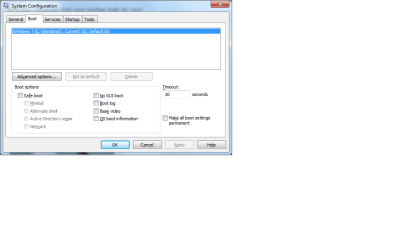
You should be able to get rid of that XP ghost listing by deleting it is msconfig>boot.

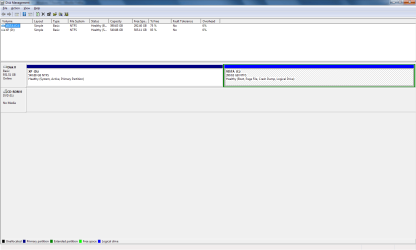
Check in Disk Management to see if XP is listed active. Post back a screenshot of the full Disk Management map and we'll look it over for ya. Use Snipping Tool in Start menu, then attach file using paper clip in reply box.

Is it your computer that your brother built for you?
 
It is the computer my brother build, i dident know what screen shots so i posted 2

BTW Vista is what 7 is on
 

Attachments

  • Untitled.png
    Untitled.png
    22.1 KB · Views: 24
  • Untitled1.png
    Untitled1.png
    14.4 KB · Views: 10

My Computer

Computer type
PC/Desktop
Computer Manufacturer/Model Number
Custom Build
OS
Windows 7 Professional 64bit
CPU
Intel Core i5 - 2500K @ 3.30GHz
Motherboard
Gigabyte Z77-HD3
Memory
4GB DDR3
Graphics Card(s)
EVGA Nvidia GeForce GT 740 2GB DDR3
Screen Resolution
1680 x 1050
Hard Drives
1T Samaung HD/ 1T toshiba external drive/ 1T western digital external drive/ 2T seagate external drive/ 250gb samaung SSD
PSU
Antec 430W
Keyboard
Microsoft Wireless Keyboard 800
Mouse
Microsoft Wireless Mouse 1000
Antivirus
AVG
Browser
Internet Explorer
XP is System Active which means it holds the MBR and can't be deleted except by DISKPART or using the Win7 installer. It will definitely mess up your Win7 install as it is.

Here is what I would do:

Unless you have more data, I would shrink Vista partition in Disk Management by about 200gb which still leaves 90gb free. Then create a New partition there formatted Logical NTFS labeled DATA. Copy your files there and triple check they are all there.

Now you are all set to boot into the Win7 DVD, select Custom install, use Drive Tools to delete XP and Vista, make a New partition there, format and install Win7.

As long as you don't touch that DATA partition with the installer, your data should be safe.
 
Lol sorry to be a pain, but i dont know how to do most of that xD

im only 14, its alright to leave the XP partions however it does now get annoying to selet 7

Once again, could you give me a quick run throught on how to do this just real quick i dont wanna take up all ur time
 

My Computer

Computer type
PC/Desktop
Computer Manufacturer/Model Number
Custom Build
OS
Windows 7 Professional 64bit
CPU
Intel Core i5 - 2500K @ 3.30GHz
Motherboard
Gigabyte Z77-HD3
Memory
4GB DDR3
Graphics Card(s)
EVGA Nvidia GeForce GT 740 2GB DDR3
Screen Resolution
1680 x 1050
Hard Drives
1T Samaung HD/ 1T toshiba external drive/ 1T western digital external drive/ 2T seagate external drive/ 250gb samaung SSD
PSU
Antec 430W
Keyboard
Microsoft Wireless Keyboard 800
Mouse
Microsoft Wireless Mouse 1000
Antivirus
AVG
Browser
Internet Explorer
How old is your brother? Can he help you do this?

I'll be glad to give you both the steps but I think you need some help there to do this, right?

It isn't alright to leave XP partition as it will screw up the installation.
 
My Brother is 22, however he doesnt live at home, nor does he come home often, and yea i think i will need some help.

The only problem is since i couldn't get my internet to instaill on XP and Vista on Virtual PC im scared it wont work on 7
 

My Computer

Computer type
PC/Desktop
Computer Manufacturer/Model Number
Custom Build
OS
Windows 7 Professional 64bit
CPU
Intel Core i5 - 2500K @ 3.30GHz
Motherboard
Gigabyte Z77-HD3
Memory
4GB DDR3
Graphics Card(s)
EVGA Nvidia GeForce GT 740 2GB DDR3
Screen Resolution
1680 x 1050
Hard Drives
1T Samaung HD/ 1T toshiba external drive/ 1T western digital external drive/ 2T seagate external drive/ 250gb samaung SSD
PSU
Antec 430W
Keyboard
Microsoft Wireless Keyboard 800
Mouse
Microsoft Wireless Mouse 1000
Antivirus
AVG
Browser
Internet Explorer
Is internet working now on Win7?

Did you set it up?

You know that when you pay for internet service, it includes tech support to walk you through all of that?
 
I know it includes tech support, it working on 7 now, but that only because my brother did an upgraded install to 7. Thats why im trying to do a clean, to have a fresh start, oh and btw my Windows 7 disk is an upgraded disk
 

My Computer

Computer type
PC/Desktop
Computer Manufacturer/Model Number
Custom Build
OS
Windows 7 Professional 64bit
CPU
Intel Core i5 - 2500K @ 3.30GHz
Motherboard
Gigabyte Z77-HD3
Memory
4GB DDR3
Graphics Card(s)
EVGA Nvidia GeForce GT 740 2GB DDR3
Screen Resolution
1680 x 1050
Hard Drives
1T Samaung HD/ 1T toshiba external drive/ 1T western digital external drive/ 2T seagate external drive/ 250gb samaung SSD
PSU
Antec 430W
Keyboard
Microsoft Wireless Keyboard 800
Mouse
Microsoft Wireless Mouse 1000
Antivirus
AVG
Browser
Internet Explorer
Upgrade version is fine. When you boot it the DVD will scan the HD and see another OS to allow upgrade key.

If not there are workarounds to get Upgrade version to work even on a wiped drive: http://www.sevenforums.com/tutorials/31402-clean-install-upgrade-windows-7-version.html

Mitch, why don't you talk with your brother and tell him that XP partition needs to be formatted over during the clean reinstall, or else the MBR in XP partition will mess up the install.

Tell him there's plenty of room to make a new data partition at the end of the drive, by shrinking Vista partition.

It's better anyway to have the OS at the first of the drive where the laser parks, for faster laser read.

If your brother says this is all cool, then if you want I will give you both the steps to use to repartition and install Win7.
 
But i have no way to talk to him, and he wont agree with me doing a clean install, he would be like you wont need it. Blah Blah blah. He is never home so he still wont be able to do it.

I still dont see why i cant just replace my windows 7 that i have now with a clean instaill of 7, with all my picture ect put onto xp partion
 

My Computer

Computer type
PC/Desktop
Computer Manufacturer/Model Number
Custom Build
OS
Windows 7 Professional 64bit
CPU
Intel Core i5 - 2500K @ 3.30GHz
Motherboard
Gigabyte Z77-HD3
Memory
4GB DDR3
Graphics Card(s)
EVGA Nvidia GeForce GT 740 2GB DDR3
Screen Resolution
1680 x 1050
Hard Drives
1T Samaung HD/ 1T toshiba external drive/ 1T western digital external drive/ 2T seagate external drive/ 250gb samaung SSD
PSU
Antec 430W
Keyboard
Microsoft Wireless Keyboard 800
Mouse
Microsoft Wireless Mouse 1000
Antivirus
AVG
Browser
Internet Explorer
Well you can try, but the installer is going to be majorly confused by that XP MBR, try to configure a dual boot that goes nowhere, update the MBR in XP which will be borked from the start.

On a single OS install the MBR System Active partition belongs in Win7, not a half uninstalled XP partition.

You know how to use Disk Management, right? It is completely safe if you don't set something Active.

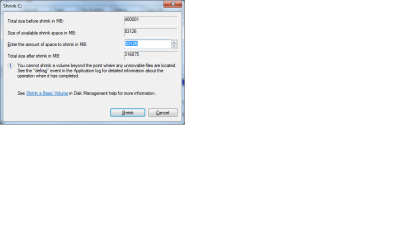
Right click on Win 7 partition and see how much it will shrink, then select enough MB to comfortably store all your data. Then rightclick format that space Logical NTFS, label it DATA.
 
1. i dont know what MBR IS
2. Sorta know how to use disk magament
3.attached a picture coz i dident know what to do
 

Attachments

  • Untitled.png
    Untitled.png
    13.3 KB · Views: 9

My Computer

Computer type
PC/Desktop
Computer Manufacturer/Model Number
Custom Build
OS
Windows 7 Professional 64bit
CPU
Intel Core i5 - 2500K @ 3.30GHz
Motherboard
Gigabyte Z77-HD3
Memory
4GB DDR3
Graphics Card(s)
EVGA Nvidia GeForce GT 740 2GB DDR3
Screen Resolution
1680 x 1050
Hard Drives
1T Samaung HD/ 1T toshiba external drive/ 1T western digital external drive/ 2T seagate external drive/ 250gb samaung SSD
PSU
Antec 430W
Keyboard
Microsoft Wireless Keyboard 800
Mouse
Microsoft Wireless Mouse 1000
Antivirus
AVG
Browser
Internet Explorer
It only wants to give up 83 gigs, which is weird since it says it has 292 gigs free. It probably needs defragging badly or has a system file in the way of shrinking. Try Disk cleanup and Defrag later.

Is 83 gigs enough for your data?

It would be good to make a separate partition for your backup image so you could start over at any time by reimaging your Win7 partition back on the HD. How much disk space did the imaging app want when you tried it earlier?
 
Back
Top