Back up onto partion

it asking if i want to make a System repair disk? Click no?

Also do i have to do it weekly Monthly or never again LOL
 

My Computer My Computer

Computer type
PC/Desktop
Computer Manufacturer/Model Number
Custom Build
OS
Windows 7 Professional 64bit
CPU
Intel Core i5 - 2500K @ 3.30GHz
Motherboard
Gigabyte Z77-HD3
Memory
4GB DDR3
Graphics Card(s)
EVGA Nvidia GeForce GT 740 2GB DDR3
Screen Resolution
1680 x 1050
Hard Drives
1T Samaung HD/ 1T toshiba external drive/ 1T western digital external drive/ 2T seagate external drive/ 250gb samaung SSD
PSU
Antec 430W
Keyboard
Microsoft Wireless Keyboard 800
Mouse
Microsoft Wireless Mouse 1000
Antivirus
AVG
Browser
Internet Explorer
I would save the backup image as it is now: a fresh install.

Then when you reimage it will be like reinstalling a brand new Win7.

Updating it as you go along might add creeping corruption.

If the backup center bugs you to set up backup, turn it off in Backup Center.

You don't need to make the Repair CD since you have the DVD's Repair Console.
 
the imaging worked fine

this is my device map
 

Attachments

  • Untitled.png
    Untitled.png
    21.1 KB · Views: 10

My Computer My Computer

Computer type
PC/Desktop
Computer Manufacturer/Model Number
Custom Build
OS
Windows 7 Professional 64bit
CPU
Intel Core i5 - 2500K @ 3.30GHz
Motherboard
Gigabyte Z77-HD3
Memory
4GB DDR3
Graphics Card(s)
EVGA Nvidia GeForce GT 740 2GB DDR3
Screen Resolution
1680 x 1050
Hard Drives
1T Samaung HD/ 1T toshiba external drive/ 1T western digital external drive/ 2T seagate external drive/ 250gb samaung SSD
PSU
Antec 430W
Keyboard
Microsoft Wireless Keyboard 800
Mouse
Microsoft Wireless Mouse 1000
Antivirus
AVG
Browser
Internet Explorer
In Disk Management, right click D:Vista partition and Delete.

Then rightclick C:Win7 to Extend Volume following these steps with screenshots: http://www.sevenforums.com/tutorials/2670-partition-volume-extend.html

After operation completes, boot into Win7, in Computer, rightclick on C: select Properties, then Tools tab, select Error Checking, click Check Now, tick both boxes, Start, then Schedule Disk Check, then restart when you can give it an hour to check the HD's file system.
 
i've done that schedule disk scan once, it took forever, and also then it happens like every 2nd day :(

anyway doing what u told me to do, will remove the dual booting, and give the OS bigger space?


Also would that mean im done with this whole mucking around with computer LOL
 

My Computer My Computer

Computer type
PC/Desktop
Computer Manufacturer/Model Number
Custom Build
OS
Windows 7 Professional 64bit
CPU
Intel Core i5 - 2500K @ 3.30GHz
Motherboard
Gigabyte Z77-HD3
Memory
4GB DDR3
Graphics Card(s)
EVGA Nvidia GeForce GT 740 2GB DDR3
Screen Resolution
1680 x 1050
Hard Drives
1T Samaung HD/ 1T toshiba external drive/ 1T western digital external drive/ 2T seagate external drive/ 250gb samaung SSD
PSU
Antec 430W
Keyboard
Microsoft Wireless Keyboard 800
Mouse
Microsoft Wireless Mouse 1000
Antivirus
AVG
Browser
Internet Explorer
Yes, follow those steps exactly to remove the old Win7 partition, then extend new Win7 over it.

Be sure not to EVER delete the Backup Image partition! It is your ticket to never having to reinstall again.

If you had ChkDsk repeating it was not scheduled to do that, and cannot be scheduled using that button more than once. It was running at Startup because you had serious drive issues.

This makes it even more important that you schedule it now, and restart the Computer when you go out to let it run.

It will fix file system errors that can come back to bite you big time.
 
i get this error message,
The parition Vista (D: ) simple volume is currently in use to force deletion of this partion click yes

Warning: forcing a deletion might cause unexpected errors in the application that is using this partion Do you want to continue? yes

Nothing is using it


Also would i shrink the back up partion, since it just wasted space for what it did not use
 

My Computer My Computer

Computer type
PC/Desktop
Computer Manufacturer/Model Number
Custom Build
OS
Windows 7 Professional 64bit
CPU
Intel Core i5 - 2500K @ 3.30GHz
Motherboard
Gigabyte Z77-HD3
Memory
4GB DDR3
Graphics Card(s)
EVGA Nvidia GeForce GT 740 2GB DDR3
Screen Resolution
1680 x 1050
Hard Drives
1T Samaung HD/ 1T toshiba external drive/ 1T western digital external drive/ 2T seagate external drive/ 250gb samaung SSD
PSU
Antec 430W
Keyboard
Microsoft Wireless Keyboard 800
Mouse
Microsoft Wireless Mouse 1000
Antivirus
AVG
Browser
Internet Explorer
Go ahead and force delete the Vista partition. There is no trouble it can cause since System Active Boot is now in the new Windows 7 partition.

You can then shrink backup if you want. Just accept whatever amount of shrinkage it will allow.

Then follow the screenshot tutorial I gave you to Extend Win7 over all of that empty space.

Then See if you still get a dual boot menu, and if so I will tell you how to remove it.
 
i followed what u did, delted Vista, it says 309gbs free but it wont let extend volume, not even with back up
 

My Computer My Computer

Computer type
PC/Desktop
Computer Manufacturer/Model Number
Custom Build
OS
Windows 7 Professional 64bit
CPU
Intel Core i5 - 2500K @ 3.30GHz
Motherboard
Gigabyte Z77-HD3
Memory
4GB DDR3
Graphics Card(s)
EVGA Nvidia GeForce GT 740 2GB DDR3
Screen Resolution
1680 x 1050
Hard Drives
1T Samaung HD/ 1T toshiba external drive/ 1T western digital external drive/ 2T seagate external drive/ 250gb samaung SSD
PSU
Antec 430W
Keyboard
Microsoft Wireless Keyboard 800
Mouse
Microsoft Wireless Mouse 1000
Antivirus
AVG
Browser
Internet Explorer
I am doing what it Says!

But extend volume it grayed out

i right click on 309.45gbs and it will only let me create a new simple volume
 

My Computer My Computer

Computer type
PC/Desktop
Computer Manufacturer/Model Number
Custom Build
OS
Windows 7 Professional 64bit
CPU
Intel Core i5 - 2500K @ 3.30GHz
Motherboard
Gigabyte Z77-HD3
Memory
4GB DDR3
Graphics Card(s)
EVGA Nvidia GeForce GT 740 2GB DDR3
Screen Resolution
1680 x 1050
Hard Drives
1T Samaung HD/ 1T toshiba external drive/ 1T western digital external drive/ 2T seagate external drive/ 250gb samaung SSD
PSU
Antec 430W
Keyboard
Microsoft Wireless Keyboard 800
Mouse
Microsoft Wireless Mouse 1000
Antivirus
AVG
Browser
Internet Explorer
Restart your computer.

If it starts the ChkDsk, be sure to press the key it says to abort it.

Now try the Extend Volume again.

If not, Then we'll use an app I'll upload to do it.
 
okay, it still wont let me extend it
No disk check at start up

No daul menu


Anyway i have to go shopping :l

i will be back soon
 

My Computer My Computer

Computer type
PC/Desktop
Computer Manufacturer/Model Number
Custom Build
OS
Windows 7 Professional 64bit
CPU
Intel Core i5 - 2500K @ 3.30GHz
Motherboard
Gigabyte Z77-HD3
Memory
4GB DDR3
Graphics Card(s)
EVGA Nvidia GeForce GT 740 2GB DDR3
Screen Resolution
1680 x 1050
Hard Drives
1T Samaung HD/ 1T toshiba external drive/ 1T western digital external drive/ 2T seagate external drive/ 250gb samaung SSD
PSU
Antec 430W
Keyboard
Microsoft Wireless Keyboard 800
Mouse
Microsoft Wireless Mouse 1000
Antivirus
AVG
Browser
Internet Explorer
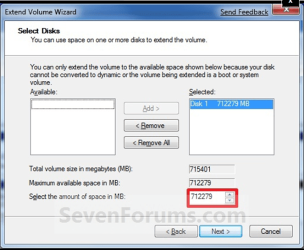
Did you left click Highlight the amount given in the Selected box at top right? Like this:

Capture.PNG

If it still won't give up the space, then try to Shrink the Backup partition one more time using DIsk Mgmt.

If either won't work, then install Partition Wizard I uploaded here: View attachment 45771

Use Partition Wizard to do either of those steps which DIsk Management won't do, as follows:

Rightclick Backup Image partition, select Resize, look carefully at the Used Space in the partition which will appear in yellow. Now slide the left border slowly over until there is still a little margin of free white space. Make sure the Image is not being cramped or it won't work. THen click OK.

Rightclick Win7 partition, select Resize, then drag the right border all the way over up against the Backup image partition. When it looks correct, click OK.

Then check it all over once again and click Apply at bottom left.
 
Last edited:
Sleep Problem is Back!!!

and i shall try ur wizard thing

how do u use that wizard
 

My Computer My Computer

Computer type
PC/Desktop
Computer Manufacturer/Model Number
Custom Build
OS
Windows 7 Professional 64bit
CPU
Intel Core i5 - 2500K @ 3.30GHz
Motherboard
Gigabyte Z77-HD3
Memory
4GB DDR3
Graphics Card(s)
EVGA Nvidia GeForce GT 740 2GB DDR3
Screen Resolution
1680 x 1050
Hard Drives
1T Samaung HD/ 1T toshiba external drive/ 1T western digital external drive/ 2T seagate external drive/ 250gb samaung SSD
PSU
Antec 430W
Keyboard
Microsoft Wireless Keyboard 800
Mouse
Microsoft Wireless Mouse 1000
Antivirus
AVG
Browser
Internet Explorer
Read steps again in post #114. Try Extending Volume highlighting the amount given in Selected Box.

Then try Shrinking Backup partition again.

If either fail, then follow the steps given for using Partition Wizard in Post #114. Ask me any questions.
 
I tryed using pation wizard restartes pc been doing it for 15 mins.


Just said my sleep problem is back an now I lost my office program for nothing
 

My Computer My Computer

Computer type
PC/Desktop
Computer Manufacturer/Model Number
Custom Build
OS
Windows 7 Professional 64bit
CPU
Intel Core i5 - 2500K @ 3.30GHz
Motherboard
Gigabyte Z77-HD3
Memory
4GB DDR3
Graphics Card(s)
EVGA Nvidia GeForce GT 740 2GB DDR3
Screen Resolution
1680 x 1050
Hard Drives
1T Samaung HD/ 1T toshiba external drive/ 1T western digital external drive/ 2T seagate external drive/ 250gb samaung SSD
PSU
Antec 430W
Keyboard
Microsoft Wireless Keyboard 800
Mouse
Microsoft Wireless Mouse 1000
Antivirus
AVG
Browser
Internet Explorer
DO NOT stop Partition Wizard or it will mess up Windows 7.

It goes into Boot Mode to resize.

Did you resize Win7 and Backup Using the steps I gave in #174?
 
I have a related question. I'm about to install 7 and I want to create a backup partition for system image files. I read in another post that you make the second partition primary. Why do you do this instead of making it a logical partition? Sorry if this is in the wrong thread.
 

My Computer My Computer

OS
Windows 7
I wasent going to stop it plus 30mins it's taking and post #114 is Boit Internet. I diden back up coz o started be 4 u told me whoops
 

My Computer My Computer

Computer type
PC/Desktop
Computer Manufacturer/Model Number
Custom Build
OS
Windows 7 Professional 64bit
CPU
Intel Core i5 - 2500K @ 3.30GHz
Motherboard
Gigabyte Z77-HD3
Memory
4GB DDR3
Graphics Card(s)
EVGA Nvidia GeForce GT 740 2GB DDR3
Screen Resolution
1680 x 1050
Hard Drives
1T Samaung HD/ 1T toshiba external drive/ 1T western digital external drive/ 2T seagate external drive/ 250gb samaung SSD
PSU
Antec 430W
Keyboard
Microsoft Wireless Keyboard 800
Mouse
Microsoft Wireless Mouse 1000
Antivirus
AVG
Browser
Internet Explorer
Back
Top