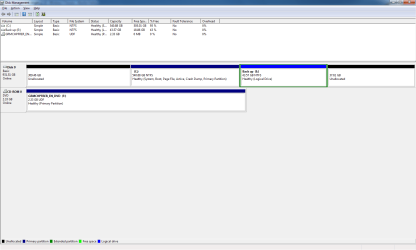
Back up onto partion

I have a related question. I'm about to install 7 and I want to create a backup partition for system image files. I read in another post that you make the second partition primary. Why do you do this instead of making it a logical partition? Sorry if this is in the wrong thread.

Backup IMage partition formatted primary so the Win7 Backup utility will discover it as a "drive" like another HD to store image.

Be sure to copy image from partition to external in case HD fails. It will need to be placed in the root of the external by same exact name to be detected by DVD or CD Repair console>Recover Using an Image.
 
I wasent going to stop it plus 30mins it's taking and post #114 is Boit Internet. I diden back up coz o started be 4 u told me whoops

Sorry Post 174.

What do you mean you didn't back up?

Did you do the steps in Post 174 to resize Win7 and Backup with Partition Wizard?

What is going on right now?
 
I don't know pc turned if the. Dident tuen back on. Turn on self blank screen. Tryed again said it was missing something and I needed to repair
 

My Computer My Computer

Computer type
PC/Desktop
Computer Manufacturer/Model Number
Custom Build
OS
Windows 7 Professional 64bit
CPU
Intel Core i5 - 2500K @ 3.30GHz
Motherboard
Gigabyte Z77-HD3
Memory
4GB DDR3
Graphics Card(s)
EVGA Nvidia GeForce GT 740 2GB DDR3
Screen Resolution
1680 x 1050
Hard Drives
1T Samaung HD/ 1T toshiba external drive/ 1T western digital external drive/ 2T seagate external drive/ 250gb samaung SSD
PSU
Antec 430W
Keyboard
Microsoft Wireless Keyboard 800
Mouse
Microsoft Wireless Mouse 1000
Antivirus
AVG
Browser
Internet Explorer
Place the DVD in the tray, reboot, select Repair my computer on second screen, then Recover Using an Image, let it discover Backup Image in partition, have it reimage HD in 15 minutes.

See why having the Backup Image is important?

So you are pretty sure that when Partition Wizard rebooted to run in boot mode to resize the partitions, that computer got turned off?
 
I have a related question. I'm about to install 7 and I want to create a backup partition for system image files. I read in another post that you make the second partition primary. Why do you do this instead of making it a logical partition? Sorry if this is in the wrong thread.

Backup IMage partition formatted primary so the Win7 Backup utility will discover it as a "drive" like another HD to store image.

Be sure to copy image from partition to external in case HD fails. It will need to be placed in the root of the external by same exact name to be detected by DVD or CD Repair console>Recover Using an Image.

So if it's a logical partition, windows backup won't recognize it as a valid location to store the image? Is this because logical partitions aren't bootable? Also, how large should I make the partition. My hard drive is 500gb, and I won't have many apps or media on it.
 

My Computer My Computer

OS
Windows 7
Last time I check partion wizard was at like 98% I did the startup repair and it worked. the got message from wizard
 

My Computer My Computer

Computer type
PC/Desktop
Computer Manufacturer/Model Number
Custom Build
OS
Windows 7 Professional 64bit
CPU
Intel Core i5 - 2500K @ 3.30GHz
Motherboard
Gigabyte Z77-HD3
Memory
4GB DDR3
Graphics Card(s)
EVGA Nvidia GeForce GT 740 2GB DDR3
Screen Resolution
1680 x 1050
Hard Drives
1T Samaung HD/ 1T toshiba external drive/ 1T western digital external drive/ 2T seagate external drive/ 250gb samaung SSD
PSU
Antec 430W
Keyboard
Microsoft Wireless Keyboard 800
Mouse
Microsoft Wireless Mouse 1000
Antivirus
AVG
Browser
Internet Explorer
What message? Did Partition Wizard resize the partitions, or did you interrupt it?

What exactly is the status of the partitions now in Disk Management? Post a screenshot if possible?

When I give you the exact steps to resize partitions with PW, why would you interrupt it and not let it run until it is finished?
 
here a picture of disk management
moz-screenshot.png


and still the extended disk volume is grayed out

Do you think you know whats wrogn when i put it to sleep?


I dident interrupted it, it just turned off


dident get time to read, it said that it dident resize i think
 

Attachments

  • Untitled.png
    Untitled.png
    23.4 KB · Views: 5

My Computer My Computer

Computer type
PC/Desktop
Computer Manufacturer/Model Number
Custom Build
OS
Windows 7 Professional 64bit
CPU
Intel Core i5 - 2500K @ 3.30GHz
Motherboard
Gigabyte Z77-HD3
Memory
4GB DDR3
Graphics Card(s)
EVGA Nvidia GeForce GT 740 2GB DDR3
Screen Resolution
1680 x 1050
Hard Drives
1T Samaung HD/ 1T toshiba external drive/ 1T western digital external drive/ 2T seagate external drive/ 250gb samaung SSD
PSU
Antec 430W
Keyboard
Microsoft Wireless Keyboard 800
Mouse
Microsoft Wireless Mouse 1000
Antivirus
AVG
Browser
Internet Explorer
Open Partiton Wizard

Right click Backup partition, select Resize, slide partition as it is over onto the unllocated space to its right. OK.

Now right click Windows 7 partition, slide its left border all the way over to left side of HD, then slide its right border all the way over to Backup parttion. OK

Then before applying steps, make a screenshot of full Partition Wizard drive map and post it back.
 
i dont know if its right
 

Attachments

  • Untitled.png
    Untitled.png
    42.1 KB · Views: 3

My Computer My Computer

Computer type
PC/Desktop
Computer Manufacturer/Model Number
Custom Build
OS
Windows 7 Professional 64bit
CPU
Intel Core i5 - 2500K @ 3.30GHz
Motherboard
Gigabyte Z77-HD3
Memory
4GB DDR3
Graphics Card(s)
EVGA Nvidia GeForce GT 740 2GB DDR3
Screen Resolution
1680 x 1050
Hard Drives
1T Samaung HD/ 1T toshiba external drive/ 1T western digital external drive/ 2T seagate external drive/ 250gb samaung SSD
PSU
Antec 430W
Keyboard
Microsoft Wireless Keyboard 800
Mouse
Microsoft Wireless Mouse 1000
Antivirus
AVG
Browser
Internet Explorer
Good job.

Now go Control Panel>Power Options and set Sleep to Never until we are finished.

Then click Apply and don't touch anything until it finished. It will go into Boot Mode to resize Win7.

Post back if anything happens.
 
why do i have to set sleep to never, its doesnt fall asleep for lile 2hrs until told to, i like to have sleep on, so i can put it, but the FREEZING AHH!

and are u sure its right?

it wont let me change partions size without rebooting
 

My Computer My Computer

Computer type
PC/Desktop
Computer Manufacturer/Model Number
Custom Build
OS
Windows 7 Professional 64bit
CPU
Intel Core i5 - 2500K @ 3.30GHz
Motherboard
Gigabyte Z77-HD3
Memory
4GB DDR3
Graphics Card(s)
EVGA Nvidia GeForce GT 740 2GB DDR3
Screen Resolution
1680 x 1050
Hard Drives
1T Samaung HD/ 1T toshiba external drive/ 1T western digital external drive/ 2T seagate external drive/ 250gb samaung SSD
PSU
Antec 430W
Keyboard
Microsoft Wireless Keyboard 800
Mouse
Microsoft Wireless Mouse 1000
Antivirus
AVG
Browser
Internet Explorer
I thought sleep might have timed out Partition Wizard, but I guess you must have shut it down.

Apply all steps in Partition Wizard and let it reboot and finish its job.

Don't touch it until it's done, okay?
 
But it turned off by itself. Any it's done 50% in 15mina grr so slow

do u have any reasons why it still freeze. I see it connects to the Internet and then freezes but I have disable everything to do with Internet and I don't know :(


Thi thing better hurry up storm is coming my way
 

My Computer My Computer

Computer type
PC/Desktop
Computer Manufacturer/Model Number
Custom Build
OS
Windows 7 Professional 64bit
CPU
Intel Core i5 - 2500K @ 3.30GHz
Motherboard
Gigabyte Z77-HD3
Memory
4GB DDR3
Graphics Card(s)
EVGA Nvidia GeForce GT 740 2GB DDR3
Screen Resolution
1680 x 1050
Hard Drives
1T Samaung HD/ 1T toshiba external drive/ 1T western digital external drive/ 2T seagate external drive/ 250gb samaung SSD
PSU
Antec 430W
Keyboard
Microsoft Wireless Keyboard 800
Mouse
Microsoft Wireless Mouse 1000
Antivirus
AVG
Browser
Internet Explorer
It isnt' turning off, it is restarting to go into Boot Mode to do the Resizing.

When it is finished if it doesn't start up it is because you moved that C: partition off of the first part of the HD before, then moved it back.

It may require booting the Win7 DVD into Repair console to run Startup Repair up to 3 separate times to repair the MBR which was moved away from the left side of the HD when you messed up the partitioning.

But WHATEVER YOU DO, be sure to let Partition Wizard finish this time, then see if it starts up to Win7.
 
It finshed last time just never re booted after
 

My Computer My Computer

Computer type
PC/Desktop
Computer Manufacturer/Model Number
Custom Build
OS
Windows 7 Professional 64bit
CPU
Intel Core i5 - 2500K @ 3.30GHz
Motherboard
Gigabyte Z77-HD3
Memory
4GB DDR3
Graphics Card(s)
EVGA Nvidia GeForce GT 740 2GB DDR3
Screen Resolution
1680 x 1050
Hard Drives
1T Samaung HD/ 1T toshiba external drive/ 1T western digital external drive/ 2T seagate external drive/ 250gb samaung SSD
PSU
Antec 430W
Keyboard
Microsoft Wireless Keyboard 800
Mouse
Microsoft Wireless Mouse 1000
Antivirus
AVG
Browser
Internet Explorer
Stops at 99% then turns off and stays off
 

My Computer My Computer

Computer type
PC/Desktop
Computer Manufacturer/Model Number
Custom Build
OS
Windows 7 Professional 64bit
CPU
Intel Core i5 - 2500K @ 3.30GHz
Motherboard
Gigabyte Z77-HD3
Memory
4GB DDR3
Graphics Card(s)
EVGA Nvidia GeForce GT 740 2GB DDR3
Screen Resolution
1680 x 1050
Hard Drives
1T Samaung HD/ 1T toshiba external drive/ 1T western digital external drive/ 2T seagate external drive/ 250gb samaung SSD
PSU
Antec 430W
Keyboard
Microsoft Wireless Keyboard 800
Mouse
Microsoft Wireless Mouse 1000
Antivirus
AVG
Browser
Internet Explorer

My Computer My Computer

Computer type
PC/Desktop
Computer Manufacturer/Model Number
Custom Build
OS
Windows 7 Professional 64bit
CPU
Intel Core i5 - 2500K @ 3.30GHz
Motherboard
Gigabyte Z77-HD3
Memory
4GB DDR3
Graphics Card(s)
EVGA Nvidia GeForce GT 740 2GB DDR3
Screen Resolution
1680 x 1050
Hard Drives
1T Samaung HD/ 1T toshiba external drive/ 1T western digital external drive/ 2T seagate external drive/ 250gb samaung SSD
PSU
Antec 430W
Keyboard
Microsoft Wireless Keyboard 800
Mouse
Microsoft Wireless Mouse 1000
Antivirus
AVG
Browser
Internet Explorer
Will Win7 start up?

Boot into DVD repair console and run Startup Repair up to 3 times to repair MBR.
 
this time windows 7 started up, but got a message says partion wizard can't complete because disk configuration have changed
 

My Computer My Computer

Computer type
PC/Desktop
Computer Manufacturer/Model Number
Custom Build
OS
Windows 7 Professional 64bit
CPU
Intel Core i5 - 2500K @ 3.30GHz
Motherboard
Gigabyte Z77-HD3
Memory
4GB DDR3
Graphics Card(s)
EVGA Nvidia GeForce GT 740 2GB DDR3
Screen Resolution
1680 x 1050
Hard Drives
1T Samaung HD/ 1T toshiba external drive/ 1T western digital external drive/ 2T seagate external drive/ 250gb samaung SSD
PSU
Antec 430W
Keyboard
Microsoft Wireless Keyboard 800
Mouse
Microsoft Wireless Mouse 1000
Antivirus
AVG
Browser
Internet Explorer
Back
Top