Back up onto partion

okay...

something had to change tho, coz backup is now in red
 

Attachments

  • Untitled.png
    Untitled.png
    17.1 KB · Views: 7

My Computer My Computer

Computer type
PC/Desktop
Computer Manufacturer/Model Number
Custom Build
OS
Windows 7 Professional 64bit
CPU
Intel Core i5 - 2500K @ 3.30GHz
Motherboard
Gigabyte Z77-HD3
Memory
4GB DDR3
Graphics Card(s)
EVGA Nvidia GeForce GT 740 2GB DDR3
Screen Resolution
1680 x 1050
Hard Drives
1T Samaung HD/ 1T toshiba external drive/ 1T western digital external drive/ 2T seagate external drive/ 250gb samaung SSD
PSU
Antec 430W
Keyboard
Microsoft Wireless Keyboard 800
Mouse
Microsoft Wireless Mouse 1000
Antivirus
AVG
Browser
Internet Explorer
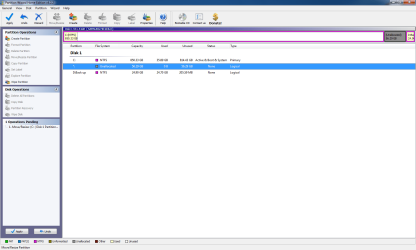
OK run Partition Wizard, rightclick Win7>Resize, then only drag the left border all the way over to the left side of the HD. OK.

Apply, see if it completes. Post back screenshot.
 
now there is left over space

how long should it take sick of waiting 30mins xD
 

Attachments

  • Untitled.png
    Untitled.png
    43.8 KB · Views: 4

My Computer My Computer

Computer type
PC/Desktop
Computer Manufacturer/Model Number
Custom Build
OS
Windows 7 Professional 64bit
CPU
Intel Core i5 - 2500K @ 3.30GHz
Motherboard
Gigabyte Z77-HD3
Memory
4GB DDR3
Graphics Card(s)
EVGA Nvidia GeForce GT 740 2GB DDR3
Screen Resolution
1680 x 1050
Hard Drives
1T Samaung HD/ 1T toshiba external drive/ 1T western digital external drive/ 2T seagate external drive/ 250gb samaung SSD
PSU
Antec 430W
Keyboard
Microsoft Wireless Keyboard 800
Mouse
Microsoft Wireless Mouse 1000
Antivirus
AVG
Browser
Internet Explorer
I think you're good.

You need to run ChkDsk given earlier to make sure nothing was messed up during partitioning. This will save you problems later. If it shows clean, then you did really good.

Can you remember how to reimage the HD using your DVD, from that Backup partition you made? If so, you'll never have to reinstall again.

Post another topic if you want to troubleshoot the sleep issue. It is likely related to the last step you took before it started being a problem again. It was waking fine before that, right?

You have learned more about advanced install and partitioning in the past 24 hours than 99% of people on earth.
 
thats not what happen when partitioning, the other one dident complete you told me to drag it to the left, and i never re did it.
 

My Computer My Computer

Computer type
PC/Desktop
Computer Manufacturer/Model Number
Custom Build
OS
Windows 7 Professional 64bit
CPU
Intel Core i5 - 2500K @ 3.30GHz
Motherboard
Gigabyte Z77-HD3
Memory
4GB DDR3
Graphics Card(s)
EVGA Nvidia GeForce GT 740 2GB DDR3
Screen Resolution
1680 x 1050
Hard Drives
1T Samaung HD/ 1T toshiba external drive/ 1T western digital external drive/ 2T seagate external drive/ 250gb samaung SSD
PSU
Antec 430W
Keyboard
Microsoft Wireless Keyboard 800
Mouse
Microsoft Wireless Mouse 1000
Antivirus
AVG
Browser
Internet Explorer
I think that PW didn't want that space to the left of your Backup partition used for WIn7.

That's why it failed twice. Nothing you did.

You could recover it into Backup if you want to have more room there. It is pretty cramped.

Remember to run Chkdsk. schedule it for when you go out by right clicking C drive in Computer >Properties>Tools>error checking>check now>tick both boxes>schedule.

It will sort out any file system errors to reassure you that your HD is in order.
 
i still have 56.29GBS free


Do you think you know why it still freezes?

i through it was to do with internet but its not
 

Attachments

  • Untitled.png
    Untitled.png
    18.1 KB · Views: 3

My Computer My Computer

Computer type
PC/Desktop
Computer Manufacturer/Model Number
Custom Build
OS
Windows 7 Professional 64bit
CPU
Intel Core i5 - 2500K @ 3.30GHz
Motherboard
Gigabyte Z77-HD3
Memory
4GB DDR3
Graphics Card(s)
EVGA Nvidia GeForce GT 740 2GB DDR3
Screen Resolution
1680 x 1050
Hard Drives
1T Samaung HD/ 1T toshiba external drive/ 1T western digital external drive/ 2T seagate external drive/ 250gb samaung SSD
PSU
Antec 430W
Keyboard
Microsoft Wireless Keyboard 800
Mouse
Microsoft Wireless Mouse 1000
Antivirus
AVG
Browser
Internet Explorer
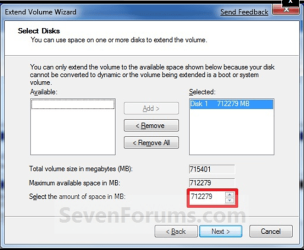
See if you can extend C volume now in Disk Mgmt.

Be sure to highlight the volume in the "Selected" box like here:

Capture.PNG

I'm not sure what that Free Space is about. If C won't extend, see if you can rightclick delete the Free Space and try again.
 
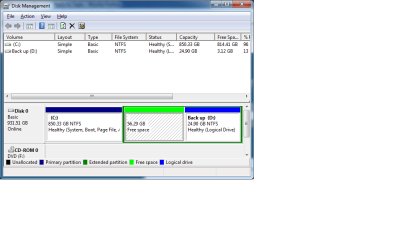
it wont extend see

So i take it you dont know about freezing still?


do you think if i do that disk chick it may fix it, coz it dident fix it with the old one
 

Attachments

  • Untitled.png
    Untitled.png
    116.9 KB · Views: 5

My Computer My Computer

Computer type
PC/Desktop
Computer Manufacturer/Model Number
Custom Build
OS
Windows 7 Professional 64bit
CPU
Intel Core i5 - 2500K @ 3.30GHz
Motherboard
Gigabyte Z77-HD3
Memory
4GB DDR3
Graphics Card(s)
EVGA Nvidia GeForce GT 740 2GB DDR3
Screen Resolution
1680 x 1050
Hard Drives
1T Samaung HD/ 1T toshiba external drive/ 1T western digital external drive/ 2T seagate external drive/ 250gb samaung SSD
PSU
Antec 430W
Keyboard
Microsoft Wireless Keyboard 800
Mouse
Microsoft Wireless Mouse 1000
Antivirus
AVG
Browser
Internet Explorer
the same with old windows, after waking from sleep it connects to the internet and then freezes, it not the internet fault as i disable internet stuff when sleep.

I have 53gb of wasted space :( but meh
 

My Computer My Computer

Computer type
PC/Desktop
Computer Manufacturer/Model Number
Custom Build
OS
Windows 7 Professional 64bit
CPU
Intel Core i5 - 2500K @ 3.30GHz
Motherboard
Gigabyte Z77-HD3
Memory
4GB DDR3
Graphics Card(s)
EVGA Nvidia GeForce GT 740 2GB DDR3
Screen Resolution
1680 x 1050
Hard Drives
1T Samaung HD/ 1T toshiba external drive/ 1T western digital external drive/ 2T seagate external drive/ 250gb samaung SSD
PSU
Antec 430W
Keyboard
Microsoft Wireless Keyboard 800
Mouse
Microsoft Wireless Mouse 1000
Antivirus
AVG
Browser
Internet Explorer
Did you use that Big Pond software for your router? Install in compatibility mode? It might be not suitable for Windows 7 and causing the freeze.

I showed you earlier how to install just the driver for your Wireless adapter. Did that work, without the Big Pond software?

It might also be the driver for wireless adapter. Click on it in Device manager and try to Update driver over internet automatically. If not, then google exact name and look for Win7 drivers.

Did you try right clicking on the Free Space to see if it offers any options? Delete if possible and try extending WIn7 then.
 
it doesnt offer any free space, and i dident use the bigpond software. just instailling the driver work, it last time i check which was about 1 week ago i had the latest driver. So i doubt it the internert.

Also in Vista everytime awaking from slepe blue screen error.

I get blue screen error when logging into my account on 7. So :S
 

My Computer My Computer

Computer type
PC/Desktop
Computer Manufacturer/Model Number
Custom Build
OS
Windows 7 Professional 64bit
CPU
Intel Core i5 - 2500K @ 3.30GHz
Motherboard
Gigabyte Z77-HD3
Memory
4GB DDR3
Graphics Card(s)
EVGA Nvidia GeForce GT 740 2GB DDR3
Screen Resolution
1680 x 1050
Hard Drives
1T Samaung HD/ 1T toshiba external drive/ 1T western digital external drive/ 2T seagate external drive/ 250gb samaung SSD
PSU
Antec 430W
Keyboard
Microsoft Wireless Keyboard 800
Mouse
Microsoft Wireless Mouse 1000
Antivirus
AVG
Browser
Internet Explorer
It may be logged in Event Viewer, or Performance log which logs service/hardware which causes slow startup or recovery from sleep.

Click through your WEI score link at Computer>Properties to use Advanced Tools>Check Performance logs for exact moment of wake up, determine which hardware or service is causing problem. It may take time to determine this. Troubleshooting takes patience and is a process. You should start a new topic here in General to get more help.

What I was asking about Disk Management is if the green outlined Free Space partition (which I've never seen before) can be deleted or anything else when you right click it so you can recover that space into Win7 or Backup?
 
Nope it wont let me delted the green space, also there is a darker green around the back up :S

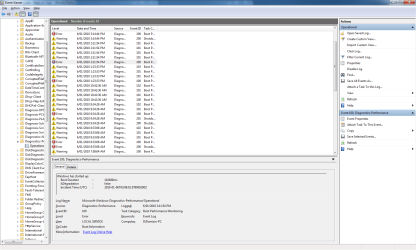
i think this is one, but i dont get what all the information is
 

Attachments

  • Untitled.png
    Untitled.png
    52.7 KB · Views: 4
  • Untitled2.png
    Untitled2.png
    52.6 KB · Views: 4

My Computer My Computer

Computer type
PC/Desktop
Computer Manufacturer/Model Number
Custom Build
OS
Windows 7 Professional 64bit
CPU
Intel Core i5 - 2500K @ 3.30GHz
Motherboard
Gigabyte Z77-HD3
Memory
4GB DDR3
Graphics Card(s)
EVGA Nvidia GeForce GT 740 2GB DDR3
Screen Resolution
1680 x 1050
Hard Drives
1T Samaung HD/ 1T toshiba external drive/ 1T western digital external drive/ 2T seagate external drive/ 250gb samaung SSD
PSU
Antec 430W
Keyboard
Microsoft Wireless Keyboard 800
Mouse
Microsoft Wireless Mouse 1000
Antivirus
AVG
Browser
Internet Explorer
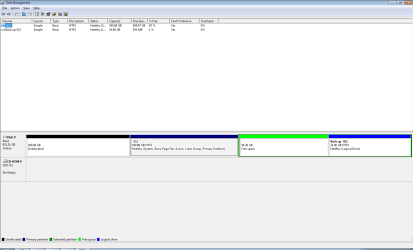
I think that green border represents an extended partition.

Right click it and see if you can create a new simple volume.
 

My Computer My Computer

Computer type
PC/Desktop
Computer Manufacturer/Model Number
Ignatz Special; 4 speed manual gearbox; factory air conditioning; one of one
OS
Windows 7 Home Premium SP1, 64-bit
CPU
Intel Skylake i5-6600K, not overclocked
Motherboard
AsRock Z170M Extreme 4, micro ATX
Memory
8 GB HyperX DDR4-2666 (2 x 4 GB)
Graphics Card(s)
none; graphics are integrated on CPU
Sound Card
onboard: Realtek ALC1150; external: USB Behringer UF0-202
Monitor(s) Displays
Dell S2340M 23 inch IPS
Screen Resolution
1600 x 900
Hard Drives
System: Crucial MX100 series SSD, 128 GB;
Data: Samsung Spinpoint 103SJ, 1 TB;
Backup: WD Caviar Green WD30EZRX-00D8PB0, 3 TB
PSU
Rosewill SilentNight 500 watt fanless, semi-modular
Case
Antec Solo II
Cooling
Noctua NH-U12S; Noctua F12 intake, Noctua S12A exhaust
Keyboard
Microsoft 200 6JH-00001 USB
Mouse
Dell or Microsoft optical wired; USB
Antivirus
Microsoft Security Essentials and Malwarebytes Premium
Browser
Pale Moon
Other Info
All fans PWM; speeds at idle: CPU circa 500 rpm; intake circa 600 rpm; exhaust circa 600 rpm; CPU temps 27 idle and 47 C load in a warm room (27 C/81 F) when running Intel Extreme Tuning Utility stress test.
Post back a screenshot of Disk Management.

Those Event Viewer errors show a slow boot which can often be a device/service delaying startup. It also might be causing the freezing.

To find the exact device, go to this log and check for events listed that are delaying the sleep wakeup at the time they happen: Control Panel\All Control Panel Items\Performance Information and Tools\Advanced Tools

You need to study this log over several days to see repeat instances of a device/service causing delay during return from sleep.

One thing major which needs to be checked is what your ACPI is set to in BIOS: Try S3 and see if wakeup freeze ends. Enter BIOS by tapping key given on first bootup screen. Don't change anything except that. Save setting.
 
I think that green border represents an extended partition.

Right click it and see if you can create a new simple volume.
Iggy this came out of the blue after he reconfig's his partitions deleting XP and resizing Win7 into its space. Suddenly some primary space had a light green band around it called Free Space. Now he says there is Dark green which was never there.

Mitch can you post a screenshot of full disk management map for us to look at?
 
Back
Top