Background Desktop Images

BuzWeaver

New member
Member
Local time
4:42 AM
Messages
92
Location
Atlanta, GA USA
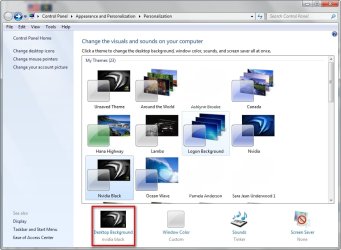
Am I missing something? I was attempting to use an image as a background, however when I go into the Background setting, then Browse, I don't get an option to select an image. I had to right click the image and choose to set it as my background.
 

My Computer

OS
Windows 7
CPU
Intel Core i7 960 Bloomfield
Motherboard
ASUSTeK Computer INC. Rampage III Formula (LGA1366)
Memory
6.00 GB Triple-Channel DDR3 @ 533MHz (8-8-8-20)
Graphics Card(s)
FHD2401 (1920x1200@59Hz) NVIDIA GeForce GTX 480
Sound Card
Realtek High Definition Audio
Monitor(s) Displays
Gateway 24" HD UltraReponse 2MS UltraColor 92% Glossy
Screen Resolution
1920x1200
Hard Drives
977GB Western Digital WDC WD10 01FALS-00E8B0 SCSI Disk Device (SATA)

USB Storage: Seagate FreeAgent USB Device

USB Storage: Seagate FreeAgentDesktop USB Device

USB Storage: STECH Simple Drive USB Device
PSU
CyberPower 1350AVR Batter Backup
Case
Cooler Master HAF Full Tower
Cooling
Cooler Master V8 RR-UV8-XBU1-GP 120mm
Keyboard
LogiTech Wave Wireless
Mouse
Logitech HID-compliant G5 Laser Mouse
Internet Speed
22.32MB
Open personalize and select desktop background and then you can browse for your desired picture or select multiple pictures to show in a slide show.

2009-06-28_121226.jpg
 

My Computer

Computer Manufacturer/Model Number
Home Brew
OS
Windows 7 Ultimate Vista Ultimate x64
CPU
Core 2 Duo E8500 3.16Ghz @ 3.8Ghz
Motherboard
eVGA 750i FTW
Memory
2x2Gigs Patriot PC2-6400 LL
Graphics Card(s)
Inno3D GeForce GTX260 216 SP
Monitor(s) Displays
ASUS VW222U 22" 2ms Response time
Screen Resolution
1680x1050
Hard Drives
SATA 150GB
SATA II 250GB
USB IDE 750GB Ext.
PSU
HYTEC 600W & Thermaltake 650W Toughpower Power Exp
Case
Thermaltake Armor LCS (Liquid Cooling System)
Cooling
Liquid Cooling System
Keyboard
Logitech G15 Gaming Keyboard
Mouse
Logitech G9 Gaming Mouse
Open personalize and select desktop background and then you can browse for your desired picture or select multiple pictures to show in a slide show.

View attachment 15803

When I go to browse I can't select anything, it says 'no items match your search'. If I have an image on the Desktop that I want to use, then use browse, there isn't anything there.
 

My Computer

OS
Windows 7
CPU
Intel Core i7 960 Bloomfield
Motherboard
ASUSTeK Computer INC. Rampage III Formula (LGA1366)
Memory
6.00 GB Triple-Channel DDR3 @ 533MHz (8-8-8-20)
Graphics Card(s)
FHD2401 (1920x1200@59Hz) NVIDIA GeForce GTX 480
Sound Card
Realtek High Definition Audio
Monitor(s) Displays
Gateway 24" HD UltraReponse 2MS UltraColor 92% Glossy
Screen Resolution
1920x1200
Hard Drives
977GB Western Digital WDC WD10 01FALS-00E8B0 SCSI Disk Device (SATA)

USB Storage: Seagate FreeAgent USB Device

USB Storage: Seagate FreeAgentDesktop USB Device

USB Storage: STECH Simple Drive USB Device
PSU
CyberPower 1350AVR Batter Backup
Case
Cooler Master HAF Full Tower
Cooling
Cooler Master V8 RR-UV8-XBU1-GP 120mm
Keyboard
LogiTech Wave Wireless
Mouse
Logitech HID-compliant G5 Laser Mouse
Internet Speed
22.32MB
What format is the picture on your desktop?
 

My Computer

Computer Manufacturer/Model Number
Home Brew
OS
Windows 7 Ultimate Vista Ultimate x64
CPU
Core 2 Duo E8500 3.16Ghz @ 3.8Ghz
Motherboard
eVGA 750i FTW
Memory
2x2Gigs Patriot PC2-6400 LL
Graphics Card(s)
Inno3D GeForce GTX260 216 SP
Monitor(s) Displays
ASUS VW222U 22" 2ms Response time
Screen Resolution
1680x1050
Hard Drives
SATA 150GB
SATA II 250GB
USB IDE 750GB Ext.
PSU
HYTEC 600W & Thermaltake 650W Toughpower Power Exp
Case
Thermaltake Armor LCS (Liquid Cooling System)
Cooling
Liquid Cooling System
Keyboard
Logitech G15 Gaming Keyboard
Mouse
Logitech G9 Gaming Mouse
.jpg
 

My Computer

OS
Windows 7
CPU
Intel Core i7 960 Bloomfield
Motherboard
ASUSTeK Computer INC. Rampage III Formula (LGA1366)
Memory
6.00 GB Triple-Channel DDR3 @ 533MHz (8-8-8-20)
Graphics Card(s)
FHD2401 (1920x1200@59Hz) NVIDIA GeForce GTX 480
Sound Card
Realtek High Definition Audio
Monitor(s) Displays
Gateway 24" HD UltraReponse 2MS UltraColor 92% Glossy
Screen Resolution
1920x1200
Hard Drives
977GB Western Digital WDC WD10 01FALS-00E8B0 SCSI Disk Device (SATA)

USB Storage: Seagate FreeAgent USB Device

USB Storage: Seagate FreeAgentDesktop USB Device

USB Storage: STECH Simple Drive USB Device
PSU
CyberPower 1350AVR Batter Backup
Case
Cooler Master HAF Full Tower
Cooling
Cooler Master V8 RR-UV8-XBU1-GP 120mm
Keyboard
LogiTech Wave Wireless
Mouse
Logitech HID-compliant G5 Laser Mouse
Internet Speed
22.32MB
Should be fine, have you tried from any other locations that you have pictures on?
 

My Computer

Computer Manufacturer/Model Number
Home Brew
OS
Windows 7 Ultimate Vista Ultimate x64
CPU
Core 2 Duo E8500 3.16Ghz @ 3.8Ghz
Motherboard
eVGA 750i FTW
Memory
2x2Gigs Patriot PC2-6400 LL
Graphics Card(s)
Inno3D GeForce GTX260 216 SP
Monitor(s) Displays
ASUS VW222U 22" 2ms Response time
Screen Resolution
1680x1050
Hard Drives
SATA 150GB
SATA II 250GB
USB IDE 750GB Ext.
PSU
HYTEC 600W & Thermaltake 650W Toughpower Power Exp
Case
Thermaltake Armor LCS (Liquid Cooling System)
Cooling
Liquid Cooling System
Keyboard
Logitech G15 Gaming Keyboard
Mouse
Logitech G9 Gaming Mouse
Apparently the issue was once I select 'browse' I have to find the 'path' then click 'ok'. That was weird, heh.
 

My Computer

OS
Windows 7
CPU
Intel Core i7 960 Bloomfield
Motherboard
ASUSTeK Computer INC. Rampage III Formula (LGA1366)
Memory
6.00 GB Triple-Channel DDR3 @ 533MHz (8-8-8-20)
Graphics Card(s)
FHD2401 (1920x1200@59Hz) NVIDIA GeForce GTX 480
Sound Card
Realtek High Definition Audio
Monitor(s) Displays
Gateway 24" HD UltraReponse 2MS UltraColor 92% Glossy
Screen Resolution
1920x1200
Hard Drives
977GB Western Digital WDC WD10 01FALS-00E8B0 SCSI Disk Device (SATA)

USB Storage: Seagate FreeAgent USB Device

USB Storage: Seagate FreeAgentDesktop USB Device

USB Storage: STECH Simple Drive USB Device
PSU
CyberPower 1350AVR Batter Backup
Case
Cooler Master HAF Full Tower
Cooling
Cooler Master V8 RR-UV8-XBU1-GP 120mm
Keyboard
LogiTech Wave Wireless
Mouse
Logitech HID-compliant G5 Laser Mouse
Internet Speed
22.32MB
Nothing actually weird about that. The OS needs to know which folder to look into, and that's the path. The problem (as such) with the personalization utility is it doesn't remember a path, so it always starts from scratch, i.e. no path :(. Maybe they'll improve this for the RTM ...
 

My Computer

Computer Manufacturer/Model Number
Custom workstation /// Lenovo X61t tablet notebook
OS
Windows 7 RTM x64
CPU
Core i7 980X @ 4.04GHz OC /// Core Duo L7500 @ 1.6GHz
Motherboard
Asus P6T6 WS Revolution ///
Memory
12GB G. Skill @ DDR-1600 OC /// 4GB
Graphics Card(s)
Saphire HD4870 Toxic 1GB /// Intel Mobile GMA X3100
Monitor(s) Displays
Dual Eizo 24" SX2461W /// 12"
Screen Resolution
1920x1200 /// 1400x1050
Hard Drives
Workstation:
5x 750GB Barracuda-11 on Areca ARC-1220;
4x 1.5TB Barracuda-11 on Intel ICH10R;
Volumes:
300GB RAID 0, 2.7TB RAID 10 on Intel;
100GB RAID 0, 1.4TB RAID 10 on Areca ///
Notebook: G.Skill Titan 256GB SSD
PSU
Tagan ITZ 1100
Case
GHS-1500 ///
Cooling
Thermalright IFX-14 + a slew of stealth fans ///
Keyboard
Logitech Edge ///
Mouse
Logitech Wireless Optical Trackball
Internet Speed
5Mbps down / 820Kbps up
Other Info
Main use: photography;
DVD Drive: L.G GGW-H20L Blu-Ray / DVD;
OC: QPI/DRAM @ 1.33v, CPU @ 1.293v, DRAM Bus @ 1.65v, CPU PLL @ 1.88v, CPU mult = 25x, BCLK = 160, DDR3-1604 @ 7-8-7-24
Nothing actually weird about that. The OS needs to know which folder to look into, and that's the path. The problem (as such) with the personalization utility is it doesn't remember a path, so it always starts from scratch, i.e. no path :(. Maybe they'll improve this for the RTM ...

Understood, however on XP when you click the desktop and browse, it will populate a folder. With W7 it doesn't, so you have to go one step further.
 

My Computer

OS
Windows 7
CPU
Intel Core i7 960 Bloomfield
Motherboard
ASUSTeK Computer INC. Rampage III Formula (LGA1366)
Memory
6.00 GB Triple-Channel DDR3 @ 533MHz (8-8-8-20)
Graphics Card(s)
FHD2401 (1920x1200@59Hz) NVIDIA GeForce GTX 480
Sound Card
Realtek High Definition Audio
Monitor(s) Displays
Gateway 24" HD UltraReponse 2MS UltraColor 92% Glossy
Screen Resolution
1920x1200
Hard Drives
977GB Western Digital WDC WD10 01FALS-00E8B0 SCSI Disk Device (SATA)

USB Storage: Seagate FreeAgent USB Device

USB Storage: Seagate FreeAgentDesktop USB Device

USB Storage: STECH Simple Drive USB Device
PSU
CyberPower 1350AVR Batter Backup
Case
Cooler Master HAF Full Tower
Cooling
Cooler Master V8 RR-UV8-XBU1-GP 120mm
Keyboard
LogiTech Wave Wireless
Mouse
Logitech HID-compliant G5 Laser Mouse
Internet Speed
22.32MB
When I'm running a theme I've saved and see a background I like and set it as background it changes the pic in the theme I was running and the pic from the theme I was running is lost. How do I fix this?
 

My Computer

Computer Manufacturer/Model Number
Dell E520
OS
7600x64 RTM
CPU
Intel® Q6700, 2.66 GHz stock clock (upgraded)
Motherboard
Dell
Memory
4g (upgraded)
Graphics Card(s)
Sapphire Radeon Toxic HD 3870 512MB GDDR4 (upgraded)
Sound Card
HT Omega Claro Plus (upgraded)
Monitor(s) Displays
22' , 40"
Screen Resolution
1050, 1080p
Hard Drives
1.5tb (upgraded)
PSU
Zalman 600w (upgraded)
Case
Dell
Cooling
stock Dell
Keyboard
dell
Mouse
dell
Internet Speed
100m Fiber optical
Other Info
Bought the Dell secondhand for cheap and upgraded cpu, vga, ram, soundcard, psu and HDD's.

My Computer

Computer Manufacturer/Model Number
Myself
OS
Windows 7 Enterprise x64
CPU
i7 860 @ 4.1GHz
Motherboard
MSI P55-GD80
Memory
4GB Corsair XMS3 1600
Graphics Card(s)
Sapphire HD 5870
Sound Card
Creative X-Fi XtremeGamer
Monitor(s) Displays
Acer 22" 5ms
Screen Resolution
1680x1050
Hard Drives
3TB
PSU
OCZ GameXtreme 700w
Case
Antec Nine Hundred
Cooling
Corsair H50
Keyboard
Logitech G15
Mouse
Logitech G5
Open personalize and select desktop background and then you can browse for your desired picture or select multiple pictures to show in a slide show.

View attachment 15803


I used to use that NVIDIA background quite a bit. It's a great background to build on...

here's some old cheesy ones I have left lol.
 

Attachments

  • Nvidia BG.jpg
    Nvidia BG.jpg
    294 KB · Views: 3,981
  • nVidia I2aMpAnT USMC BG.jpg
    nVidia I2aMpAnT USMC BG.jpg
    294.2 KB · Views: 1,951

My Computer

Computer Manufacturer/Model Number
HP dv7-3080us
OS
Microsoft Windows 7 x64 Ultimate
CPU
Intel Core i7 720M 1.6-2.8GHz
Motherboard
HP dv7-3080us
Memory
6GB DDR3 1066MHz RAM
Graphics Card(s)
NVIDIA GeForce 230M
Sound Card
HP dv7-3080us
Monitor(s) Displays
17.3" BrightView LED/LCD (1650x900) ViewSonic 22" LCD 1080p
Screen Resolution
17.3" BrightView LED/LCD (1650x900) ViewSonic 22" LCD 1080p
Hard Drives
500GB OS Drive
100GB OS Partition
400GB Media Partition

640GB Secondary Drive for Movies
PSU
HP dv7-3080us
Case
HP dv7-3080us
Cooling
HP dv7-3080us
Keyboard
HP dv7-3080us - Microsoft Wireless Keyboard 6000 v3.0
Mouse
Logitech G7
Back
Top