Backing up Bookmarks From Firefox: How Please ?

Robert11

New member
Power User
Local time
3:57 AM
Messages
542
Hello,

I use Firefox for my Browser.

I would like to backup all of my Bookmarks to an external hd so I don't lose them; my
HD is beginning to have problems, apparently.

How would I back them all up, please ?

Where is the file of them stored in W7 ?
Would just transferring the File be the easiest way ?

Thanks,
Bob
 

My Computer My Computer

OS
Windows 7 64bit

My Computer My Computer

Computer type
PC/Desktop
Computer Manufacturer/Model Number
Self Built
OS
Win 10 Pro x64
CPU
Intel I5-2500K @3.3GHz
Motherboard
Asrock P67 Extreme4
Memory
16GB G.Skill Ripjaws X (4x4GB)
Graphics Card(s)
EVGA GeForce 750 Ti SC 2GB
Sound Card
ASUS Xonar DG 5.1 Channels 24-bit 96KHz PCI Interface Sound
Monitor(s) Displays
auria eq2367
Screen Resolution
1920 x 1080
Hard Drives
250GB Samsung 850 EVO SSD
1TB WD Blue
1TB Hitachi
PSU
SeaSonic X 650W 80 Plus Gold
Case
Corsair Obsidian 750D
Cooling
Corsair H60, Three 140mm case fans
Keyboard
Logitech Wireless Keyboard K520
Mouse
Logitech Wireless Mouse M310
Internet Speed
Wave Broadband ~ 100 dn 5 up
Antivirus
Windows Defender, Malwarebytes Premium
Browser
Edge, IE11, Chrome
Other Info
Laptop specs: HP g7-1365dx /
CPU: AMD A6-3420M APU with Radeon(tm) HD Graphics /
RAM: Crucial 8Gb (2x4Gb) /
SSD: Crucial M4-CT128M4SSD2 ATA Device/ FW 000F /
GFX: AMD Radeon HD 6520G /
OS: Windows 10 Pro x64
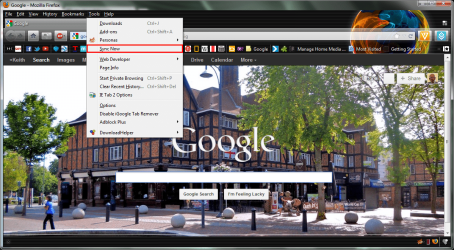
Firefox has a sync feature which will sync your bookmarks to the cloud.

screenshot173_2012-05-26.png

After you have set up your sync you will need to go to tools->options select the Sync Tab and press the Manage Account button and retrieve your recovery key and keep it safe.
 

My Computer My Computer

Computer type
Laptop
Computer Manufacturer/Model Number
Hewlett-Packard/G62-107SA Notebook
OS
Microsoft Windows 7 Home Premium 64-bit Service Pack 1
CPU
Intel(R) Core(TM) i3 CPU M 330 @ 2.13GHz
Motherboard
Hewlett-Packard 1425
Memory
8 GB DDR3
Graphics Card(s)
Intel(R) HD Graphics
Sound Card
Realtek High Definition Audio
Monitor(s) Displays
Builtin
Screen Resolution
1366 x 768 x 32 bits (4294967296 colors) @ 60 Hz
Hard Drives
250 GB SATA Hard Disk Drive 7200 rpm
2TB Seagate GoFlex USB 2 Drive
1TB Iomega Prestige USB 2 Drive
1.5TB Iomega Prestige USB 2 Drive (Samsung)
2TB WD MyBook Live NAS.
Mouse
Logitech Anywhere MX
Internet Speed
152 Mbs download 10 Mbs upload
Antivirus
Norton 360
Browser
Chrome
as an additional backup, you could use xmarks, the beauty of xmarks is you can sync your bookmarks between several computers ,so a bookmark saved on your desktop will show on your laptop . and you can log in to xmarks from any computer as well and have access to them too.

Xmarks | Bookmark Sync and Search
 

My Computer My Computer

Computer Manufacturer/Model Number
Hewlett packard/p6512uk
OS
Microsoft Windows 7 Home Premium 64-bit 7600
CPU
IIx4 amd athelon 635 processor
Motherboard
FOXCONN 2AA9
Memory
2x2gb
Graphics Card(s)
ati radeon HD 5450
Sound Card
(1) Realtek High Definition Audio (2) AMD High Definition
Monitor(s) Displays
samsung lcd tv 32"
Screen Resolution
1360x 768
Hard Drives
(1) WDC WD10 01FAES-60Z2A0 SATA Disk Device (2) Maxtor OneTouch USB Device (3) ST310003 33AS USB Device (4) WD My Book 1111 USB Device
PSU
?
Cooling
air!
Keyboard
wireless hp
Mouse
wireless Hp,optical
Internet Speed
1.10mb/s
Antivirus
MSE
Browser
Firefox
Hello,

I use Firefox for my Browser.

I would like to backup all of my Bookmarks to an external hd so I don't lose them; my
HD is beginning to have problems, apparently.

How would I back them all up, please ?

Where is the file of them stored in W7 ?
Would just transferring the File be the easiest way ?

Thanks,
Bob

I use the freeware tool, MozBackup:

MozBackup - Backup tool for Firefox and Thunderbird

MozBackup allows you to backup and restore your entire Firefox profile, or any parts of it you want--including bookmarks. Works for Thunderbird too.
 

My Computer My Computer

OS
Windows 7 x64
How would I back them all up, please ?

Where is the file of them stored in W7 ?
Would just transferring the File be the easiest way ?

Firefox bookmarks are at C users yourusername appdata roaming Mozilla Firefox Profiles. Navigate to that point and look inside a folder with a "default" extension. Inside that you will find a folder called bookmarkbackups. Inside that are the dated bookmarks with .json extensions.

You can back up your entire Firefox configuration by copying the entire Mozilla folder to a safe location. This will include bookmarks. If you ever reinstall Firefox, you can then restore your configuration and bookmarks by overwriting your newly installed Mozilla folder with this backed up version.

This Mozilla folder is not to be confused with any folders in C Programfiles.

Any ordinary file backup program can backup that location.

That is what Mozbackup does, but you can do the same thing yourself.

You can also back up bookmarks directly from Firefox at bookmarks/show all bookmarks/import and backup.
 

My Computer My Computer

Computer type
PC/Desktop
Computer Manufacturer/Model Number
Ignatz Special; 4 speed manual gearbox; factory air conditioning; one of one
OS
Windows 7 Home Premium SP1, 64-bit
CPU
Intel Skylake i5-6600K, not overclocked
Motherboard
AsRock Z170M Extreme 4, micro ATX
Memory
8 GB HyperX DDR4-2666 (2 x 4 GB)
Graphics Card(s)
none; graphics are integrated on CPU
Sound Card
onboard: Realtek ALC1150; external: USB Behringer UF0-202
Monitor(s) Displays
Dell S2340M 23 inch IPS
Screen Resolution
1600 x 900
Hard Drives
System: Crucial MX100 series SSD, 128 GB;
Data: Samsung Spinpoint 103SJ, 1 TB;
Backup: WD Caviar Green WD30EZRX-00D8PB0, 3 TB
PSU
Rosewill SilentNight 500 watt fanless, semi-modular
Case
Antec Solo II
Cooling
Noctua NH-U12S; Noctua F12 intake, Noctua S12A exhaust
Keyboard
Microsoft 200 6JH-00001 USB
Mouse
Dell or Microsoft optical wired; USB
Antivirus
Microsoft Security Essentials and Malwarebytes Premium
Browser
Pale Moon
Other Info
All fans PWM; speeds at idle: CPU circa 500 rpm; intake circa 600 rpm; exhaust circa 600 rpm; CPU temps 27 idle and 47 C load in a warm room (27 C/81 F) when running Intel Extreme Tuning Utility stress test.
Back
Top