
Backing up computer

Thank you mjf. I wonder how come notices of your replies didn't come to my email when I checked that box. So to start with I would need rewritable DVD's? I do have CD-R. I cannot afford an external hard drive. I remember on xp I think it was it just went back and backed up automatically and you could go to a restore point ifyou did something screwy to your computer. Nothing like that, huh? Don't worry about talking down to me, even your explanation I had to figure out.

Thanks.
 
Last edited by a moderator:

My Computer

Computer Manufacturer/Model Number
Vostro 220 Mini Tower Desktop Details | Dell
OS
Windows 7 Home Premium SP 1, 32-bit
CPU
Intel(R) Core(TM)2 Duo CPU E7400 @ 2.80GHz
Motherboard
Dell Inc. 0P301D
Memory
3.00 GB
Graphics Card(s)
(1) Intel(R) G45/G43 Express Chipset (2) Intel(R) G45/G43
Sound Card
(1) High Definition Audio Device (2) High Definition Audio
Monitor(s) Displays
Dell 22" wide E228WFP Analog flat panelq
Mouse
Dell optical usb mouse vostro
Other Info
OPTICAL READER, MOUSE,SPEAKERS, MONITOR, MODEM
Where is the BACK UP NOW Button and do I need DVD's for this?
 

My Computer

Computer Manufacturer/Model Number
Vostro 220 Mini Tower Desktop Details | Dell
OS
Windows 7 Home Premium SP 1, 32-bit
CPU
Intel(R) Core(TM)2 Duo CPU E7400 @ 2.80GHz
Motherboard
Dell Inc. 0P301D
Memory
3.00 GB
Graphics Card(s)
(1) Intel(R) G45/G43 Express Chipset (2) Intel(R) G45/G43
Sound Card
(1) High Definition Audio Device (2) High Definition Audio
Monitor(s) Displays
Dell 22" wide E228WFP Analog flat panelq
Mouse
Dell optical usb mouse vostro
Other Info
OPTICAL READER, MOUSE,SPEAKERS, MONITOR, MODEM
If you haven't run backup previously, you won't see a "backup now" button. From start/search, type "backup"
and hit enter. If you have previously run backup, this is where you will see the "back up now" button. If you have *not* yet run back up, you will see a button called "set up backup", instead. You need to have an external drive or DVD drive connected before you do the setup. It is strongly recommended that you backup to an external drive. I know you said you can't afford one but backing up to disks is questionable, at best. Do whatever you can to get yourself an external drive. In the mean time, there's always the on-line alternative.
 

My Computer

Computer Manufacturer/Model Number
Custom Build
OS
Windows 7 Pro/32 Academic. Build 7600
CPU
Intel 2.3 Duo core
Motherboard
EliteGroup G31T-M
Memory
4 GB DDR
Graphics Card(s)
Nvidia GeForce 9500 GT
Sound Card
Built in
Monitor(s) Displays
Viewsonic 15" 4:3
Screen Resolution
1280 x 1024
Hard Drives
WD Caviar Black 750 GB
WD 250 GB External
PSU
Antec 450w
Keyboard
Standard windows
Mouse
Logitech USB
Internet Speed
Bellsouth DSL 6.0
Thank you mjf. I wonder how come notices of your replies didn't come to my email when I checked that box. So to start with I would need rewritable DVD's? I do have CD-R. I cannot afford an external hard drive. I remember on xp I think it was it just went back and backed up automatically and you could go to a restore point ifyou did something screwy to your computer. Nothing like that, huh? Don't worry about talking down to me, even your explanation I had to figure out.

Thanks.
When you can afford it, look out for sales. With a thing called USB 3 coming, the USB 2 drives should drop even more. USB 2 externals, smallish (500GB) is fine for you I think. Get the ones without the software on them, they tend to be cheaper. The portable 500GB WD Elements (Western Digital) for doing your backups is a nice little unit. I'd leave it unplugged most of the time - it will last longer.

As for DVDs in the meantime. I haven't had a problem with DVD+R but don't see why DVD-R wouldn't be as good. I'd steer away from the R/W as I've read they are less reliable for backup use. Generally buy the 50 spindle packs since they'll work out cheaper. Of course don't consider CDs.

With DVDs make a smaller number of images say 2-3 and check that the software says something like "image successful".
Remember I spoke about images are different from the general file backups (reread). Do your file backups - you will feed the same DVD for quite a while probably as it keeps adding your incremental backups. Buy one of the special marker pens for writing on the topside of your DVDs.

To get to the page I talked about - type Backup and Restore in the bottom search box.

PS: I asked the Administrator to remove your personal email address you sent. Anyone in the world can see it. Communicate through the Forum.
 

My Computer

Computer type
PC/Desktop
Computer Manufacturer/Model Number
Own build
OS
Windows 7x64 Home Premium SP1
CPU
Intel i7 2600k
Motherboard
ASUS P8Z68 Deluxe
Memory
G.Skill Ripjaws (DDR3-1600) 2x4GB
Graphics Card(s)
Nvidia GeForce GTS 450; Intel HD Graphics 3000(GT2+)
Monitor(s) Displays
Dell Ultrasharp IPS panel U2311H, Samsung SyncMaster P2350
Screen Resolution
1920x1080
Hard Drives
Samsung 850 Pro SSD 256GB, Samsung SSD 840 120GB, Seagates 1TB Barracuda ST31000528AS x2
PSU
Seasonic M12II 520W
Case
Lian Li Lancool PC-K60
Cooling
Case: 1x120mm, 3x140mm CPU: Hyper 212+
Keyboard
Logitech MK520 (wireless)
Mouse
Logitech MK520
Internet Speed
6-7 Mbps
Antivirus
Norton Security Premium, Malwarebytes on 2 (MSE on 3rd PC)
Browser
FireFox
Other Info
Audio: Logitech Z523 2.1
USB 2 externals, smallish (500GB) is fine for you I think.

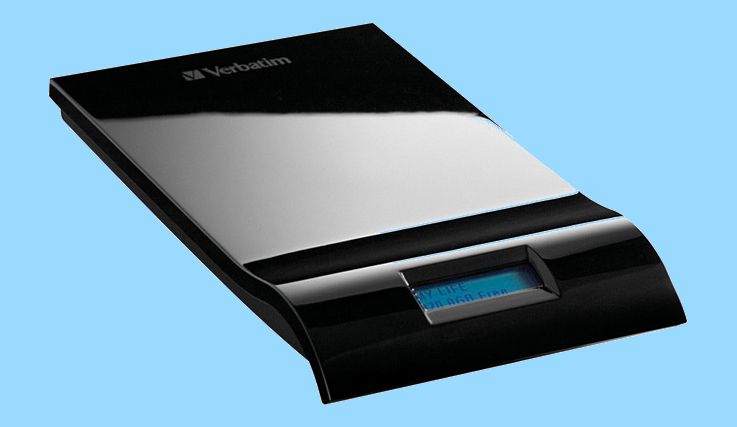
I've been using a Verbatim Insite 500GB drive every day all day for almost a year now and it has performed flawlessly even when I take it on the road with me. It has already outlasted several WD drives and a Seagate 1.5 TB drive I had in the past performing the same functions...

Verbatim500GB_B.jpg


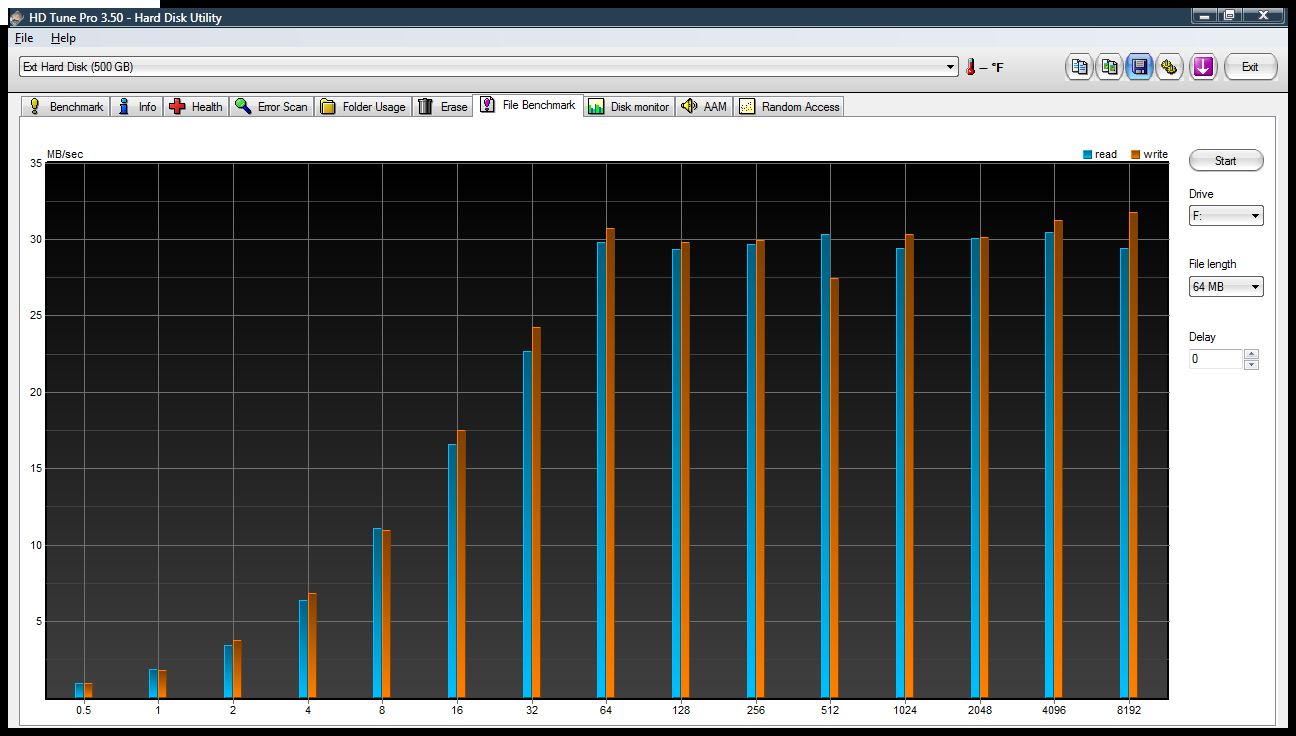
And its Read and Write benchmarks are acceptable for a USB drive...

VerbatimRWBenchmark.png


~Maxx~
.
Win7_50.png
 

My Computer

Computer Manufacturer/Model Number
HP HPE 270f
OS
Windows 7 x64 Home Premium
CPU
Intel Core i7 930 @ 2.8 Ghz Socket 1366 LGA
Motherboard
Pegatron Truckee v1.04E41
Memory
8 GB 1366 Mhz DDR3 (PC3-10700) RAM
Graphics Card(s)
ATI Radeon 5770 1 GB DDR5 RAM
Sound Card
Realtech High Definition
Monitor(s) Displays
32" Sony Bravia
Screen Resolution
1366 X 768
Hard Drives
Intel 25nm 120 GB Series 320 SSD HD Tune- 265 MBps Read/ 130 MBps Write

LaCie 1TB + 1TB RAID 0 eSATA Drive HD Tune- 160 MBps Read/ 90 MBps Write
Keyboard
Logitech Illuminated
Mouse
Logitech MX Revolution
Internet Speed
36.4 Mbps Maximum on a 37 Mbps Motorola SB501 Modem
It sounds like you are saying you back it up on the computer itself? Do you? Can I use a usb flash drive to just back up my info - not the programs? I cannnot afford an external drive at this time.
 

My Computer

Computer Manufacturer/Model Number
Vostro 220 Mini Tower Desktop Details | Dell
OS
Windows 7 Home Premium SP 1, 32-bit
CPU
Intel(R) Core(TM)2 Duo CPU E7400 @ 2.80GHz
Motherboard
Dell Inc. 0P301D
Memory
3.00 GB
Graphics Card(s)
(1) Intel(R) G45/G43 Express Chipset (2) Intel(R) G45/G43
Sound Card
(1) High Definition Audio Device (2) High Definition Audio
Monitor(s) Displays
Dell 22" wide E228WFP Analog flat panelq
Mouse
Dell optical usb mouse vostro
Other Info
OPTICAL READER, MOUSE,SPEAKERS, MONITOR, MODEM
Backup

Thank you mjf. I wonder how come notices of your replies didn't come to my email when I checked that box. So to start with I would need rewritable DVD's? I do have CD-R. I cannot afford an external hard drive. I remember on xp I think it was it just went back and backed up automatically and you could go to a restore point ifyou did something screwy to your computer. Nothing like that, huh? Don't worry about talking down to me, even your explanation I had to figure out.

Thanks.
When you can afford it, look out for sales. With a thing called USB 3 coming, the USB 2 drives should drop even more. USB 2 externals, smallish (500GB) is fine for you I think. Get the ones without the software on them, they tend to be cheaper. The portable 500GB WD Elements (Western Digital) for doing your backups is a nice little unit. I'd leave it unplugged most of the time - it will last longer.

As for DVDs in the meantime. I haven't had a problem with DVD+R but don't see why DVD-R wouldn't be as good. I'd steer away from the R/W as I've read they are less reliable for backup use. Generally buy the 50 spindle packs since they'll work out cheaper. Of course don't consider CDs.

With DVDs make a smaller number of images say 2-3 and check that the software says something like "image successful".
Remember I spoke about images are different from the general file backups (reread). Do your file backups - you will feed the same DVD for quite a while probably as it keeps adding your incremental backups. Buy one of the special marker pens for writing on the topside of your DVDs.

To get to the page I talked about - type Backup and Restore in the bottom search box.

PS: I asked the Administrator to remove your personal email address you sent. Anyone in the world can see it. Communicate through the Forum.


If I used DVD's, you would just keep using different ones, correct, you couldn't reuse them. Also, if I used a usb flash drive, what size would I know to get?
I tried backing it up on my computer but it woudln't let me, said it wanted a DVD or usb
 
Last edited:

My Computer

Computer Manufacturer/Model Number
Vostro 220 Mini Tower Desktop Details | Dell
OS
Windows 7 Home Premium SP 1, 32-bit
CPU
Intel(R) Core(TM)2 Duo CPU E7400 @ 2.80GHz
Motherboard
Dell Inc. 0P301D
Memory
3.00 GB
Graphics Card(s)
(1) Intel(R) G45/G43 Express Chipset (2) Intel(R) G45/G43
Sound Card
(1) High Definition Audio Device (2) High Definition Audio
Monitor(s) Displays
Dell 22" wide E228WFP Analog flat panelq
Mouse
Dell optical usb mouse vostro
Other Info
OPTICAL READER, MOUSE,SPEAKERS, MONITOR, MODEM
Yes you will keep using DVDs.
It depends but say a full image takes 5 DVDs. So if you make 3 images in the course of a year. You would store away 15 DVDs for a safe recovery.

For Your personal file backups it depends on how much data you have. When you make your first backup it will ask you to keep feeding disks in (probably a couple). Then when you make your next backup the program will ask you to feed in the last DVD until it gets full. Then you need a new one until it gets full and so on.

Regarding USBs, I'll ask someone who uses USBs for backup to answer you. I just use them for folder drag & drop type copying.

PS: In case anyone thinks I'm recommending DVDs for backup - I'm not. Patti advised she's not ready to buy an external HDD yet.
 

My Computer

Computer type
PC/Desktop
Computer Manufacturer/Model Number
Own build
OS
Windows 7x64 Home Premium SP1
CPU
Intel i7 2600k
Motherboard
ASUS P8Z68 Deluxe
Memory
G.Skill Ripjaws (DDR3-1600) 2x4GB
Graphics Card(s)
Nvidia GeForce GTS 450; Intel HD Graphics 3000(GT2+)
Monitor(s) Displays
Dell Ultrasharp IPS panel U2311H, Samsung SyncMaster P2350
Screen Resolution
1920x1080
Hard Drives
Samsung 850 Pro SSD 256GB, Samsung SSD 840 120GB, Seagates 1TB Barracuda ST31000528AS x2
PSU
Seasonic M12II 520W
Case
Lian Li Lancool PC-K60
Cooling
Case: 1x120mm, 3x140mm CPU: Hyper 212+
Keyboard
Logitech MK520 (wireless)
Mouse
Logitech MK520
Internet Speed
6-7 Mbps
Antivirus
Norton Security Premium, Malwarebytes on 2 (MSE on 3rd PC)
Browser
FireFox
Other Info
Audio: Logitech Z523 2.1
Patti advised she's not ready to buy an external HDD yet.

I'm hoping that Santa will see fit to leave an external HDD in Patti's stocking this Holiday Season because I'm sure she deserves one!

~Maxx~
.
Win7_50.png
 

My Computer

Computer Manufacturer/Model Number
HP HPE 270f
OS
Windows 7 x64 Home Premium
CPU
Intel Core i7 930 @ 2.8 Ghz Socket 1366 LGA
Motherboard
Pegatron Truckee v1.04E41
Memory
8 GB 1366 Mhz DDR3 (PC3-10700) RAM
Graphics Card(s)
ATI Radeon 5770 1 GB DDR5 RAM
Sound Card
Realtech High Definition
Monitor(s) Displays
32" Sony Bravia
Screen Resolution
1366 X 768
Hard Drives
Intel 25nm 120 GB Series 320 SSD HD Tune- 265 MBps Read/ 130 MBps Write

LaCie 1TB + 1TB RAID 0 eSATA Drive HD Tune- 160 MBps Read/ 90 MBps Write
Keyboard
Logitech Illuminated
Mouse
Logitech MX Revolution
Internet Speed
36.4 Mbps Maximum on a 37 Mbps Motorola SB501 Modem
Maxxwire you are sweet. I am recently divorced and live from alimony check to alimony check. A DVD is just a luxury I cannot afford, I would rather eat! Thanks!
Can you tell me one of the bestest, cheapest one?
 

My Computer

Computer Manufacturer/Model Number
Vostro 220 Mini Tower Desktop Details | Dell
OS
Windows 7 Home Premium SP 1, 32-bit
CPU
Intel(R) Core(TM)2 Duo CPU E7400 @ 2.80GHz
Motherboard
Dell Inc. 0P301D
Memory
3.00 GB
Graphics Card(s)
(1) Intel(R) G45/G43 Express Chipset (2) Intel(R) G45/G43
Sound Card
(1) High Definition Audio Device (2) High Definition Audio
Monitor(s) Displays
Dell 22" wide E228WFP Analog flat panelq
Mouse
Dell optical usb mouse vostro
Other Info
OPTICAL READER, MOUSE,SPEAKERS, MONITOR, MODEM
backup

I thought that was quick - then I looked at your specs. Pretty fast machine you have.

Windows system image is actually slow in comparative terms - it's the slowest backup app. I have come across.

Not that backup speed matters all that much ( unless you have an enormous amount of data ) . Reliability and flexibilty are more important imo.


How do you know what to backup? Surely it wouldn't be all the programs and can you back it up right on your computer somewhere.

A System Image Backup will include all of the programs on your computer as well as system settings, the 100 MB Win 7 System partition and your factory restore partition as it will show in Backup and Restore. Its fairly quick though I did one earlier this evening with 16.2 GB on the Windows 7 partition to back up and it only took 5 minutes and 22 seconds to complete.

~Maxx~
.
da59fa57.png

I just want to back up my data ? Does that make a difference in what I use? I am afraid of an external device for fear I will screw up my machine.
 

My Computer

Computer Manufacturer/Model Number
Vostro 220 Mini Tower Desktop Details | Dell
OS
Windows 7 Home Premium SP 1, 32-bit
CPU
Intel(R) Core(TM)2 Duo CPU E7400 @ 2.80GHz
Motherboard
Dell Inc. 0P301D
Memory
3.00 GB
Graphics Card(s)
(1) Intel(R) G45/G43 Express Chipset (2) Intel(R) G45/G43
Sound Card
(1) High Definition Audio Device (2) High Definition Audio
Monitor(s) Displays
Dell 22" wide E228WFP Analog flat panelq
Mouse
Dell optical usb mouse vostro
Other Info
OPTICAL READER, MOUSE,SPEAKERS, MONITOR, MODEM
I'd drag my active User folders (Documents, Pictures, Music, etc) to a DVD which holds 4.7gb each. You can get the size ahead of time by looking at the Properties box for each. I would clean up each folder ahead of time of files you don't need so you don't waste any disk space.

Other than the external, a large quantity of data or an image can also be sent across the network to another computer if that is an option for you.
 
Patti,
when we started we discussed the backup options. If you must use DVDs (because of your cost constraints) the procedure was given. For images which are a snapshot of your PC try one out. All you have to loose is waste a few DVDs. Windows is just as fast as some of the others which are more complicated.
The file backups which we also talked about are a bit slow with Windows but will usually get the job done.

For USBs I suggested drag and drop folders. If you don't want to use the regular backup that comes with Windows you can drag and drop to DVDs as well. Just when you put in a new CD/DVD windows will ask how do you want this formatted. Select format as a USB.

Remember drag and drop method of backup requires you to keep more of a record when files or folders have been changed and need to be copied.
 

My Computer

Computer type
PC/Desktop
Computer Manufacturer/Model Number
Own build
OS
Windows 7x64 Home Premium SP1
CPU
Intel i7 2600k
Motherboard
ASUS P8Z68 Deluxe
Memory
G.Skill Ripjaws (DDR3-1600) 2x4GB
Graphics Card(s)
Nvidia GeForce GTS 450; Intel HD Graphics 3000(GT2+)
Monitor(s) Displays
Dell Ultrasharp IPS panel U2311H, Samsung SyncMaster P2350
Screen Resolution
1920x1080
Hard Drives
Samsung 850 Pro SSD 256GB, Samsung SSD 840 120GB, Seagates 1TB Barracuda ST31000528AS x2
PSU
Seasonic M12II 520W
Case
Lian Li Lancool PC-K60
Cooling
Case: 1x120mm, 3x140mm CPU: Hyper 212+
Keyboard
Logitech MK520 (wireless)
Mouse
Logitech MK520
Internet Speed
6-7 Mbps
Antivirus
Norton Security Premium, Malwarebytes on 2 (MSE on 3rd PC)
Browser
FireFox
Other Info
Audio: Logitech Z523 2.1
Hi Patti,

Just check the flyer for Staples and they have the USB thumb drives on sale for $10 on the 4GB and up. I have bought two USB drives on sale from Staples.
 

My Computer

Computer type
Laptop
Computer Manufacturer/Model Number
HP Pavilion g7 series
OS
Windows 7 Home Premium 64 bit.
Memory
4 GB
Hard Drives
DVD/CD Roms
Case
Charcoal Gray
Cooling
Internal Fan
Keyboard
Duel Keyboard with Side Number Pad included and not USB #Pad
Mouse
G.E. Gray & Black Laser Mouse with Cord.
Internet Speed
Earthlink High Speed Wifi
Antivirus
M. S. E.
Browser
Firefox and Google Chrome.
Other Info
I use the computer to practice my typing skills,
but I really like to play online dressup games.
Patti- I've gotten some great deals on USB Flash Drives at both Office Depot and Office Max. I've purchased several 16 GB Toshiba Flash Trans Memory Drives that benchmarked in the 30 Mbps range for write time and backed up an entire Drive Image to it with room to spare. If you keep an eye out this Holiday Season you are sure to find some affordable Flash Drives that are suitable to use as backups.

~Maxx~
,
Win7_50.png
 

My Computer

Computer Manufacturer/Model Number
HP HPE 270f
OS
Windows 7 x64 Home Premium
CPU
Intel Core i7 930 @ 2.8 Ghz Socket 1366 LGA
Motherboard
Pegatron Truckee v1.04E41
Memory
8 GB 1366 Mhz DDR3 (PC3-10700) RAM
Graphics Card(s)
ATI Radeon 5770 1 GB DDR5 RAM
Sound Card
Realtech High Definition
Monitor(s) Displays
32" Sony Bravia
Screen Resolution
1366 X 768
Hard Drives
Intel 25nm 120 GB Series 320 SSD HD Tune- 265 MBps Read/ 130 MBps Write

LaCie 1TB + 1TB RAID 0 eSATA Drive HD Tune- 160 MBps Read/ 90 MBps Write
Keyboard
Logitech Illuminated
Mouse
Logitech MX Revolution
Internet Speed
36.4 Mbps Maximum on a 37 Mbps Motorola SB501 Modem
Patti- I've gotten some great deals on USB Flash Drives at both Office Depot and Office Max. I've purchased several 16 GB Toshiba Flash Trans Memory Drives that benchmarked in the 30 Mbps range for write time and backed up an entire Drive Image to it with room to spare. If you keep an eye out this Holiday Season you are sure to find some affordable Flash Drives that are suitable to use as backups.

~Maxx~
,
Win7_50.png

This is very good advice Maxx.
Thank you for sharing.
 

My Computer

Computer type
Laptop
Computer Manufacturer/Model Number
HP Pavilion g7 series
OS
Windows 7 Home Premium 64 bit.
Memory
4 GB
Hard Drives
DVD/CD Roms
Case
Charcoal Gray
Cooling
Internal Fan
Keyboard
Duel Keyboard with Side Number Pad included and not USB #Pad
Mouse
G.E. Gray & Black Laser Mouse with Cord.
Internet Speed
Earthlink High Speed Wifi
Antivirus
M. S. E.
Browser
Firefox and Google Chrome.
Other Info
I use the computer to practice my typing skills,
but I really like to play online dressup games.
It sounds like you are saying you back it up on the computer itself? Do you? Can I use a usb flash drive to just back up my info - not the programs? I cannnot afford an external drive at this time.

If that is the case, i would suggest getting a USB flash drive that you just plug in and then drag and drop the files that you want backed up. By all means, at least do this. While images are NICE...if you have the original OS discs and software you can always just reinstall the OS if worse comes to worse. But your personal files.....when those are gone...they are gone.

These drives go for as little as $6 for a 2GB drive at NewEgg.com.
Newegg.com - Patriot X-Porter 2GB Flash Drive (USB2.0 Portable) Model PSF2GUSB

If you need more space then here is a 4GB for $7 at NewEgg
Newegg.com - Patriot 4GB Flash Drive (USB2.0 Portable) Model PSF4GMUSB(Blue)

Here is an 8GB crucial for $16
Newegg.com - Crucial 8GB Flash Drive (USB2.0 Portable) Model JDOD8GB-730

And here is a 16GB OCZ Rally drive for $39
Newegg.com - OCZ Rally2 16GB USB 2.0 Flash Drive Model OCZUSBR2DC-16GB
 

My Computer

Computer Manufacturer/Model Number
Self-Built in July 2009
OS
Windows 7 Ultimate x64
CPU
Intel Q9550 2.83Ghz OC'd to 3.40Ghz
Motherboard
Gigabyte GA-EP45-UD3R rev. 1.1, F12 BIOS
Memory
8GB G.Skill PI DDR2-800, 4-4-4-12 timings
Graphics Card(s)
EVGA 1280MB Nvidia GeForce GTX570
Sound Card
Realtek ALC899A 8 channel onboard audio
Monitor(s) Displays
23" Acer x233H
Screen Resolution
1920x1080
Hard Drives
Intel X25-M 80GB Gen 2 SSD
Western Digital 1TB Caviar Black, 32MB cache. WD1001FALS
PSU
Corsair 620HX modular
Case
Antec P182
Cooling
stock
Keyboard
ABS M1 Mechanical
Mouse
Logitech G9 Laser Mouse
Internet Speed
15/2 cable modem
Other Info
Windows and Linux enthusiast. Logitech G35 Headset.
It sounds like you are saying you back it up on the computer itself? Do you? Can I use a usb flash drive to just back up my info - not the programs? I cannnot afford an external drive at this time.

If that is the case, i would suggest getting a USB flash drive that you just plug in and then drag and drop the files that you want backed up. By all means, at least do this. While images are NICE...if you have the original OS discs and software you can always just reinstall the OS if worse comes to worse. But your personal files.....when those are gone...they are gone.

These drives go for as little as $6 for a 2GB drive at NewEgg.com.
Newegg.com - Patriot X-Porter 2GB Flash Drive (USB2.0 Portable) Model PSF2GUSB

If you need more space then here is a 4GB for $7 at NewEgg
Newegg.com - Patriot 4GB Flash Drive (USB2.0 Portable) Model PSF4GMUSB(Blue)

Here is an 8GB crucial for $16
Newegg.com - Crucial 8GB Flash Drive (USB2.0 Portable) Model JDOD8GB-730

And here is a 16GB OCZ Rally drive for $39
Newegg.com - OCZ Rally2 16GB USB 2.0 Flash Drive Model OCZUSBR2DC-16GB
After all of the above posts I think this one is probably where you are at.
Get a deal on your USB & drop & drag your personal documents/folders.
 

My Computer

Computer type
PC/Desktop
Computer Manufacturer/Model Number
Own build
OS
Windows 7x64 Home Premium SP1
CPU
Intel i7 2600k
Motherboard
ASUS P8Z68 Deluxe
Memory
G.Skill Ripjaws (DDR3-1600) 2x4GB
Graphics Card(s)
Nvidia GeForce GTS 450; Intel HD Graphics 3000(GT2+)
Monitor(s) Displays
Dell Ultrasharp IPS panel U2311H, Samsung SyncMaster P2350
Screen Resolution
1920x1080
Hard Drives
Samsung 850 Pro SSD 256GB, Samsung SSD 840 120GB, Seagates 1TB Barracuda ST31000528AS x2
PSU
Seasonic M12II 520W
Case
Lian Li Lancool PC-K60
Cooling
Case: 1x120mm, 3x140mm CPU: Hyper 212+
Keyboard
Logitech MK520 (wireless)
Mouse
Logitech MK520
Internet Speed
6-7 Mbps
Antivirus
Norton Security Premium, Malwarebytes on 2 (MSE on 3rd PC)
Browser
FireFox
Other Info
Audio: Logitech Z523 2.1
if you never do an initial backup when you first use win 7 the the action center has a flagged message as a reminder ,you can turn the reminder off by clicking the flag, then open Action center then on the window for the backup alert click the turn off message about backups link

I cannot find the window for the backup alert. I got to the action center and that was it. I had tried to back up right on my computer, and it didn't work, so I wonder if that has something to do with it. Should I back up on USB flash drives or an external hard drive (which are so expensive). I don't want to have to remember to back it up, I want it to back up automatically according to when I have it set. Thanks.
 

My Computer

Computer Manufacturer/Model Number
Vostro 220 Mini Tower Desktop Details | Dell
OS
Windows 7 Home Premium SP 1, 32-bit
CPU
Intel(R) Core(TM)2 Duo CPU E7400 @ 2.80GHz
Motherboard
Dell Inc. 0P301D
Memory
3.00 GB
Graphics Card(s)
(1) Intel(R) G45/G43 Express Chipset (2) Intel(R) G45/G43
Sound Card
(1) High Definition Audio Device (2) High Definition Audio
Monitor(s) Displays
Dell 22" wide E228WFP Analog flat panelq
Mouse
Dell optical usb mouse vostro
Other Info
OPTICAL READER, MOUSE,SPEAKERS, MONITOR, MODEM
Back
Top