How to prevent router from waking up computer

johnhoh

New member
Guru
VIP
Local time
9:27 AM
Messages
1,363
I use WOL on my two-system home network and want to keep using it. One machine is ethernet attached and the other is wireless. Even when they are both asleep the wireless machine wakes up every thirty minutes. I can tell from the event viewer log that its waking up because of its wireless adapter. The Power Management setting for the wireless adapter has these three boxes checked "ONLY allow a magic packet to wake the computer.wake up via magic packet", "Allow this device to wake the computer" and "allow the computer to turn off this device to save power". In the advanced device properties I have Disabled for "wake on pattern match" and Enabled for "wake on magic packet".

Because of the above I am concluding that a magic packet is being sent to the wireless machine every thirty minutes by my router. How do I stop this at the router without disabling WOL altogether? I logged onto the router but did not see any settings that might stop this polliing. Thanks
 

My Computer My Computer

Computer type
PC/Desktop
Computer Manufacturer/Model Number
diy
OS
Win7 pro x64
CPU
stock i7 7700k
Motherboard
Gigabyte Z270N-WIFI mini-ITX
Memory
Corsair Vengeance LPX 16GB (2x8GB) DDR4 @ 3200MHz
Graphics Card(s)
integrated Intel HD 630
Sound Card
onboard Realtek ALC1220
Monitor(s) Displays
two vertically mounted samsung 55" 4k un55mu8000
Screen Resolution
1920x1280
Hard Drives
256GB Samsung EVO 960 M.2 pci-e NVMe SSD
PSU
SilverStone Nightjar ST45NF 450Watt Fanless
Case
No case. Motherboard is mounted directly onto power supply
Cooling
Evercool low profile 815EP with Panaflow 12L fan at 7v
Keyboard
Ortek MCK-86 mini
Mouse
Belkin 5-button USB
Internet Speed
spectrum 400mbps
I'm not too sure. The only thing I can think of is maybe UPnP i the router is doing. it. If you have that on it would be in your best interest to turn it off as it's a security issue.
 

My Computer My Computer

Computer type
PC/Desktop
OS
Windows 7 Ultimate x64
Good point. Upnp was on by default so I turned it off and rebooted the router. We'll see what happens. Btw the router is a Spectrum Wave 2 - RAC2V1S Sagemcom
 

My Computer My Computer

Computer type
PC/Desktop
Computer Manufacturer/Model Number
diy
OS
Win7 pro x64
CPU
stock i7 7700k
Motherboard
Gigabyte Z270N-WIFI mini-ITX
Memory
Corsair Vengeance LPX 16GB (2x8GB) DDR4 @ 3200MHz
Graphics Card(s)
integrated Intel HD 630
Sound Card
onboard Realtek ALC1220
Monitor(s) Displays
two vertically mounted samsung 55" 4k un55mu8000
Screen Resolution
1920x1280
Hard Drives
256GB Samsung EVO 960 M.2 pci-e NVMe SSD
PSU
SilverStone Nightjar ST45NF 450Watt Fanless
Case
No case. Motherboard is mounted directly onto power supply
Cooling
Evercool low profile 815EP with Panaflow 12L fan at 7v
Keyboard
Ortek MCK-86 mini
Mouse
Belkin 5-button USB
Internet Speed
spectrum 400mbps
no luck, wireless adapter still wakes it up frequently...
 

My Computer My Computer

Computer type
PC/Desktop
Computer Manufacturer/Model Number
diy
OS
Win7 pro x64
CPU
stock i7 7700k
Motherboard
Gigabyte Z270N-WIFI mini-ITX
Memory
Corsair Vengeance LPX 16GB (2x8GB) DDR4 @ 3200MHz
Graphics Card(s)
integrated Intel HD 630
Sound Card
onboard Realtek ALC1220
Monitor(s) Displays
two vertically mounted samsung 55" 4k un55mu8000
Screen Resolution
1920x1280
Hard Drives
256GB Samsung EVO 960 M.2 pci-e NVMe SSD
PSU
SilverStone Nightjar ST45NF 450Watt Fanless
Case
No case. Motherboard is mounted directly onto power supply
Cooling
Evercool low profile 815EP with Panaflow 12L fan at 7v
Keyboard
Ortek MCK-86 mini
Mouse
Belkin 5-button USB
Internet Speed
spectrum 400mbps
Is there any reason why you need the computer on & in sleep mode when perhaps you could just shut it down when you are not using it. If it's waking the computer every 30 minutes it looks like you have it in sleep mode for long periods.
 

My Computer My Computer

Computer type
PC/Desktop
Computer Manufacturer/Model Number
Self built using existing case
OS
Windows 7 Home Premium 64 bit sp1
CPU
Intel i5 3570 3.4Ghz Ivy Bridge SKT 1155 quad core
Motherboard
Gigabyte Z77-HD3 SKT 1155 2xSata 3, 4x USB 3.0
Memory
G-Skill Rip Jaws 16Gb (8x2) DDR3 -1600 PC3 12800 CL 10 red
Graphics Card(s)
Gigabyte NVIDIA GT610 1Gb DDR3 810/1200 PCI-E 2.0 Silent
Sound Card
NVIDIA High Definition & Realtech High Definition Audio
Monitor(s) Displays
2 x Philips 226V4L 16:9 aspect ratio
Screen Resolution
1920 x 1080 HD
Hard Drives
Samsung 840 Pro 256gb SSD, SATA 3.
Hitachi Touro Portable 1tb, USB 3.0 HDD used for image b/ups.
PSU
Corsair VS450
Case
Codeng
Cooling
PSU fan & CPU fan
Keyboard
Logitech
Mouse
Logitech Wireless trackball M570
Internet Speed
Wireless 3G. 3mg down & 550kb up.
Antivirus
Bitdefender Internet Security 2020
Browser
Opera (Current Version) & Firefox
Other Info
MS Office 2013 Pro. Davis weather station software. MGE Nova 600 avr UPS.
I'm wondering if it's actually your power settings for the computer with the wireless adapter.
So you say you put the machines to sleep? Perhaps something like a USB event or what ever is waking the computer. Is the WIFI adapter actually USB?

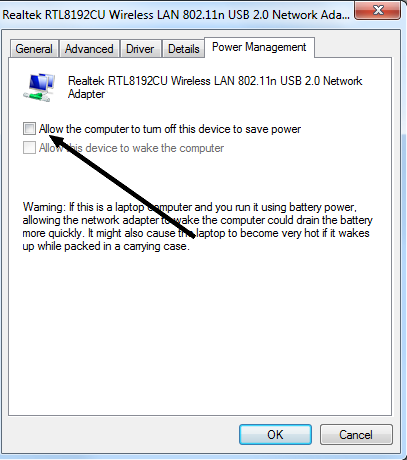
I wonder what would happen if you check this option? Or is it already checked? I hope that wouldn't affect WOL.


FKGK3KB.png
 

My Computer My Computer

Computer type
PC/Desktop
OS
Windows 7 Ultimate x64
the "allow the device to to turn off the device to save power" is checked on the adapter. If I uncheck it, WOL capability is lost and the WOL box goes gray.
 

My Computer My Computer

Computer type
PC/Desktop
Computer Manufacturer/Model Number
diy
OS
Win7 pro x64
CPU
stock i7 7700k
Motherboard
Gigabyte Z270N-WIFI mini-ITX
Memory
Corsair Vengeance LPX 16GB (2x8GB) DDR4 @ 3200MHz
Graphics Card(s)
integrated Intel HD 630
Sound Card
onboard Realtek ALC1220
Monitor(s) Displays
two vertically mounted samsung 55" 4k un55mu8000
Screen Resolution
1920x1280
Hard Drives
256GB Samsung EVO 960 M.2 pci-e NVMe SSD
PSU
SilverStone Nightjar ST45NF 450Watt Fanless
Case
No case. Motherboard is mounted directly onto power supply
Cooling
Evercool low profile 815EP with Panaflow 12L fan at 7v
Keyboard
Ortek MCK-86 mini
Mouse
Belkin 5-button USB
Internet Speed
spectrum 400mbps
Are you powering off the computer or putting it to sleep? If it's in sleep mode that may be your issue. Something is triggering it to resume from sleep mode. So this wouldn't be a WOL event at all.
 

My Computer My Computer

Computer type
PC/Desktop
OS
Windows 7 Ultimate x64
Here's the status of the problem:

The event viewer system log says its waking up because of the wireless adapter. When WOL is disabled it never wakes up, when WOL is enabled it wakes up exactly every 30 minutes.

Its waking up from sleep, but WOL applies to machines that are asleep, hibernating, or shut down. I have not tried waking it up from being shut down, as I prefer to use sleep.

Group Key Update is a WPA and WPA2 concept where the router sends out a new encryption key to all devices (sending it to their MAC address, just like a wake on lan magic packet). I found another guy who had my exact issue and solved it by adjusting the Group Key Update Interval on his router. I have a Spectrum router and the default GKUI is 1800 seconds, but it is not a changeable setting within the Router GUI. I spoke with Spectrum tech support yesterday and they are researching how to allow me to change this setting to once a day, as I can live with the machine waking up once a day.

Here is a link that overviews the situation from the other guy who has this problem...

Wake on LAN works but my PC wakes up periodically without me telling it to : techsupport
 

My Computer My Computer

Computer type
PC/Desktop
Computer Manufacturer/Model Number
diy
OS
Win7 pro x64
CPU
stock i7 7700k
Motherboard
Gigabyte Z270N-WIFI mini-ITX
Memory
Corsair Vengeance LPX 16GB (2x8GB) DDR4 @ 3200MHz
Graphics Card(s)
integrated Intel HD 630
Sound Card
onboard Realtek ALC1220
Monitor(s) Displays
two vertically mounted samsung 55" 4k un55mu8000
Screen Resolution
1920x1280
Hard Drives
256GB Samsung EVO 960 M.2 pci-e NVMe SSD
PSU
SilverStone Nightjar ST45NF 450Watt Fanless
Case
No case. Motherboard is mounted directly onto power supply
Cooling
Evercool low profile 815EP with Panaflow 12L fan at 7v
Keyboard
Ortek MCK-86 mini
Mouse
Belkin 5-button USB
Internet Speed
spectrum 400mbps
Interesting.
 

My Computer My Computer

Computer type
PC/Desktop
OS
Windows 7 Ultimate x64
Yesterday I switched out my router for an old one I had lying around which has an adjustable Group Key Update Interval (aka key renewal interval), so I set it to 7200 seconds and sure enough, my machine wakes up every two hours now. So today I picked up a new router which allows me to disable it, or to set it at as long as a week. Hopefully this will solve the issue, will post again after using for a day or so...
 

My Computer My Computer

Computer type
PC/Desktop
Computer Manufacturer/Model Number
diy
OS
Win7 pro x64
CPU
stock i7 7700k
Motherboard
Gigabyte Z270N-WIFI mini-ITX
Memory
Corsair Vengeance LPX 16GB (2x8GB) DDR4 @ 3200MHz
Graphics Card(s)
integrated Intel HD 630
Sound Card
onboard Realtek ALC1220
Monitor(s) Displays
two vertically mounted samsung 55" 4k un55mu8000
Screen Resolution
1920x1280
Hard Drives
256GB Samsung EVO 960 M.2 pci-e NVMe SSD
PSU
SilverStone Nightjar ST45NF 450Watt Fanless
Case
No case. Motherboard is mounted directly onto power supply
Cooling
Evercool low profile 815EP with Panaflow 12L fan at 7v
Keyboard
Ortek MCK-86 mini
Mouse
Belkin 5-button USB
Internet Speed
spectrum 400mbps
Yahoo the new router solved this. My new TP-link AC1900 "Touch P5" router has Key Renewal Key options varying from disabled up to a week in interval, so I've got it set for disabled for now which is the default. No more unwanted WOLs on my wireless machine. $60 on amazon with same day delivery and has a touch screen interface right on the router that makes setup way easier. Kinda weird that so few routers (I looked at about 20 of them) have the ability to set your group key update interval beyond a narrow range of an hour or two, or at all.
 

My Computer My Computer

Computer type
PC/Desktop
Computer Manufacturer/Model Number
diy
OS
Win7 pro x64
CPU
stock i7 7700k
Motherboard
Gigabyte Z270N-WIFI mini-ITX
Memory
Corsair Vengeance LPX 16GB (2x8GB) DDR4 @ 3200MHz
Graphics Card(s)
integrated Intel HD 630
Sound Card
onboard Realtek ALC1220
Monitor(s) Displays
two vertically mounted samsung 55" 4k un55mu8000
Screen Resolution
1920x1280
Hard Drives
256GB Samsung EVO 960 M.2 pci-e NVMe SSD
PSU
SilverStone Nightjar ST45NF 450Watt Fanless
Case
No case. Motherboard is mounted directly onto power supply
Cooling
Evercool low profile 815EP with Panaflow 12L fan at 7v
Keyboard
Ortek MCK-86 mini
Mouse
Belkin 5-button USB
Internet Speed
spectrum 400mbps
Routers that support the third party firmware like ASUS Merlin or DD-WRT may have that option. I use ASUS Merlin myself, but I actually don't remember seeing that option. DD-WRT seems to have more options which was my experience when I used it. Perhaps ASUS Merlin does have the option, but like a lot of their advanced configuration capabilities, you either have to SSH or Telnet into the router with something like Putty and configure via the terminal command line. Giant PITA if you ask me. Do something wrong and good luck reversing it without a router reset.
 

My Computer My Computer

Computer type
PC/Desktop
OS
Windows 7 Ultimate x64
Is this what you are talking about? If so, I've seen it in DD-WRT and my ASUS Merlin firmware. It should be standard with any good quality router.


GeZyYNr.jpg
 

My Computer My Computer

Computer type
PC/Desktop
OS
Windows 7 Ultimate x64
Is this what you are talking about?


yes that setting is exactly what I am talking about, but most user manuals (if the router even had the setting, many just default to 3600 and keep it there) would only allow to go from say 1800 to 7200 which does not solve my problem since I need either 86400 (one day) or to have it disabled altogether. Of the perhaps 20 router manuals I downloaded the other day (fortunately I have no life, so have lots of free time) only 2 or 3 had a broad range interval for that setting.

If that's your router, I am curious what the min and max is for that field.
 

My Computer My Computer

Computer type
PC/Desktop
Computer Manufacturer/Model Number
diy
OS
Win7 pro x64
CPU
stock i7 7700k
Motherboard
Gigabyte Z270N-WIFI mini-ITX
Memory
Corsair Vengeance LPX 16GB (2x8GB) DDR4 @ 3200MHz
Graphics Card(s)
integrated Intel HD 630
Sound Card
onboard Realtek ALC1220
Monitor(s) Displays
two vertically mounted samsung 55" 4k un55mu8000
Screen Resolution
1920x1280
Hard Drives
256GB Samsung EVO 960 M.2 pci-e NVMe SSD
PSU
SilverStone Nightjar ST45NF 450Watt Fanless
Case
No case. Motherboard is mounted directly onto power supply
Cooling
Evercool low profile 815EP with Panaflow 12L fan at 7v
Keyboard
Ortek MCK-86 mini
Mouse
Belkin 5-button USB
Internet Speed
spectrum 400mbps
I actually don't know what the min and max is. I'd have to look at the specs at ASUS Merlin's website for this firmware.
 

My Computer My Computer

Computer type
PC/Desktop
OS
Windows 7 Ultimate x64
Back
Top